
Adam
What is Adam?
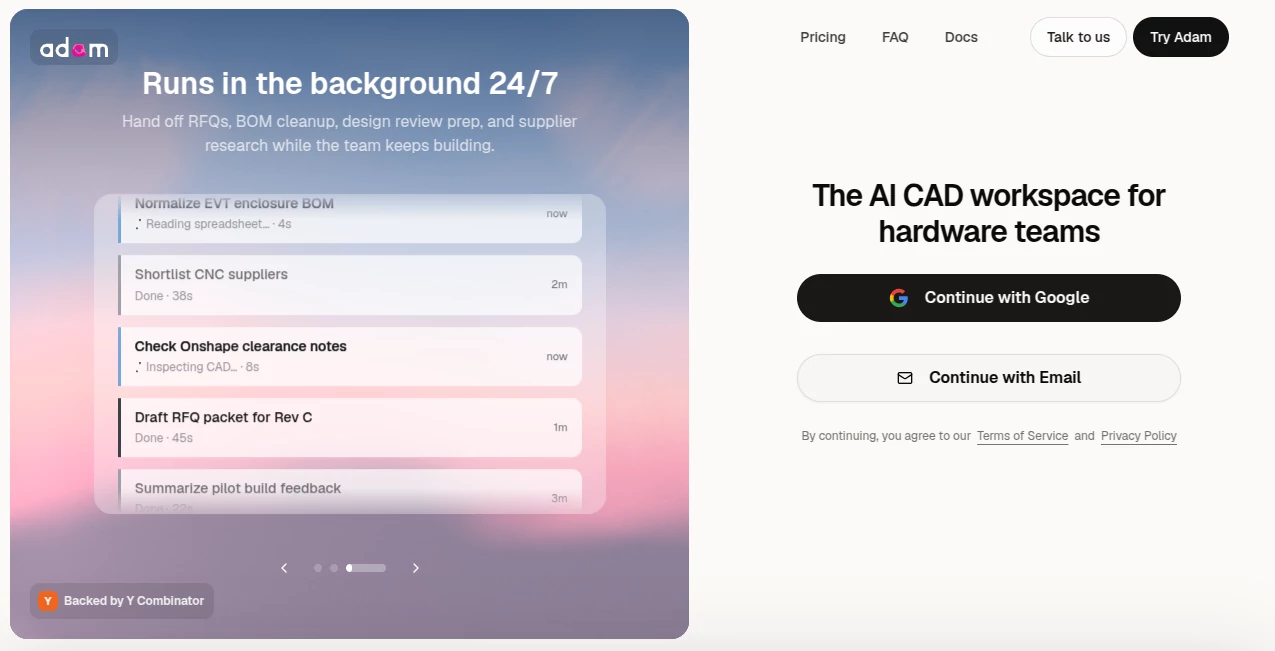
Adam is an AI-powered CAD workspace built for hardware teams that want to spend less time on repetitive engineering work and more time making decisions. Instead of treating AI as a simple chatbot, it works across CAD, PLM, sourcing, documentation, and team tools to help complete practical engineering tasks.
The platform can work with geometry, bills of materials, drawings, revisions, suppliers, renders, and engineering documents. A useful example is asking it to update a drawing, check affected parts, prepare an ECO, or find alternative components. The goal is straightforward: turn a request written in natural language into useful engineering output without forcing the team to jump between several applications.
For hardware teams already working with tools such as Onshape, Autodesk Fusion, SolidWorks, Arena, Google Drive, Slack, Gmail, and supplier catalogs, this approach can make day-to-day workflows considerably more connected.
Key Features
- AI-assisted CAD editing and engineering workflows
- Support for geometry, BOMs, drawings, revisions, and engineering documentation
- Connections to CAD and PLM platforms including Onshape, Autodesk Fusion, and SolidWorks
- BOM review, part-number checks, revision tracking, and sourcing assistance
- Supplier research and RFQ preparation
- Engineering drawing and ECO workflow support
- Photorealistic render and CMF workflow assistance
- Integration with business and collaboration tools such as Slack, Gmail, Notion, Jira, Linear, Airtable, and Google Drive
- Natural-language interaction for complex multi-step tasks
User Interface
The interface is built around conversation and active tasks. Users can describe what they need in natural language, while larger jobs can run as tasks that show their progress. This makes the experience feel closer to working with an engineering teammate than filling out a series of technical forms.
Another practical detail is that the workflow does not stop at a text response. The system can return concrete outputs such as a model edit, reconciled BOM, updated drawing, render set, or drafted RFQ. For engineers, that distinction matters because the value comes from completing work rather than simply explaining how to do it.
Accuracy & Performance
Engineering software leaves little room for vague answers, and the platform is designed around the structure and history of CAD models rather than treating every request as a blank-slate generation task. When editing a model, it can account for existing features and references, regenerate the model, and show downstream changes.
Its BOM workflow is similarly practical. For example, a team can ask for a review of an assembly and receive information about unreleased parts, revision mismatches, duplicate part numbers, and other issues that may otherwise require a manual spreadsheet review.
As with any AI-assisted engineering system, generated work should still be reviewed by qualified engineers before it reaches production. That is especially important for safety-critical designs, manufacturing tolerances, and released documentation.
Capabilities
The range of tasks is one of the strongest parts of the platform. On the CAD side, it can help modify geometry, clean up feature trees, add features, adjust dimensions, and work with design intent. Beyond CAD, it can help prepare BOMs, drawings, ECO packets, sourcing comparisons, supplier communications, and engineering documentation.
It can also connect information from different parts of a hardware workflow. A request might involve CAD geometry, a spreadsheet, supplier information, and an email draft rather than a single application. This makes the system particularly interesting for teams where engineering work frequently crosses organizational and software boundaries.
Security & Privacy
Security is an important consideration when working with proprietary hardware designs. According to the platform's security information, connected geometry, drawings, BOMs, and correspondence remain within users' connected accounts and PLM systems. Access is scoped and authenticated, with OAuth used where supported.
The company also states that connected workspace data is not used to train models, is not shared between accounts, and that workspaces are isolated and encrypted. Enterprise offerings add features such as SSO, audit logging, and administrative scope controls.
Use Cases
- CAD editing: Describe geometry changes in natural language and have the system apply appropriate model edits.
- BOM management: Review assemblies, identify revision mismatches, find duplicate part numbers, and prepare sourcing information.
- Engineering drawings: Assist with dimensions, tolerances, datums, and drawing updates.
- ECO preparation: Turn engineering changes into organized change-order documentation.
- Sourcing: Research component alternatives, compare suppliers, and prepare RFQs.
- Design reviews: Gather build notes, open issues, CAD information, and related documents into a review brief.
- Rendering and CMF: Prepare product render concepts and compare material, finish, and color directions.
- Factory handoffs: Collect drawings, BOMs, QA information, and open questions into a manufacturer-ready package.
Pros and Cons
- Pros: Designed specifically for hardware workflows, supports real CAD and engineering tasks, connects multiple workplace tools, handles BOM and sourcing work, and works through natural-language instructions.
- Pros: Useful for teams that regularly move between CAD, PLM, spreadsheets, supplier catalogs, email, and collaboration platforms.
- Cons: Its strongest value is aimed at hardware and engineering teams, so casual users may find much of its functionality unnecessary.
- Cons: AI-generated engineering work still requires human review before production or release.
- Cons: The usefulness of the platform depends partly on the CAD, PLM, and business systems connected to the workspace.
Pricing Plans
The service offers personal and team or enterprise options. Personal access uses a per-seat subscription with included task minutes and model usage. There is also a free trial, allowing prospective users to evaluate the workflow before committing to a paid subscription.
Team plans are designed for organizations that need shared usage, memory, connections, and administration across multiple seats. Additional usage can be topped up when included allowances are exceeded, with the system indicating when additional spending is approaching.
How to Use Adam
- Sign in and open the main workspace.
- Connect the CAD, PLM, supplier, and collaboration tools required for your workflow.
- Describe the engineering task in ordinary language.
- Let the system work through the relevant files, applications, and connected information.
- Review the resulting model changes, BOM updates, drawings, documents, or other outputs.
- Approve the work or make adjustments before using the result in a production workflow.
A good starting point is a contained task with a clear outcome, such as reviewing a BOM, updating a drawing, preparing an RFQ, or modifying a specific CAD feature. Once the workflow proves reliable for the team, more involved cross-tool tasks can be introduced.
Comparison with Similar Tools
Traditional CAD software remains the primary environment for detailed mechanical design, but it generally expects engineers to perform many operations manually through menus, sketches, feature trees, and parameters. AI CAD tools take a different approach by allowing users to describe desired changes in natural language.
What makes this platform stand out is its broader scope. Rather than focusing only on generating a 3D model, it connects CAD work with BOMs, PLM data, sourcing, engineering documents, suppliers, and communication tools. That makes it closer to an AI engineering coworker than a standalone 3D model generator.
For someone who simply wants to create an occasional 3D object from a prompt, a lightweight text-to-3D service may be easier. For a hardware team dealing with revisions, components, drawings, vendors, and manufacturing, the wider workflow can be much more valuable.
Conclusion
AI becomes considerably more useful when it can work with the systems where real work happens. This platform takes that idea into mechanical engineering by combining CAD assistance with BOM management, sourcing, documentation, rendering, and team workflows.
Its biggest strength is not simply generating geometry. It is the ability to connect many of the small but important jobs surrounding a hardware design and turn natural-language instructions into tangible outputs. For engineering teams dealing with repetitive CAD edits, revision checks, sourcing research, drawings, and supplier communication, that can translate into fewer manual steps and faster iteration.
It is still important to treat AI assistance as part of an engineering review process rather than an automatic replacement for professional judgment. Used that way, the platform offers an impressive direction for how hardware development could become more collaborative, connected, and efficient.
Frequently Asked Questions (FAQ)
What is this AI CAD platform?
It is an AI workspace designed for hardware teams. It can assist with CAD, BOMs, engineering drawings, sourcing, renders, documentation, and related workflows using natural-language instructions.
Can it edit existing CAD models?
Yes. The system is designed to work with existing CAD files and their feature history, allowing users to request changes such as modifying dimensions, adding features, or adjusting components while taking existing design relationships into account.
Which CAD platforms does it support?
Its integrations include Onshape, Autodesk Fusion, and SolidWorks. It can also connect with PLM systems and other tools used throughout hardware development.
Can it help with BOM management?
Yes. It can review assemblies and BOMs, identify part-number and revision inconsistencies, flag unreleased items, and assist with sourcing-related tasks.
Can it help with supplier communication?
Yes. It can research supplier options and prepare RFQs containing relevant design, quantity, tolerance, finish, and delivery information for review.
Does it support engineering drawings?
Yes. It can assist with drawing updates and detailed engineering information such as dimensions, tolerances, datum references, and fit requirements.
Is there a free trial?
Yes. A free trial is available so users can evaluate the workflow before moving to a paid subscription.
Is it suitable for industrial designers?
Yes. The platform supports industrial design workflows as well as mechanical engineering, including CMF exploration and product rendering alongside CAD work.
Is my CAD data used to train AI models?
The company states that connected workspace data is not used to train models and that connected data remains within the user's accounts and connected systems. Enterprise customers also receive additional security and administrative controls.
Who would benefit most from this tool?
Hardware startups, mechanical engineering teams, industrial designers, product development groups, and other organizations that regularly work across CAD, PLM, sourcing, manufacturing, and engineering documentation are likely to get the most value from it.
AI 3D Model Generator , AI Design Assistant , AI Productivity Tools , 3D .
These classifications represent its core capabilities and areas of application. For related tools, explore the linked categories above.

Adam Alternatives Product

Modelfy 3D

AI Entity

Unix Timesta…

Where Is Thi…

Khuram Youraj
Vurge

Trimless for…

TryApplyNow

Techvorizon …