ai image editor
What is ai image editor?
There's something incredibly satisfying about taking an ordinary photo and turning it into exactly what you had in mind with just a few words. This tool makes that feel almost effortless. You upload an image, type what you want changed, and it delivers clean, natural-looking results that actually match your vision. I've watched designers use it to refresh product shots for campaigns and creators transform casual selfies into polished visuals for social posts. The best part? It doesn't fight you with weird artifacts or over-the-top effects — it just quietly gets the job done right.
Introduction
Most photo editors still feel like work. Layers, masks, brushes, and hours of tweaking. This one flips the script: you talk to it in plain language, and it understands what you mean. Whether you're swapping backgrounds, changing moods, refreshing product photos, or exploring creative directions, it keeps the important parts intact while giving you fresh, usable results. It's become a daily companion for people who need speed without sacrificing quality — from indie creators to small brand teams who can't afford long photo shoots but still want their visuals to look intentional and polished.
Key Features
User Interface
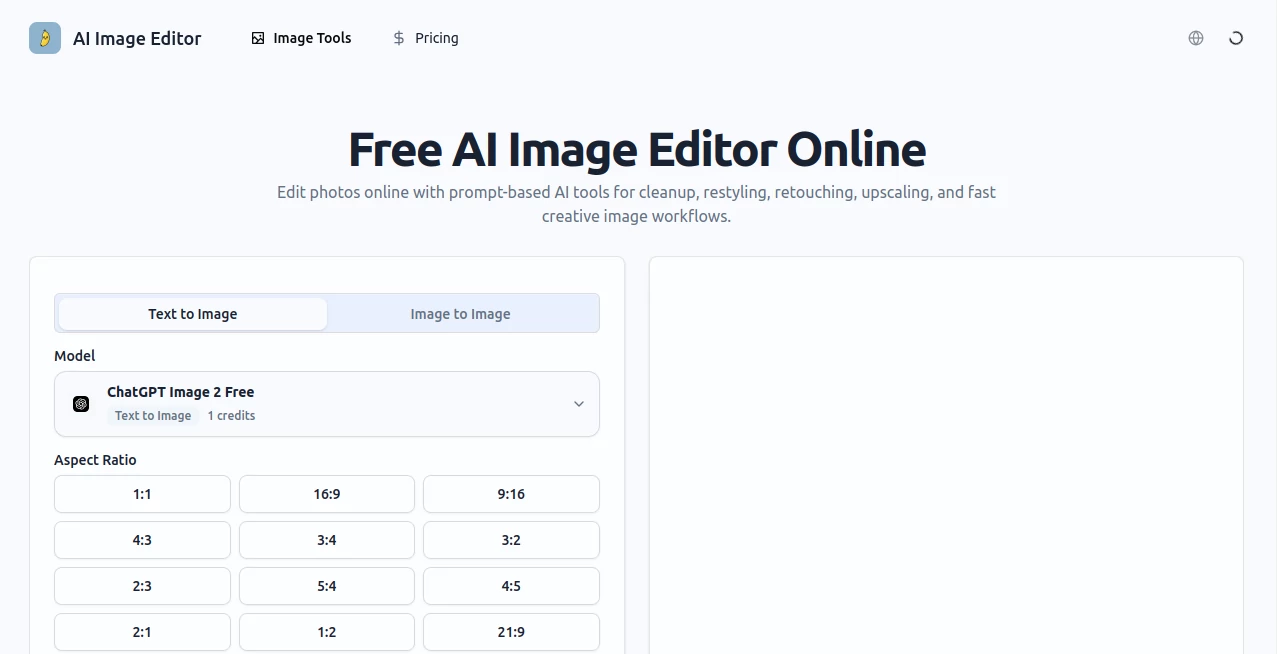
The workspace is refreshingly straightforward. A big upload area, a clear prompt box, and options to add multiple reference images if you want tighter control. Everything happens in one clean view with instant previews so you can compare variations without losing momentum. No complicated panels or hidden menus — just a focused space that lets you stay creative instead of hunting for buttons.
Accuracy & Performance
It excels at understanding what should stay the same and what can change. Faces keep their identity, product shapes remain accurate, and important details don't disappear. Generations are fast enough that you can try several ideas in one sitting, and the results rarely need heavy cleanup. The balance between following your prompt and respecting the original image is impressive — it feels thoughtful rather than random.
Capabilities
You can start from text only or use image-to-image with one or more references. Change backgrounds, swap styles, adjust lighting and mood, refresh product shots into lifestyle scenes, or explore multiple creative directions from the same base image. It supports campaign variants, localized versions, and brand-consistent visuals. The hybrid approach — text plus references — gives you the precision needed for real work while keeping the process enjoyable.
Security & Privacy
Your images are processed securely and not stored longer than necessary. No forced accounts for basic use, and the tool respects that your photos and ideas belong to you. For anyone working with client material or personal projects, that clean, low-friction approach builds real confidence.
Use Cases
A small ecommerce brand turns plain product photos into polished lifestyle scenes without booking new shoots. A content creator generates multiple variations of the same image for different platforms and audiences. A designer explores art direction options quickly before presenting to a client. Someone restoring old family photos gives them a fresh, vibrant look while keeping the original emotion intact. Wherever you need better visuals fast without losing control, it delivers.
Pros and Cons
Pros:
- Simple prompt-based editing that actually understands what you want.
- Strong preservation of important elements like faces and product shapes.
- Fast iteration with multiple reference support for precise control.
- Clean, natural-looking results suitable for professional use.
- Generous free access to try real workflows.
Cons:
- Very complex or contradictory prompts can still need refinement.
- Higher volume and advanced features require a paid plan.
- Extremely low-quality source images may limit final results.
Pricing Plans
It starts with a solid free tier that lets you test real projects and see the quality firsthand. Paid plans unlock unlimited generations, higher resolution, faster processing, and priority access during busy times. The pricing feels fair for the time and creative freedom it returns — many users say it quickly pays for itself by replacing longer photo shoots or expensive editing work.
How to Use AI Image Editor
Upload your starting image (or start from text only). Write a clear prompt describing the changes you want — be specific about mood, background, style, or lighting. Add reference images if you need tighter control over certain elements. Generate a few variations, compare them side by side, and pick the strongest one. Download in high resolution or continue refining with new prompts. The whole process stays fast and intuitive, letting you move from idea to usable visual without breaking your flow.
Comparison with Similar Tools
Many AI editors either overdo effects or require too many manual steps. This one keeps things natural while giving you meaningful control through prompts and references. Where some tools feel experimental, the results here are polished enough for client work and commercial use. It strikes a practical balance that busy creators actually appreciate day after day.
Conclusion
Good visuals shouldn't require a full design team or hours of editing. This tool brings professional-looking image editing within reach for anyone with ideas and a few minutes. It respects your original photo, follows your direction, and delivers results you can actually use. Whether you're building a brand, creating content, or just improving everyday shots, it makes the process feel lighter and the outcomes more satisfying. Sometimes the best tools are the ones that quietly help you look better than you expected.
Frequently Asked Questions (FAQ)
How specific should my prompt be?
The more clear and focused, the better — but you don't need perfect wording. Natural descriptions work well.
Can I upload multiple reference images?
Yes — combining references gives you stronger control over subject, style, and composition.
Are the results good enough for commercial use?
Absolutely — many users successfully use them for ads, product pages, and social campaigns.
How fast are generations?
Most images finish in seconds, letting you iterate quickly without losing momentum.
Do I need an account to start?
No — you can try it right away, though signing up unlocks history and more features.
Photo & Image Editor , AI Photo Enhancer , AI Design Generator , AI Image to Image .
These classifications represent its core capabilities and areas of application. For related tools, explore the linked categories above.
ai image editor details
Website unavailable — View Alternatives
Pricing
- Free
Apps
- Web App
Categories

ai image editor Alternatives Product
Grayscale Im…

Image to Ima…
Unblur Image
FacialHarmon…

Z Image
Seedream Ima…

Yodayo AI
loraai.me

Best AI SVG …