
AI Arch Generator
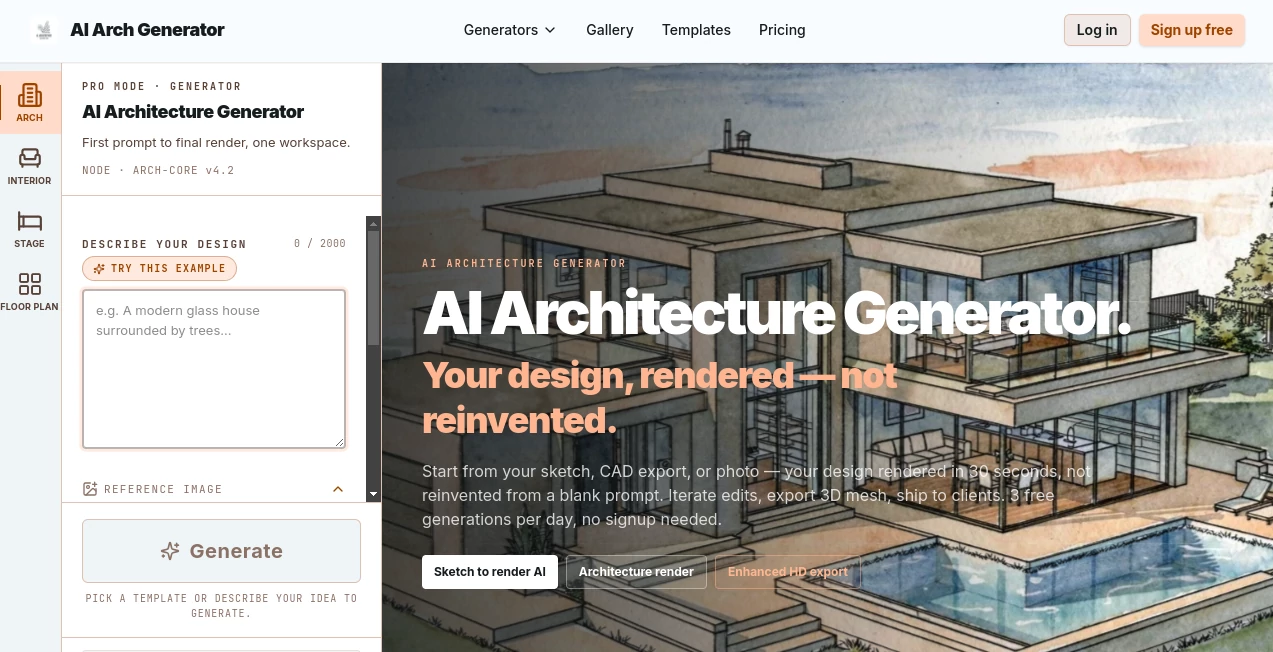
What is AI Arch Generator?
Creating architectural visuals usually takes time, technical skills, and expensive software. This platform changes that by turning sketches, CAD exports, reference images, or text prompts into presentation-ready renders within seconds. Instead of rebuilding a concept from scratch, it keeps the original structure and transforms it into a polished visualization suitable for architects, interior designers, students, and real estate professionals. It even offers free daily generations, making it easy to explore ideas before committing to a project.
Key Features
User Interface
The interface is clean and beginner-friendly. Users can either write detailed prompts for complete creative control or select ready-made templates for faster results. Uploading sketches or room photos takes only a few clicks.
Accuracy & Performance
The rendering engine focuses on preserving building proportions, layouts, and key architectural elements rather than replacing them with unrelated designs. Most renders are generated in around 30 seconds, making rapid design iterations possible.
Capabilities
- Convert sketches into photorealistic renders.
- Create interior and exterior architectural visualizations.
- Support text prompts and reference images.
- Generate multiple design styles such as Modern, Scandinavian, Japanese, and Brutalist.
- Export high-resolution images and 3D mesh files on supported plans.
Security & Privacy
The service operates through a web browser without requiring software installation. Account information and payment details are handled securely, while free usage is available without mandatory registration for limited generations.
Use Cases
- Present early architectural concepts to clients.
- Visualize interior remodeling ideas.
- Create marketing images for real estate listings.
- Help students prepare architecture presentations.
- Quickly compare different materials, lighting, and styles.
Pros and Cons
- Pros
- Very fast rendering workflow.
- Maintains the original design structure.
- Easy for both professionals and beginners.
- Free daily generations available.
- Cons
- Advanced exports require paid plans.
- Best suited for concept visualization rather than final production renders.
Pricing Plans
A free plan includes three daily generations without sign-up. Paid subscriptions unlock commercial usage, higher-quality exports, additional rendering credits, and advanced features such as 3D mesh export.
How to Use AI Architecture Generator
Upload a sketch, CAD image, room photo, or reference image. Choose either a template or enter your own prompt describing materials, lighting, and architectural style. Generate the render, review the result, make adjustments if needed, and download the finished image or supported export formats.
Comparison with Similar Tools
Unlike many general AI image generators, this solution is built specifically for architectural workflows. It focuses on preserving the original geometry instead of inventing entirely new structures, making it far more practical for professional design reviews and client presentations.
Conclusion
This is an excellent option for anyone who wants to move from concept to visualization without spending hours on traditional rendering software. The combination of speed, realistic output, flexible workflows, and architecture-focused features makes it a valuable companion for modern design projects.
Frequently Asked Questions (FAQ)
Is there a free version?
Yes. Users receive three free generations per day without creating an account.
Can I upload hand-drawn sketches?
Yes. Hand sketches, CAD exports, and reference images are all supported as inputs.
How long does rendering take?
Most images are generated in approximately 30 seconds.
Who is this tool designed for?
It is suitable for architects, interior designers, students, real estate professionals, and anyone who needs fast architectural visualizations.
Does it support commercial work?
Commercial usage is available through the paid subscription plans.
AI Art Generator , AI Design Generator , AI Image to Image , AI Interior & Room Design .
These classifications represent its core capabilities and areas of application. For related tools, explore the linked categories above.
AI Arch Generator details
Website unavailable — View Alternatives
Pricing
- Free
Apps
- Web App
Categories

AI Arch Generator Alternatives Product

Image Text E…

GPT Image 2

AniFlow AI

chibi genera…

ModelsLab

Freepik

Luma AI

Seedream 5.0

Nano Banana …