
AIBookCraft
What is AIBookCraft?
Turning a book idea into a finished manuscript can be harder than coming up with the idea itself. A character appears, a plot begins to take shape, and then the blank page gets in the way. AIBookCraft is designed to make that part of the writing process less intimidating by helping writers move from a simple premise to a structured story, chapters, and eventually a complete book.
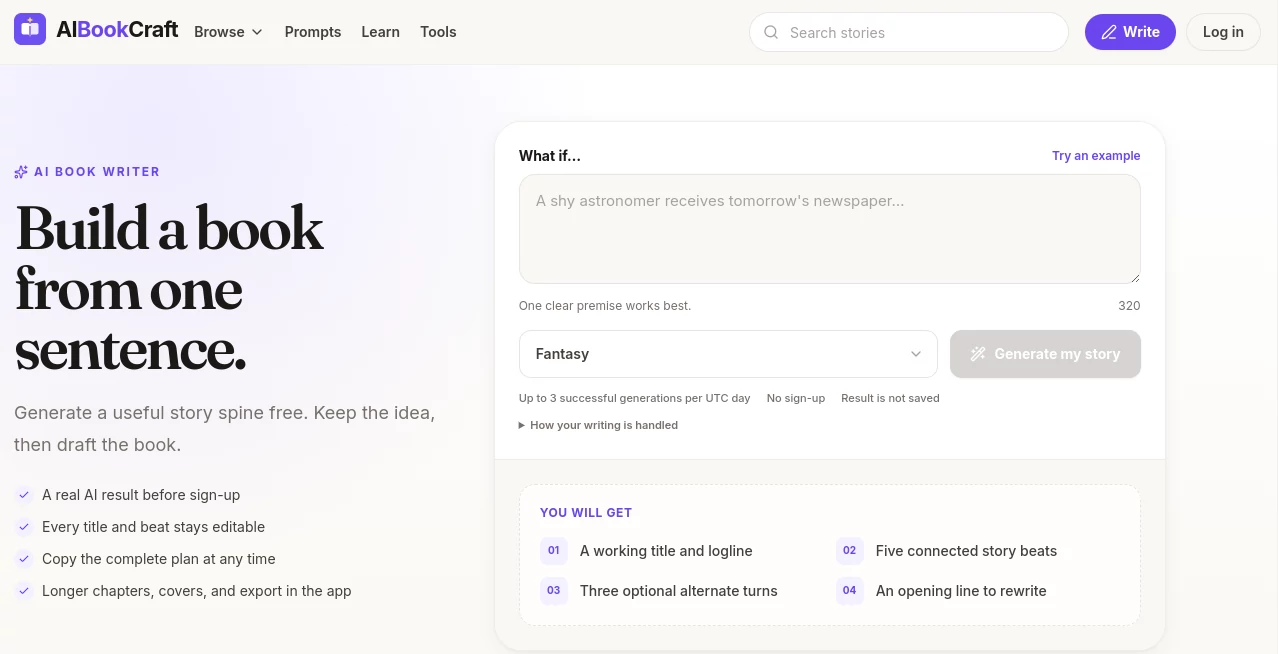
The platform takes a particularly practical approach to AI-assisted writing. Instead of asking writers to hand over an entire project and accept whatever comes back, it lets them begin with a story seed and shape the important decisions along the way. A title, logline, connected story beats, alternate turns, and an opening line can be generated before the longer drafting process begins.
That makes it useful for both first-time authors and experienced writers who already know what they want to write but occasionally get stuck on structure, pacing, or the next chapter. The goal is not simply to generate more words. It is to help turn an idea into something that has a direction.
Key Features
- AI-assisted story generation from a short premise or single sentence.
- Working titles and loglines to help define the central idea.
- Five connected story beats for building a practical story spine.
- Optional alternative turns for exploring different directions.
- Opening-line generation that gives writers a starting point for the first scene.
- Editable story decisions so writers can change the generated direction.
- Longer chapter outlines and AI-assisted chapter drafting.
- Character-building tools for connecting traits, motives, flaws, and secrets.
- Writing prompts for finding new scenes and ideas.
- Plot and book-title generators organized around writing needs.
- Writing templates that can be filled, copied, and exported.
- Cover creation and manuscript export.
- Public story sharing and a community-oriented reading experience.
User Interface
The experience is organized around the natural stages of writing rather than presenting a wall of complicated settings. A writer can begin with a seed, develop a story spine, move into chapters, and then work toward a finished manuscript.
The web experience is especially useful for getting started quickly. A visitor can test the story-generation workflow without creating an account, enter a premise, select a genre, and receive a structured result. The generated title, logline, beats, alternate turns, and opening line can then be used as the foundation for further writing.
Once the project becomes more serious, the app provides a longer writing workflow where chapters, outlines, covers, and exports become part of the process. This separation between discovering an idea and developing a full book makes the interface feel more purposeful.
Accuracy & Performance
For creative writing, accuracy is less about finding a single correct answer and more about maintaining a believable direction. The platform approaches this by building a story spine before moving into longer chapters. That can reduce the common problem of generating disconnected scenes that sound interesting individually but do not work well together.
The structured approach is also helpful when a writer wants to experiment. For example, a mystery writer could start with a missing-person premise, generate several possible turns, select the most interesting one, and then use that decision as the basis for the chapter outline.
Like any generative writing system, the quality of the final manuscript still depends on the quality of the original idea, the writer's decisions, and the editing that follows. The strongest results are likely to come when the generated material is treated as a co-writing aid rather than a replacement for editorial judgment.
Capabilities
The platform covers much more than basic paragraph generation. Its workflow can take a writer from the first story seed through planning and chapter development, while additional tools help with characters, names, plots, titles, prompts, and writing templates.
Genre support includes areas such as fantasy, romance, mystery, thriller, science fiction, horror, fairy tales, children's stories, drama, and adventure. This gives writers room to experiment with very different kinds of projects.
Another useful part of the ecosystem is its collection of public stories. Writers can browse published examples across genres, study how stories are structured, and then return to their own projects. The platform also provides writing guides covering subjects such as outlining a novel, writing dialogue, and completing a short story.
For finished projects, manuscripts can be exported as PDF or DOCX. The service also supports creating a cover and sharing stories publicly, giving the workflow a destination beyond simply generating text inside an editor.
Security & Privacy
The public web-based story generator provides a clear explanation of how its input is handled. A submitted story seed is sent to an AI provider to generate the response, while the service states that it does not save the seed or generated text from that no-sign-up experience or add them to product analytics.
There is an important distinction between the public generator and the broader writing application, so writers working on sensitive or unpublished material should review the current privacy policy and terms before uploading confidential manuscripts or commercially sensitive information.
Use Cases
- First-time authors: Turn a rough idea into a workable story structure without starting from a completely blank page.
- Novel writers: Develop characters, plot turns, chapter outlines, and longer drafts in a connected workflow.
- Short-story writers: Explore premises and quickly create a structured direction for a shorter project.
- Fantasy writers: Experiment with worlds, characters, conflicts, names, and unusual story premises.
- Romance writers: Explore relationship-driven plots, alternative turns, and genre-specific story ideas.
- Screen and fiction creators: Use generated premises, beats, and opening ideas as early-stage creative material.
- Writers experiencing creative blocks: Use prompts, plot generators, character tools, and story seeds to get moving again.
- Indie authors: Develop a manuscript and prepare it for digital sharing or further publishing workflows.
Pros and Cons
Pros
- Moves from a single idea to a structured story rather than generating disconnected text.
- Provides useful planning tools alongside AI writing assistance.
- Titles, story beats, and other early decisions remain editable.
- Includes character, plot, prompt, title, and template tools.
- Supports PDF and DOCX manuscript export.
- Offers a public story community for reading and sharing.
- Can be tried through a no-sign-up web experience.
Cons
- The generated material still needs human editing and creative direction.
- Writers looking for completely manual writing software may find the AI-centered workflow unnecessary.
- The free web generator has a daily generation limit.
- Some of the more advanced book-production features are available inside the mobile application rather than the basic web generator.
Pricing Plans
The public website currently promotes the service as free to start and provides a no-sign-up story-generation experience. The web generator allows up to three successful generations per UTC day, and generated results from that public experience are not saved.
The mobile application is presented as free to download on iOS and Android. More advanced capabilities, including longer chapter creation, cover generation, and manuscript export, are part of the broader app workflow. Specific paid subscription or credit prices are not clearly published on the public pages reviewed, so prospective users should check the current in-app pricing before making a purchase.
How to Use It
- Start with a simple story premise. A single sentence, contradiction, image, or unusual problem is enough.
- Select a genre that matches the kind of story you want to create.
- Generate the initial story result and review the working title, logline, story beats, alternate turns, and opening line.
- Edit the ideas that do not fit your vision rather than accepting every generated suggestion.
- Use the selected story direction to build a longer outline and chapter plan.
- Develop the chapters with AI assistance while keeping control over characters, plot decisions, and tone.
- Revise the manuscript and use the additional writing tools whenever you need help with characters, prompts, titles, or plot development.
- Create a cover when the manuscript is ready and export the finished work as PDF or DOCX.
Comparison with Similar Tools
Many AI writing applications concentrate on generating paragraphs, rewriting existing text, or producing content from detailed prompts. This approach is somewhat different because the workflow is built around the architecture of a book.
The story-spine stage is particularly useful for writers who tend to start drafting too early. Instead of producing twenty pages and discovering that the middle of the story has nowhere to go, a writer can first examine the central premise and connected beats. This makes it closer to an AI-assisted book-planning environment combined with a writing workspace.
Another distinction is the combination of writing tools and community features. Someone who only needs a general-purpose text generator may prefer a broader writing assistant. However, an aspiring author who wants story planning, chapter development, character support, manuscript export, and a place to discover public stories may find this more focused workflow appealing.
Conclusion
Writing a book is rarely difficult because there are no ideas. More often, the challenge is turning those ideas into a sequence of decisions that can survive beyond the first few chapters. This platform addresses that problem with a workflow that starts small and gradually builds toward a manuscript.
Its strongest quality is the connection between planning and drafting. A story seed can become a title and logline, the premise can develop into connected beats, and those decisions can continue into chapters and a complete book. The additional character, plot, prompt, and template tools make the workspace even more useful when a project hits a creative roadblock.
For anyone who has ever said, “I have an idea for a book, but I don't know where to begin,” this is a practical place to start. The AI can help with the blank pages, while the writer remains responsible for the choices that give the story its personality.
Frequently Asked Questions (FAQ)
Can beginners use this AI book-writing platform?
Yes. The workflow is designed to work from a simple premise, so users do not need professional writing experience to begin. The structured story process can be especially helpful for people writing their first book.
Can I edit the AI-generated story plan?
Yes. The generated title and story beats are designed to remain editable, allowing writers to change the direction before moving deeper into the writing process.
Can I create a complete book with it?
The broader app workflow is designed to take a project from a story seed through outlines and chapters toward a finished manuscript. It also includes cover creation and document export.
What file formats can I export?
The current website states that completed manuscripts can be exported as PDF or DOCX. These formats make it easier to keep a local copy, share a manuscript, or continue editing it elsewhere.
Can I try it without creating an account?
Yes. The public story generator can be used without signing up. It currently allows up to three successful generations per UTC day, and the results from that no-sign-up experience are not saved.
Does it support different genres?
Yes. The service supports a range of genres, including fantasy, romance, mystery, thriller, science fiction, horror, fairy tales, children's stories, drama, and adventure.
AI Book Writing , AI Novel , AI Story Writing .
These classifications represent its core capabilities and areas of application. For related tools, explore the linked categories above.
AIBookCraft details
Website unavailable — View Alternatives
Pricing
- Free
Apps
- Web App
- iOS App
- Android App
Categories

AIBookCraft Alternatives Product

AI Fanfic Ge…

Sudowrite Mu…

BookAI.chat

AI Story Gen…

The StoryGra…

CharacterHub

Automateed

ISEKAI ZERO

Klyra AI