
AI Image to Video
What is AI Image to Video?
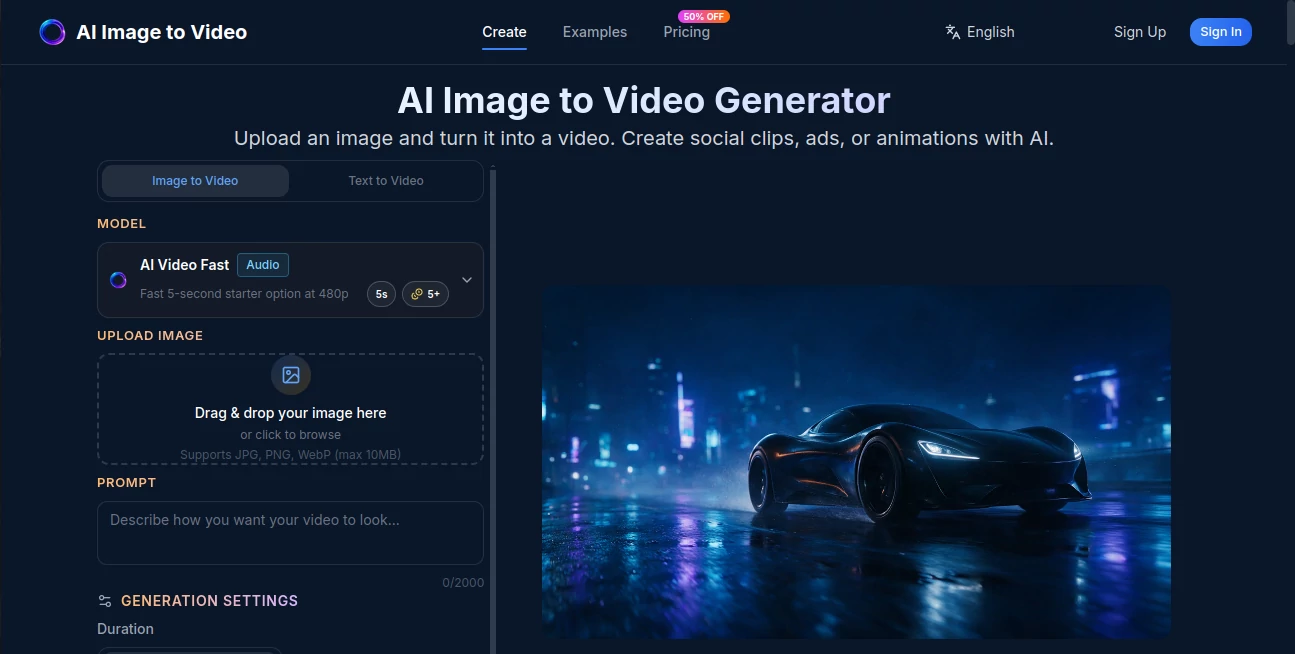
AI Image to Video is a versatile image-to-video platform designed to turn ordinary still images into short, animated videos. Instead of spending time learning a traditional video editor, users can upload a JPG, PNG, or WebP image, describe the movement they want, and let AI create the animation.
The platform is particularly useful for creators, marketers, online store owners, designers, and social media managers who regularly need short-form video content. A product photograph can become a promotional clip, a portrait can gain natural movement, and an illustration can be turned into an animated scene with only a few steps.
One of its strongest advantages is the choice of several AI video models. Users can work with models such as Veo, Kling, Runway, Hailuo, Seedance, and Wan, giving them more flexibility when a particular visual style or motion effect is needed.
Key Features
- Convert JPG, PNG, and WebP images into videos.
- Support for multiple AI video generation models.
- Text prompts for controlling movement, style, and camera effects.
- Image-to-video and text-to-video workflows.
- HD video generation with support for 1080p output.
- Multiple aspect ratio options for different platforms.
- Short video generation suitable for social media content.
- Private generation options on paid plans.
- No-watermark output on paid plans.
- Commercial-use licensing on Pro and Enterprise plans.
- Support for portraits, product photography, artwork, and other visual content.
User Interface
The interface keeps the process remarkably straightforward. The main workflow begins with an image upload area where users can drag and drop a file or browse their device. JPG, PNG, and WebP images up to 10MB are supported.
After uploading an image, users can add a prompt describing the desired action or movement. Generation settings provide additional control over elements such as duration and aspect ratio. This simple layout makes the service approachable even for someone who has never worked with professional video software.
Accuracy & Performance
Video quality depends heavily on the selected model, source image, and prompt, but the multi-model approach is a practical advantage. Different models can produce noticeably different interpretations of movement, camera motion, and character animation.
For example, a product photograph may benefit from a slow camera movement, while an illustrated character may work better with a model designed to handle stylized animation. Having several models available lets users experiment instead of being locked into one generation style.
Generation speed also varies by subscription. The Starter plan provides standard generation speed, while Pro offers priority processing and Enterprise provides the fastest generation speed.
Capabilities
The platform covers more than simple photo animation. It can be used for product demonstrations, portrait animation, social media clips, advertising creatives, anime and artwork animation, storytelling, and other short-form video projects.
Its model selection is especially useful for creators who want to compare different approaches to the same image. A marketer might create several versions of a product advertisement, while a designer could experiment with subtle camera movement to turn static artwork into a more dynamic presentation.
Security & Privacy
Privacy is addressed through private generation features available with the paid plans. Starter, Pro, and Enterprise subscriptions all include private generation, allowing users to keep their generated content within a more controlled workflow.
Anyone working with private client material, unreleased product photography, or internal creative assets should still review the service's current terms and privacy documentation before uploading sensitive files.
Use Cases
There are many practical situations where converting an image into a short video can save time. E-commerce sellers can animate product photographs to create advertising material without arranging a full video shoot. A simple product image can be given camera movement, atmospheric effects, or a more cinematic presentation.
Social media creators can also turn static photographs into short clips for TikTok, Instagram Reels, and YouTube Shorts. Instead of posting another still image, they can introduce motion and create content that feels more dynamic.
Portrait photographers and creators can experiment with subtle facial movements, head turns, and other animation effects. Designers and digital artists can animate illustrations, concept art, manga, and anime-style images while preserving much of the original visual direction.
Real estate professionals can create short property presentations from listing photographs, while marketers can produce multiple variations of an advertisement from existing campaign assets. The ability to test different AI models makes the workflow particularly useful when a project requires several creative variations.
Pros and Cons
Pros
- Simple image-to-video workflow.
- Multiple leading AI video models in one platform.
- Supports common image formats.
- Useful for marketing, social media, e-commerce, and creative projects.
- 1080p HD output is available.
- Paid plans include private generation.
- Commercial-use licensing is available on higher plans.
- Free credits make it possible to test the workflow before committing to a subscription.
Cons
- Generation consumes credits, so frequent users need a paid plan.
- Results can vary depending on the source image and selected model.
- Users looking for detailed traditional video editing tools may still need a separate editor.
- Commercial licensing is not included with the Starter plan.
Pricing Plans
The service uses a credit-based subscription model with three main plans. The Starter plan costs $5 per month and includes 200 credits, with up to 40 videos per month. It also includes multiple AI video models, private generation, and standard generation speed.
The Pro plan costs $15 per month and provides 800 credits, allowing up to 160 videos per month. It adds priority generation speed, customer support, and a commercial-use license.
The Enterprise plan costs $50 per month and includes 4,000 credits, supporting up to 800 videos per month. It provides the fastest generation speed, expert team support, private generation, and a commercial-use license.
Annual billing is also available at a substantial discount, with the pricing page currently advertising 50% savings compared with monthly billing. Credit-pack options are available as well, giving users another way to purchase generation capacity.
How to Use AI Image to Video
Using the platform is a short three-step process.
- Upload an image: Add a JPG, PNG, or WebP image of up to 10MB.
- Describe the movement: Write a prompt explaining how you want the image to move. You can describe camera movement, character actions, atmosphere, or other visual effects.
- Generate and download: Select the appropriate model and settings, generate the video, preview the result, and download the finished MP4 file.
A useful approach is to begin with a simple prompt. For example, rather than describing an entire cinematic sequence at once, start with something such as a slow camera push toward the subject. Once you understand how the selected model interprets your image, you can make the prompt more detailed.
Comparison with Similar Tools
Many AI video platforms focus on a particular model or broader video-production workflow. This service takes a different approach by bringing several image-to-video models together in one interface.
That makes it particularly appealing to users who want to compare results without maintaining separate accounts and workflows across multiple services. A creator can experiment with different models for realistic footage, cinematic movement, character animation, or stylized artwork and choose the result that best fits the project.
It is not intended to replace a full professional video editor. Its strength is the generation stage: starting with an image and quickly creating motion. For projects requiring detailed cuts, timelines, transitions, color grading, or advanced audio editing, the generated clips can instead be used as source material inside a traditional editing application.
Conclusion
AI Image to Video Generator offers a practical way to bridge the gap between static images and short-form video. Its clean workflow removes much of the technical work normally associated with animation, while support for several AI models gives creators room to experiment.
For social media creators, e-commerce businesses, marketers, designers, and anyone who has a collection of static images waiting to be used, it can turn those existing assets into something considerably more engaging. The combination of accessible generation, multiple models, HD output, and commercial options makes it a strong choice for both experimentation and regular content production.
Frequently Asked Questions (FAQ)
What is an AI image-to-video generator?
It is a type of AI tool that analyzes a still image and generates motion to create a video. Users can often guide the result with a written prompt describing the desired movement or camera action.
Which image formats are supported?
The platform supports JPG, PNG, and WebP images, with an upload limit of 10MB for the image generation workflow.
Can I use the generated videos commercially?
Commercial-use licensing is included with the Pro and Enterprise plans. Users should review the current licensing terms for their specific project before commercial publication.
Which AI video models are available?
The platform provides access to multiple models, including Veo, Kling, Runway, Hailuo, Seedance, and Wan. Model availability can change over time as new generation models are added or updated.
Is there a free option?
Yes. The service offers free credits so users can try image-to-video generation before choosing a subscription. Paid plans provide additional credits, private generation, faster processing, and other features depending on the selected tier.
Can I use it for social media videos?
Yes. The generated short clips can be used for platforms such as TikTok, Instagram, and YouTube. Aspect-ratio options also make it easier to prepare content for different social platforms.
AI Image to Video , AI Video Generator , AI Short Clips Generator .
These classifications represent its core capabilities and areas of application. For related tools, explore the linked categories above.
AI Image to Video details
Website unavailable — View Alternatives
Pricing
- Free
Apps
- Web App
Categories

AI Image to Video Alternatives Product

AI Baby Dance

ViraFlow

kling 3 AI

Seedance2 Vi…
hailuo03
LTX-3 AI
KissGen AI
Seedance 2.0
brainrotkit