
AI Natural Write
What is AI Natural Write?
I remember the sinking feeling of pasting perfectly written AI text into Turnitin or Originality.ai only to watch it light up red with high AI scores. It didn’t matter how good the content was — the detectors would flag it anyway. Then I started using this tool and that problem basically disappeared. It takes robotic, predictable AI output and turns it into writing that reads like a real person sat down and thought it through. The best part? It keeps your original meaning and tone while adding that natural flow that detectors can’t easily spot.
Introduction
AI writing tools are incredibly useful, but they often produce text that feels a bit too perfect, too structured, too “machine-like.” Schools, universities, and companies are cracking down hard with advanced detectors. This platform was built specifically to solve that problem. It doesn’t just swap synonyms — it understands context, rhythm, and human thought patterns to rewrite content in a way that feels authentically human. Students use it to polish essays, writers use it for client work, and SEO professionals rely on it to create content that ranks without getting flagged. The difference before and after is striking, and the bypass rates speak for themselves.
Key Features
User Interface
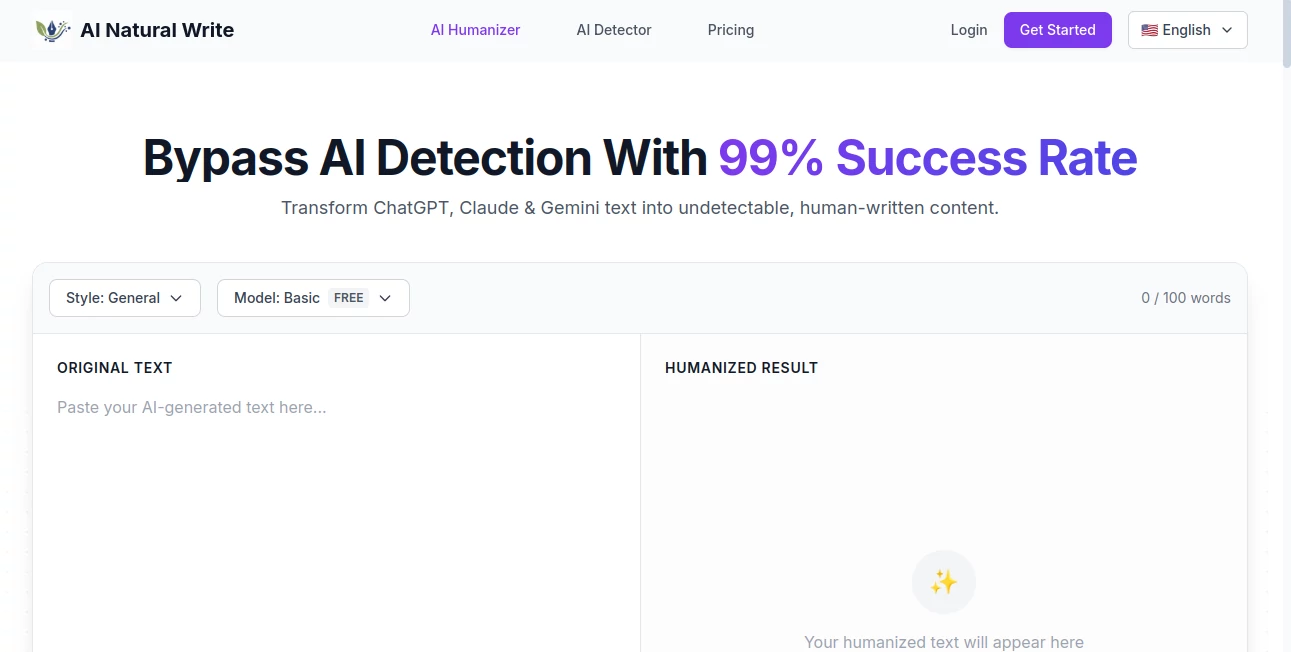
The interface is refreshingly clean and focused. You paste your AI-generated text on the left, choose a style (General, Academic, Creative, etc.), pick a model, and hit humanize. The result appears on the right with a clear before-and-after comparison. You can adjust intensity, try different modes, and regenerate specific sections without starting over. It never feels overwhelming — just straightforward and efficient, the way good tools should be.
Accuracy & Performance
It consistently delivers high bypass rates across major detectors like Turnitin, GPTZero, Originality.ai, and Content at Scale. More importantly, the output doesn’t feel “humanized” in an obvious way — it reads naturally, maintains your voice, and keeps the original meaning intact. Processing is fast, even with longer pieces, and the tool improves over time as it learns from new detector patterns.
Capabilities
Beyond basic humanization, it offers multiple modes for different needs — from light polishing to deep rewrites. It handles academic papers, blog posts, marketing copy, emails, and creative writing with equal skill. You can preserve specific tone or make the text more casual or professional. The context-aware system understands nuance, so technical explanations stay accurate while sounding conversational.
Security & Privacy
Your text is processed securely and not stored after humanization. The team is clear that they don’t use user content to train models. For students submitting papers or professionals handling client work, that privacy focus provides real peace of mind.
Use Cases
A graduate student uses it to refine AI-assisted thesis drafts so they pass institutional checks while keeping their original research intact. A freelance writer humanizes client blog posts to avoid penalties and improve reader engagement. An SEO team processes batches of AI content to create natural-sounding articles that rank better. Even marketers use it to turn stiff product descriptions into copy that actually connects with customers. It’s become a daily tool for anyone who wants to use AI speed without the detection risk.
Pros and Cons
Pros:
- Extremely effective at bypassing major AI detectors while keeping meaning intact.
- Natural-sounding output that doesn’t feel forced or over-edited.
- Fast processing even with longer documents.
- Multiple styles and modes for different writing needs.
- Generous free tier to test quality before committing.
Cons:
- Very complex or technical content may need light manual review after humanization.
- Higher volume work requires upgrading from the free plan.
Pricing Plans
The free plan gives you enough credits to test thoroughly and handle small projects. Paid plans offer more credits, priority processing, advanced modes, and higher monthly limits. Pricing is straightforward and scales reasonably with usage, making it accessible for students while powerful enough for professionals and teams.
How to Use AI Natural Write
Copy your AI-generated text and paste it into the input box. Select the style that best matches your needs, choose a model, and click Humanize. Review the result using the side-by-side comparison. Make small adjustments to the prompt or regenerate specific paragraphs if needed. Once satisfied, copy the final version and use it confidently. The whole process usually takes under a minute, even for longer pieces.
Comparison with Similar Tools
Many humanizers either over-simplify the text or fail against newer detectors. This one stands out because it focuses on both bypass rate and natural readability. It preserves more of your original intent than basic synonym-swappers while delivering better consistency than some higher-priced alternatives. For people who need reliable, natural results without overpaying, it hits a sweet spot that’s hard to beat.
Conclusion
AI writing is here to stay, but so are the tools that detect it. This platform gives you the best of both worlds — the incredible speed and ideas of AI combined with writing that reads and ranks like it came from a real person. Whether you’re a student protecting your work, a writer delivering for clients, or a marketer creating content that connects, it removes the biggest headache of using AI today. The peace of mind alone makes it worth trying.
Frequently Asked Questions (FAQ)
Will it really pass Turnitin and GPTZero?
Yes — users consistently report 0% AI detection across major tools when using the stronger modes.
Does it change the meaning of my text?
No. The tool is designed to keep your original ideas and facts while only improving flow and natural phrasing.
Is there a free way to try it?
Absolutely — the free plan gives you enough credits to test multiple pieces and see the quality for yourself.
How private is my content?
Your text is not stored after processing and is never used to train models.
Can I use it for academic writing?
Yes — many students and researchers use it successfully for essays, theses, and papers.
AI Paraphraser , AI Content Generator , AI Rewriter , AI Writing Assistants .
These classifications represent its core capabilities and areas of application. For related tools, explore the linked categories above.
AI Natural Write details
Website unavailable — View Alternatives
Pricing
- Free
Apps
- Web App
Categories

AI Natural Write Alternatives Product

LyricStudio

Dolphinscribe
Groniz

EditForge

ForthWrite

Presenti AI
promptcat

Inkfox AI

AHelp