
AIReel
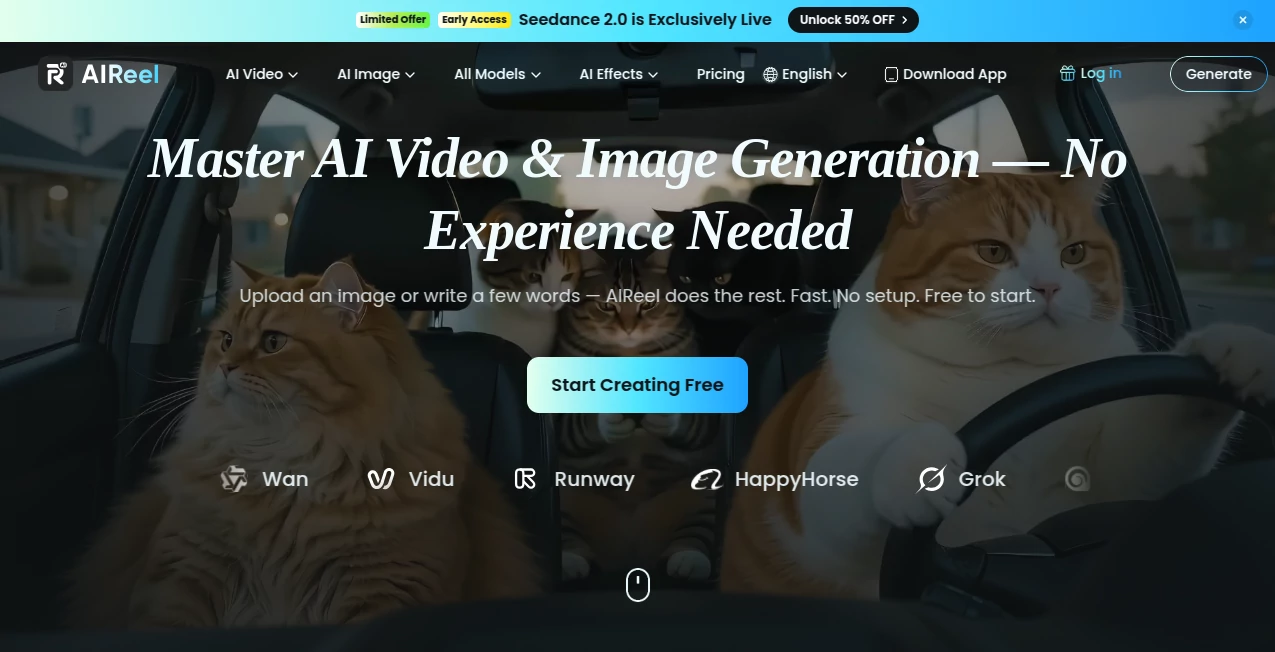
What is AIReel?
I remember sitting there with a half-baked idea for a short video, knowing it would take hours to shoot, edit, and polish. Then I tried this platform and the whole process felt different. You type a description or upload a photo, pick a model, and a few moments later you have a real video clip with motion, lighting, and feel that actually matches what was in your head. No complex software, no crew, no endless rendering waits. It’s the kind of tool that turns “wouldn’t it be cool if…” into something you can actually share the same day.
Introduction
Creating video content used to be a big production. Now, with the right AI, it feels closer to thinking out loud. This platform brings together powerful models in one easy place, letting you generate videos from text or images without switching tabs or learning new workflows. Whether you’re making quick social clips, product promos, or more cinematic scenes, it handles the heavy lifting so you can focus on the idea itself. The variety of models available means you can experiment with different styles and qualities until it feels just right. For creators who want speed without sacrificing too much control, it’s become a daily go-to.
Key Features
User Interface
The interface is clean and welcoming. You see big options for text-to-video or image-to-video right away, with clear prompts and simple sliders for duration and style. Uploading a reference image is as easy as dragging it in. Previews appear reasonably fast, and you can generate variations without starting over. It never feels intimidating — even when you’re trying something new, the flow keeps you moving forward instead of getting stuck in menus.
Accuracy & Performance
The motion feels natural, characters stay consistent, and lighting often matches the mood you describe. It handles both simple ideas and more detailed scenes without falling apart. Generation times are practical — you’re not waiting around for half an hour. In practice, the first or second try is usually close enough to use or build upon, which keeps the creative energy high instead of draining it.
Capabilities
You can start with text prompts for completely new scenes, upload images to bring them to life with motion, or combine both for stronger guidance. Multiple top models are available in one place, so you can switch between them depending on the style or quality you need. It supports different aspect ratios for social, web, or vertical content. The results are ready-to-use for Reels, ads, storytelling, or prototyping bigger ideas. It’s versatile enough for casual creators and serious enough for daily professional work.
Security & Privacy
Your prompts and uploaded images are handled responsibly. The platform focuses on delivering the service without unnecessary data retention or sharing. For anyone creating personal, client, or brand content, that sense of control matters. You generate, download, and move on with confidence.
Use Cases
A content creator turns a product photo into a smooth lifestyle video for Instagram in minutes. A marketer tests different ad concepts from the same script and picks the strongest version. A storyteller sketches a short narrative with text and watches it come alive as a mini film. A small business owner creates quick announcement clips without hiring a videographer. The common thread is speed and quality — getting ideas out of your head and into shareable form before the moment passes.
Pros and Cons
Pros:
- Combines multiple strong AI models in one simple place.
- Works well with both text prompts and reference images.
- Fast enough to support real creative iteration instead of long waits.
- Results often feel cinematic rather than obviously generated.
- Easy entry point with options to grow as your needs increase.
Cons:
- Longer or very complex scenes still work best when broken into shorter clips.
- Higher quality and unlimited generations require paid credits.
Pricing Plans
You can start for free and get a real feel for the quality with daily credits. Paid options give more generations, faster processing, and access to premium models. The credit system is straightforward — you buy what you need without forced monthly subscriptions if you prefer flexibility. For regular creators, the paid tiers quickly pay for themselves in time saved and output quality.
How to Use AIReel
Go to the generator, choose whether you want to start with text or an image. Write a clear description of the scene and mood, or upload a starting photo. Select your preferred model and aspect ratio. Hit generate and watch the preview. If you like the direction, download it or generate more variations. For better results, be specific in your prompt about camera movement, lighting, or emotion. The whole process stays simple enough that you can go from idea to finished clip in minutes.
Comparison with Similar Tools
Some tools focus only on text or only on images and often feel limited. Others have complicated interfaces or inconsistent quality. This platform brings strong models together with a clean workflow, making it easier to experiment and get usable results quickly. It stands out by balancing creative control with simplicity, giving you more reliable outputs than many single-model alternatives.
Conclusion
Video creation doesn’t have to be slow or stressful. This tool makes it feel approachable and exciting again — turning ideas into moving visuals without the usual barriers. Whether you create for fun, business, or storytelling, it gives you a practical way to bring concepts to life fast. The results are often good enough to use right away, and the speed keeps the creative spark alive. For anyone who wants to make video part of their regular toolkit, it’s worth trying.
Frequently Asked Questions (FAQ)
How long are the generated videos?
Most clips are short and focused (typically 5–10 seconds), perfect for social media and quick storytelling.
Do I need video editing skills?
Not at all. The tool handles motion, transitions, and basic effects automatically.
Can I upload my own images?
Yes — image-to-video mode is one of the strongest features and gives excellent consistency.
Is there a free way to try it?
Yes, you can start creating with free daily credits before deciding on paid options.
What kind of content works best?
Clear scenes with action, emotion, or product focus tend to produce the strongest results.
AI Animated Video , AI Image to Video , AI Video Generator , AI Text to Video .
These classifications represent its core capabilities and areas of application. For related tools, explore the linked categories above.

AIReel Alternatives Product

Seedance 2.0

Vidtool AI

FastMoro AI

Seedance Pro…

Seedance 2.0

Runway Gen-4…

Nano Banana …

Quso AI
seedance2-pro