


















Seedance 2.5
What is Seedance 2.5?
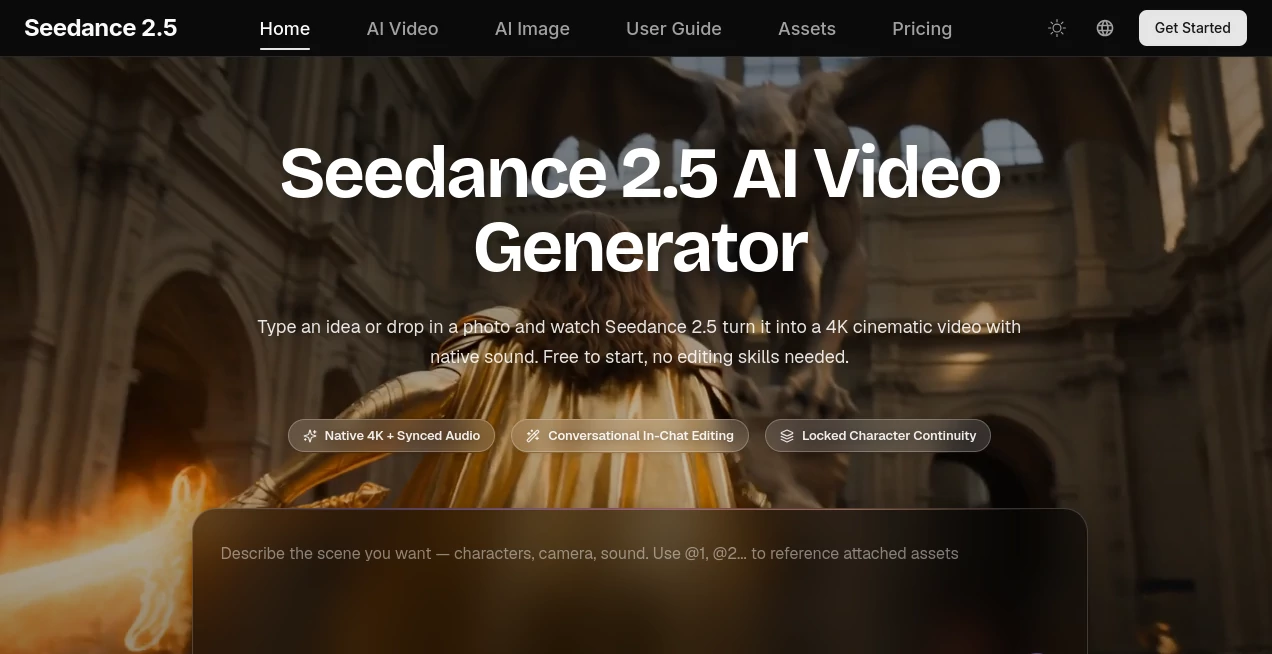
Creating a polished video normally takes a camera, editing software, visual assets, audio work, and plenty of time. Seedance 2.5 takes a much simpler approach: describe a scene, upload visual references, or combine different types of media, and let AI turn the creative brief into a finished video.
The platform is designed around multimodal video generation, allowing text, images, video clips, and audio to work together. That makes it useful for everything from short social media content and product demonstrations to educational scenes, advertising concepts, trailers, and creative experiments.
One of its strongest advantages is that video and sound are handled together. Instead of generating silent footage and then searching for suitable sound effects or dialogue, users can create scenes with native audio that follows the action. For creators who care about speed without wanting their videos to feel rushed or unfinished, this workflow can be particularly appealing.
Key Features
- Text-to-video generation from natural-language descriptions
- Image-to-video creation for animating still images
- Multimodal reference support for images, videos, and audio
- Video generation at resolutions up to 4K
- Smooth motion at up to 30fps
- Native audio generation with synchronized dialogue and sound effects
- Multi-shot storytelling from a single creative prompt
- Conversational video editing through natural-language instructions
- Video extension for continuing an existing scene
- Character and visual continuity across multiple shots
- Commercial licensing on paid plans
- Free access for trying the service before purchasing a plan
User Interface
The interface is built around a straightforward generation workflow rather than a traditional video-editing timeline. Users can begin with a written idea or upload an image and then provide additional references when more control is needed.
This approach is especially friendly to people who are comfortable describing an idea but do not want to learn keyframes, layers, complicated rendering settings, or conventional editing terminology. The conversational editing feature is another useful touch. Instead of rebuilding a scene manually, a creator can describe a change such as warmer lighting, a different camera movement, or a revised moment in the sequence.
Accuracy & Performance
Video quality depends heavily on the prompt, references, and complexity of the requested scene, but the platform is built to maintain stable motion and visual consistency across generated footage. Its advertised output supports resolutions up to 4K and smooth 30fps motion.
The system also focuses on believable movement, lighting, weight, and momentum. This matters when generating scenes with people, products, vehicles, or camera movement, where small inconsistencies can quickly make AI-generated footage look artificial.
Multi-shot generation is another practical advantage. Instead of producing unrelated clips, the system can create several shots from one description while attempting to maintain the same characters, lighting, and overall visual direction.
Capabilities
The most interesting capability is the combination of different media types within one creative workflow. A creator can use text for the story, images for character or product references, video for movement or camera inspiration, and audio as part of the creative direction.
The platform also supports conversational editing and video extension. This means the initial generation does not necessarily have to be the final result. A creator can generate a scene, review it, describe a change, and continue refining the result without moving into a separate editing application.
For storytelling, multi-shot generation can be particularly useful. A simple brief can describe an establishing shot, a close-up, an action sequence, and a reaction shot while keeping the visual language more consistent across the sequence.
Security & Privacy
The service's privacy policy states that account information such as a name and email address may be collected, while prompts, uploaded images, videos, audio, and generated content are processed to provide the service. It also describes the collection of technical information such as IP address, browser type, device information, and usage activity through cookies and similar technologies.
Users should therefore avoid uploading confidential, private, or sensitive material unless they are comfortable with the platform's published privacy practices. Businesses and professional teams should also review the current privacy policy and licensing terms before using customer-owned or confidential assets in production workflows.
Use Cases
Short-form content creators can use the platform to produce videos for TikTok, Instagram Reels, YouTube Shorts, and other social channels without setting up a camera or spending hours inside an editor.
Marketing teams can turn campaign ideas into video advertisements and quickly experiment with different creative directions. Instead of producing one concept and waiting for a complete production cycle, teams can test multiple visual approaches from the same campaign idea.
E-commerce businesses can animate product images into promotional demonstrations, rotating product shots, lifestyle scenes, and short advertisements. This can be useful when a business has good product photography but lacks the budget for a full video production.
Educators can create visual explanations, animated examples, and short lesson segments. A difficult concept that would normally require several slides can sometimes be communicated more effectively through a short visual scene.
Agencies can also use the workflow for early concepts, client presentations, pitch videos, and rapid creative variations. It can be particularly useful during the stage where an idea needs to become visual before a larger production begins.
For hobbyists, the possibilities are much more open-ended. A simple prompt can become a cinematic experiment, an imaginative character scene, a short story, or a visual concept that would otherwise require considerable production work.
Pros and Cons
Pros
- Supports text, image, video, and audio inputs
- Can generate videos up to 4K resolution
- Native audio reduces the need for separate audio production
- Natural-language editing makes iteration easier
- Useful for both beginners and experienced creators
- Multi-shot generation helps with short narrative sequences
- Free access makes it possible to test the workflow before subscribing
- Paid plans include commercial licensing
Cons
- Complex scenes may still require several generations to achieve the desired result
- Higher-resolution generations can consume considerably more credits
- Professional users should review licensing and privacy terms before uploading sensitive assets
- AI-generated footage can still require human review before commercial publication
- The most demanding workflows may require a higher-tier subscription because of credit usage
Pricing Plans
The service currently offers a free starting option, allowing users to experiment without entering a credit card for their first clips. Paid subscriptions are credit-based and provide additional generation capacity, faster processing, and broader access to higher-end generation workflows.
The Lite plan is displayed at a launch price of $14.90 with annual billing and includes 600 credits per month. The Pro plan is displayed at $24.90 with annual billing and includes 1,500 credits per month. The Ultra plan is displayed at $49.95 with annual billing and includes 3,600 credits per month.
The paid plans also advertise unlimited commercial licensing. Higher tiers increase batch-generation capacity and processing priority, with the Ultra plan adding a dedicated account manager.
Because promotional pricing and credit requirements can change, users should check the current plan details before subscribing.
How to Use It
Start by writing a clear description of the scene you want to create. A useful prompt can include the subject, location, lighting, camera movement, mood, visual style, and important actions. You can also upload an image when you want the generated video to follow a particular character, product, or visual reference.
Next, add additional reference material when the scene requires more control. Combining images, video clips, and audio cues can help communicate an idea that would be difficult to explain with text alone.
Generate the video and review the result. If something is not quite right, use a natural-language instruction to request a change rather than starting from scratch. For example, you might ask for warmer lighting, a slower camera movement, a different framing, or a continuation of the scene.
Once the result matches your needs, download the finished video and prepare it for your intended platform. For commercial projects, review the applicable plan and licensing terms before publishing.
Comparison with Similar Tools
Many AI video generators focus primarily on converting text or a single image into a short clip. This platform takes a broader approach by combining text, images, video, and audio within the same creative workflow.
Another notable distinction is the built-in editing experience. Instead of treating generation as a one-time operation, it allows users to refine scenes using conversational instructions. This can make the creative process feel closer to working with an assistant than operating traditional editing software.
Its support for high-resolution output, native audio, multi-shot sequences, and reference-based generation also makes it appealing to users who want to move beyond simple animated images and create more complete video concepts.
Conclusion
For anyone who wants to turn an idea into polished video without assembling a complicated production workflow, this platform is a compelling option. Its combination of multimodal references, high-resolution generation, native audio, multi-shot storytelling, and conversational editing gives creators considerably more room to experiment.
The biggest appeal is simplicity. You can start with a sentence, a photograph, or a collection of references and gradually shape the result through natural instructions. That makes it suitable for social creators, marketers, educators, businesses, agencies, and anyone who wants to explore video creation without spending hours learning conventional editing software.
It is not a replacement for every professional production workflow, and generated footage should still be reviewed carefully. But for rapid concept development, social content, advertising experiments, product visuals, and creative storytelling, it offers a practical way to move from an idea to a finished video much faster.
Frequently Asked Questions (FAQ)
What can I create with this AI video generator?
You can create cinematic videos from text prompts, images, video references, and audio. Common applications include social media clips, product demonstrations, advertisements, educational videos, short stories, concept trailers, and creative experiments.
Can it generate 4K videos?
Yes. The service advertises video generation at up to 4K resolution, along with smooth motion at up to 30fps.
Does it generate audio with the video?
Yes. Native audio generation is included, allowing dialogue, sound effects, and ambient audio to be generated alongside the visual content and synchronized with the scene.
Can I edit a generated video?
Yes. The conversational editing feature allows users to describe changes using natural language. You can also extend existing video content when you want a scene to continue.
Is it free to use?
You can start for free and create initial clips without entering a credit card. Paid plans provide additional monthly credits, higher processing priority, and other benefits for users who need more generation capacity.
Can the generated videos be used commercially?
Paid plans advertise unlimited commercial licensing. Anyone using the service for business or client work should still review the latest licensing terms and make sure that uploaded assets and generated content comply with their own legal and commercial requirements.
AI Image to Video , AI Video Generator , AI Video Editor , AI Text to Video .
These classifications represent its core capabilities and areas of application. For related tools, explore the linked categories above.

Seedance 2.5 Alternatives Product
Render of Dr…

Seedance 2.0

Sora 2 Video

Wan 2.7 AI

gpt video

HappyHorse AI

Seedance AI …
VideoFlux

LPM 1.0
