

















AIStoryBuilders
Verified Blue CheckMark
Verified Blue CheckMark products are featured above free or unverified listings.
This badge indicates authenticity and builds trust, giving your product higher visibility across the platform.
Upgrade to get verified
Verified Blue CheckMark products are featured above free or unverified listings. This badge indicates authenticity and builds trust, giving your product higher visibility across the platform.
Upgrade to get verified
What is AIStoryBuilders?
AI StoryBuilders: Plan, Write and Revise Your Novel with AI
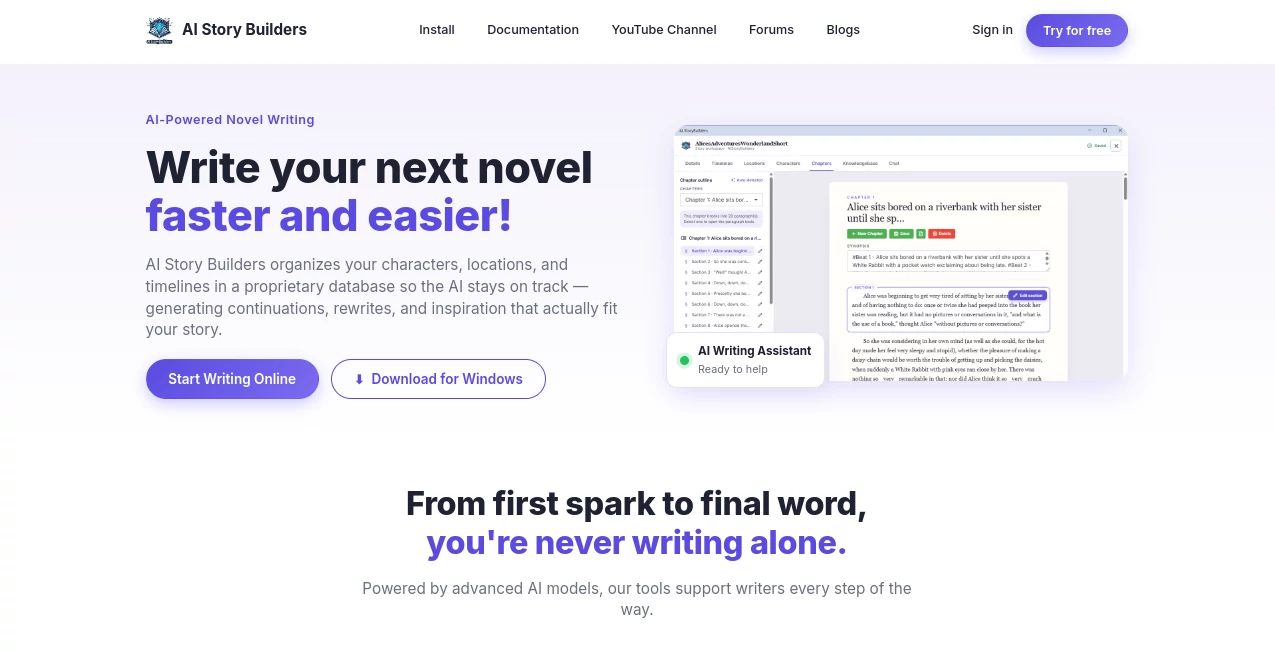
Writing a novel means keeping hundreds of details straight: who your characters are, where each scene happens, what has already taken place, and what is still true at any point in the story. AI StoryBuilders is a free, open-source novel-writing tool built around that problem. It keeps your characters, locations, timelines and chapters in one structured place, and its AI uses that structure every time it writes, so new prose stays consistent with the story you have already built. Version 4.0 runs in your web browser with nothing to install, or as a desktop app for Windows, and works with the AI provider you choose.
What is AI StoryBuilders?
AI StoryBuilders is a writing workspace for fiction. Instead of asking a general chatbot to "write chapter three" and hoping it remembers chapter one, you build a story model: a synopsis, a style, a timeline of story periods, the places where scenes happen, and characters with backgrounds such as appearance, goals, history, aliases and facts. Each section of each chapter is tagged with the characters, location and timeline it involves. When the AI writes, it reads the chapter synopsis, the sections that came before, and the story details that apply to that moment.
The result is an AI writing partner that knows your story, while you stay in charge of every word that gets saved.
Key Features
1. Start from an Idea or an Existing Manuscript
Type a title and a short synopsis, choose up to three chapters, and AI StoryBuilders drafts the characters, locations, timelines and the opening section of each chapter for you. Already have a draft? Import a Word, PDF, text or Markdown file of up to 50 MB, and the AI splits it into chapters and sections and finds the characters, locations and timelines in it.
2. Characters, Locations and Timelines
Give each character background details by type: Appearance, Goals, History, Aliases and Facts. Describe each location, and tie any description to a timeline when it is only true at a certain point in the story. Rename a character, location or timeline and the change is applied across the whole story.
3. AI Section Generation
Open any section and click the AI button. Optionally describe what should happen, choose how many words to write (10 to 1,000), and generate. The AI writes or rewrites the section using the chapter synopsis, the earlier sections and the section's characters, location and timeline. Nothing is saved until you review it, and Undo restores the previous text.
4. Story Style, System Message and World Facts
Pick a style such as Drama, Fantasy or Mystery, edit the system message the AI follows (for example point of view and tense), and list World Facts that must always hold, such as "Magic is illegal in the Northern Kingdom."
5. Writing Voice
Upload a lexical fingerprint: a short profile of how you write, covering sentence rhythm, word choice, punctuation, point of view and the habits you avoid. While a story has one, every AI-generated section and every Story Chat edit is written in your voice instead of a generic AI style.
6. Story Chat
Ask questions about your story, check it for problems such as orphaned characters, or ask for changes like "Add a new character named Captain Rourke." Story Chat never changes your story on its own. Every edit appears as a Proposed change card that you can inspect, then Apply or Discard.
7. Knowledge Base and Knowledge Graph
Each story can have its own knowledge base of Markdown pages for world history, magic systems, research or anything else you want the AI to know. Link pages with [[Page name]], organize them into folders, see backlinks and unresolved links, and explore the connections in an interactive graph. The AI searches these pages when you ask it to, and Story Chat can propose new pages, page edits and folder changes.
8. Autodetect Characters and Attributes
After you write a section, Autodetect Attributes reads it and lists new characters and new details about existing ones, so your story model keeps up with your prose.
9. Export and Backup
Save the whole story as a Word document, or export it as a project file that includes the knowledge base and writing voice, to back it up or move it to another computer or browser.
How AI StoryBuilders Works
Connect an AI provider once in Settings. AI StoryBuilders works with Blazor DataExchange prepaid credits (OpenAI, Anthropic and Google models through one key), or with your own API key from OpenAI, Azure OpenAI, Anthropic or Google AI. You can also use a local Ollama model, which needs no key and keeps everything on your own computer. The app tests each model before it can be used, so only models that can reliably handle its tasks appear in the lists.
Next, create a story or import a manuscript, refine the characters, locations and timelines the AI drafted, then write chapter by chapter and section by section, typing yourself or asking the AI to write. Use Story Chat whenever you want a second opinion or a quick change.
Privacy and Ownership
There are no accounts or sign-ins. Your stories stay on your computer: in your Documents folder in the Windows version, or in your browser's storage in the browser version. Only the text the AI needs for a task is sent, and only to the provider you choose. The search data used to find relevant story details is created on your own computer.
Benefits of Using AI StoryBuilders
Consistency: The AI writes from your characters, locations, timelines and world facts, so it is far less likely to contradict what you have already established.
Control: You review every AI-written section and approve every Story Chat change before it is saved.
Your voice: Writing Voice keeps AI prose sounding like you.
Your choice of AI: Use the models you prefer and pay your provider directly, or run a local model.
Free and open source: AI StoryBuilders is released under the MIT license.
Limitations to Consider
You need an AI provider: an API key, Blazor DataExchange credits, or a computer running Ollama, and AI usage costs depend on that provider. Small or older models may not pass the app's model test. The browser version keeps stories in about 5 MB of browser storage, and clearing the site's data deletes them, so export the projects you want to keep. The desktop version needs Windows 10 (version 2004) or later.
Who Should Use AI StoryBuilders?
AI StoryBuilders is built for novelists and fiction writers who want help drafting and revising without losing track of their story. It suits writers working on long or complex books with many characters and story periods, writers with an unfinished manuscript they want to organize and continue, world-builders who keep extensive lore and research notes, and anyone who wants AI assistance that writes in their own voice.
Final Thoughts
AI StoryBuilders treats a novel as a structured story, not one long prompt. By combining a story model, AI generation, Story Chat, a linked knowledge base and your own writing voice, it helps you write faster and more consistently while you keep full control of your book. Watch the quick start video to see the whole workflow in about two minutes.