
AmazVid
What is AmazVid?
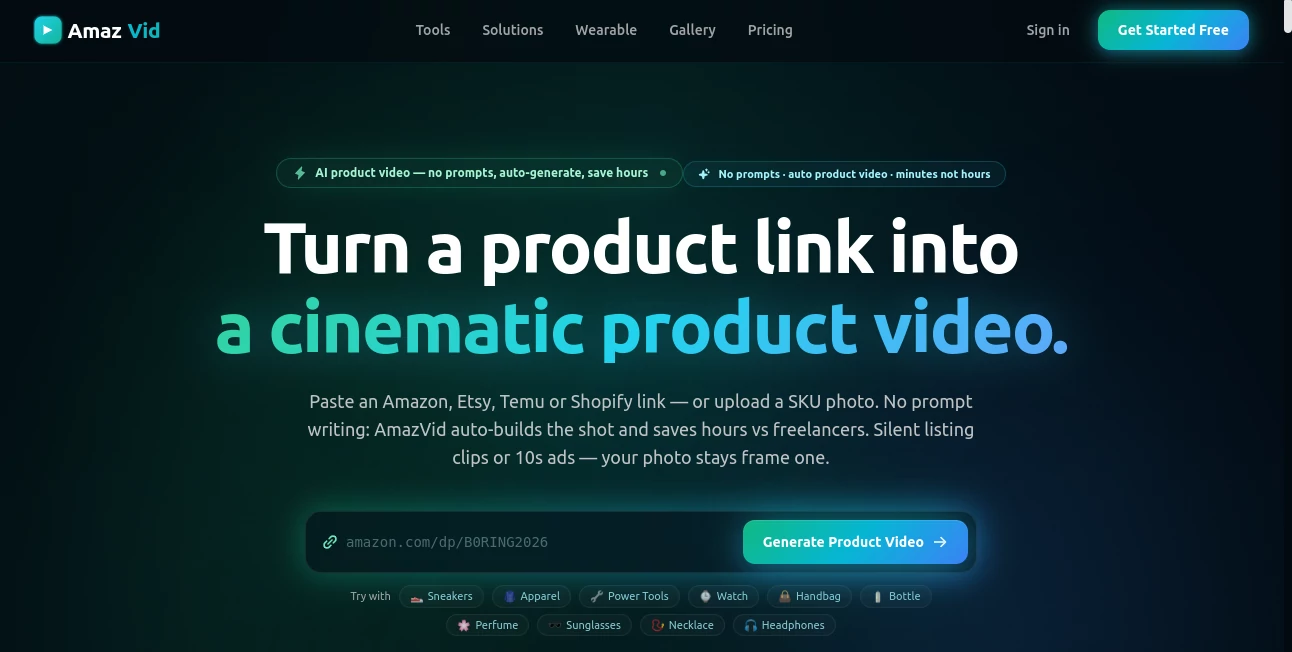
AmazVid is built for e-commerce sellers who want professional-looking product videos without organizing a photo shoot, hiring a freelancer, or learning complicated prompt techniques. Instead of starting with a blank text box, users can paste a product link from Amazon, Etsy, Temu, or Shopify, or upload a product photo and let the platform build the video around the actual item.
The idea is refreshingly practical. Product photography is often one of those jobs that sounds simple until a store has dozens or hundreds of SKUs. A new launch, seasonal update, or advertising campaign can quickly turn into a long list of photos, revisions, models, and production costs. This tool takes a much more direct approach: provide the product, choose the type of video you need, and generate a ready-to-use clip.
The focus is also on keeping the product recognizable. The original product image is used as the first frame, while the generation process creates movement, camera angles, lighting, or advertising-style motion around it. That makes the workflow particularly appealing to online retailers that cannot afford for packaging, colors, logos, or product details to drift too far from the real item.
Key Features
- Product video generation from Amazon, Etsy, Temu, and Shopify links.
- Upload support for product or SKU images when a marketplace URL is not available.
- Product shots designed for e-commerce listings and product detail pages.
- Ad creative generation for paid social campaigns.
- Wearable try-on videos for apparel, footwear, and eyewear.
- Silent video exports without burned-in captions.
- 9:16, 1:1, and 16:9 aspect ratios for different platforms.
- 1080p output on supported paid plans.
- Batch processing for up to five product shots at a time.
- First-frame product locking to help maintain SKU identity.
User Interface
The interface is designed around a simple e-commerce workflow rather than a traditional AI video editor. There is no need to spend time constructing elaborate prompts. A seller can start with a marketplace URL or product image, select a generation mode, and move directly toward the final render.
This approach should feel familiar to anyone managing an online store. Instead of learning a new creative application, the user is essentially giving the system the same product information they already have and turning that information into motion.
The workflow also makes sense for larger catalogues. Product shot mode can process multiple products in a batch with shared camera settings, which can be useful when a store wants a consistent visual style across a collection.
Accuracy & Performance
One of the strongest aspects of the platform is its emphasis on product fidelity. The source product photo remains the first frame, while the system uses information from the listing to anchor the generated result. Shape, color, material, logo, and packaging are treated as important product characteristics rather than details that can simply be reinvented.
That does not mean every generated frame will be perfectly identical to a real studio shoot. Complex packaging text and fine visual details can still be challenging for generative video systems. However, the workflow is clearly designed to reduce one of the biggest risks of AI product content: ending up with a beautiful video featuring a product that no longer looks like the one being sold.
Generation is intended to take minutes rather than the days that can be involved in coordinating traditional product shoots. Batch jobs can also run separately, making the system practical for catalogue updates rather than only one-off creative experiments.
Capabilities
The platform offers several distinct production modes. Product Shot is aimed at catalogue and listing content, with options for camera angles and lighting. Ad Creative is intended for more promotional, cinematic clips, while Wearable Try-on focuses on showing apparel, footwear, and eyewear on an AI-generated model.
The generated videos can be prepared in vertical, square, or landscape formats. That gives sellers flexibility when the same product needs to appear on a product page, social feed, short-form video platform, or advertising campaign.
Another useful detail is the silent output. Instead of permanently adding captions or promotional text to the generated video, the resulting clip can be edited later in the user's preferred application. This is particularly useful for advertisers who want to manage offers, headlines, music, and calls to action directly inside their advertising workflow.
Security & Privacy
For e-commerce businesses, the most important concern is often not just video quality but how product information and uploaded assets are handled. Users should review the current privacy policy and terms before uploading commercially sensitive material, especially when working with unreleased products or client catalogues.
The service terms also describe the platform as a business tool and explain how user content, generated outputs, credits, billing, and acceptable use are handled. For agencies managing several brands, checking these policies before establishing a production workflow is a sensible step.
Use Cases
The most obvious use case is creating richer product pages. A static product image can communicate what an item looks like, but a short camera movement can make the listing feel considerably more active. A slow orbit around a watch, handbag, bottle, or piece of equipment can reveal details that a single photograph leaves hidden.
Paid advertising is another strong application. A retailer can take an existing product image that already works and turn it into a short vertical or square video suitable for social advertising. This makes it easier to refresh creative without organizing another shoot every time an advertisement becomes stale.
Fashion brands can also benefit from the wearable workflow. Instead of arranging a model shoot for every new pair of shoes, jacket, or pair of glasses, sellers can experiment with AI-generated try-on content using the actual SKU as the starting point.
For agencies, the batch workflow can be especially useful. Imagine receiving five new products from a client on Monday morning and needing consistent listing videos by the afternoon. A URL-based workflow can remove much of the repetitive production work that would normally sit between the product catalogue and the final creative assets.
Pros and Cons
Pros
- Very straightforward workflow with no complex prompt engineering.
- Works directly from common e-commerce marketplace links.
- Strong emphasis on keeping the original product recognizable.
- Useful combination of listing, advertising, and try-on workflows.
- Supports multiple aspect ratios for different publishing channels.
- Batch product-shot generation can save time on larger catalogues.
- Paid plans remove the watermark.
- Credit-based pricing makes individual generation costs relatively easy to understand.
Cons
- Generated video can still vary from the original product, particularly with complex packaging details.
- Videos are silent, so music, narration, and captions need to be added separately when required.
- Ad Creative currently focuses on one product at a time.
- The credit system means high-volume catalogues need to monitor monthly usage carefully.
- Businesses requiring highly controlled professional cinematography may still prefer a traditional production workflow.
Pricing Plans
The service uses a credit-based model, starting with a free option for testing the workflow. The current free plan provides six credits, while paid subscriptions increase the monthly allowance and add capabilities suited to larger catalogues.
- Free: 6 credits to get started, with 768p drafts and watermarking.
- Seller: $29 per month for 40 credits, no watermark, and batch processing for up to five products.
- Growth: $49 per month for 70 credits and the features included in Seller.
- Studio: $79 per month for 120 credits, priority rendering, and 1080p shots.
- Agency: $199 per month for 350 credits, API access, white-label delivery, and a dedicated account manager.
One-time credit packs are also available for businesses that occasionally need additional generation capacity. Product shots consume fewer credits than advertising or wearable generations, so the most suitable plan depends heavily on how frequently a store creates each type of content.
How to Use It
- Open the platform and start with a product listing URL or upload a product image.
- Choose the type of content you want to create, such as a product shot, ad creative, or wearable try-on.
- Select the preferred aspect ratio and available generation settings.
- Start the render and wait for the generated clip to finish.
- Review the result carefully, especially product shape, packaging, logos, and fine details.
- Download the finished video and add captions, music, offers, or other campaign elements in your preferred editor if needed.
- Upload the final version to your product page, social media channel, or advertising platform.
Comparison with Similar Tools
Many AI video generators begin with a text prompt and ask users to describe a scene. That approach is excellent for creative experimentation, but it is not always ideal for e-commerce. A retailer usually does not want an imaginary handbag or bottle; they want their actual product presented in a more engaging way.
This platform takes a more specialized route. The product listing or SKU image becomes the foundation of the generation process, and the available modes are organized around real commercial tasks such as product listings, advertisements, and fashion try-on content.
Compared with hiring photographers or freelancers, the main advantage is speed and repeatability. Compared with a general-purpose AI video playground, the advantage is the tighter connection to product catalogues and SKU-focused content. For a small store with only a handful of products, the difference may be modest. For a growing catalogue with frequent creative refreshes, the workflow can become much more valuable.
Conclusion
For e-commerce sellers, the hardest part of producing product video is often not creativity. It is repetition. Every new SKU can mean another shoot, another brief, another round of revisions, and another invoice. A tool built around product URLs and SKU images removes much of that friction.
The strongest reason to consider this platform is its practical focus. It is not trying to be a complete filmmaking application. Instead, it concentrates on a specific problem: turning existing product assets into useful video content for listings, advertisements, and fashion presentation.
That makes it particularly interesting for Shopify stores, marketplace sellers, DTC brands, agencies, and anyone managing a catalogue that changes faster than a traditional production team can comfortably handle. The free credits also make it relatively easy to test the workflow before committing to a subscription.
Frequently Asked Questions (FAQ)
Can I create a product video from an Amazon listing?
Yes. Amazon product links are supported alongside Etsy, Temu, and Shopify links when the listing can be successfully parsed.
Do I need to write an AI prompt?
No. The workflow is designed to generate the shot automatically from the product listing or uploaded product image, so traditional prompt engineering is not required.
Can I upload my own product image?
Yes. Sellers can upload their own SKU photo when they do not have a suitable marketplace URL.
Can I create videos for fashion products?
Yes. The Wearable mode is designed for products such as apparel, footwear, and eyewear, allowing sellers to visualize their products on an AI-generated model.
Does the generated video include sound?
No. The generated clips are silent and do not include burned-in captions. Music, voiceovers, and text can be added later using another editing tool.
What video formats are available?
The platform supports 9:16, 1:1, and 16:9 formats, making the output suitable for vertical short-form content, square social feeds, and landscape placements.
Can I generate several products at once?
Product Shot mode supports batches of up to five products with shared camera settings.
How many credits does a product video use?
A 5-second Product Shot costs 2 credits, while a 10-second Product Shot costs 3 credits. Ad Creative costs 5 credits, and Wearable Try-on costs 6 credits. Higher 2K resolution adds one additional credit.
Is there a free plan?
Yes. A free plan is available for testing the service before moving to a paid subscription.
AI Ad Generator , AI Video Generator , AI E-commerce Assistant , AI Advertising Assistant .
These classifications represent its core capabilities and areas of application. For related tools, explore the linked categories above.

AmazVid Alternatives Product

Wan 2.7

Meigen AI

Ad Suite AI

Toon Composer

AI Dance Vid…

Seedance 2

Veo

Spark Robin
Seedance Stu…