Ankon AI
What is Ankon AI?
Ankon AI is an innovative platform that transforms ideas, documents, scripts, and reference materials into engaging whiteboard explainer videos. It helps creators, educators, founders, and businesses turn complex information into simple visual stories without requiring professional animation skills or video editing experience.
The platform combines automated script creation, hand-drawn style animations, narration, captions, and publishing-ready video elements in one streamlined workflow. Instead of spending hours planning scenes or learning complicated editing software, users can provide a topic or upload content and receive a complete explainer video designed for sharing and learning.
With support for multiple languages, voice features, subtitles, and different content sources, this tool is especially useful for anyone who wants to create educational, marketing, or product explanation videos faster while maintaining a professional appearance.
Key Features
- Generate whiteboard-style explainer videos from simple ideas, scripts, PDFs, or images.
- Automatic narration creation and voice synchronization.
- Line-by-line whiteboard drawing animations that match the voiceover.
- Built-in captions and downloadable subtitle files.
- Support for multiple languages for global audiences.
- Automatic video metadata generation including titles, descriptions, and chapters.
- Voice cloning capabilities for personalized narration experiences.
- Export-ready videos suitable for social media, courses, and websites.
- API access for developers and advanced workflows.
User Interface
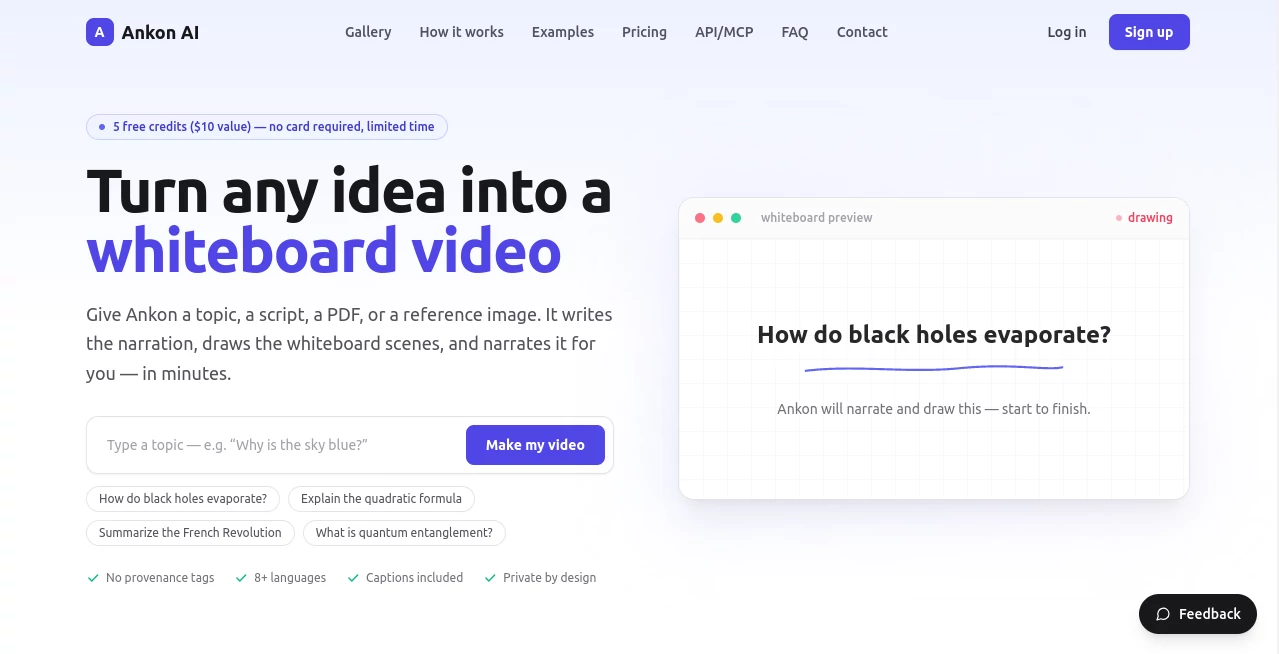
The interface is designed around simplicity. Users do not need previous animation or editing knowledge to create videos. The workflow focuses on providing an idea, uploading a source file, and receiving a finished video. The clean design reduces unnecessary steps and allows creators to focus on their message rather than technical production tasks.
Accuracy & Performance
The platform is built to keep generated videos aligned with the original source material. Whether users provide a document, educational topic, or written script, the system creates narration and visual scenes based on the provided information. The automated workflow significantly reduces the time needed to move from concept to finished video.
The rendering process is optimized for creators who need consistent results without managing complex animation software. Videos include synchronized drawings, voiceovers, and captions to improve viewer understanding.
Capabilities
This solution goes beyond basic video generation by focusing on educational and explanatory content. It can transform articles, product documentation, tutorials, research materials, and business ideas into easy-to-follow visual presentations.
Creators can produce videos for online courses, YouTube channels, startup presentations, product demonstrations, newsletters, and social media campaigns. The combination of automated writing, illustration, and narration makes it suitable for both individuals and professional teams.
Security & Privacy
Privacy is an important part of the platform experience. User content is designed to remain private while being processed for video creation. The service also provides control over generated content, including voice management features that allow users to manage personalized voice options.
Use Cases
- Education: Convert lessons, research papers, and course materials into engaging visual explanations.
- Content Creators: Create informative videos for YouTube, social platforms, and online communities.
- SaaS Companies: Build product walkthroughs and feature explanation videos.
- Marketing Teams: Turn blog posts and written campaigns into visual content.
- Founders: Create startup introduction videos without hiring animation specialists.
- Businesses: Explain internal processes, training materials, and customer education topics.
Pros and Cons
Pros
- Simple workflow with no advanced editing skills required.
- Creates professional-looking whiteboard videos quickly.
- Supports multiple content sources including PDFs and images.
- Includes captions and publishing-ready metadata.
- Useful for education, marketing, and business communication.
Cons
- Focused mainly on whiteboard explainer video styles.
- Advanced video customization may be limited compared with professional editing tools.
- Longer projects may require additional credits.
Pricing Plans
The platform offers a credit-based pricing model where one credit represents approximately one minute of finished video. New users can start with free credits before choosing a paid subscription.
- Starter: Designed for learning and personal projects with monthly video credits.
- Plus: Suitable for content creators who regularly publish videos.
- Pro: Built for agencies and professional users who need higher limits.
- Studio: Designed for teams, API workflows, and larger production needs.
Paid plans include features such as captions, subtitles, multiple languages, faster rendering, and additional creation tools.
How to Use Ankon AI
Creating a video requires only a few simple steps:
- Provide a topic, upload a document, add a script, or share a reference image.
- Let the system generate narration, drawings, and synchronized scenes.
- Review the final video and export it with captions, subtitles, and publishing details.
Comparison with Similar Tools
Compared with traditional animation software, this platform focuses on speed and accessibility. Many video creation tools require manual scene building, character design, and editing knowledge, while this solution automates the complete explainer video process.
It is particularly suitable for users who want educational and informative videos rather than highly cinematic productions. The focus on whiteboard storytelling creates a clear format that works well for tutorials, explanations, and knowledge-sharing content.
Conclusion
Creating educational and explanatory videos can often be time-consuming, especially for people without animation experience. This platform provides a practical solution by combining automated writing, illustration, narration, and subtitles into a single workflow.
For teachers, creators, marketers, and businesses looking to transform ideas into engaging visual content, it offers an efficient way to produce professional whiteboard videos while saving valuable production time.
Frequently Asked Questions (FAQ)
What type of videos can be created?
Users can create whiteboard explainer videos for education, marketing, tutorials, product explanations, and business communication.
Can I use my own documents?
Yes, users can provide sources such as PDFs, scripts, topics, and reference images to create videos based on their materials.
Does it include subtitles?
Yes, generated videos include captions and subtitle files that can be used for accessibility and publishing.
Can I create videos in different languages?
Yes, the platform supports multiple languages for narration and video creation.
Is it suitable for businesses?
Yes, companies can use it for product demonstrations, training materials, marketing videos, and customer education content.
AI Animated Video , AI Video Generator , AI Text to Video , AI Presentation Generator .
These classifications represent its core capabilities and areas of application. For related tools, explore the linked categories above.

Ankon AI Alternatives Product

Gemini Omni …

Seedance 2.0

seedream vid…

Trump AI Vid…

Gemini Omni …

Image to Vid…

seedance 3.0
Seedance 2 A…

Pixelfox AI