
ApiFlux
What is ApiFlux?
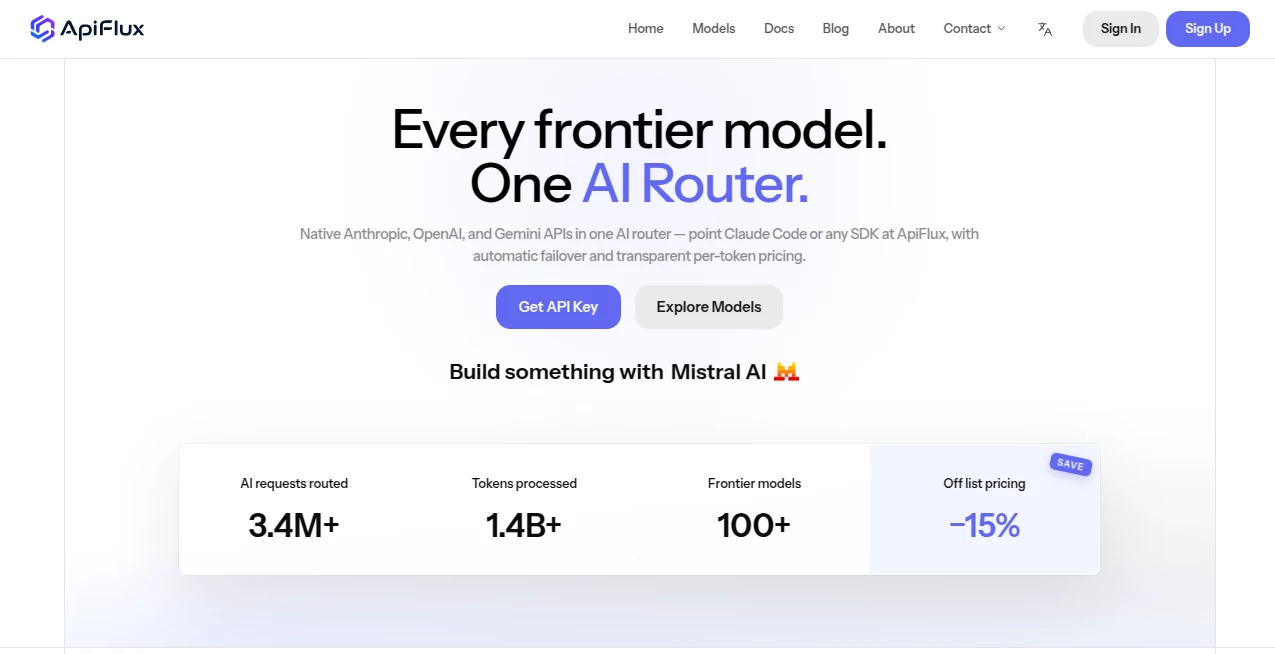
Working with multiple AI models can become surprisingly complicated. Developers often have to manage separate API keys, billing systems, SDK configurations, usage dashboards, and provider-specific endpoints just to give an application access to several models. ApiFlux brings those pieces together through a single AI routing layer designed for developers who want more flexibility without rewriting their applications every time they change models.
The platform provides access to more than 100 frontier models from major providers including Anthropic, OpenAI, Google, DeepSeek, Kimi, and Qwen. Instead of maintaining several provider accounts for every project, developers can use one API key and a unified interface while switching between supported models as needed.
One of the most appealing aspects is the pricing approach. There is no recurring subscription requirement. Users can top up their balance and pay according to model usage, while the platform states that models are priced at 85% of the respective maker's list price. For a developer testing several models or running a small application, this can make experimentation considerably easier.
Key Features
- Access to more than 100 frontier AI models through one routing layer.
- OpenAI-compatible API support for easier integration with existing applications and SDKs.
- Support for models from Anthropic, OpenAI, Google, DeepSeek, Kimi, Qwen, and other providers.
- Automatic failover that can reroute requests when an upstream provider experiences problems.
- Transparent per-token pricing with request-level cost visibility.
- Live monitoring of token usage, latency, errors, and model health.
- One balance for working with multiple supported models.
- Per-key usage logs and limits for teams and shared environments.
- Compatibility with popular developer tools such as Claude Code, Codex CLI, and OpenCode.
- Model switching without requiring a complete rewrite of application code.
User Interface
The interface is built around the needs of developers rather than casual AI experimentation. The dashboard focuses on practical information such as requests, token consumption, latency, costs, errors, and model health. This makes it easier to understand what an application is actually spending and where performance problems may be occurring.
The setup is also intentionally straightforward. A developer creates an API key, adds funds, points an existing tool or SDK toward the provided endpoint, and can begin making requests. For someone already familiar with OpenAI-compatible APIs, the learning curve should be relatively small.
Accuracy & Performance
Performance depends partly on the underlying model and provider being used, but the routing layer adds an important operational feature: automatic failover. If an upstream route becomes degraded, requests can be redirected toward a healthy route instead of leaving the application completely dependent on one provider.
The live dashboard adds another useful layer of visibility. Developers can inspect latency, token usage, costs, errors, and request activity rather than relying on guesswork when evaluating different models.
Of course, routing does not change the fundamental behavior or limitations of an underlying language model. AI responses can still be inaccurate or incomplete, so production applications should maintain appropriate testing, validation, and human oversight.
Capabilities
The main strength is model variety. A single integration can provide access to different model families without forcing developers to build a separate billing and connection setup for each provider.
This is particularly useful when different tasks benefit from different models. A coding application might use one model for complex programming tasks and another for faster, lower-cost requests. A research application could compare several models using the same prompt. A startup can also experiment with new models without immediately committing its entire infrastructure to one vendor.
The platform also supports common developer workflows. Existing OpenAI SDK-based applications can generally be redirected by changing the base URL, while dedicated guidance is available for tools such as Claude Code, Codex CLI, and OpenCode.
Security & Privacy
Privacy is an important consideration for any service sitting between an application and an AI provider. The service states that full prompts, responses, and attachments are not stored by default. They are processed transiently for purposes such as request forwarding, security checks, troubleshooting, and billing.
Full prompt and response logging can be enabled by a user or organization administrator when needed, with the privacy policy stating that enabled logs are retained for 30 days before deletion from online systems. The platform also records operational information such as token usage, latency, errors, routing, failover results, and security-related events.
Developers should still review the privacy requirements of their own applications and the policies of the underlying AI providers before sending sensitive information through any third-party routing service.
Use Cases
AI Coding Tools: Developers can connect coding agents and command-line AI development tools to multiple model families while keeping a centralized balance and usage view.
Production Applications: Chatbots, copilots, AI assistants, and agent-based applications can use multiple models while benefiting from routing and failover capabilities.
Model Evaluation: Teams testing several frontier models can send comparable workloads through one interface rather than creating and maintaining multiple provider configurations.
Prototypes and Side Projects: The top-up model is convenient for developers who want to experiment without adding another recurring subscription.
Small Development Teams: Teams can share credit while using individual API keys, limits, and usage records to keep track of consumption.
Reducing Vendor Lock-in: Applications can retain a compatible API structure while changing the model used for individual workloads.
Pros and Cons
- Pros: Access to 100+ models through one integration.
- Pros: OpenAI-compatible API makes migration easier for many existing applications.
- Pros: Automatic failover improves resilience when an upstream provider has problems.
- Pros: Transparent per-token billing and live usage information.
- Pros: No recurring subscription is required.
- Pros: Useful for model comparison and multi-provider development.
- Cons: Developers are still dependent on the availability and capabilities of upstream providers.
- Cons: Model availability, pricing, limits, and capabilities can change over time.
- Cons: Applications handling sensitive information need to carefully evaluate the routing layer and relevant provider policies.
Pricing Plans
The pricing model is usage-based rather than subscription-based. Developers can top up an account and pay according to their actual model consumption. The service currently advertises supported models at 85% of the respective model maker's list price, effectively presenting a 15% reduction from those listed rates.
Pricing is calculated on a per-token basis, with the exact cost depending on the selected model and applicable usage. The dashboard provides visibility into request costs and token consumption, which is useful for keeping development and production spending under control.
Because individual model prices and upstream services can change, developers should check the current model pricing before making significant purchasing or deployment decisions.
How to Use It
Getting started is designed to take only a few steps. First, create an account and generate an API key. Add funds to the account balance and select one of the available models.
Next, connect the application or development tool to the provided API endpoint. For applications already using an OpenAI-compatible SDK, the integration can often be handled by changing the base URL while leaving the rest of the implementation intact.
After making requests, use the dashboard to review token consumption, latency, costs, errors, and model activity. This makes it possible to compare models and identify which configurations work best for a particular workload.
Comparison with Similar Tools
AI model routing services generally solve a similar problem: giving developers access to several models without requiring completely separate integrations. What makes this platform particularly interesting is the combination of a broad model selection, OpenAI-compatible access, automatic failover, usage monitoring, and a straightforward pay-as-you-go approach.
Compared with connecting directly to individual providers, a unified router can reduce administrative overhead. Instead of maintaining separate balances, API configurations, and monitoring systems, a team can centralize much of that work.
The trade-off is that another layer sits between the application and the underlying model provider. For teams with strict infrastructure, compliance, latency, or data-processing requirements, that additional layer should be evaluated carefully before moving production workloads.
Conclusion
For developers who regularly move between AI models, managing multiple providers can quickly become a maintenance problem. A unified routing layer offers a practical alternative by bringing model access, billing, monitoring, and failover into one workflow.
The combination of 100+ supported frontier models, OpenAI-compatible integration, usage-based pricing, automatic failover, and detailed monitoring makes this a compelling option for developers building everything from small experiments to production AI applications.
Its biggest advantage may simply be flexibility. Developers can test different models, change providers, and experiment with new AI capabilities without rebuilding the entire application around a single vendor.
Frequently Asked Questions (FAQ)
What is an AI router?
An AI router provides a unified interface for sending requests to multiple AI models and providers. It can simplify model switching, billing, monitoring, and routing compared with managing every provider separately.
How many AI models are supported?
The platform currently advertises access to more than 100 frontier models, including models from Anthropic, OpenAI, Google, DeepSeek, Kimi, Qwen, and other major model providers.
Is an OpenAI SDK compatible?
Yes. The service provides an OpenAI-compatible API, allowing many existing applications and SDK-based integrations to connect by changing the API base URL rather than rewriting the entire application.
Does it require a monthly subscription?
No. The service uses a top-up and usage-based billing approach, allowing developers to add funds and pay for model usage rather than committing to a recurring subscription.
Does it support automatic failover?
Yes. When an upstream provider or route becomes degraded, the routing system can redirect requests toward available healthy routes, helping applications remain operational during provider issues.
Is prompt data stored?
Full prompts, responses, and attachments are not stored by default according to the current privacy policy. If prompt logging is actively enabled, full prompts and responses are retained for 30 days before deletion from online systems, subject to stated exceptions.
Can teams monitor API usage?
Yes. The dashboard provides information about token usage, costs, latency, errors, and request activity. Per-key logs and limits can also help teams understand individual usage.
AI Productivity Tools , AI API Design , AI Developer Docs , AI Developer Tools .
These classifications represent its core capabilities and areas of application. For related tools, explore the linked categories above.

ApiFlux Alternatives Product

Scillus

Ito AI

CapyQR

Remove My Me…

GenPPT AI

HY Motion

Slackactivity

Emergent

Zamicus