
Chat Genio
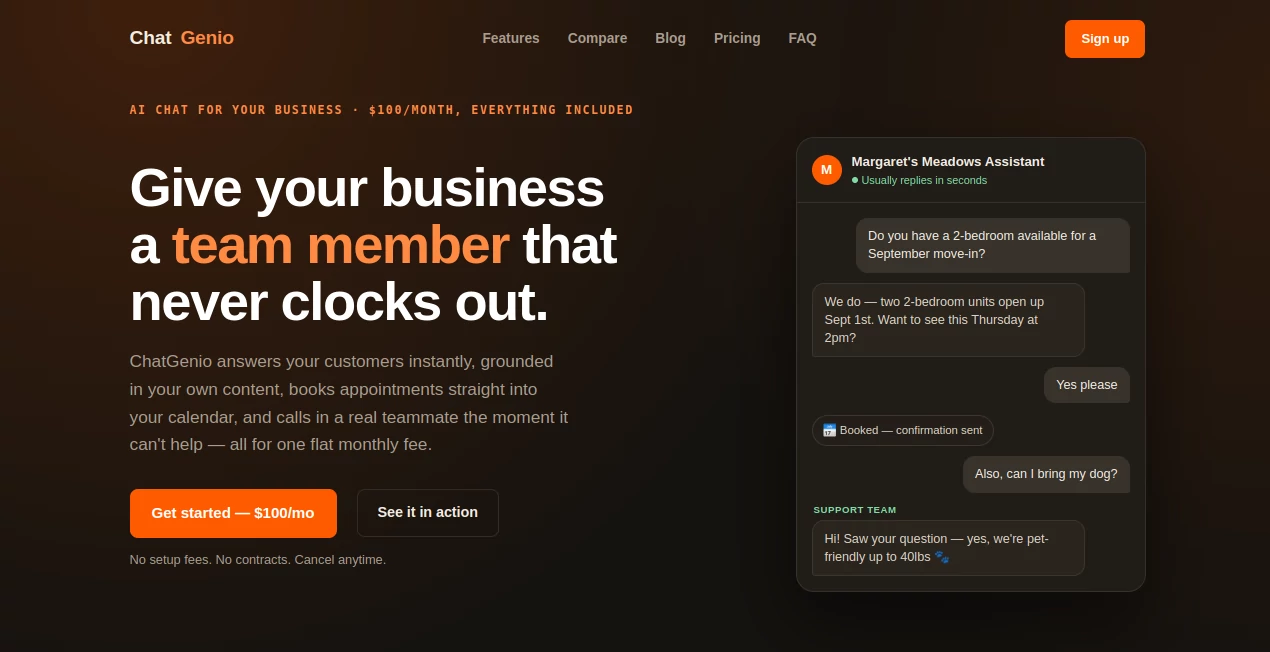
What is Chat Genio?
ChatGenio is an AI-powered business chat assistant designed to do much more than answer routine customer questions. It learns from a company's website and uploaded documents, responds using that business-specific information, captures leads, checks availability, books appointments, and knows when a conversation needs a real person.
That combination makes it particularly useful for businesses that receive customer questions throughout the day but do not want their team constantly tied to a chat window. Instead of giving visitors generic answers, the assistant works from the company's own content and stays within the boundaries defined by the business.
For a small company, this can be especially practical. A visitor can ask about a service, request an appointment, or leave contact information without waiting for someone from the team to become available.
Key Features
- AI chat trained on your website and uploaded business documents
- Automatic multilingual responses based on the visitor's language
- Lead capture during conversations
- Real-time calendar checking and appointment booking
- Video meeting links and confirmation emails
- Two-way live handoff through Slack
- Email fallback when a human handoff is needed
- HubSpot CRM synchronization
- Website, Facebook Messenger, Instagram, and WhatsApp support
- Automatic knowledge refresh when website content changes
- One-line website installation
User Interface
The interface is designed to feel like a normal conversation rather than a complicated customer-service system. Visitors can type questions naturally, while the assistant handles tasks such as finding available appointment times or collecting lead information during the conversation.
For businesses, installation is intentionally simple. The website widget can be added with a single line of code, and it can automatically match the site's existing colors or use one of several preset styles. This keeps the assistant from feeling like an unrelated third-party element placed on the page.
Accuracy & Performance
One of the more useful aspects of the system is that its answers are based on the company's own website and uploaded documents rather than relying on broad internet knowledge. This is important for businesses because customers usually need specific information about services, policies, availability, pricing, or procedures.
The assistant is also designed to avoid guessing when it reaches the limits of its knowledge. Instead, it can notify the team through Slack or fall back to email. In practice, that creates a useful balance: automation handles common questions while unusual or sensitive requests can reach a human.
Capabilities
The platform combines customer communication with several practical business functions. It can capture a potential customer's information during a conversation, check a connected calendar, schedule an appointment, create a video link, and send a confirmation email.
Another useful capability is multilingual communication. Visitors can communicate in their preferred language, allowing businesses to serve a broader audience without creating separate support workflows for every language.
It also works across several communication channels, including a company's website, Facebook Messenger, Instagram, and WhatsApp. Leads can be pushed into Slack and HubSpot, giving teams a way to keep conversations connected with their existing workflow.
Security & Privacy
Privacy is particularly important for a business assistant that handles customer conversations and company information. Each client's assistant, knowledge base, and conversation history are isolated from those belonging to other businesses, according to the service's privacy information.
The platform also states that stored credentials are encrypted using AES-256. This provides an additional layer of protection for connected account credentials while the system manages business integrations.
Use Cases
This type of assistant can be useful across many customer-facing businesses. A property management company, for example, can answer questions about available units and arrange viewings. A consulting company can allow prospects to request a meeting without sending several emails back and forth.
Service businesses can use it to collect leads while visitors are still browsing their websites. Marketing teams can benefit from automatically sending those leads to their CRM, while support teams can use the live handoff feature when a question requires personal attention.
It can also work well for businesses that receive inquiries outside normal working hours. Instead of leaving a visitor with a contact form and no immediate response, the assistant can handle the initial conversation and capture useful information for the team.
Pros and Cons
- Pros: Uses business-specific content, supports lead capture, handles appointment booking, offers multilingual conversations, integrates with Slack and HubSpot, supports multiple channels, and provides human handoff when automation is not enough.
- Pros: The setup is straightforward and requires only one line of code for website installation.
- Pros: There is a single plan rather than multiple feature tiers that restrict important functionality.
- Cons: The $100 monthly price may be more than what a very small business wants to spend on a basic chatbot.
- Cons: Some advanced capabilities, including Salesforce and Zendesk integrations, source citations, sentiment escalation, voice input, and ROI reporting, are still listed as upcoming features rather than currently available.
Pricing Plans
The pricing structure is refreshingly simple. The service costs $100 per month and includes the full feature set rather than separating core capabilities into multiple subscription tiers.
The plan includes conversations across the supported channels, lead capture, calendar booking, video links, confirmation emails, Slack handoff, HubSpot synchronization, and an assistant trained on the company's own content. There are no setup fees, per-seat charges, or long-term contracts, and customers can cancel on a month-to-month basis.
How to Use It
Getting started follows a straightforward three-step process. First, provide information about the business, including its website, FAQs, and existing documents. The assistant can use this material as its knowledge base, so businesses do not have to create an entirely new collection of content just for the chatbot.
Next, the assistant is connected to the desired services, such as the calendar and Slack. Once the setup is complete, a single line of code can be added to the website. The knowledge base can also refresh automatically when the business updates its website.
A typical workflow might look like this: a visitor asks a question, receives an answer based on the company's information, requests an appointment, and gets an available time without leaving the conversation. If the question falls outside the assistant's capabilities, the conversation can be transferred to a team member.
Comparison with Similar Tools
Traditional chatbots often focus on predefined questions and fixed responses. More advanced AI assistants can hold natural conversations, but the real difference for a business comes from what happens after the conversation starts.
This platform places considerable emphasis on turning conversations into business actions. Instead of stopping at an answer, it can capture a lead, schedule a meeting, connect the conversation to a CRM, or bring a human into the chat through Slack.
Compared with a basic customer-support widget, it is therefore better suited to companies that want their chat assistant to participate in sales and appointment workflows rather than simply answer frequently asked questions.
Conclusion
For businesses that want customer communication to continue even when their team is busy, an AI assistant with access to company-specific information can be a practical addition. The combination of grounded answers, lead capture, scheduling, CRM integration, and human escalation gives it a broader role than a conventional FAQ chatbot.
The flat $100 monthly price also makes the offering easy to understand. Businesses know what they are getting without having to compare several complicated tiers. While some advanced features remain on the roadmap, the current feature set already covers many of the everyday tasks that can make website conversations more useful.
If the goal is to turn website visitors into conversations, appointments, and qualified leads while keeping a human available for situations that require personal attention, this is an appealing option worth considering.
Frequently Asked Questions (FAQ)
How much does it cost?
The service costs $100 per month, with all currently available features included in the plan.
Does it work with a company's own information?
Yes. The assistant can be trained using the company's website and uploaded documents, allowing it to answer questions based on business-specific information.
Can it book appointments?
Yes. When connected to a calendar, it can check available times, book appointments, create video links, and send confirmation emails.
Can a human take over a conversation?
Yes. A conversation can be handed over to a team member through Slack. If the live handoff is unavailable, the system can use email as a fallback.
Which communication channels are supported?
The platform supports website chat, Facebook Messenger, Instagram, and WhatsApp from a single backend.
Does it integrate with a CRM?
Yes. Leads can be synchronized with HubSpot, allowing businesses to connect conversations with their existing customer-management workflow.
Is technical knowledge required to install it?
No. The setup is designed for non-technical users. After the assistant is configured, it can be added to a website with one line of code.
Can the subscription be cancelled?
Yes. The service is offered on a month-to-month basis without a long-term contract, and there are no setup fees.
AI Lead Generation , AI CRM Assistant , AI Customer Service Assistant , AI Scheduling .
These classifications represent its core capabilities and areas of application. For related tools, explore the linked categories above.

Chat Genio Alternatives Product

ZoraInsights

FiveMinChat

Supawazap

Reloq

Lessie AI

Fillout.com

LSGRO

Zinng

AntForms