Astorie
What is Astorie?
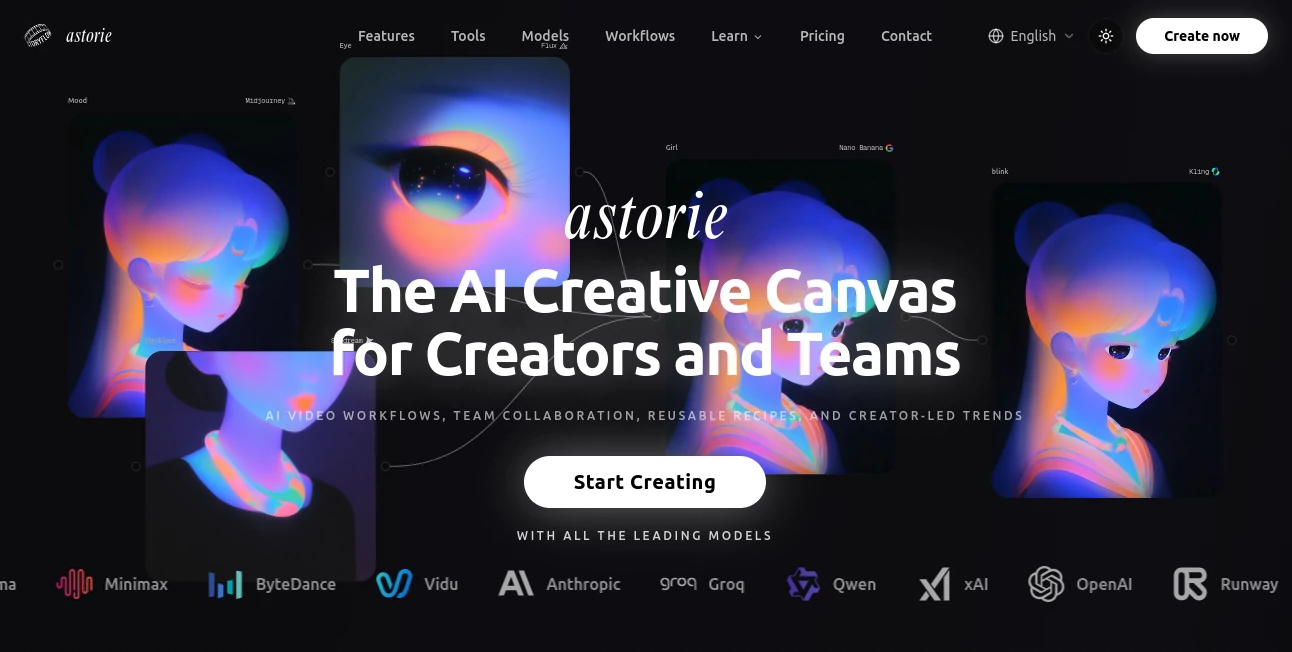
Astorie is an AI creative canvas built for people who want to bring images, videos, audio, music, and other generative workflows together without constantly jumping between different platforms. Instead of locking users into a single AI model, it provides a workspace where multiple models can be connected, compared, and used as part of the same creative process.
The platform currently brings together more than 100 AI models, covering image generation, video generation, audio and music creation, creative editing, 3D generation, and language-based workflows. This makes it particularly interesting for creators who need more than a simple text-to-image or text-to-video generator.
Its biggest advantage is the canvas itself. A creator can start with an idea, generate an image, animate it, add audio, refine the result, and organize the steps into a reusable workflow. For anyone who has ever lost time moving files between several AI websites, that approach can feel refreshingly practical.
Key Features
- Access to 100+ AI models from multiple providers in one workspace.
- Infinite canvas for building visual, video, audio, and multi-step AI workflows.
- Image generation and editing with a wide selection of models.
- Text-to-video and image-to-video generation.
- AI audio, voice, music, and sound-effect generation.
- Lip-sync, upscaling, background removal, and other creative editing tools.
- 3D and world-generation capabilities.
- Reusable Recipes for saving complete creative workflows.
- Real-time team collaboration and shared workspaces.
- Professional export options for workflows intended for video editing applications.
User Interface
The interface is centered around an infinite node-based canvas rather than a traditional single-prompt screen. Each generation or editing operation can be represented as a node, allowing users to connect different stages of a project visually.
This approach is especially useful when a project involves several iterations. For example, a creator can generate a character image, use it as a reference for a video generation step, add a voice, apply lip sync, and continue refining the result without losing the relationship between those assets.
There is a learning curve compared with very simple prompt-and-generate tools, but that extra flexibility is exactly what makes the workspace appealing to more advanced creators.
Accuracy & Performance
Performance depends heavily on the model selected, since the platform connects users with different AI providers rather than relying on a single generation engine. This gives creators the freedom to choose a model based on the type of result they want instead of accepting whatever model a standalone application provides.
The ability to compare different models on the same canvas is particularly useful during experimentation. A creator can test several approaches, keep the strongest result, and continue developing the project from there.
Because processing is handled in the cloud, users do not need a powerful local GPU to work with the available models. Generation speed will naturally vary according to the model, task complexity, and current processing demand.
Capabilities
The platform goes well beyond basic AI video generation. Its creative toolkit covers image generation, video generation, audio and music creation, editing, workflow automation, and 3D-related generation.
For video projects, creators can work with text-to-video and image-to-video workflows, then use additional tools such as lip sync and enhancement. Image workflows can combine different models and reference assets, while audio workflows can introduce generated voices, music, and sound effects.
Another useful feature is the ability to save a complete workflow as a Recipe. Instead of recreating the same sequence every time, users can preserve the model choices, prompts, connections, and creative steps and reuse them on another project.
Security & Privacy
The service provides privacy and security controls as part of its account and workspace infrastructure. Customer content can include prompts, uploaded images, videos, audio, generated outputs, project information, workflow data, and generation metadata.
Users should pay attention to the platform's privacy terms when working with sensitive material. The privacy policy states that content from default consumer, free, pro, and team plans may be used for AI model training and product improvement, unless a designated setting, plan-specific term, or separate agreement restricts that use.
The platform also uses third-party infrastructure and AI providers to operate its service. Payment processing is handled through third-party processors rather than storing full payment card numbers directly.
Use Cases
AI Video Production: Filmmakers, content creators, and social media teams can combine multiple video models, reference images, editing tools, and audio generation in one workflow.
Social Media Content: Creators can develop short-form visual concepts, generate supporting images, animate them, create voiceovers or music, and prepare variations for different formats.
Advertising and Marketing: Marketing teams can experiment with several visual directions quickly and compare different AI models before selecting the strongest creative.
Character Creation: Artists can develop consistent characters using reference assets and then move those characters into animated or video workflows.
Creative Agencies: Teams handling multiple clients can benefit from shared canvases, reusable workflows, and centralized access to different generation models.
Concept Development: Designers and filmmakers can use the canvas as a visual playground for exploring storyboards, scenes, styles, environments, and creative directions before committing to a final production.
Pros and Cons
Pros
- Large collection of AI models in one platform.
- Supports image, video, audio, music, and 3D workflows.
- Infinite canvas makes complex projects easier to organize.
- Reusable Recipes can save considerable time on repeat workflows.
- Cloud-based processing means no local GPU is required.
- Useful collaboration features for creative teams.
- Offers a free plan without requiring a credit card.
Cons
- The node-based workflow may take some time for beginners to understand.
- Generation speed and results can vary between different underlying models.
- Credit usage needs to be monitored for users producing content at high volume.
- Creators working with confidential material should review the data-use and AI-training provisions before uploading sensitive assets.
Pricing Plans
A free option is available for users who want to explore the platform before paying. The paid plans use a monthly credit system and provide access to the broader model library and higher generation limits.
The Standard plan is designed for professional users and small teams and includes 1,600 credits per month. The Pro plan provides 5,400 credits per month and higher concurrency, making it better suited to larger teams and more demanding production workflows.
The Ultimate plan is aimed at heavy users and includes 17,000 credits per month, higher concurrency, and a discount on additional credits. The platform also offers a short Pro trial and periodically provides promotional pricing, so users should check the current plan details before subscribing.
How to Use It
- Create an account and open a new project.
- Start with a prompt, reference image, video, audio file, or another supported asset.
- Add the appropriate AI generation or editing node to the canvas.
- Choose the model that best matches the desired result.
- Connect additional nodes when the project requires multiple stages.
- Generate and compare different results.
- Refine the strongest output using additional generation or editing steps.
- Save the workflow as a Recipe if you expect to use the same process again.
- Invite collaborators when working as part of a team.
- Export the finished assets or workflow for further production.
Comparison with Similar Tools
Many AI creative platforms focus on one particular medium. A dedicated video generator may be excellent for producing clips, while an image generator may provide a deeper set of image-focused controls. This platform takes a different approach by bringing multiple creative mediums and AI providers into a single canvas.
Compared with a straightforward prompt-based video generator, the canvas offers considerably more control over multi-step production. Compared with a traditional design application, the focus is much more strongly placed on generative AI models and connected workflows rather than templates and conventional design tools.
It also differs from node-based systems designed primarily for technical AI workflows. Here, the emphasis is on creative production, model comparison, collaboration, and turning ideas into finished media rather than requiring users to build and maintain their own local AI infrastructure.
Conclusion
For creators who regularly work with several AI generation platforms, the biggest attraction is the ability to bring those workflows into one creative environment. Instead of treating image generation, video creation, audio production, editing, and 3D work as completely separate activities, the canvas connects them into a single process.
The platform is not necessarily the simplest choice for someone who only wants to type one prompt and receive a finished clip. Its strengths become more apparent when a project involves experimentation, multiple models, several creative stages, or collaboration with other people.
For professional creators, agencies, filmmakers, marketers, and teams building AI-assisted media pipelines, the combination of model variety, reusable workflows, cloud processing, and collaborative canvas tools makes it a compelling option worth exploring.
Frequently Asked Questions (FAQ)
What is this platform used for?
It is an AI creative workspace for generating and editing images, videos, audio, music, and other media while connecting multiple AI models through a visual canvas.
How many AI models are available?
The platform currently provides access to more than 100 AI models across image, video, audio, creative editing, 3D, and other workflows.
Do I need a powerful computer?
No. The AI models run in the cloud, so users do not need a local GPU to perform the supported generations.
Can teams collaborate on projects?
Yes. Shared canvases, workspaces, reusable workflows, and collaboration features are available for teams.
Can workflows be reused?
Yes. Completed workflows can be saved as Recipes, allowing creators to reuse a sequence of models, prompts, connections, and creative steps on future projects.
Is there a free plan?
Yes. A free option is available, allowing users to try the platform without entering a credit card.
Can AI-generated content be used commercially?
Commercial usage depends on the applicable terms, model, plan, and content involved. Users should review the current terms and any model-specific restrictions before using generated material commercially.
Is user content used to train AI models?
The privacy policy states that content from default consumer, free, pro, and team plans may be used for AI training and product improvement unless an applicable setting, plan term, or separate agreement limits that use. Users working with confidential content should review the privacy terms carefully.
AI Video Generator , AI Music Generator , AI Text to Video , AI Text to Image .
These classifications represent its core capabilities and areas of application. For related tools, explore the linked categories above.

Astorie Alternatives Product

AI Baby Dance

Lyria3 AI

Wan-Animate.…

Grok Imagine

Custom Song
Z-Image Free
AudioVideoGe…

Seedance 2

Berrioo