Ballet
What is Ballet?
Ballet is a workflow automation platform designed for teams that need to connect multiple business systems without waiting weeks for an engineering team to build every integration by hand. Instead of starting with a complicated visual workflow, users can describe the outcome they want in plain English, such as routing leads, detecting account activity, or updating billing information across connected systems.
The platform is built for organizations where important workflows often sit in an engineering backlog simply because several internal systems need to communicate with one another. It turns those ideas into executable, reviewable code and can keep the resulting workflows running across the company's existing technology stack.
What makes the approach particularly interesting is its focus on internal and proprietary systems. A workflow does not have to stop at the boundaries of a standard connector library. This makes it a practical option for revenue operations, sales operations, support operations, and product-led growth teams working with a mixture of commercial software, databases, APIs, and internal services.
Key Features
- Plain-English workflow creation for multi-system business processes.
- Automation that can connect proprietary and internal systems.
- Generated code that can be reviewed and version controlled.
- Deterministic execution for steps where consistency is important.
- Agentic reasoning for workflow steps that benefit from flexibility.
- Support for revenue, marketing, sales, and operational workflows.
- Replayable workflow runs for easier auditing and troubleshooting.
- Approval gates before important workflow changes are put into operation.
- Integration with existing business systems and APIs.
- Workflows designed to reduce dependence on lengthy engineering queues.
User Interface
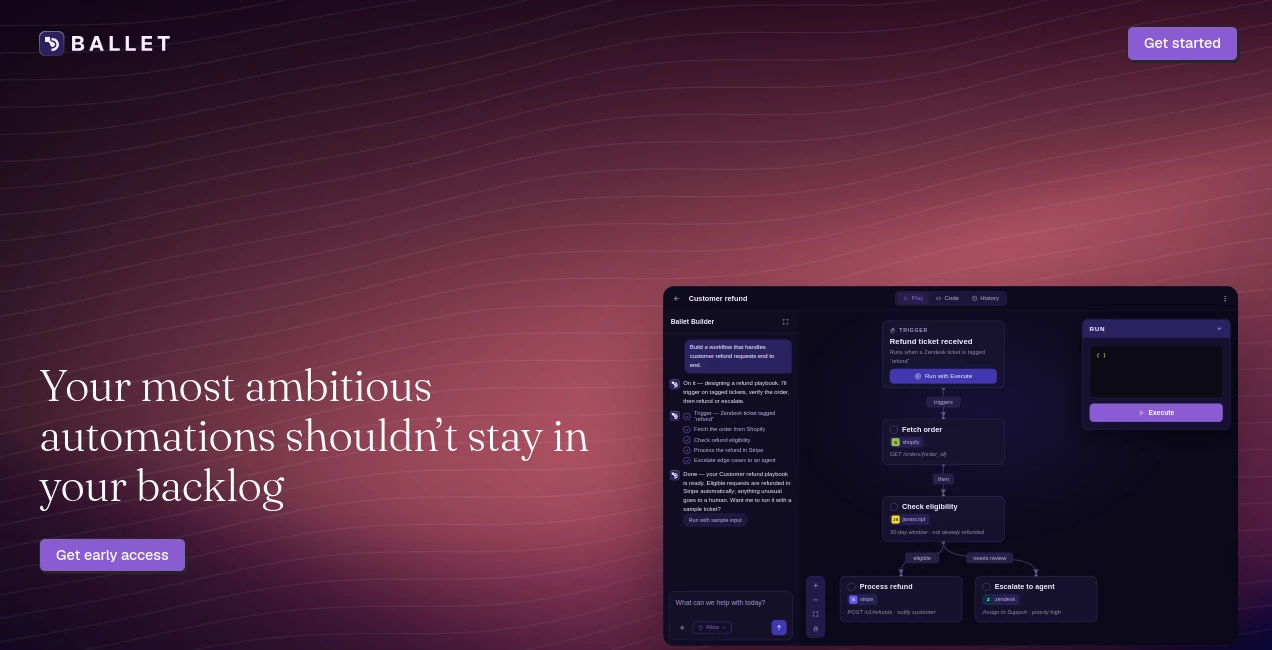
The experience is centered around describing the desired business outcome rather than manually drawing a large collection of connected blocks. This makes the starting point approachable for operations teams that understand the process they want to automate but may not want to build an integration from scratch.
The workflow creation process follows a straightforward idea: plan what should happen, build the automation, and then run it. For teams used to maintaining complicated internal processes, this outcome-first approach can make automation projects easier to discuss and prototype.
Accuracy & Performance
Consistency is one of the platform's strongest selling points. Generated workflows are designed to use deterministic code for operations where an identical result is required every time. Flexible, agentic reasoning can instead be reserved for parts of a process where judgment or adaptation is useful.
This distinction matters in business automation. A sales recommendation may benefit from some flexibility, while changing a customer's billing information should follow predictable rules. Keeping those responsibilities separate can make automated processes easier to trust and maintain.
Capabilities
The platform is particularly suited to workflows that span several systems. For example, a marketing team could capture an inbound lead, enrich the record, remove duplicates, evaluate product usage, and route the lead to the appropriate CRM destination.
Another example is account surge detection. Product telemetry can be monitored for meaningful changes, enriched with additional information, and converted into a next-best action for a sales representative. Sales operations can also use automated processes to propagate changes to pricing, terms, or SKUs through internal billing systems rather than updating only the CRM.
The platform is built to work with the systems companies already depend on, including CRM platforms, databases, billing services, enrichment tools, communication platforms, and customer-support systems.
Security & Privacy
Visibility is an important part of the platform's approach. Generated workflow code can be inspected and version controlled, while approval gates provide an additional checkpoint before changes are deployed. Runs can also be replayed, which is useful when a team needs to understand what happened during an automated process.
The product is part of the Brainfish organization and is covered by Brainfish's SOC 2 Type II compliance. Businesses evaluating the platform should still review the provider's current security and privacy documentation against their own compliance requirements before connecting sensitive production systems.
Use Cases
Lead Management: Capture inbound leads, enrich their information, check relevant product data, remove duplicates, score prospects, and route qualified leads to the appropriate CRM workflow.
Revenue Operations: Detect meaningful changes in customer or product activity and automatically deliver useful signals to the appropriate sales representative.
Sales Operations: Reduce manual work around customer and account changes by connecting CRM records with internal services and other business applications.
Billing Operations: Allow authorized teams to make changes to pricing, terms, or product SKUs and propagate those changes through internal billing infrastructure.
Product-Led Growth: Turn product usage signals into actionable sales or customer-success workflows without relying on manually maintained CRM fields.
Support Operations: Connect support workflows with internal systems so operational actions can move beyond simple ticket-based processes.
Pros and Cons
Pros
- Creates complex workflows from plain-English descriptions.
- Designed to work with proprietary internal systems.
- Produces inspectable and version-controlled workflow code.
- Combines deterministic automation with flexible reasoning.
- Useful for teams dealing with long engineering backlogs.
- Strong fit for revenue and operations workflows spanning multiple systems.
- Replayable runs and approval gates improve operational visibility.
Cons
- The product is currently offered through an early-access model.
- Public pricing information is not currently available.
- Teams with only simple two-system automations may find the platform more powerful than necessary.
- Organizations with highly sensitive internal systems should complete their own security review before deployment.
- Getting the most value from the platform may require clearly defined business processes and access to the relevant internal APIs or systems.
Pricing Plans
At the time of review, there are no public pricing plans listed on the website. The product is currently inviting selected teams to request early access and offers a working session in which a real workflow can be modeled using the team's systems.
This approach is aimed at organizations that already have a meaningful multi-system workflow waiting in their engineering backlog. Rather than selecting a standard self-service subscription, interested teams can discuss their specific automation requirements and evaluate how the platform fits their existing infrastructure.
How to Use It
Start by identifying a workflow that currently requires several systems, manual steps, or an engineering ticket. A good candidate might involve lead routing, customer activity detection, billing changes, or another repetitive operational process.
Next, describe the desired outcome in plain English. Explain what should trigger the workflow, which systems contain the necessary information, what decisions need to be made, and what action should happen at the end.
The platform can then model the workflow and generate the underlying code. Review the generated logic with the appropriate technical or operations stakeholders, make any required changes, and use the approval process before putting the workflow into production.
For organizations evaluating the platform during early access, bringing one real workflow to the working session is likely to provide a much better assessment than testing a generic example.
Comparison with Similar Tools
Traditional workflow platforms are often excellent for connecting popular applications through predefined connectors. The challenge becomes more noticeable when a company needs to connect proprietary databases, internal APIs, or a large and complicated system graph.
This platform takes a different approach by generating integration code for the workflow rather than relying exclusively on a fixed visual connector library. Compared with general AI agents, it also places greater emphasis on deterministic, reviewable execution where business processes require predictable results.
For example, an AI agent may be useful when a workflow needs flexible reasoning, while a traditional automation platform can be convenient for straightforward application-to-application tasks. The approach here sits between those models, combining programmable workflows with agentic reasoning where it provides practical value.
Conclusion
For revenue and operations teams, the biggest automation problem is not always knowing what should be automated. Often, the real obstacle is getting multiple systems to work together without consuming valuable engineering time. This platform addresses that gap by turning business outcomes described in plain language into executable workflows that can reach internal systems.
Its strongest appeal is for companies with sophisticated stacks, proprietary infrastructure, and a growing backlog of operational automations. The combination of generated code, deterministic execution, approval gates, and flexible reasoning gives teams a more controlled way to automate processes that would otherwise remain manual.
Because the product is still in early access and does not currently publish standard pricing, it is best suited to teams willing to evaluate it around a real workflow. For the right organization, that could be a much more meaningful test than simply connecting a few common applications and calling the job finished.
Frequently Asked Questions (FAQ)
What is this platform used for?
It is designed to automate multi-system business workflows, particularly for revenue operations, sales operations, support operations, marketing, and product-led growth teams.
Can it connect to internal systems?
Yes. One of its main differentiators is the ability to work with proprietary systems and internal APIs rather than depending entirely on a predefined connector library.
Does it generate code?
Yes. The platform generates workflow code that can be inspected, reviewed, version controlled, and replayed.
Is the workflow execution deterministic?
Where consistency is important, workflows use deterministic code. Agentic reasoning can be applied to selected steps where flexibility and judgment are more useful.
Is there a free plan?
No public free or paid plan is currently listed on the website. The product is presently offering early access to selected teams.
Who is the platform best suited for?
It is particularly well suited to RevOps, Sales Ops, Support Ops, and product-led growth teams that have complex workflows blocked by engineering capacity.
AI Workflow Management , AI Sales Assistant , AI Productivity Tools , AI CRM Assistant .
These classifications represent its core capabilities and areas of application. For related tools, explore the linked categories above.

Ballet Alternatives Product
ChatGPT

Airtable AI …

Sales Prospe…

Zivy

Somnio

TrySchedule

eesel AI
AnyToURL

BulkPicTools