Beatmo
What is Beatmo?
Turning a still photo into something that feels alive can be surprisingly difficult with traditional editing software. Beatmo takes a much simpler approach: start with a photo, choose a motion style, and let AI transform the static image into a short animated video.
The platform is built around creative photo animation, with a strong focus on dance and rhythmic movement. It can work with portraits, selfies, pets, and even sketches, making it an interesting option for anyone who wants to create playful social content without learning complicated video-editing tools.
Its collection of visual themes also makes the experience feel more like browsing creative ideas than configuring a technical video generator. For someone who has a great photo but wants to give it a little personality, this can be a fun way to experiment.
Key Features
- AI-powered photo-to-motion animation
- Dance and rhythm-focused motion templates
- Character animation for portraits, pets, sketches, and selfies
- Dynamic visual effects designed to complement movement
- Multiple creative themes and animation styles
- Short videos suitable for social media and messaging platforms
- Simple upload, selection, generation, and export workflow
User Interface
The interface keeps the creative process straightforward. Instead of presenting users with a large collection of complicated editing controls, the experience revolves around choosing a photo and selecting an effect or motion style.
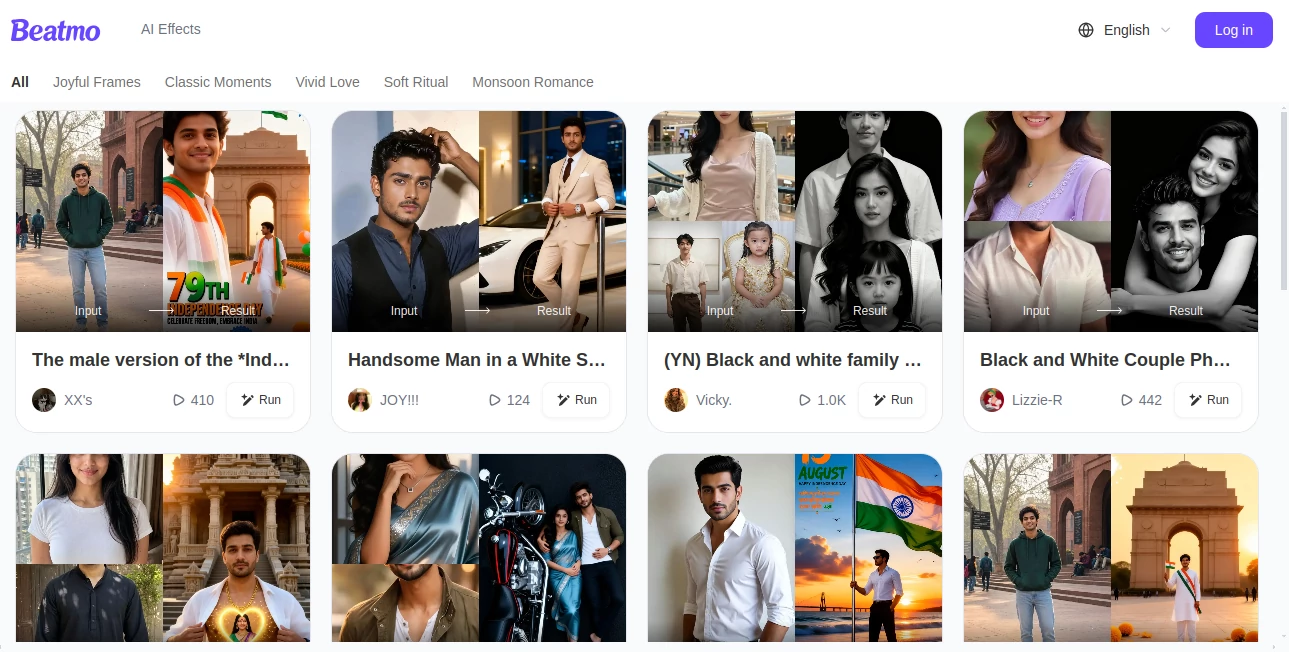
The web experience currently organizes creative effects into themes such as Theme Mix, Visual Wonder, Fire Photo, Light Mood, India Wedding, and Dance Beat. This approach is useful when you know the mood you want but do not necessarily know which technical settings would produce it.
For casual creators, that simplicity is one of the strongest parts of the experience. You can focus on the idea behind the clip rather than spending time learning a professional video editor.
Accuracy & Performance
AI photo animation depends heavily on the quality and composition of the source image. Clear portraits with a visible subject generally give the system more useful visual information to work with, while complicated images can be more challenging.
The underlying motion synthesis is designed to add energetic and rhythmic movement while maintaining the identity of the original visual. The generation process is aimed at producing results quickly, which makes it practical for experimentation and short-form content creation.
As with any AI animation system, results can vary between images and motion templates. Trying a different source photo or style can often produce a noticeably better result.
Capabilities
The main strength is its ability to turn static visual material into animated content. A portrait can become a dancing clip, while a pet or illustrated character can be given movement of its own.
The service also provides dynamic visual effects that are designed to make the resulting clips more expressive. This makes it useful not only for straightforward animation, but also for creating humorous, surprising, or attention-grabbing content.
The available themes provide another layer of flexibility. A creator can experiment with different moods rather than relying on one fixed animation style.
Security & Privacy
The published privacy information states that personal information is handled according to applicable privacy requirements, including GDPR-related provisions. It also explains that users can request deletion of their account and associated data.
According to the application's published Google Play data-safety information, data is encrypted during transmission and the developer states that data is not shared with third parties. The app may collect information such as personal information, app information and performance data, and device or other identifiers.
Anyone working with personal photographs should still review the current privacy policy before uploading sensitive or private material, particularly when using AI services that process images.
Use Cases
Social media content: Turn ordinary portraits into short, entertaining clips that are more likely to stand out in a fast-moving social feed.
Profile and selfie experiments: Give a favorite selfie a completely different personality without manually animating it.
Pet animations: Bring photos of pets to life with playful movement and rhythmic effects.
Creative experiments: Artists and casual creators can test how sketches, illustrations, and unusual portraits behave when converted into motion.
Entertainment: Create funny dance clips for sharing with friends or in messaging apps.
Event content: Themes such as wedding-oriented visual styles can be useful for turning event photography into more engaging short clips.
Pros and Cons
Pros:
- Very accessible approach to AI photo animation
- Strong focus on fun dance and motion effects
- Works with portraits, pets, selfies, and sketches
- Multiple creative themes provide variety
- Designed with social sharing in mind
- Does not require traditional video-editing skills
Cons:
- Results can vary depending on the source image and selected style
- The platform is more focused on short creative animations than full-scale video production
- Advanced users may want more manual control over motion and editing
- Pricing details are not prominently specified on the public website
Pricing Plans
The public website does not currently provide a detailed pricing table that clearly lists individual plans and their prices. The associated Android application is available with in-app purchases, so some features or usage may require payment depending on the current offering.
Because pricing and available purchase options can change, users should check the current account or purchase interface before deciding which option is best for their needs.
How to Use It
1. Choose a photo: Start with a portrait, selfie, pet photo, sketch, or another suitable image.
2. Select a creative style: Browse the available themes and motion effects to find something that matches the mood of the image.
3. Generate the animation: Let the AI process the image and synthesize the selected movement.
4. Review the result: Check the generated clip and decide whether the selected style works well with the original photo.
5. Experiment: If the result is not quite right, try another image or motion template. A different combination can dramatically change the final video.
6. Share the finished clip: Export the result and use it in social posts, messages, or other creative projects.
Comparison with Similar Tools
Many AI video platforms concentrate on text-to-video generation, cinematic scenes, or professional editing workflows. This product takes a narrower and more approachable route by concentrating on animating existing images.
That difference matters. Someone looking to produce a five-minute promotional video will likely need a more comprehensive video-production platform. Someone who simply wants to make a portrait dance, animate a pet, or turn a sketch into a playful clip may find this type of focused tool much easier to use.
Its strongest advantage is therefore not the number of professional editing controls, but the speed and simplicity of going from a static image to an entertaining piece of motion content.
Conclusion
AI photo animation becomes much more interesting when the process does not feel like video production. With its portrait animation, dance templates, character movement, and themed effects, Beatmo offers a playful way to transform ordinary images into short motion-based creations.
It is particularly well suited to social media users, casual creators, and anyone who enjoys experimenting with photos. The results will naturally depend on the source image and chosen effect, but the low-friction workflow makes trying different ideas easy.
If your goal is to make a still image feel more expressive rather than build a complete professional video from scratch, this is a creative option worth exploring.
Frequently Asked Questions (FAQ)
What can I animate?
You can use portraits, selfies, pet photos, sketches, and other suitable images as the starting point for AI-generated motion.
Can it create dance videos from photos?
Yes. Dance and rhythmic animation are among its central creative features, with templates designed to add movement to static portraits.
Is it suitable for social media?
Yes. The generated clips are designed for sharing on social platforms and messaging applications, making it a practical choice for short-form content.
Do I need video-editing experience?
No. The basic workflow is designed around selecting an image, choosing a motion style, generating the result, and exporting the finished clip.
Can I animate a pet photo?
Yes. Character animation is designed to work with subjects such as pets in addition to human portraits and sketches.
Is there a free version?
The associated Android application is listed as free to install with in-app purchases. The exact availability of free generations and paid features may change over time.
Can I delete my account and associated data?
The published privacy policy states that users can request deletion through the application's account settings or by contacting the service.
Is it a full video editor?
It is better understood as a focused AI photo-animation and creative video-generation service rather than a traditional timeline-based video editor with extensive manual editing controls.
AI Animated Video , AI Image to Video , AI Video Generator .
These classifications represent its core capabilities and areas of application. For related tools, explore the linked categories above.

Beatmo Alternatives Product

image to vid…

Wan 2.7 AI

Happy Oyster
v04 ai
RightAI
Kling 4.0 AI
VideoFlux
Visfeng AI F…
wan2-6.org