


















BeatMV
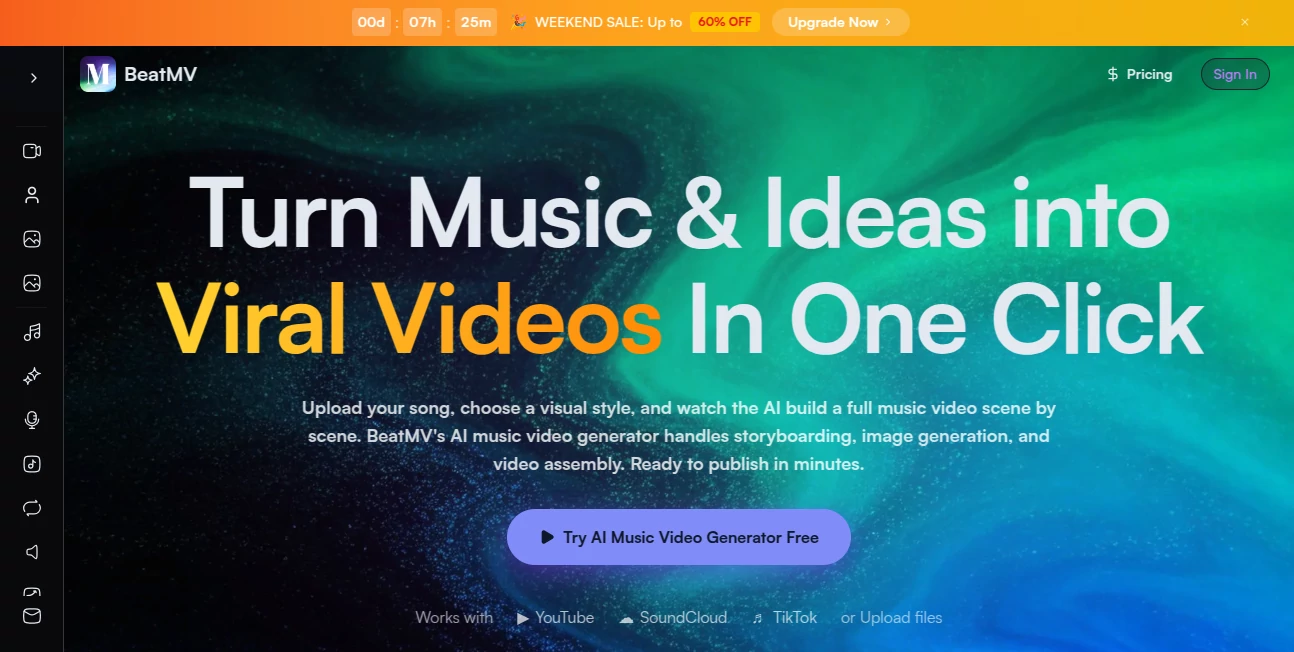
What is BeatMV?
I’ve watched too many talented musicians pour their heart into a track only to release it with a static lyric video or low-effort phone footage. The music deserves better visuals. This tool finally makes that possible without a film crew, expensive editor, or months of waiting. You upload your song or paste a link, pick a vibe, and the AI builds a full multi-scene music video that actually syncs to the beat and feels like it belongs on a big platform. The first time I tried it, the result looked so good I immediately shared it — and friends asked who directed it. That kind of reaction is rare, and it happens often here.
Introduction
Making a music video used to be a massive production. Now, with this platform, any creator can go from raw audio to polished video in minutes. It analyzes your track’s lyrics, rhythm, energy, and mood, then builds a complete storyboard, generates scenes, adds transitions, and even handles lip-sync where it fits. You can let the AI direct everything or take control scene by scene. The output looks professional enough for TikTok, YouTube, or Instagram Reels, and it supports all the popular formats. It’s become a favorite for indie artists, content creators, and even established musicians who want fast, high-quality visuals without burning through their budget.
Key Features
User Interface
The dashboard is clean and inviting. Upload your track or drop in a YouTube/SoundCloud link, choose from 20+ visual styles, and decide between AI Director mode for one-click results or Custom mode for more hands-on control. The storyboard editor lets you review every scene, regenerate anything you don’t like, and reorder with simple drag-and-drop. Previews load fast, so you stay in the creative zone instead of waiting around. It feels designed by people who actually make things, not just engineers.
Accuracy & Performance
The AI listens carefully to your music — it catches beat drops, energy shifts, and vocal cues, then times cuts and transitions accordingly. Characters stay consistent across scenes, lip-sync feels natural, and the overall pacing matches the song’s emotion. Generation is impressively quick for the quality you get, and the results hold up well even on first try. Many creators report that minor tweaks are all they need before publishing.
Capabilities
It supports full music videos, short clips for social media, story mode for cinematic narratives, dance mode for high-energy choreography, and singing mode with strong lip-sync. You can mix styles across scenes, use reference images for character consistency, and export in 16:9, 9:16, or 1:1 formats ready for any platform. There’s also a growing set of supporting tools like AI music generators, lyric writers, and vocal removers, making it a more complete creative hub.
Security & Privacy
Your tracks and generated videos are handled securely, with options to keep projects private until you’re ready to share. The platform focuses on giving creators control over their work without unnecessary data collection or forced public exposure.
Use Cases
An indie artist drops a new single and has a scroll-stopping video ready the same day. A TikTok creator turns trending audio into eye-catching clips that perform better than static content. A band creates official visuals for their latest release without waiting on a production schedule. Content creators build consistent series by reusing character styles across multiple tracks. It works for anyone who wants their music to be seen, not just heard.
Pros and Cons
Pros:
- Turns songs into full, watchable videos incredibly fast.
- Strong beat-sync and scene transitions that feel professional.
- Multiple modes and styles give real creative flexibility.
- Character consistency and lip-sync work better than most tools.
- No editing skills required — great for musicians who aren’t video pros.
Cons:
- Longer or very complex videos may need multiple generations.
- Higher resolutions and unlimited use are on paid plans.
Pricing Plans
You can start for free and create several videos to test the quality. Paid plans unlock higher resolutions, faster generation, more styles, unlimited projects, and commercial rights. The pricing is reasonable for the time and production value it saves — many creators say one good video pays for months of access.
How to Use BeatMV
Upload your song file or paste a link from YouTube or SoundCloud. Choose a visual style and video mode (Story, Dance, or Singing). Let the AI Director create the full video or switch to Custom mode for more control. Review the storyboard, regenerate any scenes you want to change, and export in the format you need. Add lyrics or captions if desired, then share directly to your platforms. The whole process can be done in one focused session.
Comparison with Similar Tools
Many AI video tools produce short clips or generic animations that don’t sync well with music. This one stands out by focusing specifically on music videos with strong beat awareness, character consistency, and multiple creative modes. It gives you both fast one-click results and deeper control, making it more practical for real creators than tools that are either too basic or overly complicated.
Conclusion
Your music deserves visuals that match its energy and emotion. This platform makes that possible without a big budget or video production skills. It turns the gap between audio and audience into a quick, enjoyable process that actually delivers scroll-stopping results. For musicians, creators, and anyone who wants their sound to be seen, it’s one of the most exciting tools available right now.
Frequently Asked Questions (FAQ)
How long does it take to generate a video?
Most full videos are ready in a few minutes, depending on length and complexity.
Can I use my own song?
Yes — upload any MP3 or paste links from major platforms.
Do the characters lip-sync?
Yes, especially in Singing mode, with good accuracy on most tracks.
Are the videos suitable for commercial use?
Paid plans include commercial rights for your generated videos.
What formats can I export?
16:9, 9:16, and 1:1 — perfect for YouTube, TikTok, Instagram, and more.
AI Animated Video , AI Image to Video , AI Music Video Generator , AI Video Generator .
These classifications represent its core capabilities and areas of application. For related tools, explore the linked categories above.

BeatMV Alternatives Product

VoooAI
Seedance 2.0…

wan2-6.org

seedance 3.0
Minimax H3

S2LIfe AI

Sora 2 AI

Veo

Image to Vid…
