
















vizstudio
What is vizstudio?
Let’s be honest for a second. Most AI video tools out there feel like a gamble. You type in a brilliant idea, hit generate, and cross your fingers. Sometimes you get magic. More often than not, you get a glitchy mess where a person’s hands melt into their coffee cup. Frustrating, right?
I’ve spent the better part of this year testing every video generator I could find. And just when I thought everything looked the same, I stumbled upon something different. It doesn’t scream for attention with flashy promises. Instead, it quietly delivers exactly what you pictured in your head. The motion feels right. The colors stay consistent. Characters don’t suddenly turn into some weird alien version of themselves halfway through a scene. That’s the kind of reliability that turns a casual project into something you’re actually proud to share.
Whether you’re a content creator racing against a Thursday deadline, a marketer trying to explain a complex product, or just someone who loves bringing doodles to life, this platform changes how fast you can work. No more spending three days in editing hell. No more rendering overnight and waking up to errors. Just clean, smooth, usable video that looks like it took way more effort than it actually did.
Key Features
What makes this platform stand out in a sea of sameness? It’s not just one thing. It’s how all the pieces fit together. You’re not getting a bare-bones generator that spits out random clips. You’re getting a full creative companion that understands context, respects your original vision, and actually listens to what you tell it to do.
User Interface
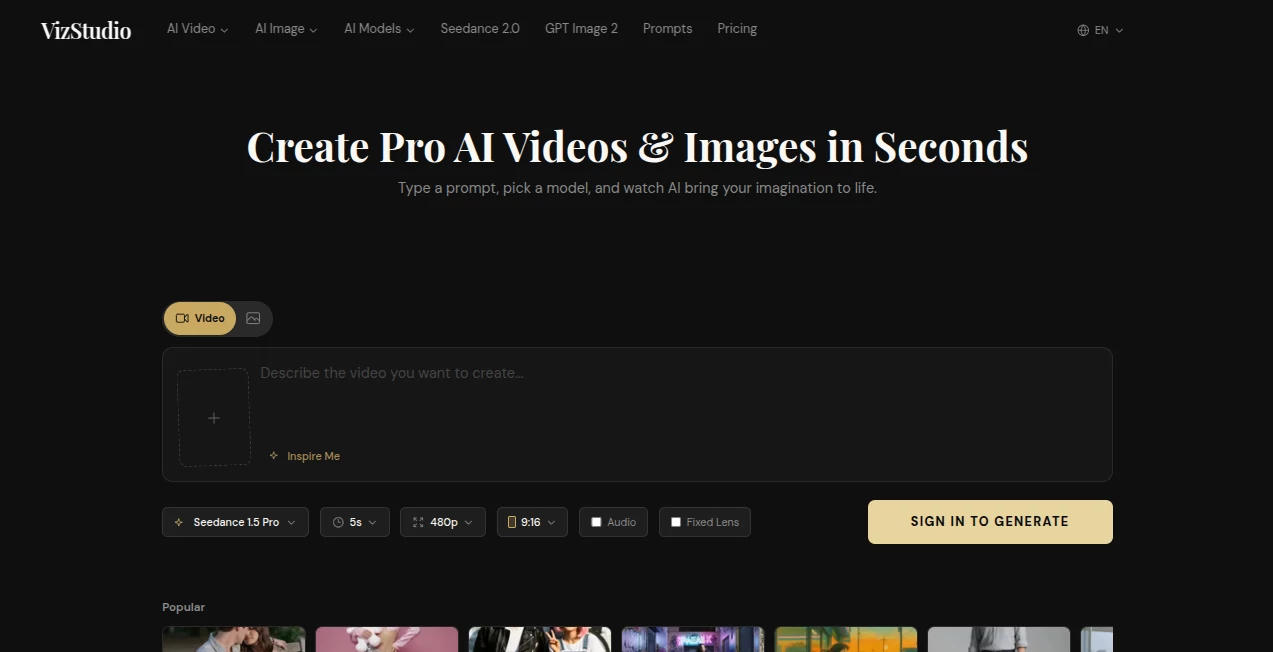
Nobody wants to read a thirty-page manual just to make a fifteen-second video. The dashboard here is refreshingly straightforward. You’ve got a clean text box, some handy toggles for aspect ratio (vertical for TikTok, widescreen for YouTube), and a big Generate button that just works. I love that advanced settings aren’t hidden, but they also aren’t shoved in your face. If you just want to type “a cat riding a skateboard through a neon city” and hit go, you can. If you want to tweak motion intensity, camera angles, or lighting direction, those options are a click away.
The layout feels like it was designed by someone who actually makes videos for a living. Thumbnails load fast. The preview player is smooth. And there’s a handy history section where you can go back and revisit old generations without hunting through folders. Small touches, but they add up when you’re working on a tight schedule.
Accuracy & Performance
Here’s where most tools fall apart. You’ve seen the memes. The weird extra fingers. The eyes that don’t quite look in the same direction. The physics that make no sense. This engine handles those details surprisingly well. I threw some tricky prompts at it. Things like “a glass of red wine tipping over in slow motion” and “a ballerina spinning with her hair flowing naturally.” The results weren’t perfect every single time, but the hit rate was way higher than what I’m used to.
Speed is another win. Most clips render in under a minute, even at higher resolutions. You’re not sitting around watching a progress bar crawl from 1% to 100% while your coffee gets cold. It keeps up with you, not the other way around. And when you need to iterate—tweak one word, change a color, adjust a camera movement—it regenerates fast enough that you can actually experiment without killing your whole afternoon.
Capabilities
The platform handles both text-to-video and image-to-video really well. Starting from scratch with a prompt gives you endless creative freedom. But uploading a reference image takes things to another level. You can feed it a sketch, a mood board, or even a photo of a product, and watch it animate the scene naturally. It understands depth, movement, and lighting far better than earlier generations of this technology.
You can also extend existing clips, which is a lifesaver when you need just two more seconds of a perfect shot. The camera control features deserve a shoutout too. Want a slow zoom? A dolly shot? A dramatic pan? Just describe it. The engine figures out the rest. For marketers and small business owners, this means you can whip up professional-looking demos or social ads without hiring a full production team.
Security & Privacy
This matters more than people think. When you’re uploading brand assets, product shots, or even personal photos to animate, you need to know where that data goes. The platform has clear policies about not training models on your private uploads unless you explicitly opt in. Your generated videos stay yours. No hidden clauses about claiming ownership of your creations or using them for promotional materials without asking. That transparency builds trust, especially for professionals who can’t afford legal headaches down the road.
Use Cases
Real people are using this for real work every day. And the variety might surprise you.
E-commerce store owners are turning static product photos into lifestyle videos. Imagine a picture of a cozy sweater turning into a clip where the fabric moves gently in a breeze. That small touch boosts engagement like crazy on Instagram and TikTok. Content creators are using it to generate B-roll for YouTube videos, saving hours of searching through stock footage sites. Instead of settling for “close enough” clips, they just generate exactly what the script needs.
Educators and trainers are bringing diagrams to life. A flowchart about how the heart pumps blood becomes an animated journey. A map of historical trade routes becomes a moving visualization. Students remember more when they see motion, not just static images. And marketing teams are iterating faster than ever. Need five different ad variations by tomorrow morning? Generate them. Test them. Pick the winner. Launch. No waiting on video editors, no expensive reshoots.
I even know a few small filmmakers who use it for storyboarding. Instead of drawing rough sketches, they generate quick animated versions of scenes to test pacing and camera angles before heading to set. It saves money and reveals problems early, before the expensive production days start.
Pros and Cons
Pros: The visual consistency is genuinely impressive. Characters and objects stay recognizable across multiple generations. Motion physics feel natural, with realistic weight and momentum. Generation speed keeps you in a creative flow state instead of a waiting state. The pricing structure (more on that below) makes sense for both casual users and power creators. Customer support actually responds within hours, not days or weeks.
Cons: Longer videos (over fifteen seconds) can sometimes lose subtle details in complex scenes. Very niche prompts involving specific historical costumes or obscure animals might require a few tries to get right. The mobile experience works fine for viewing, but the real power is on desktop. And while the free tier gives you a solid taste, you’ll want a paid plan if you're producing daily content.
Pricing Plans
Like most modern creative tools, this one operates on a credit system. New users get a batch of free credits just for signing up, which is perfect for testing things out without commitment. Paid plans scale with how much you create. Hobbyists can get by on the lower tier, generating dozens of short clips each month. Professional creators and agencies will want the higher tiers, which offer faster rendering priority, more concurrent jobs, and higher resolution exports up to 4K.
There’s also a pay-as-you-go option, which I appreciate. Not everyone wants another monthly subscription. You buy a chunk of credits, use them whenever you need them, and they don’t expire for a full year. That flexibility means you’re not punished for having a slow month or a sudden busy spike. Compared to competitors charging premium rates for mediocre results, this platform offers better value at almost every level.
How to Use VizStudio.art
Getting started takes two minutes. Head to the website and create an account using your email or a social login. The welcome tour walks you through the basics, but honestly, you could skip it and figure things out just as fast.
Once you're in, you'll see the main creation dashboard. Choose whether you want to start from text or an image. For text, write a clear description of what you want to see. Think like a director giving notes. Instead of “a dog running,” try “a golden retriever puppy running through tall grass at golden hour, camera following from the side.” The more specific you are about lighting, camera angle, and mood, the better the results will match your vision.
For image-to-video, drag and drop your reference photo. Then describe how you want it to move. Maybe you want clouds drifting across the sky. Maybe you want water rippling in a fountain. Maybe you want a character turning their head slowly. The engine analyzes the image and animates according to your instructions. Hit generate, wait a short moment, and your video appears in the gallery. From there, you can download it, extend it, or tweak the prompt and try again for a different take.
Comparison with Similar Tools
I’ve used almost every major video generator on the market. Runway has powerful features but a steep learning curve and a credit system that burns through your wallet fast. Pika is fun and playful but inconsistent when you need precise results. Sora from OpenAI made huge waves, but it’s shutting down soon, so investing time there feels risky for long-term projects.
Where this platform wins is the balance between capability and usability. It doesn’t require a technical background, but it doesn’t dumb things down either. The motion quality sits comfortably alongside the industry leaders, sometimes beating them on specific tasks like character consistency across multiple shots. And the price-to-performance ratio leans heavily in its favor, especially for creators who need volume without sacrificing quality.
The one area where you might choose a different tool is if you need hyper-specialized features like lip-syncing dialogue for a talking avatar. That’s not the focus here. This platform excels at cinematic motion, atmospheric scenes, product animations, and creative B-roll. It’s a generalist that’s genuinely good at a wide range of tasks, rather than a specialist that does one thing perfectly and everything else poorly.
Conclusion
AI video generation has officially grown up. The days of glitchy nightmares and unusable outputs are fading fast. This platform represents where the technology should be: reliable enough for professional work, fast enough for rapid iteration, and creative enough to surprise you in wonderful ways.
If you’ve been burned by other tools in the past, give this one a shot with an open mind. Start with the free credits. See how it handles your specific use case. Chances are, you’ll find yourself generating clip after clip, not because you have to, but because it’s genuinely fun to see your ideas take motion. And when a creative tool makes work feel like play, that’s when you know you’ve found something worth keeping around.
Frequently Asked Questions (FAQ)
Do I own the videos I create?
Yes, full commercial rights belong to you. You can use generated clips in client work, social media, ads, or anywhere else without paying additional licensing fees.
Is there a free trial?
New accounts receive free credits to test the platform. No credit card required. Once those run out, you can either buy a plan or continue with the limited free tier, which offers slower generation and lower resolution.
What resolutions are supported?
From 720p for quick drafts up to 4K for final exports. Higher resolutions use more credits but look significantly better on large screens.
Can I upload my own music or add voiceover?
The platform focuses on visual generation. Adding external audio is something you’d do in a separate video editor, but many users combine the two workflows easily.
How long can generated videos be?
Standard generations run from three to fifteen seconds. You can extend clips or chain multiple generations together for longer sequences.
Does it support different aspect ratios?
Yes. Square (1:1) for Instagram feed, vertical (9:16) for Stories and Reels, and horizontal (16:9) for YouTube and presentations. You can also specify custom ratios for specific needs.
What happens to my uploaded images after generation?
They remain private by default. The platform doesn't use them for training unless you explicitly check a box allowing it. You can also delete history at any time.