


















BGBye
What is BGBye?
Creating clean, professional visuals often starts with removing distracting backgrounds. This AI-powered tool makes that process remarkably simple by automatically separating subjects from their backgrounds in just a few clicks. Whether you are preparing product photos, social media content, marketing materials, or video assets, it delivers impressive results without requiring advanced editing skills.
Unlike many online background removal services that focus only on images, this platform also supports video background removal, making it a practical solution for creators, designers, e-commerce businesses, and digital marketers. It supports multiple AI models, batch image processing, and convenient drag-and-drop uploads, helping users complete repetitive editing tasks much faster while maintaining high-quality output. :contentReference[oaicite:0]{index=0}
Key Features
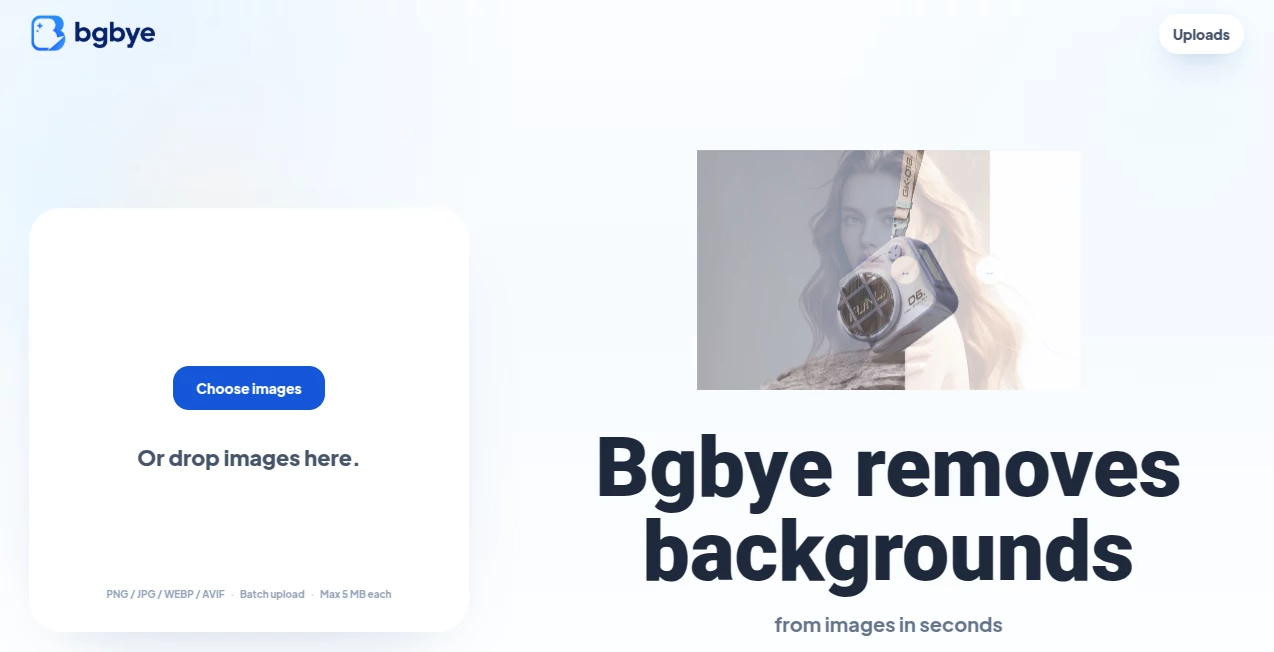
User Interface
The interface is clean, modern, and beginner-friendly. Users can simply drag and drop files or upload them from their device. Images and videos are processed through an intuitive workflow, allowing users to preview results before downloading. The ability to upload multiple images at once makes large editing projects significantly more efficient. :contentReference[oaicite:1]{index=1}
Accuracy & Performance
One of the strongest aspects of the platform is its use of multiple AI segmentation models instead of relying on a single engine. Users can compare results generated by different models and choose the version that preserves edges, hair, transparent objects, and fine details most accurately. This flexible approach often produces cleaner cut-outs than traditional single-model solutions. :contentReference[oaicite:2]{index=2}
Capabilities
- Automatic image background removal.
- AI-powered video background removal.
- Batch processing for multiple images.
- Support for JPG, PNG, WebP, MP4, WebM, and MOV files.
- Preview results before downloading.
- Compare outputs from several AI models.
- Export transparent backgrounds.
- Fast browser-based workflow without software installation.
Security & Privacy
The service operates directly through a web browser, eliminating the need for complex installations. According to the available information, uploaded files are processed automatically and managed for temporary processing rather than long-term storage. Users working with highly confidential content should still review the platform's privacy policy before uploading sensitive material. :contentReference[oaicite:3]{index=3}
Use Cases
- Creating transparent product images for online stores.
- Designing professional marketing materials.
- Preparing YouTube thumbnails.
- Generating social media graphics.
- Removing backgrounds from promotional videos.
- Editing profile pictures.
- Preparing presentation assets.
- Supporting graphic design workflows.
Pros and Cons
Pros
- Supports both images and videos.
- Multiple AI models improve overall accuracy.
- Batch image processing saves time.
- No complicated software installation.
- Simple drag-and-drop interface.
- Works directly inside the browser.
Cons
- Video processing may require additional time for larger files.
- Internet access is required.
- Very complex scenes may still benefit from manual touch-ups.
Pricing Plans
The platform currently offers free access to its core background removal features, allowing users to remove backgrounds from images and videos without purchasing expensive editing software. Available plans and future premium options may evolve over time. :contentReference[oaicite:4]{index=4}
How to Use BGBye
Open the website and upload an image or video using drag-and-drop or the upload button. Select one or more available AI models for processing. After the system completes background removal, compare the generated results, preview the output, and download the version that best matches your project requirements. Batch uploads can also be used when editing multiple images at once. :contentReference[oaicite:5]{index=5}
Comparison with Similar Tools
Many AI background removal services focus exclusively on static images, while this platform expands its functionality by supporting video processing as well. The option to evaluate outputs from multiple AI models gives users additional flexibility, especially when working with challenging subjects such as hair, transparent materials, or complex edges. This makes it an attractive option for creators seeking both convenience and higher-quality results. :contentReference[oaicite:6]{index=6}
Conclusion
For anyone looking to simplify image or video editing, this AI-powered background removal solution offers an excellent balance of speed, quality, and usability. Its combination of browser-based accessibility, multiple AI engines, batch processing, and support for both images and videos makes it valuable for professionals as well as casual users. Whether the goal is creating cleaner product photography, improving marketing assets, or preparing engaging social media content, it provides an efficient workflow that can save considerable editing time.
Frequently Asked Questions (FAQ)
Can it remove backgrounds from videos?
Yes. Besides images, it also supports AI-powered video background removal.
Does it support batch processing?
Yes. Multiple images can be uploaded and processed together.
Which image formats are supported?
Common formats including JPG, PNG, and WebP are supported.
Is software installation required?
No. Everything works directly in a web browser.
Who can benefit from this tool?
Graphic designers, marketers, photographers, e-commerce sellers, content creators, and anyone needing quick background removal can benefit from using it.
AI Background Remover , Photo & Image Editor .
These classifications represent its core capabilities and areas of application. For related tools, explore the linked categories above.

BGBye Alternatives Product

Face Shape D…

Avatarka AI

ai banana

Plottie

Seedream 4.5

Kapwing

Before After…

Roblox Man F…

RemoveLayer
