
BGRemover
What is BGRemover?
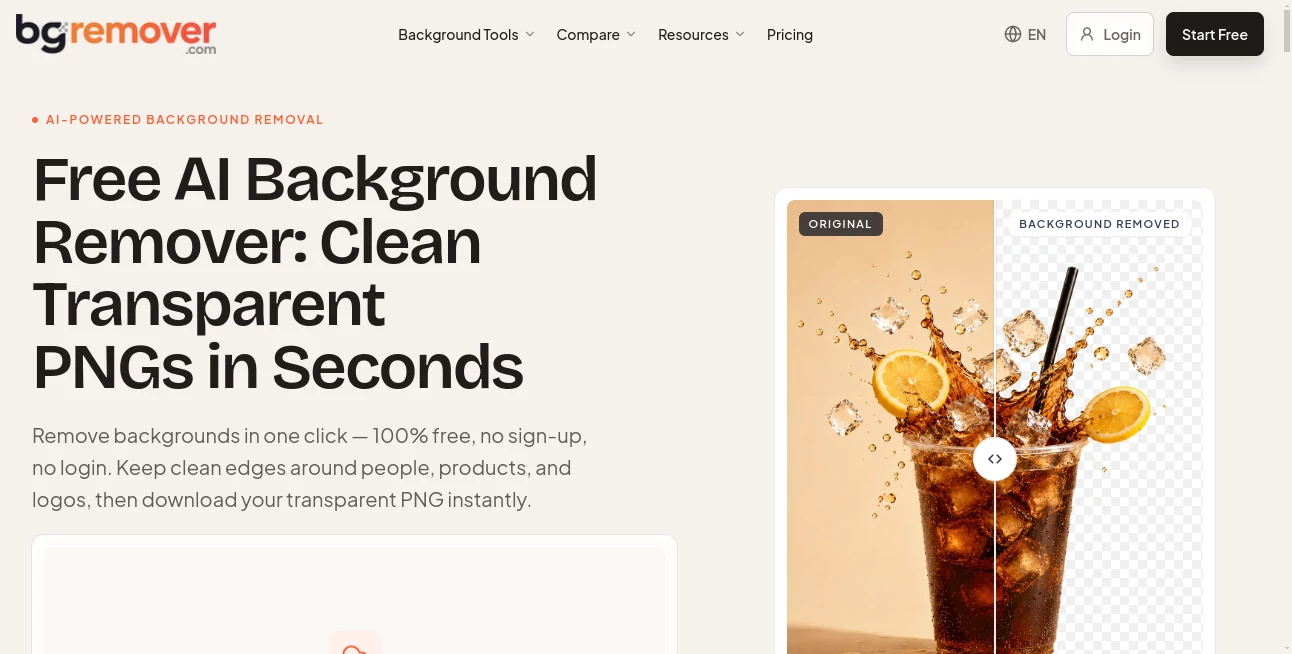
BGRemover is an AI-powered background removal tool designed to turn ordinary photos into clean, ready-to-use cutouts without requiring advanced image-editing skills. Its main workflow is refreshingly simple: upload an image, let the AI separate the subject from its surroundings, inspect the result, and download the finished image.
The service is particularly useful for product sellers, designers, creators, marketers, and anyone who regularly needs transparent images. It supports common formats including PNG, JPG, JPEG, and WebP, with uploads of up to 10 MB. The free experience also stands out because users can remove backgrounds without signing up or adding a watermark to their exports.
Key Features
- AI-powered automatic background removal
- Transparent PNG output
- White background option for consistent image layouts
- No-sign-up free background removal
- No watermark on free exports
- Support for PNG, JPG, JPEG, and WebP files
- Image uploads up to 10 MB
- Before-and-after preview for checking cutouts
- Detailed inspection at 100% zoom
- Support for people, products, animals, vehicles, hair, and logos
- Tools for preparing ecommerce and website assets
- Additional workflows for signatures, avatars, stickers, and video backgrounds
User Interface
The interface keeps the process focused rather than surrounding the user with a complicated editing workspace. A typical job involves uploading an image, generating the cutout, opening the preview, and checking the result before downloading it.
The before-and-after comparison is especially useful when the subject has small details that are easy to miss at normal viewing size. Users can zoom in to inspect areas such as hair, glasses, fur, logos, feet, and narrow gaps. For someone preparing a product listing or social graphic, this simple review step can save time later.
Accuracy & Performance
Background removal is more difficult than simply deleting pixels of a certain color. Hair, fur, reflections, transparent objects, and soft edges all require the system to distinguish the foreground from the background carefully.
The AI is built to handle a broad range of subjects, including portraits, products, animals, cars, and graphics. The quality of the final cutout still depends on the original photograph, however. A sharp image with good lighting and a clearly visible subject generally gives the system more information to work with.
For example, a clean product photograph with a distinct outline can usually be prepared quickly, while a portrait with loose hair against a similarly colored background deserves a closer inspection before publication. That practical approach makes the tool more useful than simply clicking download and assuming every edge will be perfect.
Capabilities
The core capability is automatic image background removal, but the surrounding workflows make the service more versatile. Transparent cutouts can be used for ecommerce listings, catalogs, websites, presentations, advertisements, profile images, and creative projects.
Users can also prepare images for passport and ID photo workflows, create website assets, make transparent logos and signatures, and turn subjects into sticker-style graphics. There is also a separate workflow for removing backgrounds from video clips.
For output, transparent PNG files are well suited to layered designs and websites, while a solid white background can be more practical for marketplaces, catalogs, and templates that require visual consistency.
Security & Privacy
Privacy is an important consideration whenever photographs are uploaded to an online service. The platform advises users to review its privacy and storage terms before submitting sensitive or client-owned images.
Users should also remember that removing a background does not change ownership or usage rights. If an image contains a person's likeness, a trademark, copyrighted material, or commercial photography, the necessary permissions still apply after the background has been removed.
Use Cases
- Ecommerce: Create cleaner product images for online stores, catalogs, and marketplace listings.
- Marketing: Prepare people, products, and logos for advertisements and promotional graphics.
- Website Design: Create transparent visual assets that can be placed naturally over different page backgrounds.
- Social Media: Remove distracting backgrounds from portraits, products, and campaign images.
- Profile Photos: Isolate a person from a busy environment for professional profiles or team pages.
- Graphic Design: Produce transparent assets that can be combined with other design elements.
- Stickers: Turn photographs of people, pets, or objects into clean cutout graphics.
- Documents: Prepare scanned signatures with transparent backgrounds for digital documents and forms.
Pros and Cons
Pros
- Easy workflow with very little manual work
- Free background removal without requiring an account
- No watermark on free image exports
- Supports several popular image formats
- Useful preview and 100% inspection workflow
- Works with products, portraits, animals, vehicles, and graphics
- Useful for both personal projects and professional content production
Cons
- Very complex edges may still require careful manual inspection
- Output quality can vary depending on source image quality
- Users working with sensitive images should review the privacy and storage terms first
- Higher-volume image and video work may require a paid plan or additional credits
Pricing Plans
The service offers a free way to test its background removal capabilities without requiring a sign-up or credit card. The free experience includes watermark-free image downloads, making it convenient for users who only need occasional background removal.
For users with larger workloads, paid options are available through subscription plans and flexible credit purchases. The pricing structure includes monthly and yearly subscriptions as well as one-time credit options, allowing occasional users and regular content producers to choose different approaches.
How to Use BGRemover
- Open the background removal workspace.
- Upload a PNG, JPG, JPEG, or WebP image within the supported file-size limit.
- Start the background removal process.
- Open the preview when processing is complete.
- Inspect important edges at 100% zoom, especially hair, fur, glasses, logos, and small gaps.
- Choose a transparent PNG or an appropriate solid background output.
- Download the finished image and use it in your website, store, design, or marketing project.
Comparison with Similar Tools
There are many background-removal services available, including tools built into larger design and photo-editing platforms. Some are better suited to users who need a complete creative suite, while others concentrate specifically on quick cutouts.
The biggest advantage here is the straightforward workflow. Someone who only wants to isolate a product or person does not necessarily need a full photo editor with dozens of unrelated controls. The no-sign-up free option and watermark-free exports also make it appealing for quick jobs where installing software or starting a subscription would be unnecessary.
For professional workflows, the most important comparison point should be edge quality rather than simply processing speed. Testing a few representative images, particularly those containing hair, glass, fur, reflections, or complicated outlines, is the best way to determine which service fits a particular project.
Conclusion
Removing a photo background should not require opening a heavyweight editor every time a clean cutout is needed. This tool takes a more direct approach, combining automatic subject detection with a preview and inspection workflow that helps users catch edge problems before exporting.
Its free, no-sign-up experience makes it particularly attractive for quick projects, while the broader collection of image and video workflows gives frequent creators more room to work. Whether the goal is preparing a product listing, creating a professional portrait asset, designing a social graphic, or producing a transparent logo, it offers a practical way to get from an ordinary image to a usable visual asset with minimal effort.
Frequently Asked Questions (FAQ)
Can I remove an image background for free?
Yes. The service provides a free background-removal workflow without requiring an account or login, and free image exports do not carry a watermark.
Which image formats are supported?
Supported image formats include PNG, JPG, JPEG, and WebP. The main workspace supports files up to 10 MB per image.
Can it remove backgrounds from product photos?
Yes. Product photography is one of the main use cases. After processing, the resulting cutout can be used for ecommerce listings, catalogs, advertisements, and other promotional designs.
Does it work with hair and fur?
It is designed to handle subjects with fine edges such as hair and fur. However, these areas should always be inspected closely because lighting, image resolution, compression, and background contrast can affect the final cutout.
Can I download a transparent PNG?
Yes. Transparent PNG output is available for designs, websites, presentations, logos, and other projects where the subject needs to sit naturally over another background.
AI Background Remover , Photo & Image Editor .
These classifications represent its core capabilities and areas of application. For related tools, explore the linked categories above.

BGRemover Alternatives Product

Nano Banana …

Pixelfox AI

Text Remover…
Kirkified AI

poseup
Picavo

Playyy AI

Free HD Phot…

AI Interior …