

















Blink
What is Blink?
Turning an idea into a working application has traditionally required developers, long development cycles, and significant investment. Today, that process looks very different. This platform enables entrepreneurs, startups, creators, and businesses to transform simple text prompts into fully functional applications without touching a single line of code.
Instead of focusing only on interface generation, it builds complete production-ready applications with authentication, databases, APIs, hosting, deployment, and modern user experiences. Whether the goal is launching a SaaS product, an internal dashboard, an AI-powered assistant, or an online marketplace, everything is assembled through natural language instructions, making software creation dramatically faster.
The experience feels less like using a traditional no-code builder and more like collaborating with an experienced software development team. Users describe their vision, refine the results through conversation, and watch a complete application come to life in minutes instead of weeks.
Key Features
User Interface
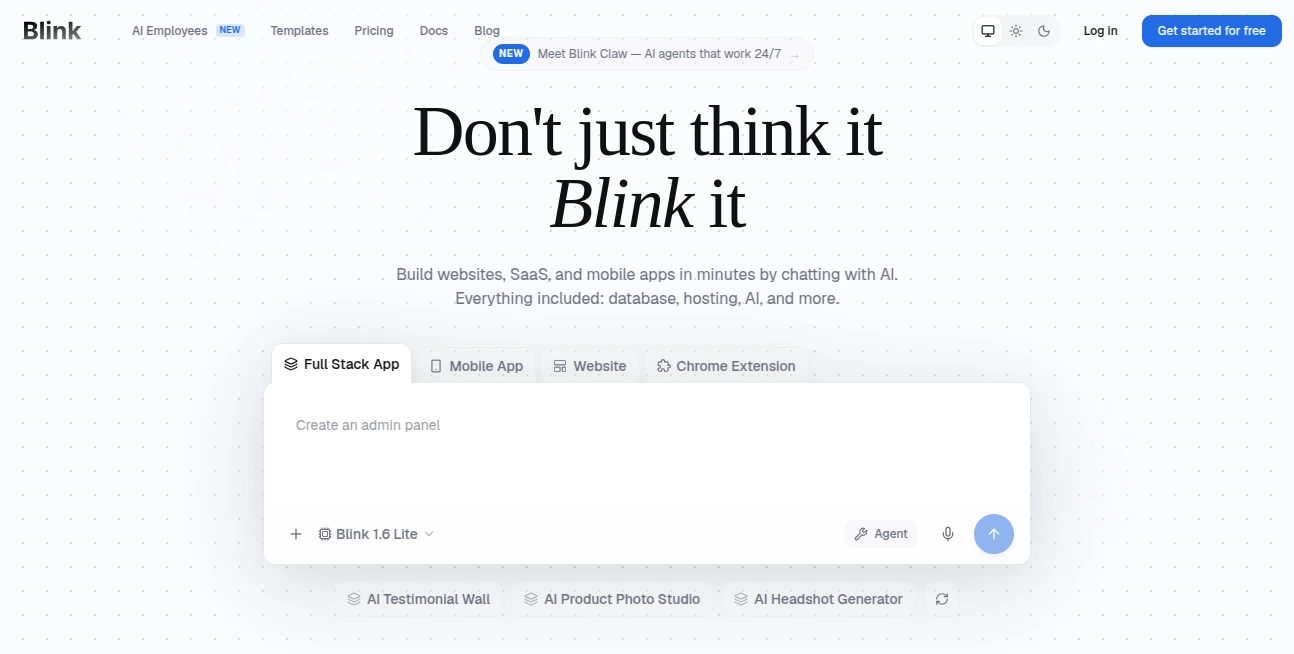
The interface is intentionally designed for speed and simplicity. Instead of overwhelming users with dozens of configuration panels, the platform encourages natural conversations. Describe the application, request changes, add features, and refine the design through simple prompts.
Projects remain organized, allowing creators to iterate quickly while maintaining a clear overview of every component of their application.
Accuracy & Performance
Applications are generated with production deployment in mind rather than simple prototypes. Backend infrastructure, authentication systems, databases, responsive layouts, and deployment workflows are created automatically, helping reduce repetitive development work while accelerating project delivery.
The platform also supports rapid iteration, allowing features, layouts, and business logic to evolve without rebuilding projects from scratch.
Capabilities
- Create complete full-stack web applications.
- Generate AI-powered products and chatbots.
- Build SaaS platforms and internal business tools.
- Create landing pages and marketing websites.
- Integrate databases and authentication automatically.
- Support payment integrations for subscription products.
- Connect with hundreds of AI models through a unified gateway.
- Deploy applications with hosting included.
- Use custom domains for production projects.
- Export and continue developing applications when needed.
Security & Privacy
Applications include modern infrastructure such as secure authentication, SSL protection, managed hosting, and deployment tools. These built-in services simplify the process of launching reliable applications while reducing the amount of manual configuration typically required during development.
Use Cases
- Launching startup MVPs within hours.
- Building AI-powered customer support tools.
- Creating subscription-based SaaS products.
- Developing internal dashboards for businesses.
- Building CRM and workflow management systems.
- Creating booking platforms and marketplaces.
- Developing educational applications.
- Building AI content generators.
- Creating business automation tools.
- Rapidly validating new product ideas.
Pros and Cons
- Pros
- Extremely fast application development.
- No programming knowledge required.
- Full-stack generation instead of frontend-only projects.
- Built-in hosting and deployment.
- Supports modern AI integrations.
- Suitable for entrepreneurs, startups, and businesses.
- Scales from prototypes to production-ready products.
- Cons
- Advanced enterprise customization may still require developer expertise.
- Complex applications consume more AI credits.
- Large projects benefit from careful prompt refinement during development.
Pricing Plans
A free plan is available for new users, allowing experimentation without a credit card. Paid subscriptions increase the available AI credits and unlock additional capabilities for individuals, professionals, and collaborative teams. Hosting is included across all plans, making it easy to publish projects immediately after development.
How to Use Blink
- Create a new account.
- Describe the application idea using natural language.
- Allow the AI to generate the frontend, backend, database, and infrastructure.
- Review the generated application.
- Request modifications through additional prompts.
- Test functionality.
- Publish the project using the built-in deployment system.
- Continue improving the application as requirements evolve.
Comparison with Similar Tools
Many AI development platforms concentrate on generating code snippets or designing interfaces. This solution distinguishes itself by creating complete production-ready applications that include backend logic, authentication, database management, hosting, deployment, and AI integrations from a single conversational workflow.
For founders who want to move from concept to launch quickly, this integrated approach removes many of the technical barriers commonly associated with traditional software development while still providing the flexibility needed to expand projects over time.
Conclusion
Building software has become significantly more accessible thanks to modern AI-powered development platforms. By combining conversational app creation with automated infrastructure, deployment, authentication, database management, and AI integrations, this solution dramatically shortens the journey from idea to live product.
Whether you are validating a startup concept, building an internal business solution, launching an AI-powered SaaS product, or creating a customer-facing application, it offers an impressive balance of simplicity, speed, and production readiness. It is an excellent choice for founders, creators, agencies, and businesses looking to build more while spending less time on technical setup.
Frequently Asked Questions (FAQ)
Can beginners build applications without coding?
Yes. The platform is specifically designed for users who want to build software through natural language instead of programming.
Can it build complete full-stack applications?
Yes. Applications include frontend interfaces, backend services, databases, authentication, hosting, and deployment.
Does it support AI-powered products?
Yes. Developers can integrate numerous AI models to build chatbots, generators, assistants, and intelligent business tools.
Is there a free plan?
Yes. New users can start with a free plan before upgrading to larger subscription tiers.
Who is this platform best suited for?
It is ideal for entrepreneurs, startups, product teams, agencies, freelancers, educators, and businesses that want to build applications quickly without managing complex infrastructure.
AI No-Code & Low-Code , AI Code Generator , AI Developer Tools , AI App Builder .
These classifications represent its core capabilities and areas of application. For related tools, explore the linked categories above.

Blink Alternatives Product

Screenshot t…

CtrlOps

Workik

CodeSpy AI
AI Wire

Agent Grid

TutuoAI

Lovable

Lovable APP
