
















Block Poster Pro
What is Block Poster Pro?
Block Poster Pro is a browser-based poster creation tool designed to turn images and documents into large, printable posters using ordinary sheets of paper. Instead of requiring a wide-format printer or a trip to a print shop, users can divide a design across multiple pages, download the result as a PDF, and assemble the printed sheets into one oversized display.
The workflow is refreshingly practical. Upload an image, choose the paper size and poster width, adjust the print settings, inspect the tiled preview, and export. It also supports PDF, TXT, Markdown, and DOCX inputs, making it useful for more than photographs or artwork.
Key Features
- Convert JPG, PNG, WebP, and GIF images into tiled poster PDFs.
- Support for PDF, TXT, Markdown, and DOCX document inputs.
- Choose from A4, Letter, A3, Legal, Tabloid, and A2 paper formats.
- Portrait and landscape orientations.
- Control the number of pages used across the poster.
- Adjust printer margins and page overlap.
- Choose between contain and cover image fitting.
- Add cut marks and row or column labels for easier assembly.
- Preview the complete page grid before exporting.
- Browser-first processing for standard poster workflows.
User Interface
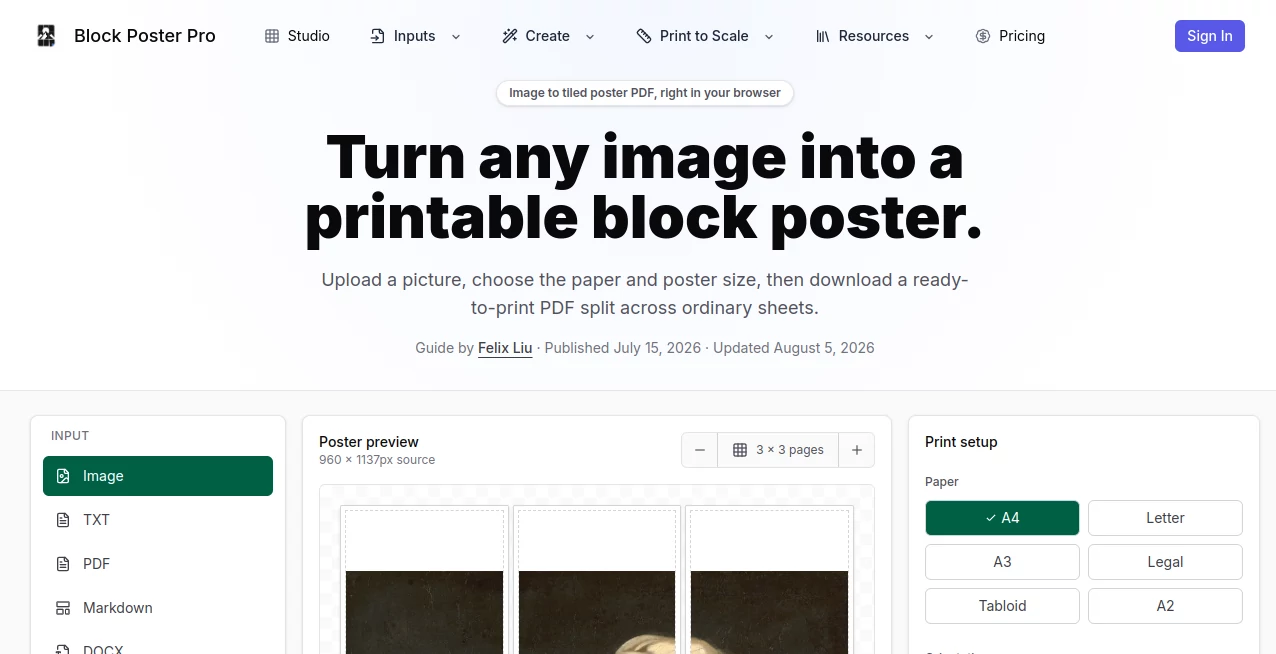
The interface focuses on the part that matters most when preparing a large print: seeing what the final result will actually look like. A tiled preview displays the poster as individual pages, while the print controls sit alongside it.
Settings such as paper size, orientation, pages wide, margin, overlap, and image fitting can be changed before exporting. This makes it much easier to experiment with a three-page-wide classroom poster or a larger multi-sheet wall display without repeatedly printing test versions.
Accuracy & Performance
The tool calculates the page grid based on the source image, selected paper format, printable margins, and overlap. This is particularly useful because a large poster can quickly become frustrating when pages do not line up correctly.
The browser-based workflow also keeps the basic poster creation process quick. Images are processed locally for the current image workflow, while the tiled PDF is generated directly in the browser. For best results, users should start with a sufficiently high-resolution source image and check the preview before printing.
Capabilities
The image workflow is only part of the platform. Users can also turn PDF, TXT, Markdown, and DOCX files into large tiled displays. A Word document, for example, can be rendered into a continuous poster canvas and divided across regular printer sheets.
The supported paper choices make the system flexible for different printers. A4 and Letter work well for everyday home and office printing, while A3, Tabloid, and A2 can reduce the number of seams when larger paper is available.
There is also a Chrome extension that can pick images directly from a web page, capture a visible area, paste an image from the clipboard, or scan images on the current tab. Batch workflows are available for users with eligible paid access.
Security & Privacy
Privacy is one of the more useful aspects of the browser-first approach. Standard image, PDF, TXT, Markdown, and DOCX poster workflows are processed in the browser before entering the tiled PDF export pipeline.
The current image workflow does not require sending the source image to a remote server simply to create a basic poster. AI Clean and AI Detail features are different: when a user explicitly requests one of these AI generations, the selected image is sent to the configured AI provider for processing.
Use Cases
This type of tool is particularly handy when a normal printer is available but a normal sheet of paper is simply too small. Teachers can create classroom wall displays, science fair materials, maps, diagrams, schedules, and educational posters without rebuilding their designs in specialist software.
It can also work well for event signage, party decorations, dorm-room artwork, office mood boards, retail displays, temporary wayfinding signs, and photo murals.
Documents open up another practical use. A workshop guide, project plan, timetable, checklist, recipe, or set of instructions can be enlarged for a wall while keeping the original source document intact.
Pros and Cons
- Pros: Simple browser-based workflow, detailed print controls, live tiled preview, multiple paper sizes, support for several document formats, overlap and cut-mark options, and no need for a large-format printer.
- Pros: The page grid is visible before export, which makes it easier to balance poster size against the number of sheets required.
- Pros: The Chrome extension can simplify collecting images directly from web pages.
- Cons: Very large posters require more printed sheets and consequently more cutting and assembly.
- Cons: Final print quality depends heavily on the resolution of the original image.
- Cons: Some complex Word-specific layout features may not reproduce exactly like they do in Microsoft Word.
Pricing Plans
There is a free option that lets users build a complete preview and create watermarked tiled PDFs from images up to 3MB. Personal PDF, TXT, Markdown, and DOCX files can also be previewed within the stated file limits.
The Single Export option is available as a one-time purchase and provides one watermark-free personal PDF export, along with included AI credits and access to the supported Studio inputs. There is no automatic subscription renewal for this option.
For regular users, the Pro Monthly plan provides unlimited Studio exports while subscribed, a monthly AI credit allowance, support for personal files up to 50MB, and access to the Chrome extension's larger batch workflow.
The Pro Yearly plan provides annual AI credits and permanently unlocks the non-AI Studio tools after the first successful annual payment. Additional AI credit packs are also available for eligible Studio customers who need more AI generations.
How to Use Block Poster Pro
Start by selecting the source you want to turn into a poster. For an image, common JPG, PNG, WebP, and GIF files are supported. Document workflows can begin with PDF, TXT, Markdown, or DOCX files.
Next, choose the paper format and orientation. Decide how many pages wide the finished poster should be. Then adjust the margin, overlap, image fitting mode, and cut marks according to the printer and the way you plan to assemble the final piece.
Review the tiled preview carefully. Once the layout looks right, export the PDF and print the pages at actual size rather than allowing the printer dialog to automatically scale them. Finally, arrange the sheets using their row and column labels, trim where necessary, and assemble the finished poster.
Comparison with Similar Tools
Traditional poster-printing software can provide extensive design controls, but it often assumes that the user is creating the artwork from scratch. This tool takes a different approach: the source material can already exist, and the main task is turning it into a correctly scaled multi-page print.
Compared with simply enlarging an image in a standard PDF viewer, the dedicated controls for overlap, margins, cut marks, page labels, and pages-wide scaling make the assembly process more predictable. The document input options are another advantage when the desired wall display already exists as a Word file or PDF.
The browser-first workflow also makes it convenient for quick jobs. Someone who needs a large classroom diagram or temporary event sign does not necessarily need a full desktop publishing application just to divide a design across several sheets.
Conclusion
For anyone who has ever wanted a wall-sized poster but only had access to a regular printer, this is a genuinely useful solution. Its strength is not flashy design software; it is the attention given to the practical details that determine whether a multi-page print actually works.
The combination of tiled previews, flexible paper choices, adjustable overlap and margins, cut marks, page labels, and support for both images and documents makes the workflow suitable for everything from a quick party sign to a classroom display or large office reference sheet.
Frequently Asked Questions (FAQ)
What is a block poster?
A block poster is a large poster divided into a grid of smaller printable pages. The pages are printed individually and then trimmed and assembled to create one larger display.
Which image formats are supported?
JPG, PNG, WebP, and GIF files are supported for the image workflow. A high-resolution source is recommended when creating a physically large poster.
Can documents be converted into posters?
Yes. PDF, TXT, Markdown, and DOCX files are supported alongside images, allowing existing documents to become large-format tiled displays.
Which paper sizes can be used?
The available paper formats include A4, Letter, A3, Legal, Tabloid, and A2. Portrait and landscape orientations are also available.
What is the difference between contain and cover?
Contain keeps the entire source image visible within the poster area. Cover fills the poster area more completely but can crop parts of the original image.
How should I print the exported PDF?
Print at actual size or 100% scale and disable automatic fit-to-page scaling. This helps preserve the dimensions represented by the tiled layout.
Are images processed in the browser?
The standard image workflow processes the image in the browser. AI Clean and AI Detail generations are different and require the selected image to be sent to the configured AI provider.
Can I use it without paying?
Yes. The free option allows users to build the complete preview and create watermarked image-based tiled PDFs. Paid access is required for certain personal exports and additional capabilities.
Is there a Chrome extension?
Yes. The Chrome extension can pick images from web pages, capture visible areas, paste images from the clipboard, and scan images on the current tab. Eligible paid plans support larger batch workflows without watermarks.
What is the best number of pages for a poster?
It depends on the intended viewing distance and available printer. Two or three pages wide can work for smaller room posters, while four to six pages wide may be more appropriate for classroom displays or event signage.