


















Blogworkflow AI
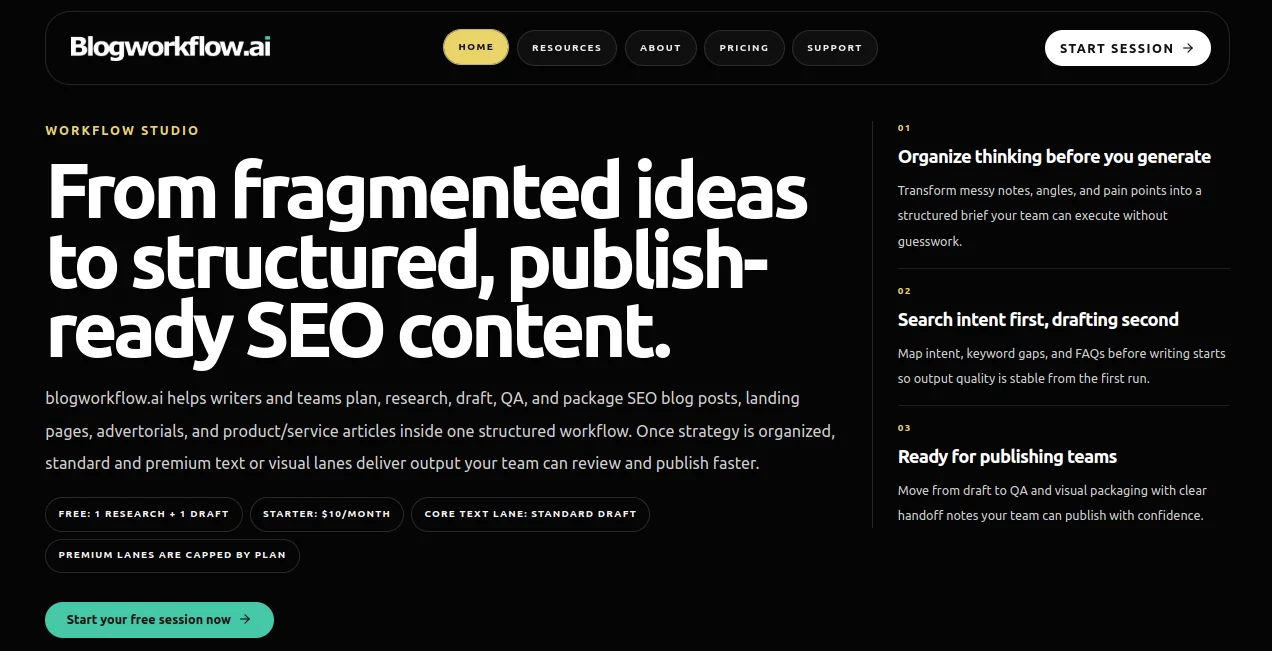
What is Blogworkflow AI?
I used to watch content teams jump between ten different tools — one for research, another for outlining, a third for drafting, and then endless back-and-forth on revisions. The chaos was exhausting. Then I started using this platform and everything felt different. It takes messy ideas, scattered notes, and vague briefs and turns them into a repeatable 8-step system that actually produces publish-ready SEO content. The first time my team ran a full workflow, we went from a rough topic to a complete, optimized blog post with SEO notes, visuals guidance, and QA checks in one place. The difference in speed and consistency was immediately obvious.
Introduction
Most teams don’t have a writing problem — they have a production problem. Prompts give you text, but they don’t give you structure, intent alignment, or a smooth handoff to publishing. This tool fixes that by guiding you through a complete workflow: from topic angle and brand setup to SERP gap analysis, evidence gathering, outlining, drafting, QA, and visual packaging. It’s built for agencies, in-house teams, and solo operators who need reliable, commercially usable content without starting from scratch every time. The 8-step system keeps everyone on the same page and dramatically reduces revision loops.
Key Features
User Interface
The interface is clean and purposeful. You start a session, follow the guided steps, and everything stays in one place. No switching tabs or copying text between tools. Each step shows clear handoffs — what the AI did, why it matters, and what comes next. You can pause, review, or adjust at any point. It feels like having a smart production assistant that never forgets the commercial goal or brand voice.
Accuracy & Performance
The workflow forces proper structure before generation, so outputs are more consistent and on-target than generic prompting. It maps search intent and gaps early, gathers supporting evidence, and builds logical outlines before drafting. This foundation leads to fewer major rewrites and higher publishing confidence. Teams report noticeably better first drafts and faster time-to-publish compared to their old scattered processes.
Capabilities
It handles full SEO blog posts, landing pages, advertorials, and product-focused articles. You get structured briefs, keyword and intent mapping, evidence packs, detailed outlines, multiple draft qualities (standard and premium lanes), QA checks, and even visual direction packs. The system works for both solo writers and larger teams with clear handoff notes. Premium text and image lanes give extra polish when needed, while keeping costs predictable.
Security & Privacy
Your content stays within your workspace. The platform is built for professional use with appropriate data handling, giving teams confidence when working on client projects or sensitive brand material. No unnecessary sharing or exposure of your unpublished work.
Use Cases
An SEO agency runs client campaigns with fewer revision rounds because every piece follows the same proven structure. An in-house marketing team standardizes their monthly blog output, making it easier to maintain quality across multiple writers. A solo founder moves from idea to published post faster without sacrificing SEO depth. E-commerce brands create product-led content and advertorials that actually convert. The common benefit is turning content creation from chaotic to predictable and scalable.
Pros and Cons
Pros:
- Complete end-to-end workflow instead of disconnected prompts.
- Strong focus on commercial intent and SEO from the very first step.
- Clear handoffs and QA make team publishing much smoother.
- Flexible lanes let you balance speed, quality, and cost.
- Significantly reduces time wasted on revisions and scattered tools.
Cons:
- Best results come when you invest a little time in the early planning steps.
- Heavy visual or very long-form content may need extra manual polish.
Pricing Plans
It starts with a free tier that lets you test the full workflow with limited runs — enough to see real value quickly. Starter and higher plans unlock more volume, premium text and image lanes, and team features. Pricing is straightforward and scales with your publishing rhythm, making it accessible for solo operators while supporting serious agency and in-house needs.
How to Use BlogWorkflow
Start a new session, define your topic angle and business goal, set brand voice, and run through the guided steps. The system handles research gaps, evidence collection, outlining, drafting, QA, and visual guidance automatically. Review outputs at each stage, make adjustments if needed, and export the complete package ready for your CMS. For recurring content, save templates to make future runs even faster. The whole process keeps you in control while removing the usual friction.
Comparison with Similar Tools
Generic AI writers give you text quickly but lack structure and intent alignment. Other workflow tools often feel either too rigid or too loose. This one sits in the sweet spot — structured enough for serious production, flexible enough for creative work, and focused on publish-ready output rather than just first drafts. Teams moving from prompt chaos to this system usually notice the biggest improvement in consistency and speed-to-publish.
Conclusion
Content production doesn’t have to be scattered and stressful. When you have a clear, repeatable system that respects both creativity and commercial goals, everything gets easier. This platform delivers exactly that — turning fragmented ideas into polished, SEO-ready content with less friction and more confidence. For teams and individuals who publish regularly, it’s quickly becoming the smarter way to work.
Frequently Asked Questions (FAQ)
How long does a full workflow take?
Most users complete a full piece in 30–60 minutes, depending on review time.
Can I use it for client work?
Yes — many agencies use it daily for client content delivery.
Do I need to be technical?
No — the guided steps make it accessible for writers and marketers.
Is there support for team collaboration?
Yes — higher plans include team features and shared workspaces.
What kind of content works best?
SEO blog posts, landing pages, advertorials, and product/service articles see the strongest results.
AI SEO Assistant , AI Content Generator , AI Marketing Plan Generator , AI Writing Assistants .
These classifications represent its core capabilities and areas of application. For related tools, explore the linked categories above.
Blogworkflow AI details
Website unavailable — View Alternatives
Pricing
- Free
Apps
- Web App
Categories

Blogworkflow AI Alternatives Product

Quizify - AI…

Cataseo AI

Grok 4

kling 3

StyleBias

Dolphinscribe

Lutains

nano banana …

Touchpoint
