


















chat.cx
What is chat.cx?
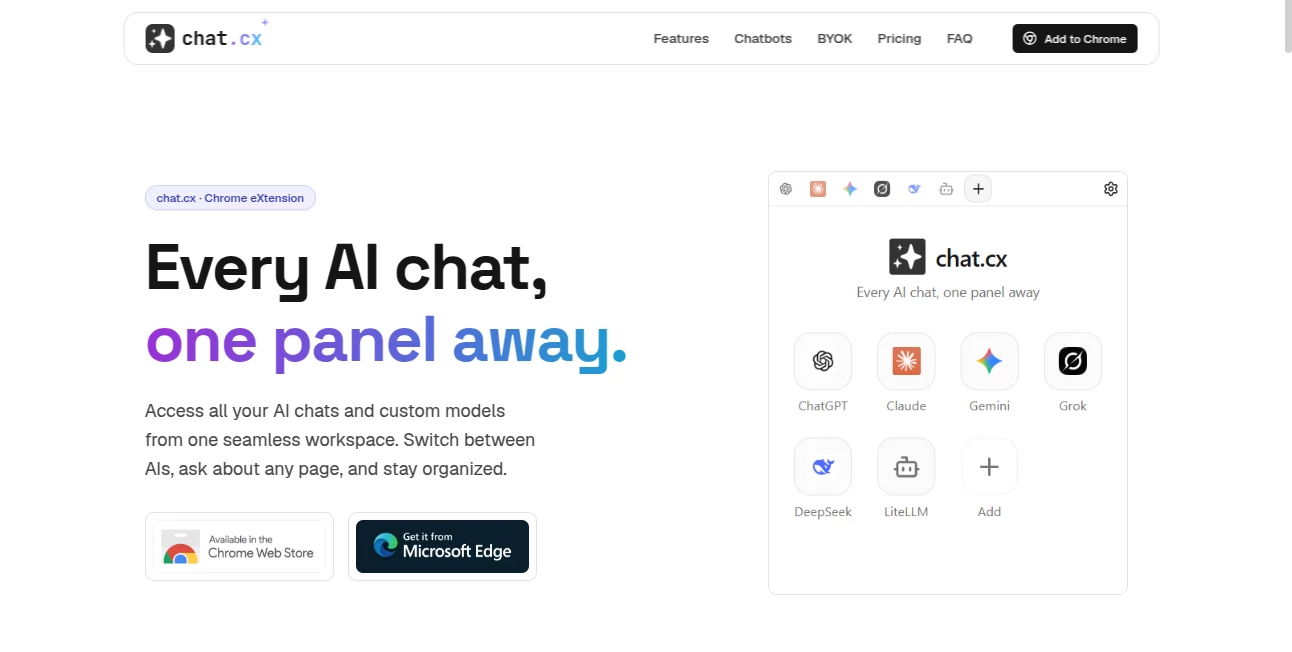
chat.cx is a Chrome extension designed for people who use more than one AI assistant during the day and are tired of jumping between browser tabs. Instead of replacing services such as ChatGPT, Claude, Gemini, Grok, or Perplexity, it brings their real websites together inside a single browser workspace.
The idea is refreshingly practical: keep the AI services you already use, keep your existing accounts and subscriptions, and access them from one convenient panel. There is no separate account to create, and the extension does not act as an API-based wrapper around the services.
For anyone researching a topic, writing content, coding, comparing AI responses, or working with several models at once, this approach can make everyday browsing considerably less fragmented.
Key Features
- Access around 30 popular AI chat services from one browser workspace.
- Use existing accounts, subscriptions, models, and conversations from supported services.
- Open several AI chats simultaneously and keep them loaded while switching between them.
- Use the side panel, toolbar popup, full-page view, new window, or standalone app window.
- Send webpage text, selected content, screenshots, or captured page areas directly to an AI chat.
- Connect personal OpenAI-compatible API endpoints, including cloud and local models.
- Use services such as Ollama or LM Studio when they expose a compatible API.
- Access web search, webpage fetching, image generation, attachments, voice features, markdown, code highlighting, and other native-chat capabilities where supported.
User Interface
The interface is built around a tabbed workspace rather than another standalone chatbot window. Users can pin frequently used services, search the available catalog, rearrange tabs, and open the same service more than once when comparing answers.
The side panel is particularly useful when researching a webpage because the AI conversation can remain visible beside the content being read. There is also an on-page launcher and a keyboard shortcut, making the workspace accessible without constantly returning to a separate tab.
The interface also supports light, dark, and system themes. Small controls such as back, forward, reload, zoom, copying a link, and opening a conversation in a normal window make the experience feel closer to a browser workspace than a conventional AI wrapper.
Accuracy & Performance
One of the strongest aspects of the service is that it does not attempt to recreate the AI providers' interfaces or process their conversations through an intermediary server. Supported websites are embedded directly, so responses come from the underlying services and remain subject to their own models, subscriptions, and capabilities.
Multiple conversations can stay loaded at the same time. This means an answer can continue streaming while the user checks another model, reads a webpage, or works in a different conversation. For comparison-heavy workflows, that can save a surprising amount of repetitive tab switching.
Performance will naturally depend on the AI provider, network connection, browser, and selected model. The extension itself is primarily designed to organize access rather than make the underlying AI models faster or more accurate.
Capabilities
The extension goes beyond simply collecting links to AI websites. Its page-context features let users send readable webpage text, a selected portion of a page, or a screenshot into a chosen conversation. A right-click option can also start an AI interaction with captured page content.
Another useful feature is support for OpenAI-compatible endpoints. Users can configure a base URL, API key, model, system prompt, sampling settings, headers, and streaming options. This makes the workspace useful for developers and advanced users who work with multiple APIs or local models.
Native API chats also include practical features such as conversation threads, search, temporary mode, markdown, highlighted code, mathematical content, reasoning views, attachments, voice input and output, and token or timing information.
Security & Privacy
Privacy is a central part of the product's design. The service states that it has no servers of its own and that conversations with supported AI providers go directly from the browser to those providers.
API keys are stored locally on the user's device rather than being synchronized to a cloud service. Native chat history is also kept in local browser storage and is sent only to the API endpoint configured by the user.
For embedded AI websites, users continue using their own browser sessions, logins, cookies, subscriptions, and accounts. This means users should still review the privacy policies and data practices of each AI provider they connect to, since the underlying service remains responsible for its own conversations and data handling.
Use Cases
AI research: Compare responses from several language models without opening a separate browser tab for every service.
Content creation: Keep a writing assistant open beside research material and send selected webpage content into the conversation.
Software development: Work with different coding assistants, API endpoints, or local models while keeping development documentation visible.
Model comparison: Ask the same question to multiple AI systems and compare their answers side by side or across persistent tabs.
Web research: Capture page text, selections, or screenshots and send them directly to an appropriate AI conversation.
Local AI experimentation: Connect compatible Ollama or LM Studio endpoints and experiment with local models from the same workspace.
Daily productivity: Keep frequently used AI services one click away instead of maintaining a long collection of open browser tabs.
Pros and Cons
Pros
- Brings many AI chat services into one browser workspace.
- No separate account is required.
- Works with existing provider accounts and subscriptions.
- Supports multiple persistent chat tabs.
- Useful webpage context tools make research workflows easier.
- Supports OpenAI-compatible APIs and local AI endpoints.
- API keys and native chat data are designed to remain locally stored.
- The free plan provides access to the full product with a five-chat-tab limit.
Cons
- The quality and speed of responses still depend on the underlying AI providers.
- Users must maintain their own accounts or API keys for services that require them.
- The free plan limits users to five active chat tabs.
- Some provider-specific features may behave differently when accessed inside an embedded browser environment.
- Using many AI services simultaneously can still consume significant browser resources.
Pricing Plans
The product currently offers a free plan with no account, trial, or credit card requirement. The free version includes up to five chat tabs, access to the chatbot catalog, page text and screenshot sharing, multiple interface modes, API chats using personal keys, web search, page fetching, image-generation tools, and on-page AI access.
There is also an Early Supporter lifetime option. It uses a pay-what-you-want one-time payment and provides unlimited chat tabs, the features included in the free version, future pro features, and access across the user's devices. The current supporter offer is described as an early-access lifetime price that ends when the pro offering launches.
How to Use the Extension
Start by installing the Chrome extension and selecting the AI services you regularly use. Supported services can be opened inside the workspace without creating another account specifically for the extension.
Next, sign in to each AI service using your existing account when necessary. Once authenticated, the corresponding conversation can be opened from the workspace, while the provider's own subscription and access level remain unchanged.
When researching online, open the extension beside the webpage and send the page text, a selected passage, or a screenshot to the AI service you want to use. Developers can instead add an OpenAI-compatible endpoint and configure its model and connection settings.
From there, keep several conversations open, switch between them as needed, and continue working without repeatedly moving between separate browser tabs.
Comparison with Similar Tools
Many multi-model AI applications place a new interface on top of several APIs. That approach can be convenient, but it often means creating another account, paying for another subscription, or sending conversations through the application's own infrastructure.
This extension takes a different route. Supported AI websites remain the actual services users already know, while the extension focuses on bringing them together inside the browser. Existing accounts and provider subscriptions continue to apply, rather than being replaced by a separate centralized AI subscription.
For users who specifically want one interface with one centralized billing system, an all-in-one AI platform may be more convenient. For users who already have several AI accounts and want to organize them without replacing those services, the browser-based approach is considerably more appealing.
Conclusion
Managing several AI assistants can quickly become messy. Dozens of tabs, different conversations, separate subscriptions, and multiple browser windows make a simple research task unnecessarily complicated. This extension addresses that problem with a straightforward workspace that puts existing AI services within easy reach.
Its strongest advantage is not trying to become another AI model. Instead, it acts as a practical layer around the services users already depend on, while also supporting personal APIs and local models for more advanced workflows.
For researchers, developers, writers, students, and anyone who regularly switches between AI assistants, the combination of persistent tabs, page context, multiple interface modes, and local API configuration makes it a useful addition to the everyday browser toolkit.
Frequently Asked Questions (FAQ)
Do I need a separate account?
No. There is no separate account required for the extension. Users sign in to supported AI services with the accounts they already have.
Does it replace my ChatGPT, Claude, or Gemini subscription?
No. It works as a workspace around those services. Your access, subscription, and service-specific capabilities continue to depend on your own account with each provider.
Can I use my own API keys?
Yes. OpenAI-compatible endpoints can be configured with your own API settings, including supported cloud providers and compatible local AI platforms.
Can I use local AI models?
Yes. Local services such as Ollama and LM Studio can be connected when they expose an OpenAI-compatible Chat Completions API.
Are API keys stored on a server?
The service states that API keys are stored locally on the user's device and are not synchronized to its cloud infrastructure. They are used directly with the API endpoint configured by the user.
How many AI services are available?
The current catalog includes around 30 AI chat services, with the option to add compatible APIs beyond the built-in catalog.
Is there a free plan?
Yes. The free plan costs $0 and does not require an account, trial, or payment card. It includes the core product with a limit of up to five chat tabs.
Can I compare different AI models?
Yes. Multiple conversations can remain open simultaneously, and the same AI service can be opened more than once. This makes it practical to compare prompts, responses, and models without repeatedly reopening conversations.
AI Chatbot , AI Developer Tools , AI Productivity Tools .
These classifications represent its core capabilities and areas of application. For related tools, explore the linked categories above.
chat.cx details
Website unavailable — View Alternatives
Pricing
- Free
Apps
- Web App
- Chrome Extensions
Categories

chat.cx Alternatives Product

Website Clon…

Weekly Brief

FLINT AI

GPT Image 2 …
Automaited

Project Mela

OGimage

GPT Image 2 …

Classroom Sc…
