


















Chatgbot
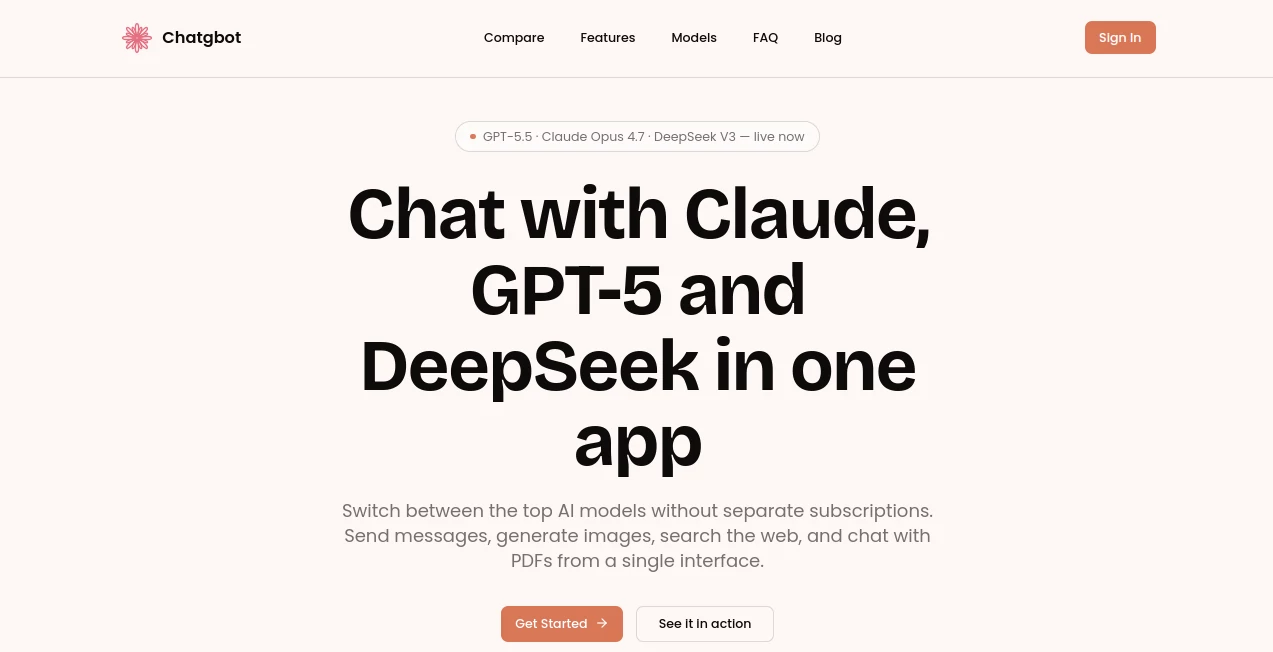
What is Chatgbot?
Most people who work with AI on a daily basis end up juggling browser tabs. One tab for the chatbot that writes the cleanest prose, another for the one that codes well, a third for the one that actually searches the web properly. This platform was built around a simple complaint: why should switching AI brains feel like switching banks? Instead of locking users into a single model's strengths and blind spots, it puts several leading language models behind one interface and one subscription, so a person can pick whichever mind fits the task at hand without re-entering payment details five times a month.
The pitch is refreshingly unglamorous. There's no claim of some secret proprietary model that beats everything else. The value is in the plumbing — official API connections to multiple top-tier providers, a shared conversation history, and a UI that gets out of the way.
Key Features
User Interface
The chat window looks like what you'd expect from a modern AI client: a message composer, a model picker, and a sidebar for past conversations. What stands out is the model switcher sitting right above the input box. A thread can start with one model, and a few messages later, continue with a completely different one — the prior context carries over instead of resetting. There's also a side-by-side comparison mode, where the same prompt gets sent to two models at once, with both responses streaming in real time next to each other. For anyone who's ever copy-pasted a question into three different apps just to compare tone, this alone saves a noticeable chunk of time.
Accuracy & Performance
Because the platform routes requests through official APIs rather than scraped or unofficial endpoints, response quality tracks whatever the underlying model is currently capable of — when a provider ships an upgrade, that upgrade shows up here too, without a separate rollout cycle. In practice this means the reasoning quality, factual grounding, and code accuracy are only as good (and only as limited) as the model selected for that message. Choosing GPT for a tricky refactor and Claude for a delicate email draft, in the same conversation, is where the accuracy gains really show up — not from any one model being smarter, but from never being stuck with the wrong one for the job.
Capabilities
- Multi-model chat with the ability to swap models mid-conversation while keeping full history
- Side-by-side comparison mode for testing the same prompt across two models simultaneously
- Image generation directly inside the chat thread
- Document conversations — upload a PDF and ask questions about its contents
- Web search integrated into responses, so answers can reference current information instead of relying purely on training data
Security & Privacy
All model access happens through official provider APIs rather than third-party workarounds, which matters for anyone wary of where their prompts actually end up. The service maintains its own privacy policy and terms covering data handling and account information, and account access is gated behind a standard login flow. As with any cloud-based AI tool, sensitive or regulated data should still be handled with the usual caution, but the architecture itself avoids the murkier practice of routing traffic through unofficial reverse-engineered endpoints.
Use Cases
- Writers who draft in one model for natural-sounding tone and switch to another to tighten and punch up the copy
- Developers comparing code suggestions from two models side by side before deciding which solution to ship
- Students researching a topic with web-grounded answers, then summarizing assigned PDF readings in the same session
- Teams that want every member to have access to multiple frontier models without managing a stack of separate subscriptions and invoices
Pros and Cons
- Pro: Access to several frontier models under a single membership instead of paying for each separately
- Pro: Conversation history persists even when switching models mid-thread
- Pro: Built-in image generation, PDF chat, and web search without needing separate tools
- Pro: Free tier available with no credit card required to start
- Con: Quality and behavior still depend on the underlying model chosen, so results vary by selection
- Con: As an aggregator, it depends on continued API access from the upstream model providers
Pricing Plans
The platform offers a free tier that doesn't require a credit card to get started, making it easy to try the multi-model experience before committing. Paid membership unlocks fuller access across the available models and features, billed as a single recurring subscription rather than separate charges per AI provider. Subscriptions can be cancelled at any time, and current plan details and limits are best confirmed directly on the pricing page since model lineups and tiers are updated as new releases roll out.
How to Use Chatgbot
- Create a free account — no credit card needed for the initial sign-up
- Pick a model from the switcher at the top of the chat window based on the task (writing, coding, research, etc.)
- Type a prompt, or upload a PDF to start a document-based conversation
- Use comparison mode to send one prompt to two models and review both answers side by side
- Switch models mid-conversation whenever a different strength is needed, without losing prior context
- Upgrade to a paid plan when broader model access or higher usage limits are needed
Comparison with Similar Tools
Single-model chat apps tie a user to one company's roadmap — when that provider lags on a particular task, there's no fallback inside the same app. Multi-model aggregators solve this, but many route through unofficial channels that can break without warning or raise privacy questions. What sets this platform apart is the combination of official API access, a genuinely unified conversation history across models, and bundled extras like PDF chat and image generation that competitors often sell as separate add-ons. The side-by-side comparison feature in particular is uncommon — most aggregators make users pick a model and commit, rather than letting two answers stream in at once.
Conclusion
For anyone tired of maintaining four different AI subscriptions just to always have the "best" model on hand, this is a practical fix rather than a flashy one. It doesn't try to outsmart GPT, Claude, or DeepSeek — it just makes sure you're never locked out of any of them, and that switching between them costs nothing more than a click. Combined with built-in web search, PDF chat, and image generation, it functions less like a single chatbot and more like a control room for whichever AI happens to be right for the moment.
Frequently Asked Questions (FAQ)
- Which AI models can I access? The platform connects to several leading models from different providers, including GPT, Claude, DeepSeek, and Grok, all accessible from the same chat interface.
- Do I need a credit card to try it? No, the free tier is available without entering payment details.
- Can I switch models in the middle of a conversation? Yes, the conversation history carries over even when a different model is selected partway through.
- Is web search included? Yes, responses can incorporate current web information rather than relying solely on a model's training data.
- Can I cancel my subscription anytime? Yes, the membership can be cancelled at any time.
- Is my data secure? Model access runs through official provider APIs, and account data is governed by the platform's published privacy policy.
AI PDF , AI Productivity Tools , AI Chatbot , AI Text to Image .
These classifications represent its core capabilities and areas of application. For related tools, explore the linked categories above.

Chatgbot Alternatives Product

MuseArt AI

XreplyAI

Sales Prospe…

UPDF AI

freellm

X Grok Imagi…

AllInOneTools

China Brush

Createimg.ai
