Chat Image
What is Chat Image?
Creating high-quality visuals no longer requires advanced design skills or hours of editing. This AI-powered image generator transforms simple text prompts into polished visuals while also allowing users to edit existing images with remarkable ease. Whether you need marketing graphics, product photography, posters, social media content, portraits, or interface mockups, the platform offers an intuitive experience that helps both beginners and professionals achieve impressive results.
Instead of switching between multiple design applications, users can describe an idea in natural language and receive ready-to-use images within seconds. Uploading a reference image makes it even easier to refine styles, replace objects, enhance compositions, or create fresh variations without starting from scratch. The combination of speed, flexibility, and quality makes it an excellent choice for creators, businesses, developers, marketers, and designers who want reliable AI-assisted image generation.
Key Features
- Create images from simple text prompts.
- Edit uploaded reference images using natural language instructions.
- Generate professional posters and promotional graphics.
- Create realistic product photography for online stores.
- Design UI concepts and application mockups.
- Generate portraits and creative character artwork.
- Create social media visuals optimized for multiple platforms.
- Produce multiple visual styles from a single prompt.
- Fast image generation with minimal manual editing.
- Suitable for personal and commercial creative projects.
User Interface
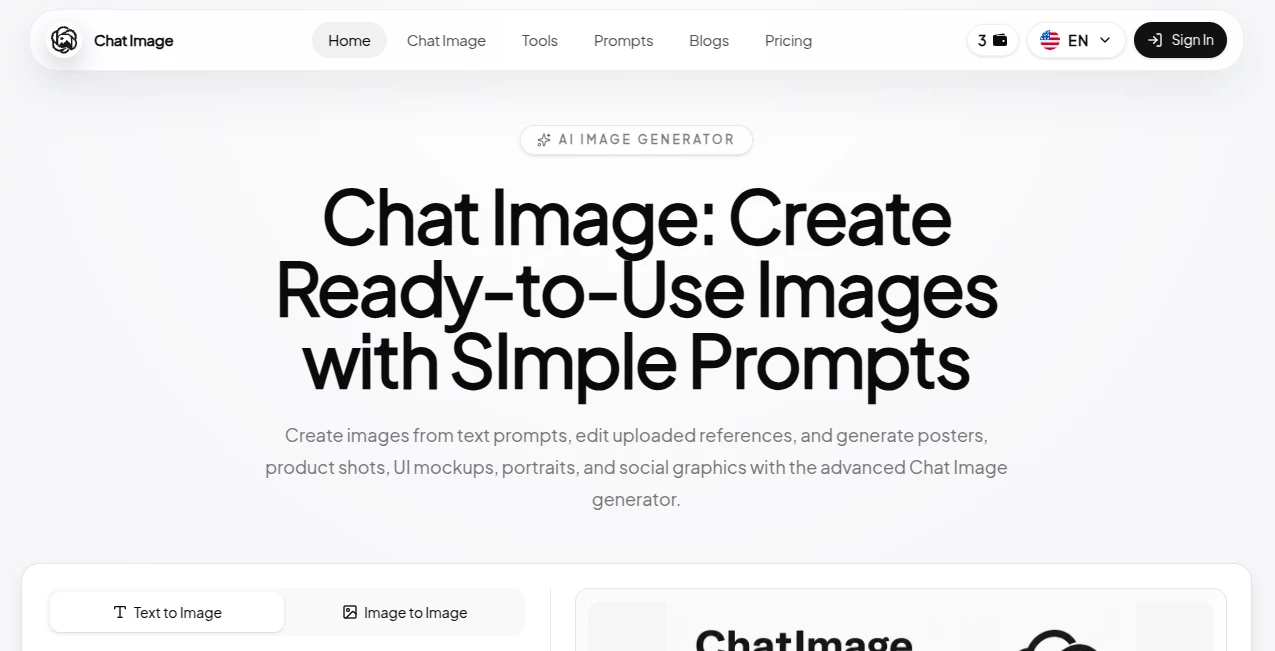
The interface is designed to remove unnecessary complexity. Users simply enter a prompt, upload a reference image if needed, and describe the desired changes. The workflow feels conversational, making image generation approachable even for people who have never used professional design software. Navigation remains clean and responsive, allowing users to focus on creativity rather than learning complicated tools.
Accuracy & Performance
The platform performs well when interpreting detailed prompts and visual instructions. It captures colors, composition, lighting, and artistic styles with impressive consistency. More specific prompts generally produce more refined outputs, making it suitable for professional creative work where precision matters.
Image generation is typically completed quickly, allowing users to experiment with multiple concepts before selecting the final version. This rapid iteration significantly reduces the time normally spent designing graphics manually.
Capabilities
The platform supports much more than basic text-to-image generation. Users can redesign existing artwork, enhance product photos, generate advertising materials, visualize user interfaces, produce presentation graphics, create illustrations, and experiment with artistic concepts using simple conversational prompts.
Businesses can quickly generate marketing assets, while designers can build prototypes without investing hours in manual editing. Content creators benefit from a continuous source of unique visuals for blogs, videos, newsletters, and social media campaigns.
Security & Privacy
The service focuses on providing a secure cloud-based experience while processing user requests online. Uploaded reference images remain part of the generation workflow, allowing users to edit and improve existing visuals without relying on complicated desktop software. As with any cloud service, users should review the platform's privacy policy before uploading confidential or sensitive material.
Use Cases
- Creating marketing banners and advertisements.
- Designing product showcase images for eCommerce stores.
- Producing engaging social media graphics.
- Generating presentation visuals.
- Creating website illustrations.
- Designing UI and mobile application mockups.
- Creating posters for events and campaigns.
- Generating portraits and creative artwork.
- Producing blog and article featured images.
- Rapid visual brainstorming during product development.
Pros and Cons
Pros
- Very easy to use.
- Fast image generation.
- Supports editing uploaded reference images.
- Produces professional-looking graphics.
- Suitable for both beginners and experienced designers.
- Works well across multiple creative industries.
Cons
- Complex prompts may require several revisions.
- Advanced manual editing features are naturally more limited than dedicated desktop design software.
- Internet access is required for image generation.
Pricing Plans
The platform offers access to AI image generation with subscription-based plans designed for different usage levels. Available features and generation limits may vary depending on the selected plan. Users should review the latest pricing information on the official website before choosing a subscription.
How to Use Chat Image
- Open the platform and start a new project.
- Write a detailed description of the image you want.
- Optionally upload a reference image.
- Add editing instructions or preferred artistic style.
- Generate the image.
- Review the results and refine the prompt if necessary.
- Download the finished image for personal or commercial use according to the platform's licensing terms.
Comparison with Similar Tools
Compared with many AI image generators, this platform places strong emphasis on conversational editing rather than only generating images from scratch. The ability to combine prompt-based creation with reference image editing makes creative workflows significantly smoother. Users who regularly produce advertising materials, UI concepts, social graphics, or product visuals may appreciate how quickly they can move from an initial idea to a polished result without switching between multiple applications.
Conclusion
For anyone looking to create professional visuals without spending hours in traditional design software, this platform delivers an enjoyable and productive experience. The combination of natural-language prompting, reference image editing, fast generation, and support for a wide range of creative projects makes it valuable for marketers, entrepreneurs, designers, educators, and content creators alike.
Whether the goal is producing eye-catching social media graphics, designing marketing campaigns, creating product photography, or experimenting with artistic concepts, the platform provides an efficient workflow that helps turn ideas into polished images with minimal effort.
Frequently Asked Questions (FAQ)
Can I create images from text prompts?
Yes. Simply describe your idea in natural language, and the platform generates matching visuals.
Can I edit existing images?
Yes. You can upload reference images and modify them using conversational instructions.
Is it suitable for commercial projects?
It is commonly used for marketing materials, product images, branding assets, and other professional creative work. Users should review the licensing terms for commercial usage.
Can beginners use it?
Absolutely. The interface is designed to be accessible even for users with no graphic design experience.
What types of visuals can be created?
Users can generate posters, product photos, UI mockups, portraits, illustrations, social media graphics, promotional materials, and many other visual assets.
AI Photo & Image Generator , Photo & Image Editor , AI Design Generator , AI Text to Image .
These classifications represent its core capabilities and areas of application. For related tools, explore the linked categories above.

Chat Image Alternatives Product
GPT Image 1.5

bananaai.app

WonderShare …

Nano Banana …

Qwen Image
Nano Banana …
OC-Maker

AIGAZOU
Luma AI