


















China Video AI Image-to-Video Generator
What is China Video AI Image-to-Video Generator?
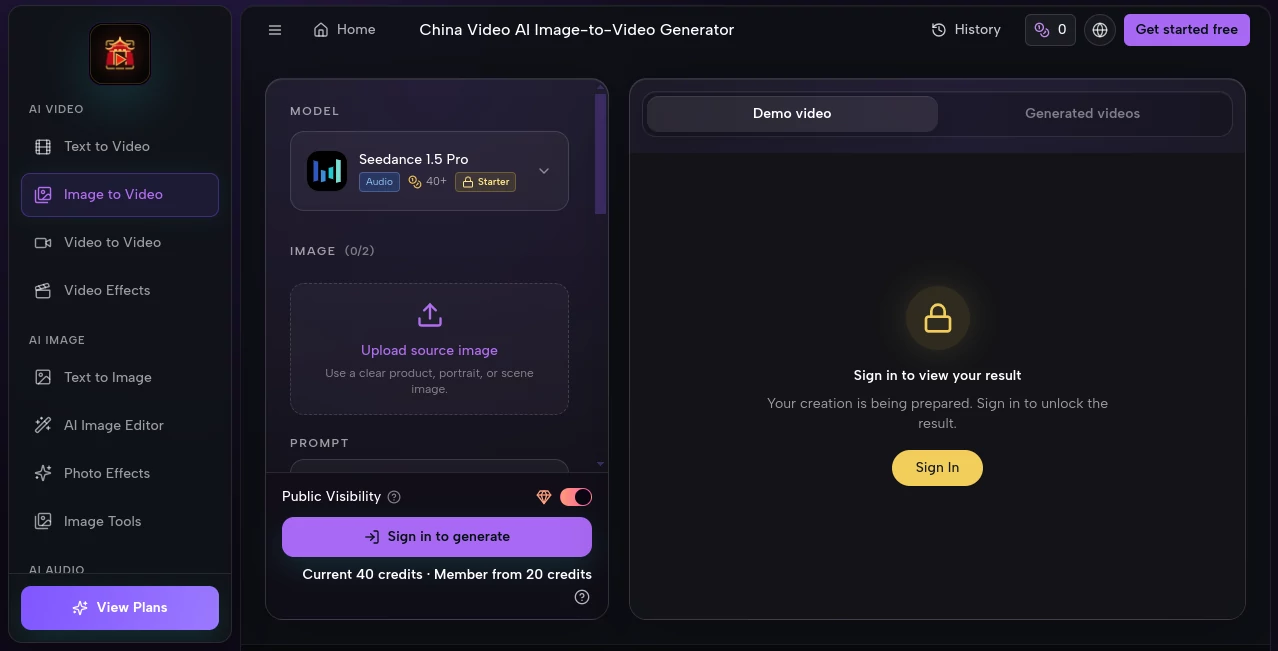
China Video AI Image-to-Video Generator offers a focused way to transform a still image into a short AI-generated video. Instead of rebuilding a scene from scratch, users can upload a portrait, product photo, illustration, or other visual and describe how they want it to move.
The workflow is particularly appealing for creators who already have strong source images but need motion for social media, advertising, product presentations, or creative projects. The interface keeps the source image, prompt, model selection, aspect ratio, duration, resolution, and generation settings together, making the process easy to understand before starting a render.
Key Features
- Image-to-video generation from portraits, products, illustrations, and scene images.
- Natural-language prompts for describing subject and camera movement.
- Multiple AI video models available from the same workspace, including several Seedance versions, MiniMax H3, PixVerse V6, and Veo models.
- Flexible aspect ratios including 16:9, 9:16, 1:1, 4:3, 3:4, and 21:9.
- Video durations of 4, 8, or 12 seconds depending on the selected generation setup.
- Resolution options ranging from 480p to 1080p.
- Optional sound generation.
- Credit costs are displayed before generation, helping users understand the expected usage.
- Finished generations can be reviewed through the account's creations area.
User Interface
The interface is built around a straightforward creation screen. A user starts by uploading a source image, then enters a motion prompt and selects the desired settings. The controls are arranged in a logical order, so there is little need to jump between different pages while preparing a video.
One useful detail is the visibility of important generation choices before rendering. Users can see the model, aspect ratio, duration, and resolution rather than discovering these limitations after creating a clip. For someone experimenting with several ideas in one sitting, that can make the workflow noticeably less frustrating.
Accuracy & Performance
Performance naturally varies according to the selected model, resolution, duration, and current queue. The service states that most short generations take a few minutes, although heavier settings and higher demand can affect processing time.
Motion direction is controlled through the prompt. Users can describe camera movement, subject actions, lighting, atmosphere, or pacing, giving them more influence than simply applying an automatic animation effect to an image.
For example, a product photograph can be prompted with a slow camera push and subtle lighting movement, while a portrait can be given a natural facial or body action. The quality of the final result still depends heavily on the source image and how clearly the desired movement is described.
Capabilities
The main strength of the workspace is its combination of source-image animation and model choice. Rather than being locked into a single generation engine, users can select from different models according to the type of result they want and the amount of credit they are willing to spend.
It can animate still portraits and product photographs, add controlled movement to artwork and campaign graphics, and create short cinematic-style sequences from a single visual starting point. Multiple aspect ratios also make it practical for different publishing environments, from landscape video to vertical social content.
The system supports both quick experimentation and more deliberate production work. Users can choose shorter or longer clips, change resolution, and select different models before committing credits to a generation.
Security & Privacy
Privacy depends on the selected account and generation settings. Paid plans provide private generation, meaning those outputs are visible only to the account holder. Users should also pay attention to the rights associated with their source material, as responsibility for uploaded images, prompts, and final usage remains with the user.
This is especially important for commercial projects involving customer photographs, branded assets, copyrighted artwork, or other material that requires permission before being uploaded or reused.
Use Cases
- Product marketing: Turn static product photography into short promotional clips for advertisements and product pages.
- Social media: Create vertical animated content from existing images for short-form platforms.
- Portrait animation: Add natural movement to portraits and character-focused imagery.
- Creative campaigns: Bring advertising artwork, mockups, and campaign visuals to life without recreating the entire scene.
- Concept development: Test visual ideas quickly before investing in a full video production.
- Illustration animation: Add camera movement and atmosphere to artwork or digital illustrations.
- Content production: Produce short visual assets for presentations, websites, launches, and promotional campaigns.
Pros and Cons
Pros
- Simple image-to-video workflow.
- Several AI video models available from one workspace.
- Useful control over motion through natural-language prompts.
- Multiple aspect ratios and resolution options.
- Credit cost is shown before generation.
- Free starter credits are available for new users.
- Paid plans include private, watermark-free generation and commercial rights.
Cons
- Generation time can vary with queue load and selected settings.
- Higher resolutions and longer videos generally require more credits.
- Free generations include a small branded watermark.
- Results can vary depending on the quality of the source image and prompt.
- Users need to understand credit consumption when working with premium models.
Pricing Plans
The service uses a credit-based system alongside monthly and yearly subscriptions. New users can start with available starter credits, while paid options are designed for people who need more frequent generation.
The listed yearly options include Starter at $99.99 per year with 12,000 credits, Pro at $299.99 per year with 32,000 credits, and Unlimited at $899.99 per year with 90,000 SOTA credits plus unlimited access to selected basic and enhanced models. Monthly plans are also available, while one-time credit packs provide another option for users who prefer not to maintain a subscription.
Credit consumption depends on the model and generation settings. Resolution, duration, and certain additional features can increase the amount required, so checking the displayed cost before generating is a sensible habit.
How to Use China Video AI Image-to-Video Generator
- Upload a clear source image such as a portrait, product photograph, illustration, or scene.
- Write a prompt explaining the movement you want to see. Include details about the subject, camera, lighting, mood, and background when they matter.
- Select an available AI video model based on the desired style, speed, and credit usage.
- Choose an aspect ratio that matches the destination of the video.
- Select the duration and resolution.
- Review the estimated credit cost before generation.
- Generate the video and review the result.
- Use the creations area in your account to access completed generations and continue refining your ideas.
Comparison with Similar Tools
Many image-to-video services concentrate on a single model or a very specific animation workflow. This platform takes a broader approach by bringing multiple AI video models into one creation environment. That can be useful for creators who want to compare different generation approaches without maintaining separate workflows for every model.
Another advantage is the amount of control exposed before generation. Aspect ratio, duration, resolution, model selection, and credit usage are presented as part of the same workflow. This makes it particularly suitable for users who care about both creative control and predictable resource usage.
It is not necessarily the right choice for every project. Someone looking for advanced timeline editing, detailed post-production, or a traditional video editor may still need dedicated editing software after generating the initial clips. For turning still visuals into short AI-generated sequences, however, the focused workflow is a strong fit.
Conclusion
China Video AI Image-to-Video Generator is a practical option for anyone who wants to add motion to existing images without building a video from the ground up. Its combination of prompt-based motion control, several AI models, flexible output settings, and visible credit costs makes the creation process approachable while still offering room for experimentation.
The biggest benefit is the way it fits into an existing creative workflow. A product photographer, marketer, designer, or content creator can start with an asset they already have and turn it into something more dynamic in just a few steps. For short promotional clips, social content, animated artwork, and visual experiments, that makes it a useful addition to an AI video toolkit.
Frequently Asked Questions (FAQ)
Can I try the image-to-video generator for free?
Yes. New users can try the service with available free starter credits before purchasing additional credits or selecting a paid plan.
What types of images can I use?
The workflow is designed for source images such as product photographs, portraits, illustrations, and scene images. Clear images with an obvious subject generally provide a better starting point.
What video aspect ratios are available?
The interface provides 16:9, 9:16, 1:1, 4:3, 3:4, and 21:9 options, giving users flexibility for different content formats.
Can I control how the image moves?
Yes. Motion can be described with a natural-language prompt. You can explain subject movement, camera direction, atmosphere, lighting, and pacing to guide the generation.
How long does video generation take?
Most short generations take a few minutes, although processing time can change depending on queue conditions, model selection, duration, and resolution.
Are generated videos suitable for commercial use?
Paid plans include commercial rights according to the listed plan features. Users are still responsible for ensuring they have the necessary rights to uploaded source materials and for complying with applicable usage requirements.
Do free videos have a watermark?
Yes. Free generations include a small branded watermark, while paid generations and private outputs are described as watermark-free.
How are credits calculated?
The required credit amount depends on the selected model and generation settings. Higher resolution, longer duration, and audio-enabled video can require additional credits, with the estimated cost shown before generation.
Can I choose different AI models?
Yes. The workspace provides access to multiple models, allowing users to choose between different generation options depending on the project and desired output.
AI Image to Video , AI Video Generator , Video .
These classifications represent its core capabilities and areas of application. For related tools, explore the linked categories above.
China Video AI Image-to-Video Generator details
Website unavailable — View Alternatives
Pricing
- Free
Apps
- Web App
Categories

China Video AI Image-to-Video Generator Alternatives Product

Sora-2.co

Seedance 2.0

Wan AI

Seedance AI …

happyhorse
VideoFlux

Image 2 AI

VidiOne

Sora 2 AI
