Choicer Voicer
What is Choicer Voicer?
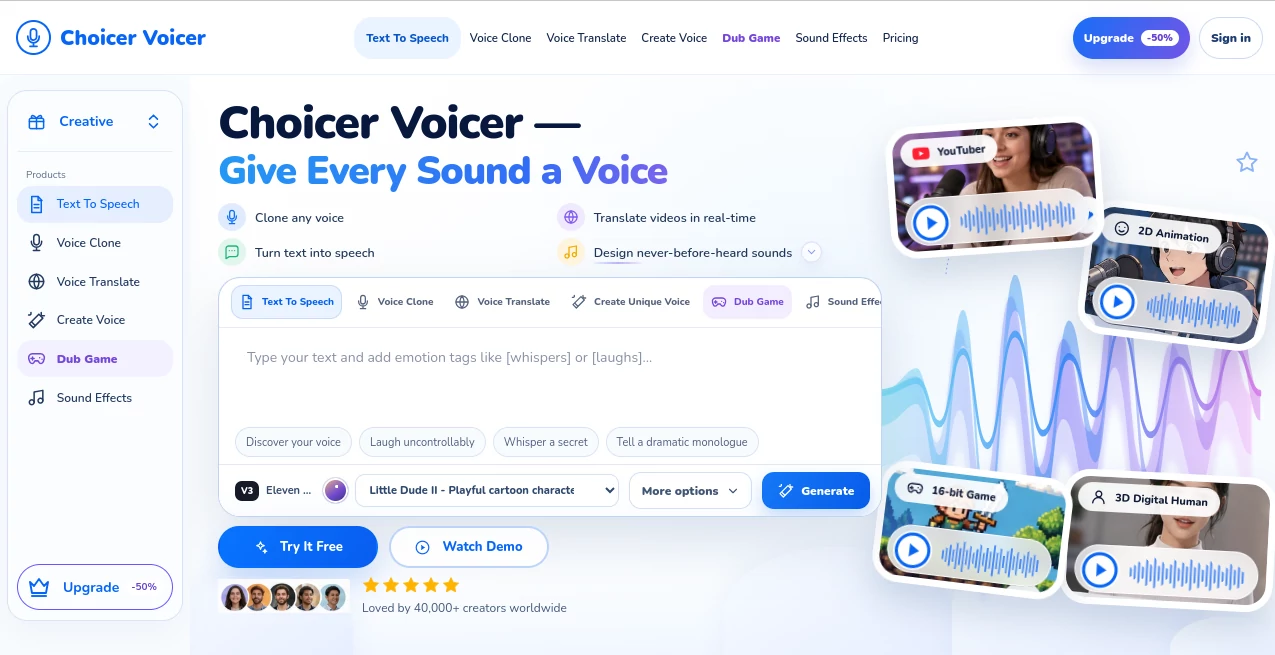
Creating convincing voice content usually takes more than simply converting a script into audio. Different projects need different personalities, accents, emotions, pacing, and vocal styles. Choicer Voicer brings several of these tasks into one focused workspace, allowing creators to generate speech, clone voices, translate video dialogue, design original voices, and produce sound effects.
The platform is built with creators, businesses, game developers, video producers, and digital storytellers in mind. A YouTuber can turn written notes into narration, while a game developer can create distinct voices for NPCs and characters. Someone producing multilingual videos can also translate spoken content while retaining the character of the original voice.
One particularly interesting aspect is the range of creative control. Instead of treating generated speech as a fixed output, users can work with voice samples, emotional direction, tone, timbre, and character concepts to create audio that better fits the project.
Key Features
The platform combines several voice-focused capabilities that would otherwise require multiple specialized services. Its main tools include text-to-speech, voice cloning, voice translation, voice design, game and video dubbing, and sound-effect generation.
- Voice cloning from uploaded audio samples
- Text-to-speech generation for scripts, notes, blogs, tutorials, and other written content
- Video voice translation across seven supported languages
- Custom voice design with control over tone, timbre, and emotion
- Character voices for games, animation, and digital content
- Sound-effect creation for creative projects
- Voice options designed for e-commerce, livestreaming, and advertising
- Dubbing workflows for games, animations, videos, and character-driven content
User Interface
The interface is organized around individual creative workflows rather than a long list of disconnected tools. Users can move between text-to-speech, voice cloning, translation, voice creation, dubbing, and sound effects from the main workspace.
The voice-generation area also provides controls for factors such as stability, duration, prompt influence, and guidance. For someone experimenting with character voices, these controls make the process feel more like directing a performance than simply pressing a generate button.
The workflow is also approachable for first-time users. A creator can upload a compatible audio file, enter text, select a voice, or choose a creative direction and begin experimenting without needing advanced audio-production knowledge.
Accuracy & Performance
Voice generation is most useful when the result matches the intended mood rather than merely pronouncing every word correctly. The platform places considerable attention on vocal character, emotional delivery, and tone, which can make generated speech more suitable for storytelling, tutorials, advertisements, and character dialogue.
Voice translation is another notable capability. Videos can be translated into English, German, French, Italian, Spanish, Indonesian, or Chinese while aiming to preserve the original voice tone. This is particularly useful for creators who want to reach audiences in different markets without completely changing the identity of the speaker.
Performance will naturally depend on the source material, selected settings, language, and type of generation. For professional projects, listening to several generated variations before choosing the final take is still a sensible workflow.
Capabilities
Voice cloning lets users upload a voice sample and create speech based on that vocal identity. The service states that samples as short as 10 seconds can be used for cloning, making experimentation relatively quick.
Text-to-speech covers practical formats such as work notes, storybooks, tutorials, tweets, blogs, and website comments. Built-in voices can be used when creating a custom clone is unnecessary.
Voice Design takes a more experimental approach. Users can create original voices by adjusting characteristics such as tone, timbre, and emotion. This opens the door to unusual character concepts, including fantasy figures, animated personalities, game characters, and even non-human voices.
For video and game production, dubbing can give different characters their own vocal identity. A single project can therefore include energetic protagonists, calmer supporting characters, dramatic narrators, or distinctive NPC voices without requiring a separate recording session for every role.
Security & Privacy
Voice cloning deserves particular attention when it involves real people. Users should only upload voices they have permission to clone and should make sure their intended use complies with applicable rights, consent requirements, and the platform's terms.
The service's pricing information also notes that commercial projects are supported on the paid Creator, Studio, and Business plans, subject to the applicable rights, consent requirements, and restrictions in its Terms of Service.
For businesses and creators working with recognizable voices, obtaining appropriate authorization before cloning or distributing generated speech is an important part of a responsible production workflow.
Use Cases
YouTube and Content Creation: Turn scripts, notes, and written ideas into narrated audio without recording every piece manually. Voice cloning can also help maintain a consistent creator identity across a large content library.
Games and Animation: Developers can create voices for NPCs, game characters, anime-style characters, cartoons, and other fictional roles. This can be especially useful during prototyping when a studio needs many temporary performances quickly.
Multilingual Video: A creator with an established audience can translate video dialogue into several languages while keeping a recognizable vocal character. This can make localization feel less disconnected from the original production.
E-commerce and Livestreaming: Different vocal styles can be used for product presentations, advertisements, and live-selling content. Switching between energetic, calm, mature, or friendly delivery can help match the voice to the product and audience.
Education: Tutorials, notes, and learning materials can be converted into spoken content. Clear narration can also make written material more convenient to consume while commuting or away from a screen.
Creative Audio: Voice Design and sound generation can be useful for filmmakers, game designers, animators, and creators who need unusual voices or atmospheric audio without recording every element from scratch.
Pros and Cons
- Pros: Multiple voice-generation workflows are available in one workspace.
- Pros: Voice cloning can start from a relatively short audio sample.
- Pros: Video voice translation supports seven languages.
- Pros: Voice Design provides control over tone, timbre, and emotional characteristics.
- Pros: Useful for creators, games, animation, e-commerce, education, and video production.
- Pros: A free plan is available without requiring a credit card.
- Cons: Advanced Voice Design is reserved for higher-tier plans.
- Cons: High-volume production requires a paid subscription with a larger credit allowance.
- Cons: Responsible use of voice cloning requires users to have appropriate permission for voices they upload.
Pricing Plans
The pricing structure is designed to let users start with basic generation and increase capacity as their production requirements grow.
- Free: $0 per month, with 2,000 credits, text-to-speech, sound-effect previews, a standard generation queue, and personal projects.
- Creator: $9 per month when billed annually, with 120,000 credits per month, expressive text-to-speech, enhanced voice cloning, voice translation, sound effects, and commercial projects.
- Studio: $24 per month when billed annually, with 500,000 credits per month, professional voice cloning, speech-to-text, full Voice Design access, game dubbing, priority sound-effect generation, and two workspace seats.
- Business: $72 per month when billed annually, with 2,000,000 credits per month, everything in Studio, five professional voice profiles, higher Voice Design capacity, high-volume translation and dubbing, five workspace seats, and priority support.
Annual billing can provide savings compared with monthly pricing, with the service indicating savings of up to 25%. Credits act as the shared usage unit across supported voice and sound tools and refresh at the beginning of each billing period.
How to Use It
Start by choosing the workflow that matches the project. For narration, open the text-to-speech workflow and enter the script you want to turn into audio. Select a suitable voice and adjust the available generation settings before producing the result.
For voice cloning, upload an appropriate audio sample in a supported format such as MP3, WAV, M4A, FLAC, or OGG. The service supports audio uploads of up to 25 MB in its voice interface. Once the voice has been processed, enter the text you want the generated voice to deliver.
For multilingual content, upload a video and choose the target language. The available translation languages include English, German, French, Italian, Spanish, Indonesian, and Chinese.
If the project needs something more distinctive, use Voice Design to experiment with tone, timbre, emotion, and character direction. For games and animated productions, the dubbing workflow can then be used to give individual roles different vocal personalities.
Comparison with Similar Tools
Many AI audio platforms specialize heavily in one area, such as text-to-speech, voice cloning, or audio editing. This platform takes a broader approach by combining several voice-centered workflows in the same environment.
Its strongest advantage is the connection between these functions. A creator can begin with ordinary text-to-speech, move into custom voice creation, translate a finished video, and create character-oriented audio without switching between several unrelated applications.
For someone who only needs basic narration once in a while, a dedicated text-to-speech service may be sufficient. For creators working across video, games, multilingual publishing, character voices, and commercial content, having these capabilities together can be considerably more convenient.
Conclusion
For creators who treat audio as an important part of their content rather than an afterthought, this platform offers an appealing collection of tools in one place. Voice cloning, expressive text-to-speech, multilingual voice translation, custom voice design, dubbing, and sound creation cover a surprisingly wide range of production needs.
The most interesting feature may be the freedom to move beyond ordinary narration. A simple script can become a character performance, a translated video can retain a familiar vocal identity, and an imaginary character can receive a voice designed specifically for its personality.
The free plan makes it easy to test the basic workflow before committing to a subscription. For creators producing content regularly, the higher plans add the credits, commercial capabilities, voice ownership features, and collaboration options needed for more serious production.
Frequently Asked Questions (FAQ)
What can this AI voice platform do?
It can generate speech from text, clone voices, translate video voices, design original voices, create sound effects, and dub games, animations, and other video content.
Can I clone a voice from a short recording?
Yes. The service states that voice cloning can work with an audio sample as short as 10 seconds. Results can vary depending on the quality and characteristics of the recording.
How many languages are available for voice translation?
Voice translation currently supports seven languages: English, German, French, Italian, Spanish, Indonesian, and Chinese.
Is there a free plan?
Yes. The Free plan costs $0 per month and includes 2,000 credits, text-to-speech, sound-effect previews, a standard generation queue, and personal projects.
Which plan includes Voice Design?
Full Voice Design access begins with the Studio plan. The Business plan provides the same workflow with greater capacity for larger character and brand libraries.
Can the generated voices be used commercially?
Commercial projects are supported on the Creator, Studio, and Business plans, subject to the applicable rights, consent requirements, and restrictions in the Terms of Service.
Is it useful for game development?
Yes. The platform includes a dedicated game dubbing workflow and supports character-oriented voice creation for NPCs, anime characters, cartoon characters, and other roles.
Can I use it for YouTube videos?
Yes. Text-to-speech can be used for narration, while voice cloning can help creators maintain a consistent vocal identity across their content, provided they have the necessary rights to the voice being used.
AI Translate , AI Speech Synthesis , AI Text to Speech , AI Voice Cloning .
These classifications represent its core capabilities and areas of application. For related tools, explore the linked categories above.

Choicer Voicer Alternatives Product
Qwen3 TTS

ModelsLab

UPDF AI

Omni Voice

Adobe Podcast

TopPDF

Qwen3 TTS

Fine Voice

AI Voice Clo…