

















Fine Voice
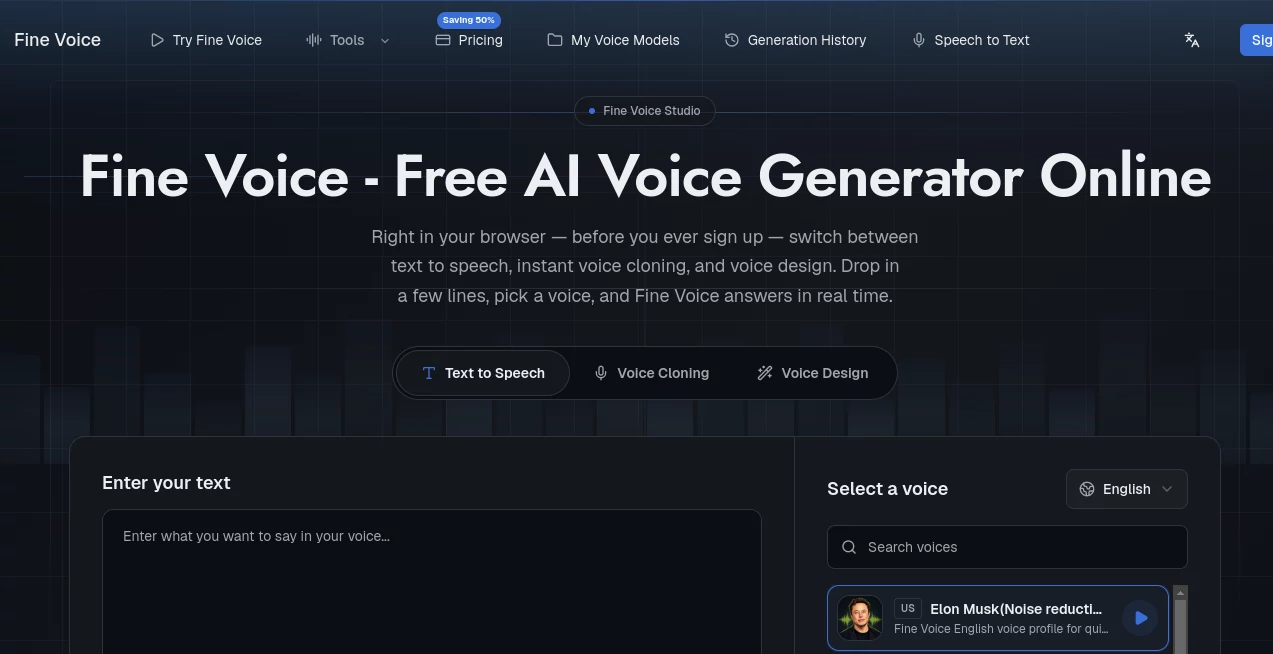
What is Fine Voice?
Creating professional-quality audio once required expensive software, recording equipment, and hours of editing. Today, modern AI has changed that workflow completely. This platform brings voice generation, cloning, enhancement, transcription, and audio editing into one streamlined workspace, making it possible for creators of every skill level to produce polished voice content within minutes.
Whether you're producing YouTube videos, podcasts, online courses, audiobooks, presentations, advertisements, or social media content, the platform delivers realistic AI voices, flexible voice customization, and powerful editing tools without the steep learning curve of traditional audio production software.
One of its biggest strengths is the combination of multiple voice technologies under a single dashboard. Instead of switching between several applications for text-to-speech, voice changing, speech recognition, sound effects, and audio enhancement, users can complete their entire workflow in one place. This not only saves time but also keeps projects organized from start to finish.
Key Features
User Interface
The dashboard is designed for simplicity while still providing advanced creative controls. Navigation is intuitive, allowing beginners to generate voices immediately, while experienced creators can fine-tune voice styles, cloning options, and editing settings. Uploading files, generating speech, and exporting projects require only a few clicks.
Accuracy & Performance
The AI produces natural-sounding speech with expressive intonation, clear pronunciation, and multilingual support. Voice cloning captures vocal characteristics with impressive realism, while speech-to-text delivers accurate transcriptions for interviews, meetings, and recorded conversations. Audio enhancement tools effectively reduce background noise and improve overall clarity.
Capabilities
- AI Text-to-Speech generation
- Professional and instant voice cloning
- AI voice changer
- Speech-to-text transcription
- AI voice enhancement
- Background noise removal
- AI sound effect generation
- Background music generation
- Voice design and customization
- Talking photo creation
- Support for multiple languages and accents
- Cloud-based workflow with fast processing
Security & Privacy
The platform emphasizes responsible AI usage by protecting user data through modern encryption technologies and encouraging ethical voice generation practices. Commercial policies, privacy protection, and responsible content creation are clearly highlighted, making it suitable for both individuals and business teams handling sensitive audio projects.
Use Cases
- Create realistic voiceovers for YouTube videos.
- Produce engaging podcast introductions and narration.
- Generate audiobook narration without recording equipment.
- Clone voices for personalized digital assistants.
- Create multilingual marketing campaigns.
- Improve poor-quality recordings with AI enhancement.
- Convert meetings into searchable transcripts.
- Generate sound effects for games and videos.
- Create educational content with natural AI narration.
- Build social media content faster using AI voices.
Pros and Cons
Pros
- Comprehensive collection of voice creation tools.
- Natural and expressive AI voices.
- Professional voice cloning capabilities.
- Easy for beginners to learn.
- Multiple creative tools available on one platform.
- Useful free plan for testing features.
- Supports creators, educators, marketers, and businesses.
Cons
- Some advanced features require paid plans.
- Monthly usage limits depend on subscription level.
- Professional voice cloning has higher-tier limitations.
Pricing Plans
A free plan is available for users who want to explore the platform before subscribing. Paid subscriptions include Basic, Pro, and Business plans with increasing limits for text-to-speech generation, voice changing, voice cloning, transcription, AI enhancement, and sound effect generation. Annual billing offers significant savings compared to monthly subscriptions.
How to Use FineVoice
Start by creating an account and choosing the desired AI feature. Upload an audio file or enter text, depending on your project. Select a voice model, customize language, tone, or style if needed, and generate the result. After reviewing the output, make any necessary edits using enhancement or editing tools before exporting the final audio in your preferred format.
Comparison with Similar Tools
Unlike many AI voice applications that focus solely on text-to-speech, this solution combines voice synthesis, cloning, enhancement, transcription, sound effect generation, music creation, and voice transformation in one ecosystem. This integrated approach reduces the need for multiple subscriptions while simplifying content production for creators who regularly work with audio and multimedia.
Its balance between ease of use and professional-grade capabilities makes it suitable for beginners while still providing enough flexibility for experienced creators and business teams.
Conclusion
For anyone looking to simplify audio production with AI, this platform offers an impressive combination of quality, versatility, and convenience. From realistic voice generation and cloning to transcription, enhancement, and creative sound production, it provides nearly every essential tool required for modern voice content creation. The intuitive interface, reliable performance, and expanding feature set make it a valuable solution for content creators, educators, marketers, podcasters, and businesses seeking faster and more professional workflows.
Frequently Asked Questions (FAQ)
Is there a free version available?
Yes. Users can access a free plan with limited monthly usage to explore the core features before upgrading.
Can I clone my own voice?
Yes. The platform supports both instant and professional voice cloning, depending on your subscription plan.
Does it support speech-to-text?
Yes. Audio recordings can be transcribed into editable text with AI-powered speech recognition.
Can I improve low-quality recordings?
Yes. Built-in AI enhancement tools reduce noise, improve clarity, and optimize overall audio quality.
Who benefits most from this platform?
Content creators, YouTubers, podcasters, educators, businesses, marketers, audiobook producers, and anyone who regularly works with voice or audio content.