ClaimResolver
What is ClaimResolver?
Dealing with a consumer dispute can become stressful surprisingly quickly. A missing security deposit, unpaid invoice, property damage, or unresolved refund can leave you with messages, receipts, contracts, photographs, and a long list of things you need to remember. The real challenge is often not knowing that you have a problem, but turning all of that information into a clear record and deciding what to do next.
ClaimResolver is a self-help technology platform designed to make that process more manageable. It helps users organize the facts of a dispute, prepare an AI-assisted demand letter, review and edit the wording, create an approved PDF, organize supporting evidence, and, when appropriate, send the letter through a tracked mailing service. The resulting information can remain connected in a single case record rather than being scattered between email threads, folders, screenshots, and postal receipts.
The platform is particularly useful for people who want to take the first practical steps toward resolving a dispute without immediately hiring an attorney. It is important to understand its boundaries, though: it is not a law firm and does not provide legal advice. Users remain responsible for reviewing their documents, checking the applicable rules, and deciding when professional legal assistance is appropriate.
Key Features
- Plain-language dispute intake that turns a user's description into organized case facts.
- AI-assisted English demand letter drafting based on the information provided.
- Editable letters so users can review facts, deadlines, requested resolutions, and wording before approval.
- PDF generation for the final approved demand letter.
- Optional certified mailing with delivery status connected to the relevant case.
- Evidence organization for contracts, receipts, screenshots, photographs, messages, and other supporting records.
- Case timelines that help keep important events in chronological order.
- California-first small claims preparation, including filing-related information and an SC-100 draft workflow.
- Private case records connected to a user's account.
- Google sign-in for secure access to saved case information.
User Interface
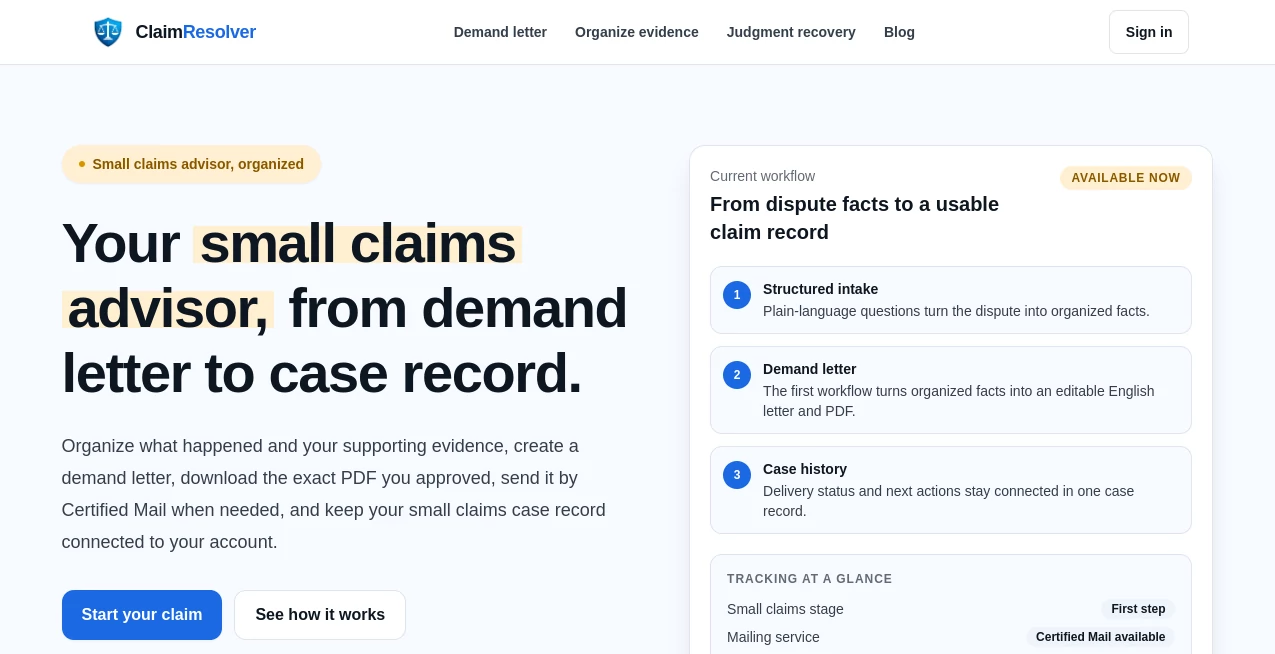
The interface takes a guided approach rather than presenting users with a complicated legal form from the beginning. A user can start by explaining what happened in everyday language and then work through the information needed for the dispute record.
The demand-letter workflow follows a straightforward sequence: describe the dispute, identify the closest situation, review the generated draft, make any necessary changes, and then download or mail the finished document. This approach is helpful for someone who knows the facts of their situation but is unsure how to organize them into a professional letter.
The workspace concept is another practical touch. Instead of treating the demand letter as an isolated document, the platform keeps the letter, evidence, mailing information, and case history connected. That can make a meaningful difference when a dispute stretches over several weeks.
Accuracy & Performance
The quality of the generated material depends heavily on the information supplied by the user. The platform does not ask users to blindly accept an automatically generated document. Instead, the workflow explicitly puts the user in control of the facts and final wording.
This review step is especially important for disputes. Dates, dollar amounts, names, agreements, deadlines, and descriptions of events can change the meaning of a claim. A useful workflow should make these details easier to inspect rather than hiding them behind an automated result.
For example, someone dealing with an unpaid invoice can describe the work performed, the agreed amount, payment history, and previous attempts to resolve the issue. Those details can then form the foundation of a more structured demand letter and supporting case record.
Capabilities
The platform covers more than simple letter generation. Its broader purpose is to help users build an organized record before deciding whether a dispute needs to move toward small claims court.
Evidence can include agreements, leases, invoices, receipts, payment records, emails, text messages, photographs, videos, repair estimates, and other relevant documentation. Organizing these materials alongside a factual timeline can make it much easier to understand which piece of evidence supports each part of a dispute.
The small claims preparation workflow currently focuses on California. Users can work with California filing information and an SC-100 draft, while additional state-specific workflows are intended to be introduced when the relevant requirements are ready.
The platform also connects physical mailing with the case record. If certified mail is selected, mailing and delivery updates can remain associated with the same case instead of becoming another disconnected item to track.
Security & Privacy
Dispute records can contain sensitive personal and financial information, so keeping information organized should not come at the cost of careless data handling. The service provides private case access through user accounts and supports Google sign-in for accessing saved records.
Users should still follow good information-security practices. The demand-letter workflow specifically warns users not to include passwords, complete payment card numbers, Social Security numbers, or unnecessary sensitive information in their dispute description.
Just as importantly, the service clearly presents itself as a self-help technology platform rather than a law firm. AI-assisted drafts should be reviewed before they are used, and users should seek professional legal advice when their situation requires it.
Use Cases
Security deposit disputes: Renters can organize move-out information, payment records, messages, photographs, and other evidence when a security deposit has not been returned or a deduction is being disputed.
Unpaid invoices: Freelancers, contractors, and small businesses can organize invoices, agreements, payment records, and communications before making a formal demand for payment.
Refund and service disputes: When a service was not delivered as expected or a refund remains unresolved, users can document the transaction and requested resolution in one place.
Property damage: Photographs, repair estimates, receipts, messages, and a timeline can be organized to create a clearer record of what happened and what compensation is being requested.
Small claims preparation: Users preparing for a small claims matter can keep their timeline and evidence organized before moving to the applicable court process. California-specific preparation is currently supported.
Pre-court dispute resolution: Not every disagreement needs to begin with a lawsuit. A well-organized demand letter can give the other party a clear opportunity to resolve the matter before a court filing becomes necessary.
Pros and Cons
- Pros: Guided plain-language intake makes the process approachable for people unfamiliar with legal paperwork.
- Pros: Demand letters can be reviewed and edited before the final PDF is created.
- Pros: Evidence, correspondence, mailing records, and case information can stay connected.
- Pros: Certified mailing and delivery tracking are available as part of the workflow.
- Pros: California small claims preparation adds value beyond basic document generation.
- Pros: Clear boundaries distinguish the service from a law firm or legal-advice provider.
- Cons: State-specific court preparation is currently centered on California rather than covering every U.S. jurisdiction.
- Cons: Users still need to verify the facts and final wording instead of treating AI-generated material as automatically correct.
- Cons: It is designed for self-help workflows, so complex or high-stakes legal disputes may require a qualified attorney.
Pricing Plans
The service does not currently present a conventional set of publicly listed subscription tiers with fixed monthly prices on its main product pages. Instead, certain services, such as available mailing options, display the applicable service levels and prices before an order is submitted.
This model makes sense for a platform that combines digital case preparation with optional physical services. Users can create and review their documents without assuming that downloading a PDF automatically creates a mailing order. Mailing is a separate step, and the available options and associated prices are shown before submission.
Because service availability and pricing can change, users should check the current pricing shown during the workflow before placing an order.
How to Use It
Start by describing the dispute in your own words. Explain what happened, identify the type of dispute, and provide the important facts such as dates, amounts, agreements, and the resolution you are requesting.
Next, review the information collected by the guided workflow. The system uses those details to prepare an AI-assisted English demand letter. Take time to check every important statement. If an amount, date, name, or description is incorrect, edit it before approving the document.
Once the letter is ready, you can download the approved PDF or choose an available mailing option. If you use certified mail, delivery events can remain connected to the case record.
For a stronger record, organize your supporting material as well. Contracts, receipts, invoices, messages, photographs, payment records, repair estimates, and other relevant evidence can be kept with the case so you can return to the complete history later.
If the dispute moves toward small claims court, California users can also use the available state-specific preparation workflow. Always confirm current court requirements and deadlines before filing.
Comparison with Similar Tools
Many online legal tools focus on a single document, such as a template for a demand letter. That can be useful when a person already knows exactly what to write, but it leaves the surrounding organization to the user.
This platform takes a broader approach. The demand letter is one part of a larger case record that can include the underlying facts, timeline, evidence, mailing information, delivery updates, and small claims preparation. That makes it more suitable for someone who wants a structured starting point rather than a blank document.
Traditional legal assistance remains different. An attorney can provide advice tailored to a specific legal situation and represent a client's interests where permitted. The platform deliberately does not position itself as a replacement for that relationship. Its strongest use case is self-help: helping an individual get organized, prepare a clear written demand, preserve supporting records, and understand the next practical step.
Conclusion
A dispute becomes much easier to manage when the story, evidence, written demand, and next step are no longer scattered across different places. That is where this platform stands out. Rather than stopping at an AI-generated letter, it provides a connected workflow for organizing the facts, preparing the document, keeping evidence together, tracking certified mail, and preparing for small claims when appropriate.
The California-first approach and clear self-help boundaries also make the product more credible than services that try to present automated output as a substitute for professional legal advice. Users remain responsible for reviewing their information and checking the rules that apply to their situation, but the platform can remove much of the organizational friction along the way.
For consumers, freelancers, renters, contractors, and small businesses facing straightforward payment or property disputes, having a clean case record can be valuable even before a courtroom is involved. A clear timeline, organized evidence, and professional demand letter give the other party a concrete opportunity to resolve the matter—and give the user a much better starting point if the dispute continues.
Frequently Asked Questions (FAQ)
What is a demand letter?
A demand letter is a formal written request asking another person or business to resolve a dispute by taking a specific action, such as paying an amount owed or addressing a documented loss. It generally explains the relevant facts, the requested resolution, and a deadline or response expectation.
Can I edit the AI-generated demand letter?
Yes. The workflow is designed so users can review and edit the English draft before approving the final version. Reviewing the document carefully is important because the user is responsible for confirming that the facts and requested resolution are accurate.
Can I download the demand letter as a PDF?
Yes. After reviewing and approving the letter, users can download the final PDF. Downloading the document does not automatically create a mailing order.
Can I send the letter by certified mail?
Yes. Available certified mailing options can be selected separately, and delivery updates can remain connected to the relevant case record. Service options and prices are displayed before the mailing order is submitted.
Does it provide legal advice?
No. It is a self-help technology platform, not a law firm, and its AI-assisted material should not be treated as legal advice. Users should review their documents and consult a qualified legal professional when their circumstances require legal guidance.
Which state is currently supported for small claims preparation?
California is currently the primary state-specific workflow. The platform provides California filing-related preparation, including an SC-100 draft workflow, with additional state workflows intended to be added as their requirements are ready.
What types of evidence can I organize?
Users can organize materials such as contracts, leases, invoices, receipts, payment records, emails, text messages, photographs, videos, repair estimates, and other records that help establish what happened and support the requested resolution.
Is post-judgment recovery supported?
A California-first preparation workflow for judgment recovery is available, allowing users to organize judgment facts and supporting documents and review official resources before choosing their next official step.
AI Documents Assistant , AI Legal Assistant .
These classifications represent its core capabilities and areas of application. For related tools, explore the linked categories above.

ClaimResolver Alternatives Product

Rename files…

aipen.ink

Docubix

TO MD

LocalRAG!
Fill PDF fro…

AI Complianc…

Zush

Odysseus AI