

















Zush
What is Zush?
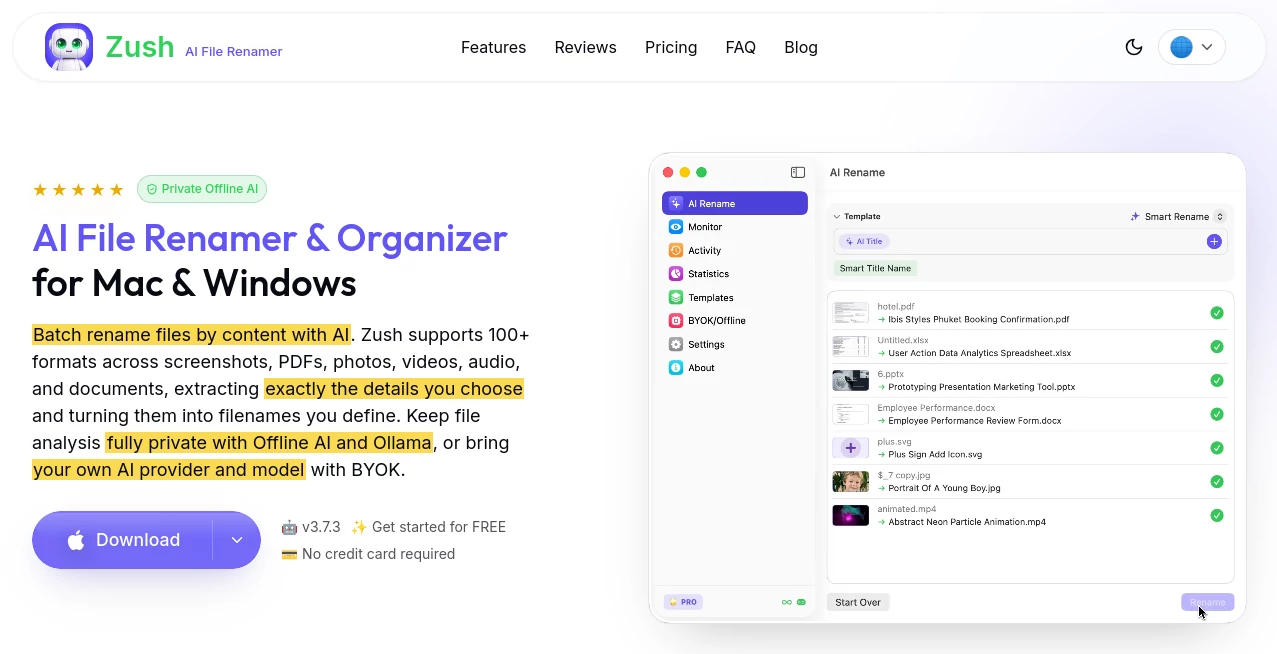
Managing hundreds or thousands of files can quickly become frustrating when screenshots, documents, images, and creative assets are saved with meaningless names like IMG_4829 or Document_Final_v3. Zush brings a smarter approach to digital organization by using artificial intelligence to understand file content and create meaningful, descriptive filenames automatically.
Designed for professionals, creators, and anyone who works with large collections of digital assets, this intelligent file management solution helps transform messy folders into organized libraries that are easier to search, browse, and maintain. Instead of manually renaming every file, users can let AI analyze the content and generate names that actually describe what each file contains.
The tool works across different file types, including images, screenshots, documents, videos, audio files, and design assets. It is especially useful for photographers, designers, researchers, marketers, and business users who spend valuable time organizing digital content.
Key Features
- AI-Powered File Naming: Automatically creates meaningful filenames by analyzing the content and context of files.
- Multi-Format Support: Works with various file formats, including images, documents, videos, audio recordings, and creative files.
- Batch File Processing: Rename multiple files at once instead of handling each file manually.
- Smart Content Understanding: Uses AI vision and language capabilities to identify objects, scenes, text, and file details.
- Folder Monitoring: Automatically processes new files added to selected folders.
- Custom Naming Options: Allows users to create naming preferences and templates.
- Offline AI Mode: Provides privacy-focused processing options for users who prefer local workflows.
- Rename History: Keeps track of previous changes for better file management control.
User Interface
The interface is designed with simplicity in mind. Users do not need technical knowledge to start organizing their files. The workflow feels natural: select files or folders, allow the AI to analyze them, review suggested names, and apply changes.
The clean design makes it suitable for both casual users and professionals who manage large digital libraries. The focus remains on reducing repetitive work without adding unnecessary complexity.
Accuracy & Performance
The strongest advantage of this tool is its ability to understand what a file contains rather than relying only on metadata. For example, instead of keeping a generic screenshot name, it can recognize visible elements and create a more useful description.
Performance is optimized for handling large groups of files, making it practical for users with extensive image collections, project folders, or business documents. The AI-based approach helps create filenames that are easier to find later through search tools.
Capabilities
This solution goes beyond simple renaming. It can analyze visual content, extract important information, and create organized naming structures that match different professional workflows.
- Image and screenshot analysis
- Document content recognition
- Creative asset organization
- Smart metadata generation
- Custom prompts and naming rules
- Support for professional file libraries
Security & Privacy
Privacy is an important consideration when working with personal or professional files. The platform provides privacy-focused options, including offline processing capabilities, helping users maintain greater control over their data.
For professionals handling sensitive documents, private projects, or customer assets, having more control over how files are analyzed can provide additional peace of mind.
Use Cases
This AI file organization assistant can be valuable across many industries and workflows. Some common examples include:
- Photographers: Organize large photo collections with descriptive names instead of random camera-generated filenames.
- Designers: Manage creative assets, references, and project files more efficiently.
- Content Creators: Quickly organize screenshots, videos, thumbnails, and media resources.
- Businesses: Improve document organization and reduce time spent searching for files.
- Researchers: Maintain structured collections of papers, images, and reference materials.
- Legal and Accounting Teams: Make document libraries easier to navigate.
Pros and Cons
Pros
- Reduces manual file organization tasks
- Creates descriptive and searchable filenames
- Supports many file formats
- Useful for both personal and professional workflows
- Includes privacy-focused processing options
- Handles batch renaming efficiently
Cons
- Advanced features may require a paid plan
- AI-generated names may occasionally need user review
- Large file collections may require additional processing time
Pricing Plans
The platform offers flexible pricing options designed for different types of users. A free version is available for users who want to explore the core functionality, while paid plans unlock advanced capabilities.
- Free Plan: Basic file renaming features for everyday organization needs.
- PRO Monthly: Starts at around $8 per month and includes advanced features.
- PRO One-Time: A lifetime purchase option is available for users who prefer a one-time payment.
Paid features include unlimited professional renaming, offline AI mode, custom templates, folder monitoring, smart metadata, and additional workflow tools.
How to Use Zush
- Select the files or folders you want to organize.
- Allow the AI system to analyze the content.
- Review the suggested filenames.
- Customize naming preferences if needed.
- Apply the changes and enjoy a cleaner file structure.
The process is designed to be quick and requires no complicated setup, making it accessible even for users who are not familiar with AI tools.
Comparison with Similar Tools
Traditional file renaming applications usually depend on manual rules, numbering systems, or simple text replacements. While those methods can help with basic tasks, they do not understand the actual content of files.
AI-powered organization provides a more intelligent approach by analyzing what is inside each file and creating names that reflect the information contained within. This makes it especially valuable for users who work with visual assets, documents, and large digital collections.
Compared with standard automation tools, this solution focuses on understanding files rather than simply changing their names, offering a more practical workflow for modern digital environments.
Conclusion
Organizing digital files does not have to be a time-consuming manual process. By combining artificial intelligence with practical file management features, this tool helps users create cleaner folders, improve searchability, and spend less time dealing with repetitive organization tasks.
Whether you are managing thousands of photos, business documents, creative projects, or personal files, an intelligent naming assistant can make your workflow faster and more efficient. It is a useful solution for anyone looking to bring more structure to their digital life.
Frequently Asked Questions (FAQ)
What does this AI file organization tool do?
It analyzes file content and automatically creates descriptive filenames to help users organize and find their digital files more easily.
Which types of files can it rename?
It supports various file categories, including images, screenshots, documents, videos, audio files, and creative project assets.
Can it rename multiple files at the same time?
Yes. The batch processing feature allows users to organize large collections of files efficiently.
Does it support private file processing?
Yes. Privacy-focused options, including offline processing capabilities, are available for users who want more control over their data.
Who can benefit most from this tool?
Photographers, designers, marketers, researchers, businesses, and anyone managing large digital file collections can benefit from automated file organization.