
Claude Watermark
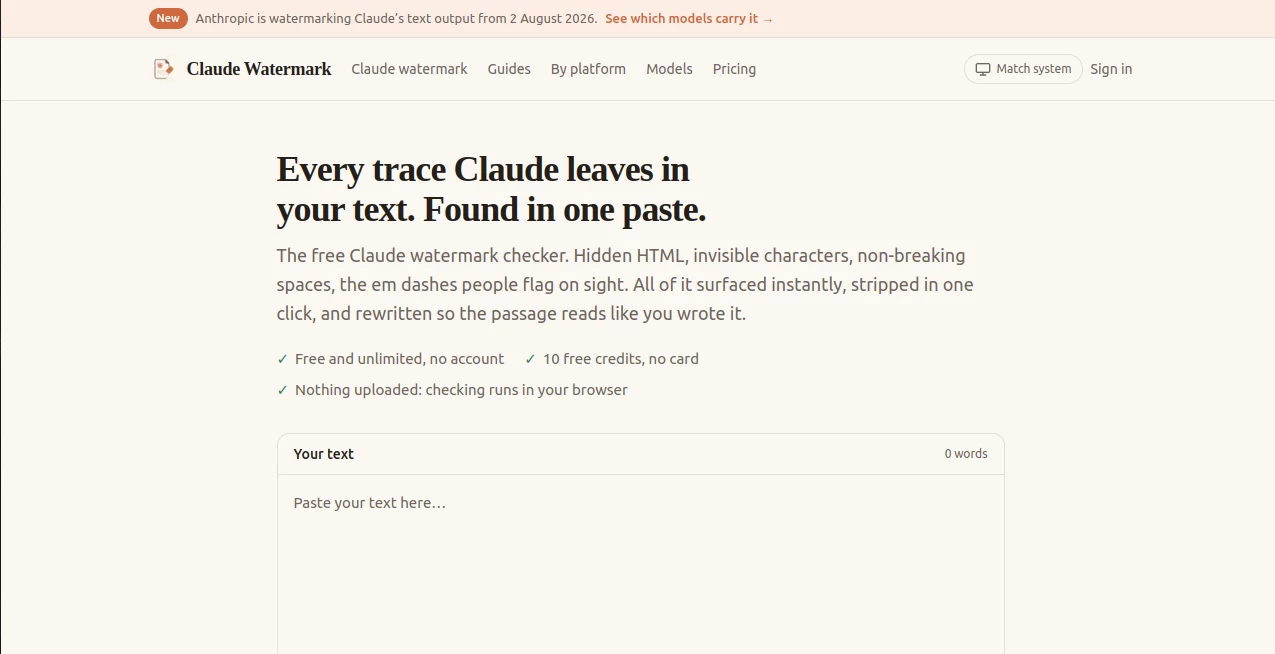
What is Claude Watermark?
Claude Watermark is a browser-based tool designed to inspect text for traces that can appear when content is copied from Claude interfaces and then clean those traces when needed. Instead of relying on a vague probability score, it looks for concrete details such as hidden HTML, invisible Unicode characters, unusual spaces, and other copy-and-paste artifacts.
The service also goes beyond basic checking. After identifying detectable artifacts, users can clean the text with a single click or use a rewriting option that changes sentence rhythm, phrasing, and structure. This makes the workflow useful for writers, editors, developers, students, and anyone moving AI-assisted text between different platforms.
One particularly practical detail is that checking happens directly in the browser. There is no account required for the basic checker, and the site states that text being checked is not uploaded.
Key Features
- Browser-based checking: Text can be inspected directly in the browser without uploading the passage for the checking process.
- Hidden HTML detection: The checker identifies HTML class information that can remain attached to copied text.
- Invisible character detection: Zero-width characters, byte-order marks, non-breaking spaces, and other unusual Unicode characters can be surfaced.
- Style-related signals: The service also highlights patterns such as curly quotes and frequent em dashes while making it clear that these are not proof of AI authorship.
- One-click cleaning: Detected copy-and-paste artifacts can be removed without manually searching through the source.
- Rewrite option: A separate rewriting pass can alter sentence structure, rhythm, and phrasing for users who want a more natural editorial result.
- Instant feedback: Findings appear as text is checked, including counts and positions for deterministic artifacts.
- No-account basic checking: The site offers free and unlimited checking without requiring an account.
User Interface
The interface is deliberately straightforward. The main workspace places the text input at the center, allowing a user to paste a passage and immediately see what has been detected. A word counter makes the size of the passage visible, while the cleaning and rewriting actions are easy to find.
This simple approach is especially useful when the goal is not to learn another complicated editing application. A writer can paste a section, inspect the findings, remove unwanted artifacts, and continue working without leaving the page.
Accuracy & Performance
One of the stronger aspects of the checker is its distinction between evidence and statistical guesswork. An invisible character either exists in the text or it does not. The same applies to specific HTML class information. These findings can therefore be reported with considerably more confidence than a generic AI-generated percentage.
The site also treats stylistic clues more carefully. Curly quotation marks, em dashes, and sentence patterns can occur naturally in human writing, so their presence alone should not be treated as proof that a passage was generated by AI.
Checking is designed to happen instantly as text is entered. The optional rewriting process takes a few seconds for a typical passage, while larger documents are handled according to their length.
Capabilities
The tool covers several different layers of text inspection. At the technical level, it can identify hidden markup and characters that are difficult to see during normal editing. At the editorial level, it can highlight stylistic patterns and provide a rewriting workflow.
It is also built around the reality of modern copy-and-paste workflows. Content may move from an AI chat interface into Google Docs, WordPress, Notion, email, publishing platforms, or other editors. The service provides platform-specific guidance for many of these environments, helping users understand what may survive during that transfer.
Another useful distinction concerns statistical watermarking. The site explains that a true statistical watermark based on word selection cannot simply be confirmed from the text without the required detection key. Rather than presenting an unsupported certainty, it separates detectable copy-and-paste artifacts from claims that cannot currently be independently verified.
Security & Privacy
Privacy is one of the most appealing aspects of the basic checking workflow. According to the website, checking runs entirely inside the user's browser and the text is not uploaded during that process. This means users can inspect a passage without sending the original text to a remote checking server.
The rewriting feature works differently because the passage needs to be processed by the model provider used for that service. The website states that rewritten passages are not retained afterward and are not used for model training.
For sensitive professional material, users should still review the privacy terms of any external processing service before submitting confidential information.
Use Cases
Writers and editors: People who use AI during drafting can inspect copied passages for hidden characters or markup before moving them into a publishing workflow.
Blog and website publishers: Editors working with CMS platforms can clean formatting artifacts before publishing articles, product descriptions, or other long-form material.
Students and researchers: Users can inspect pasted material to understand what technical artifacts exist in the text rather than relying entirely on an AI detection score.
AO3 and community publishing: The tool is particularly relevant for platforms where hidden HTML classes can trigger automated rules or visual detection systems.
Professional communication: Writers moving AI-assisted drafts into email, documentation, collaboration tools, or internal knowledge bases can use the checker as a final cleanup step.
Developers: Anyone working with HTML, Unicode text, or content-processing pipelines can use the deterministic findings to identify characters and markup that are otherwise difficult to spot manually.
Pros and Cons
Pros
- Free and unlimited basic checking.
- No account is required for the checking workflow.
- Checking runs directly in the browser.
- Identifies specific hidden characters and HTML artifacts.
- Shows positions and counts for concrete findings.
- Separates deterministic evidence from uncertain stylistic signals.
- Includes a one-click cleaning workflow.
- Offers rewriting for users who need deeper editorial changes.
- Provides guides for many popular writing and publishing platforms.
Cons
- The basic checker cannot prove whether a statistical watermark exists when the required detection key is unavailable.
- Rewriting is a separate credit-based feature rather than part of unlimited free checking.
- Users handling confidential text should consider the additional privacy implications of the rewriting process.
- Style-based indicators such as punctuation patterns should be interpreted as clues rather than definitive evidence.
Pricing Plans
The basic checking experience is free, unlimited, and does not require an account or payment card. Users who want cleaning and rewriting capabilities receive 10 free credits after signup, with no card required, and the website states that these credits do not expire.
The credit system is based on word count. One credit covers up to 500 words, while a long document can be processed as a single rewriting job according to the site's stated limits. This makes the pricing structure relatively easy to understand for occasional users as well as people working with longer documents.
How to Use the Tool
- Open the checker in a web browser.
- Paste the text you want to inspect into the main text field.
- Review the detected HTML, invisible characters, unusual spaces, and stylistic signals.
- Pay particular attention to deterministic findings because these represent concrete characteristics of the text.
- Use the cleaning function when you want to remove detected copy-and-paste artifacts.
- Use the rewriting option when you want to change sentence structure, rhythm, and phrasing.
- Copy the cleaned or revised passage into your preferred editor or publishing platform.
Comparison with Similar Tools
Traditional AI detectors generally focus on predicting whether writing appears machine-generated. That approach produces a probability or classification and can be difficult to interpret, particularly when the passage is short or has been heavily edited.
This service takes a different starting point. It looks first for tangible characteristics of the text, such as hidden markup and invisible Unicode characters. That makes it closer to a text-inspection and cleanup utility than a conventional AI detector.
The distinction is important. A passage containing an invisible character can be identified directly, while a stylistic pattern can only suggest a possibility. By presenting those categories separately, the tool gives users more useful information about what is actually present in their text.
Conclusion
For anyone who regularly moves AI-assisted writing between chat applications, editors, publishing platforms, and collaboration tools, this checker offers a focused way to inspect what may be hiding inside copied text. Its strongest feature is the emphasis on observable artifacts rather than pretending that every AI-related question can be answered with a simple percentage.
The combination of instant browser-based checking, invisible-character detection, HTML cleanup, platform guidance, and optional rewriting makes it a practical addition to a modern writing workflow. The free checking option also makes it easy to test a passage before deciding whether the additional rewriting features are necessary.
For users who want a clearer picture of what is actually contained in copied text, rather than another black-box AI score, this is a particularly useful tool to keep in the writing toolbox.
Frequently Asked Questions (FAQ)
Is the checker free?
Yes. The website states that checking is free and unlimited, and the basic checking process does not require an account.
Does checking upload my text?
According to the website, checking runs entirely in the browser, so the text is not uploaded during the checking process.
What types of artifacts can it find?
It can identify hidden HTML class information, zero-width characters, byte-order marks, non-breaking spaces, unusual Unicode spaces, and other detectable formatting artifacts.
Can it prove that text has a statistical AI watermark?
No. The site explains that verifying a statistical watermark would require a detection key that is not publicly available. The checker therefore does not claim that it can definitively prove the presence of such a watermark.
Can detected artifacts be removed?
Yes. The cleaning function can remove detected copy-and-paste artifacts, including hidden characters and relevant HTML information.
Does the rewriting feature use AI?
Yes. The rewriting process sends the passage to the site's model provider for processing and changes sentence structure, rhythm, and phrasing.
How many words does one rewriting credit cover?
The website states that one credit covers 500 words. It also notes that a 20,000-word document can be processed as a single job.
Can it be used with publishing platforms?
Yes. The site provides guidance for a wide range of platforms and editors, including WordPress, Google Docs, Notion, Medium, Substack, Microsoft Word, Gmail, LinkedIn, Slack, Discord, and others.
Is it affiliated with Anthropic?
No. The website explicitly states that it is independent and is not affiliated with Anthropic, OpenAI, or Google.
What is the main benefit of using it?
The main benefit is the ability to inspect concrete copy-and-paste artifacts in text and clean them before continuing with an editing, publishing, or communication workflow.
AI Detector , AI Rewriter , AI Content Detector , AI Writing Assistants .
These classifications represent its core capabilities and areas of application. For related tools, explore the linked categories above.
Claude Watermark details
Website unavailable — View Alternatives
Pricing
- Free
Apps
- Web App
Categories

Claude Watermark Alternatives Product

AHelp

Humanio AI

LinkedIn Spe…

YooPrompt

SuperAI

Nano Banana

TranslateAI …

Sudowrite Mu…

Rephrazy