
Clawcraft
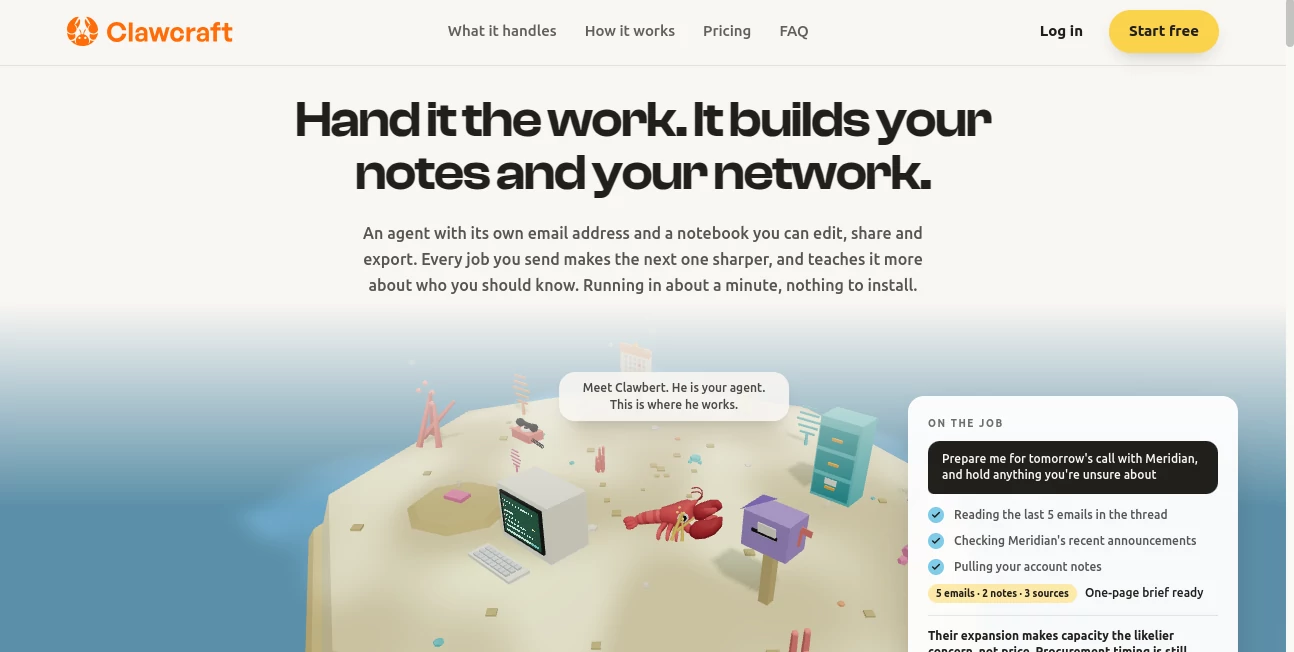
What is Clawcraft?
Clawcraft takes a practical approach to AI agents: instead of asking users to configure servers, install complex software, or build automation from scratch, it provides a managed environment where you can simply talk to an AI agent and give it instructions. The service is designed to handle multi-step workflows, work with connected services, and carry out tasks on your behalf.
The idea is particularly appealing for people who want more from AI than a traditional chat window. Rather than stopping at an answer, the agent can work through a sequence of actions based on what you ask it to do. For example, an instruction involving email, scheduling, files, or other connected services can become an actual workflow instead of just a piece of advice.
Another notable aspect is the straightforward pricing model. The service currently offers a single $19-per-month plan and allows users to start for free, making it relatively easy to test the concept before committing.
Key Features
- Managed AI agent environment without requiring users to maintain their own servers.
- Natural-language interaction for giving instructions and managing tasks.
- Multi-step workflow execution for tasks that involve several actions.
- Connections to third-party services such as email, calendars, productivity applications, and other supported integrations.
- Automatic routing of individual tasks to appropriate AI models.
- Email automation based on rules and instructions provided by the user.
- Isolated environments designed to keep customer workloads separated.
- A simple flat-rate subscription rather than complicated usage-based pricing.
User Interface
The biggest advantage of the interface is its conversational approach. Instead of learning a complicated automation builder, users can communicate with the agent in much the same way they would explain a task to another person.
This can make the experience considerably more approachable for someone who understands the desired outcome but does not want to spend an afternoon connecting nodes, writing scripts, or configuring a server. The underlying complexity stays behind the scenes while the user focuses on what needs to be done.
Accuracy & Performance
Performance depends on the task, the connected services, and the AI models involved. The platform is designed to route different steps to suitable models, which can help avoid using an unnecessarily expensive or powerful model for every operation.
For workflow-based tasks, this approach makes sense. A simple classification or transformation does not necessarily require the same model as a complex reasoning task. The platform handles that routing as part of its managed agent infrastructure, allowing users to concentrate on the result rather than model selection.
Capabilities
The agent is built around completing actions rather than merely generating text. It can work with information from connected services and, when authorized, read, process, modify, send, or delete data according to the instructions it receives.
This opens the door to practical workflows such as handling incoming email, working with calendar information, organizing information from connected applications, processing documents and files, or combining several actions into one larger task.
For example, a user could describe a recurring administrative task in ordinary language instead of manually performing every step. That difference is where the platform becomes more interesting than a conventional chatbot.
Security & Privacy
Privacy is treated as an important part of the platform. Customer content is not used to train AI models, according to the company's privacy policy. Connected-service credentials are stored securely and are used to maintain authorized integrations.
The service also uses encryption in transit and at rest for sensitive information, access controls, security monitoring, and per-tenant environment isolation. Its primary infrastructure is hosted in the Montreal region.
There is an important consideration for businesses: once an external service is connected, the AI agent may have access to the information available through that connection. Users therefore remain responsible for granting appropriate permissions and making sure their workflows comply with applicable privacy requirements.
Use Cases
The platform is best suited to tasks where several small actions need to happen together. Email management is one obvious example, particularly for users who regularly need to process, organize, or respond to messages according to predefined instructions.
It can also be useful for scheduling and calendar-related workflows, handling information from connected productivity services, processing files and documents, and automating repetitive administrative work.
Small teams may find the approach especially useful when they want an AI assistant capable of taking action without having to build and maintain an internal automation system. Individual professionals can also use it for recurring personal workflows that would otherwise consume time every week.
A good rule of thumb is simple: if a task can be described as a sequence of actions and those actions involve services the agent can access, it may be a good candidate for automation.
Pros and Cons
Pros
- No need to manage your own AI-agent server infrastructure.
- Natural conversational interaction makes automation easier to approach.
- Supports multi-step workflows rather than only question-and-answer interactions.
- Can connect with external services and work with their data when authorized.
- Customer content is not used to train AI models.
- Simple $19 monthly pricing makes the service easy to evaluate.
- Model routing can help match different tasks with suitable AI models.
Cons
- Advanced workflows depend on the availability and capabilities of supported integrations.
- Connecting an AI agent to sensitive services requires careful permission management.
- Users who need complete control over their own infrastructure may prefer a self-hosted solution.
- AI-driven workflows can still require monitoring, especially when they are allowed to modify or send information automatically.
Pricing Plans
The current pricing model is refreshingly simple. The platform offers one flat subscription at $19 per month, with the option to start for free before becoming a paying subscriber.
There are no complicated tiers presented on the main product page, which makes the service easier to understand for someone who simply wants to know what it will cost to use a managed AI agent. For individuals and small teams experimenting with automation, the single-plan approach is a welcome alternative to pricing structures that become difficult to calculate as usage grows.
How to Use the AI Agent
Getting started is designed to be straightforward. Create an account and access the managed agent environment rather than setting up your own server or runtime.
- Sign up and enter the agent environment.
- Connect the services you want the agent to work with.
- Provide clear instructions describing the task or workflow you want completed.
- Review the permissions and connected services involved in the workflow.
- Let the agent perform the requested steps.
- Monitor the results, particularly when a workflow has permission to send, modify, or delete information.
For the best results, instructions should be specific. Instead of saying “handle my email,” explain what should happen, which messages matter, what conditions should be checked, and what action should follow. Clear instructions give an agent a much better foundation for completing a workflow reliably.
Comparison with Similar Tools
Traditional chatbots are excellent at answering questions and generating content, but they generally stop once the response has been produced. Conventional automation platforms, on the other hand, can perform actions but often require users to manually design workflows and configure individual steps.
This service sits somewhere between those two approaches. Its emphasis is on an AI agent that can understand natural-language instructions and turn them into multi-step actions while the infrastructure is managed for the user.
That makes it particularly interesting for people who want the flexibility of AI-driven automation without the technical overhead associated with operating an agent environment themselves.
Conclusion
Clawcraft presents a compelling vision for practical AI automation: tell an agent what you need, connect the services it is allowed to use, and let the managed infrastructure handle the technical side.
Its strongest appeal is simplicity. There is no requirement to operate your own server, and users do not have to become workflow engineers just to automate everyday tasks. The combination of conversational instructions, multi-step workflows, connected services, privacy controls, and a straightforward $19 monthly price makes it worth considering for professionals and teams looking for a more hands-on form of AI assistance.
It is not a replacement for careful workflow design or responsible permission management, particularly when sensitive information is involved. Used thoughtfully, however, it can turn repetitive digital work into something much closer to a conversation: explain the outcome, provide the necessary access, and let the agent handle the steps.
Frequently Asked Questions (FAQ)
What is this AI agent platform?
It is a managed AI-agent service that lets users interact with an AI agent through natural-language instructions. The agent can perform multi-step tasks and interact with connected services when appropriate permissions are provided.
Do I need my own server?
No. The platform provides a managed environment, so users do not need to install or operate their own agent server infrastructure.
Can the agent work with email?
Yes. Email is one of the supported use cases, and the platform can use authorized email connections as part of automated workflows.
Can it connect to other applications?
Yes. The service is designed to connect with third-party applications such as email, calendars, productivity tools, and other supported services.
Is customer content used to train AI models?
According to the privacy policy, customer content, including data obtained from connected services, is not used to train AI models or for purposes beyond providing the service.
How much does it cost?
The current advertised subscription is $19 per month, and users can start for free.
Is it suitable for business workflows?
It can be useful for businesses that need to automate repetitive administrative tasks, particularly workflows involving email, scheduling, files, documents, and connected productivity services. Businesses should carefully review permissions and privacy requirements before connecting sensitive systems.
Can the agent modify or send information?
Yes. When authorized, AI agents can read, process, modify, send, and delete data from connected services. Because these actions can have real consequences, permissions and workflow instructions should be configured carefully.
AI Workflow Management , AI Productivity Tools , AI Email Assistant , AI Scheduling .
These classifications represent its core capabilities and areas of application. For related tools, explore the linked categories above.

Clawcraft Alternatives Product

Tate-A-Tate

Magpie

VercelAPP

WhatIsThisMo…

Sendmux

ace.me

Nano Banana

LLaMaRush

Sourcetable