

















ClawOneClick
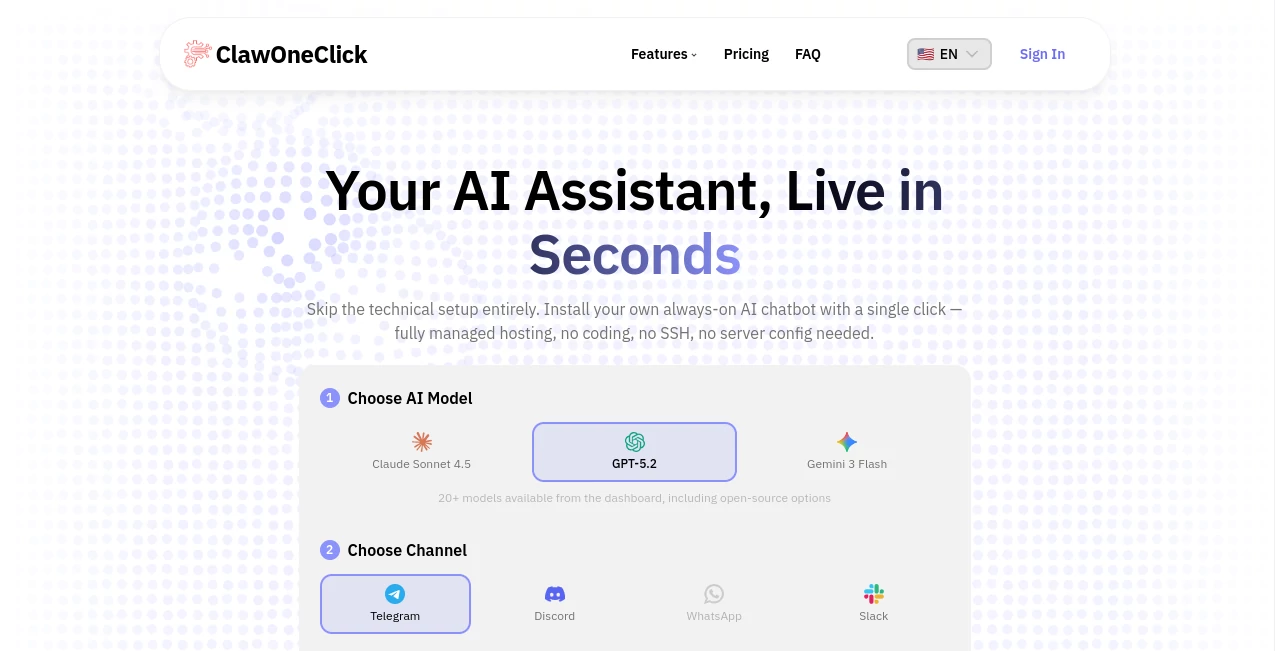
What is ClawOneClick?
Launching a personal AI assistant usually involves server configuration, cloud deployment, API integrations, and a long list of technical steps that can discourage even experienced users. This platform takes a completely different approach by removing the complexity and allowing anyone to deploy a fully functional AI assistant in less than a minute.
Designed for creators, entrepreneurs, teams, and professionals, the solution provides a streamlined deployment experience that requires no coding knowledge, no server management, and no DevOps expertise. Users can select an AI model, connect a preferred communication channel, and have an intelligent assistant ready to work almost immediately.
What makes the platform particularly appealing is its focus on accessibility. Instead of spending hours configuring infrastructure, users can concentrate on productivity, automation, customer interactions, content creation, research, and daily workflows.
Key Features
User Interface
The dashboard is clean, intuitive, and designed for simplicity. Every step of the deployment process is presented in a logical sequence, making it easy for first-time users to get started. AI model selection, communication channel setup, and deployment options are organized in a straightforward workflow that minimizes confusion.
Even users with no technical background can navigate the platform comfortably. The onboarding experience feels more like setting up a modern app than configuring enterprise software.
Accuracy & Performance
The platform supports a wide range of advanced AI models, giving users flexibility to choose the engine that best matches their needs. Whether the goal is content generation, document analysis, customer communication, coding assistance, or productivity enhancement, users can access powerful language models through a single interface.
Cloud-hosted infrastructure helps maintain reliability and consistent performance while reducing the risk of downtime often associated with self-managed deployments.
Capabilities
The assistant can handle a broad variety of tasks across personal and professional workflows.
- Content drafting and editing
- Email summarization and response generation
- Research assistance and information gathering
- Document analysis and summarization
- Customer support automation
- Meeting reminders and productivity management
- Translation and proofreading
- Creative brainstorming and idea generation
- Code explanation and technical assistance
- Workflow automation across communication channels
The ability to connect assistants to platforms such as Telegram, Discord, WhatsApp, and Slack makes the solution highly flexible for both individuals and organizations.
Security & Privacy
Security is built into the deployment process. Managed cloud infrastructure, secure connections, and encrypted communication help reduce the operational risks commonly associated with self-hosted solutions.
Organizations that require additional control can benefit from advanced deployment options designed for larger teams and business environments. This balance between simplicity and security is one of the platform’s strongest advantages.
Use Cases
- Deploying AI assistants for customer support teams.
- Creating personal productivity assistants for daily task management.
- Automating communication through messaging platforms.
- Providing instant research and knowledge support.
- Generating content and marketing materials faster.
- Supporting software development and debugging workflows.
- Managing business operations with AI-powered automation.
- Assisting remote teams with collaboration and information sharing.
Pros and Cons
Pros
- Extremely fast deployment process.
- No coding or server administration required.
- Supports multiple leading AI models.
- Works across popular communication channels.
- Managed cloud hosting reduces maintenance effort.
- Suitable for both individuals and teams.
- Persistent memory capabilities enhance user experience.
Cons
- Advanced customization may be more limited compared to fully self-hosted solutions.
- Subscription costs may not fit every hobby project.
- Internet connectivity is required for access and management.
Pricing Plans
The platform offers several pricing tiers designed for different types of users.
- Starter Plan: Ideal for individual users who need a single AI assistant deployment with managed hosting and model access.
- Pro Plan: Suitable for growing teams requiring multiple assistants, additional resources, and priority support.
- Enterprise Plan: Built for organizations that need unlimited deployments, dedicated infrastructure, monitoring tools, and advanced administrative controls.
Each plan includes access to multiple AI models, cloud hosting, and communication channel integrations.
How to Use ClawOneClick
Getting started is remarkably simple.
- Choose an AI model from the available options.
- Select a communication channel such as Telegram, Discord, WhatsApp, or Slack.
- Connect the chosen platform.
- Create an account or sign in.
- Launch the assistant with a single deployment action.
- Begin interacting with the AI assistant immediately.
The entire process is designed to be completed within minutes, making it accessible even for users with no technical experience.
Comparison with Similar Tools
Many AI deployment platforms require users to rent servers, configure environments, manage API credentials, install dependencies, and maintain infrastructure over time. This platform focuses on eliminating those barriers.
Compared to traditional self-hosted solutions, the deployment process is dramatically faster and easier. Users can focus on utilizing AI rather than building the technical foundation required to run it.
For businesses and creators seeking speed, convenience, and managed hosting, it offers a compelling alternative to more complicated deployment frameworks.
Conclusion
For anyone interested in deploying a powerful AI assistant without dealing with infrastructure management, this platform delivers a refreshing experience. The combination of one-click deployment, multi-model support, messaging platform integration, and managed hosting creates a practical solution for modern AI adoption.
Whether you are a solo creator looking to improve productivity, a developer seeking faster deployment, or a business aiming to automate communication, the platform provides a straightforward path from idea to implementation. Its emphasis on simplicity, reliability, and accessibility makes it a valuable addition to the growing ecosystem of AI-powered productivity tools.
Frequently Asked Questions (FAQ)
What is the primary purpose of this platform?
It enables users to deploy and manage AI assistants quickly without requiring coding skills or server administration knowledge.
Which communication channels are supported?
Users can connect assistants to popular platforms including Telegram, Discord, WhatsApp, and Slack.
Do I need technical experience to use it?
No. The platform is specifically designed to simplify deployment for non-technical users.
Can businesses use it for customer support?
Yes. The assistant can automate customer interactions, answer questions, and improve response efficiency.
Does it support multiple AI models?
Yes. Users can choose from numerous AI models depending on their workflow requirements and preferences.
Is cloud hosting included?
Yes. Managed cloud hosting is included, removing the need for users to maintain servers themselves.
AI Workflow Management , AI Productivity Tools , AI Team Collaboration , AI Chatbot .
These classifications represent its core capabilities and areas of application. For related tools, explore the linked categories above.

ClawOneClick Alternatives Product

Sourcetable

ChatFlowchart
SalaryHow
ClearWork

Free Email V…
Arobis AI Vi…

Presenti AI
AthenaChat
Dewy Chat
