
ClipBG
What is ClipBG?
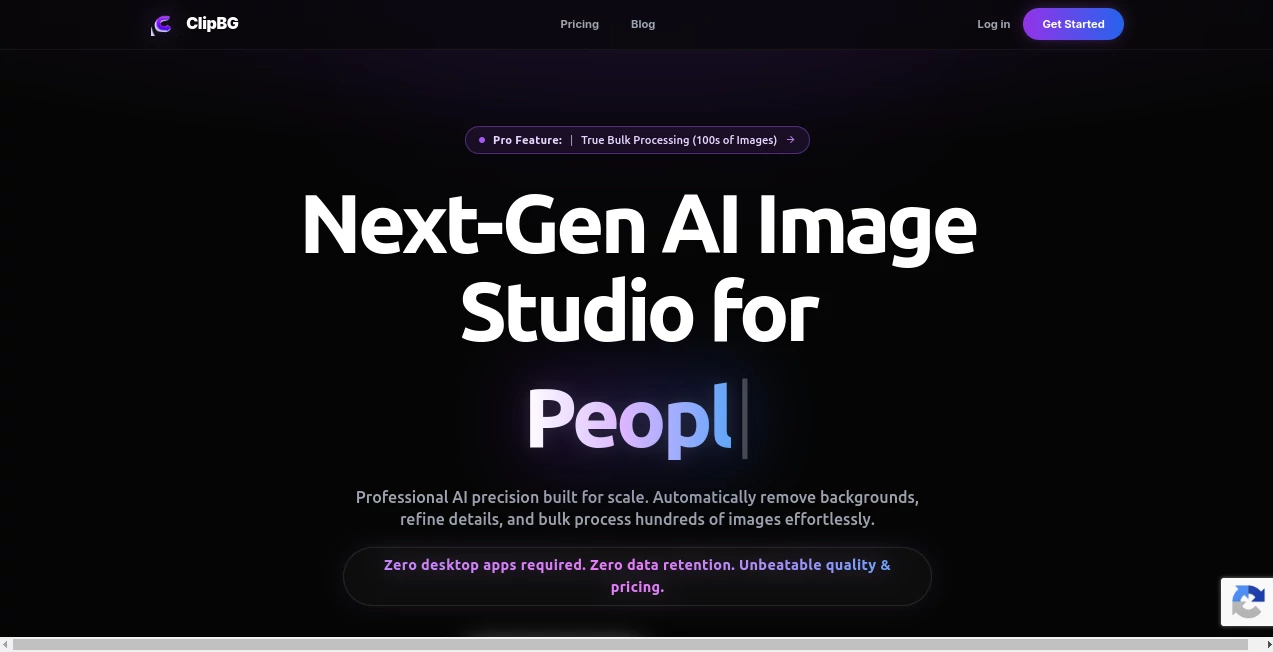
Creating clean, professional-looking images used to require advanced editing skills and expensive desktop software. Today, modern AI has transformed that process into something anyone can accomplish within seconds. This platform delivers an impressive browser-based experience that removes image backgrounds with remarkable precision while providing additional editing tools for creators, online sellers, marketers, and professional designers.
Instead of limiting users to simple background removal, it offers a complete image editing workflow. From refining complex edges and resizing canvases to batch processing hundreds of files, the platform is designed to eliminate repetitive work while maintaining professional-quality output. Whether you're preparing product photos for an online store or creating graphics for social media campaigns, the workflow feels fast, polished, and surprisingly enjoyable.
One aspect that immediately stands out is the attention given to commercial users. Bulk automation, image enhancement, and preset export options help businesses process large image collections efficiently without sacrificing consistency. At the same time, beginners can upload a single photo and receive excellent results with virtually no learning curve.
Key Features
User Interface
The interface is refreshingly simple. Uploading images requires only a few clicks, while editing controls remain clean and easy to understand. Users can switch between automatic processing and manual refinement without feeling overwhelmed. Since everything runs directly in the browser, there is no software installation or complicated setup required.
Preset layouts for marketplaces, social media platforms, and print-on-demand products make it especially convenient for creators who frequently prepare images for multiple destinations.
Accuracy & Performance
The AI performs exceptionally well with challenging image elements such as hair, transparent objects, fur, soft shadows, and detailed edges. Rather than producing harsh cutouts, it preserves natural contours that require little or no manual correction.
Batch processing significantly improves productivity by allowing hundreds of images to be edited in a single workflow. The addition of HD upscaling and refinement tools further improves image quality for commercial use.
Capabilities
- Automatic AI background removal
- Bulk processing for large image collections
- Magic eraser for removing unwanted objects
- Background replacement
- Canvas resizing for multiple platforms
- Drop shadow generation
- High-resolution image upscaling
- Professional transparent PNG export
- Image refinement after automatic processing
- Commercial-ready workflow for online businesses
Security & Privacy
Privacy receives serious attention. Uploaded files are encrypted during processing and are automatically deleted after a short retention period instead of being permanently stored. The platform also states that customer images are not used for AI model training without explicit permission, making it an appealing choice for businesses handling sensitive visual assets.
Use Cases
- Creating professional e-commerce product images.
- Preparing transparent PNG files for graphic design projects.
- Generating clean product listings for online marketplaces.
- Designing social media marketing materials.
- Producing print-on-demand artwork.
- Editing large photography collections in bulk.
- Improving marketing visuals for agencies.
- Accelerating creative workflows for freelance designers.
Pros and Cons
Pros
- Very accurate background removal.
- Excellent handling of difficult edges like hair and glass.
- Powerful bulk editing capabilities.
- No desktop software installation required.
- Built-in image enhancement tools.
- Privacy-focused image processing.
- Fast cloud-based performance.
- Suitable for both beginners and professionals.
Cons
- Advanced features require paid credits.
- Internet connection is required.
- Manual refinement may still be necessary for highly complex images.
Pricing Plans
The service provides a free starting option that allows users to test its AI capabilities with previews before purchasing credits. Paid plans unlock HD downloads, larger processing limits, bulk editing, and additional professional features. Credit rollover is also available for active subscriptions, making it a flexible solution for businesses with varying workloads.
How to Use ClipBG
Upload one or multiple images directly through the browser. The AI automatically removes backgrounds and generates clean cutouts within seconds. Users can then refine edges, erase unwanted objects, replace backgrounds, resize canvases, apply shadows, or upscale image quality before exporting the final result in high resolution.
For businesses handling hundreds of product photos, batch mode dramatically reduces editing time while maintaining consistent visual quality across every image.
Comparison with Similar Tools
Many background removal solutions focus on a single task and require additional software for resizing, enhancement, or large-scale processing. This platform combines those capabilities into one streamlined workflow. Its combination of AI precision, browser-based editing, bulk automation, HD enhancement, and commercial-friendly features makes it particularly attractive for e-commerce businesses, creative agencies, and professional content creators who value both speed and consistency.
Conclusion
This platform goes well beyond simple background removal by delivering a complete AI-powered image editing workspace. Its thoughtful workflow, excellent cutout quality, business-oriented automation, and strong privacy practices make it a dependable choice for individuals and organizations alike. Whether you're editing a single portrait or processing hundreds of commercial product photos, the experience remains smooth, efficient, and consistently professional.
Frequently Asked Questions (FAQ)
Is the platform suitable for beginners?
Yes. The interface is intuitive enough for first-time users while still offering advanced editing features for professionals.
Can multiple images be processed at once?
Yes. Bulk processing allows users to edit hundreds of images in a single workflow.
Does it support transparent PNG exports?
Yes. Images can be exported with transparent backgrounds for use in design, e-commerce, and marketing projects.
Are uploaded images kept permanently?
No. Uploaded files are automatically removed after processing, and customer content is not used for AI model training without permission.
Who benefits most from this platform?
Online retailers, photographers, graphic designers, digital marketers, agencies, and content creators can all benefit from its automated editing workflow.
AI Photo & Image Generator , Photo & Image Editor , AI Background Remover , AI Image to Image .
These classifications represent its core capabilities and areas of application. For related tools, explore the linked categories above.

ClipBG Alternatives Product

NanoBanana2

AI Interior …

Removebg one

Nano Banana …

Remove text …

Klyra AI
remove bg vi…

Picnana

Nano Banana …