
ClipFinder
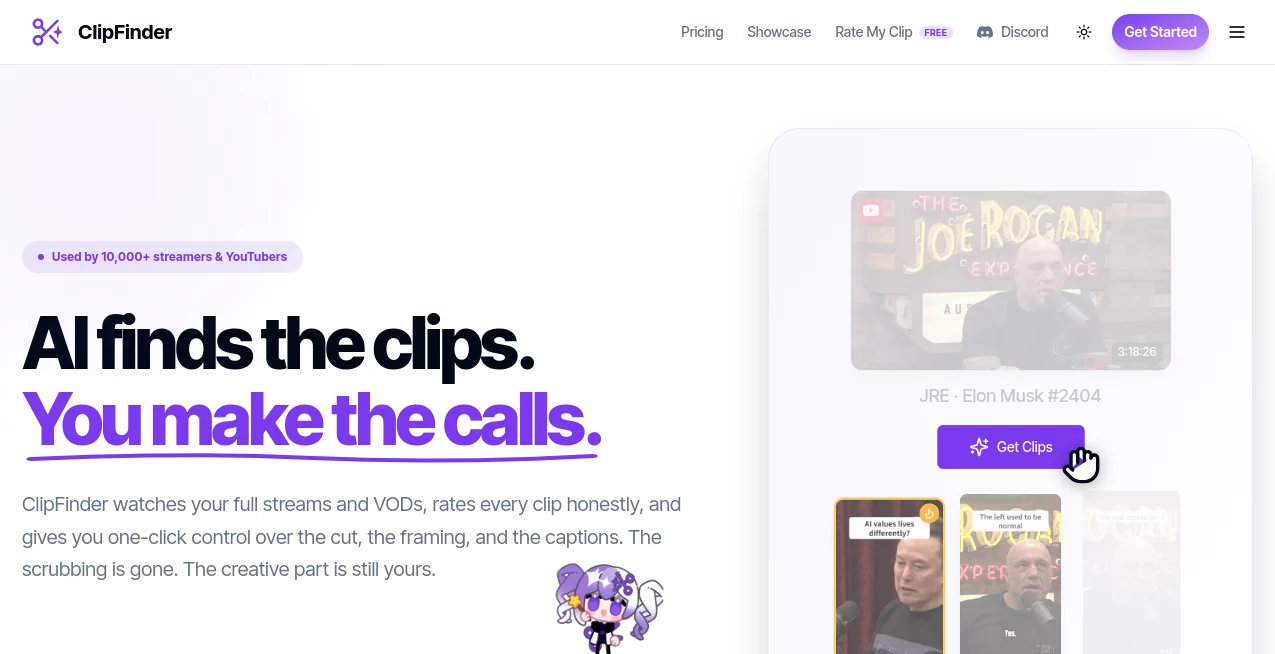
What is ClipFinder?
Finding memorable moments inside long-form videos can be surprisingly time-consuming. Whether you're working with podcasts, interviews, livestreams, webinars, or educational recordings, manually scrubbing through hours of footage quickly becomes frustrating. This platform changes that experience by using artificial intelligence to identify the most valuable segments within minutes, allowing creators to focus on publishing instead of editing.
Instead of relying on manual timestamps, the AI analyzes spoken content and video context to surface meaningful highlights. Users simply paste a supported video link, let the system process the content, and receive ready-to-review clips that can be previewed, trimmed, and exported. This streamlined workflow is especially valuable for content creators who publish consistently across YouTube, TikTok, Instagram Reels, and other short-form platforms.
For anyone producing educational videos, business presentations, podcasts, or marketing content, the platform offers an efficient way to transform long recordings into engaging clips without requiring professional editing skills.
Key Features
User Interface
The interface is refreshingly simple. Rather than overwhelming users with complex editing timelines, it focuses on a clean workflow: submit a video, wait for AI analysis, preview suggested moments, and fine-tune the final selection. Even first-time users can navigate the process comfortably without watching tutorials.
Accuracy & Performance
The AI analyzes both speech and contextual information to detect moments that are likely to attract viewers. Instead of randomly splitting videos into equal sections, it identifies complete conversations, memorable statements, educational explanations, and impactful reactions. Processing is considerably faster than manually reviewing long recordings, making it practical for creators who publish frequently.
Capabilities
- AI-powered video highlight detection.
- Automatic extraction of engaging clips.
- Support for long-form videos such as podcasts and interviews.
- Preview clips before exporting.
- Trim extracted clips with minimal effort.
- Reduce hours of manual editing.
- Create content suitable for short-form social media.
- Simple link-based workflow.
- Fast AI analysis.
- Ideal for recurring content production.
Security & Privacy
The service processes submitted videos through a cloud-based workflow while maintaining encrypted website connections. Users should always review the platform's privacy policy before uploading sensitive or confidential content, especially when working with private business recordings.
Use Cases
- Turning podcast episodes into social media clips.
- Creating YouTube Shorts from long videos.
- Repurposing livestream recordings.
- Producing marketing snippets for promotional campaigns.
- Highlighting educational lessons for students.
- Extracting memorable moments from interviews.
- Building engaging content for Instagram Reels.
- Sharing webinar highlights with potential customers.
Pros and Cons
Pros
- Very easy for beginners.
- Significantly reduces manual editing time.
- AI identifies meaningful moments instead of random timestamps.
- Useful for multiple types of long-form content.
- Designed for creators who publish frequently.
Cons
- Results may still benefit from a final human review.
- Cloud processing depends on internet connectivity.
- Advanced professional editing features remain outside its primary focus.
Pricing Plans
The platform offers online access, while available plans and usage limits may change over time. Visitors should review the official pricing page for the latest subscription options, available credits, and premium features before choosing a plan.
How to Use ClipFinder
Start by copying the URL of a supported video and submitting it to the platform. The AI analyzes the recording and identifies moments worth highlighting. Once processing is complete, review the suggested clips, preview each segment, trim where necessary, and export the selections for publishing on your preferred social media channels or video platforms.
Comparison with Similar Tools
Many AI video editors concentrate on complete video production, requiring users to learn complicated editing interfaces. This solution takes a more focused approach by specializing in discovering valuable moments inside existing videos. That specialization makes it especially appealing to podcasters, educators, interview hosts, marketers, and creators who consistently transform long-form content into shorter, shareable formats.
Conclusion
Repurposing long videos no longer needs to consume hours of manual work. With intelligent clip detection, an intuitive workflow, and practical tools for reviewing and trimming highlights, this platform helps creators publish more content in less time. Anyone looking to maximize the value of podcasts, interviews, webinars, or livestreams will appreciate how efficiently AI can uncover the moments audiences are most likely to watch and share.
Frequently Asked Questions (FAQ)
What types of videos can be analyzed?
It is designed for long-form content including podcasts, interviews, webinars, educational videos, and livestreams.
Does it automatically find interesting moments?
Yes. Artificial intelligence analyzes the content and suggests clips that appear to contain valuable or engaging moments.
Can clips be adjusted before exporting?
Yes. Users can preview generated highlights and trim them before saving or downloading.
Who benefits the most from this platform?
Content creators, marketers, educators, podcasters, agencies, and businesses that regularly publish video content.
Does it require professional video editing experience?
No. The workflow is designed to be beginner-friendly while still offering enough flexibility for experienced creators.
AI Video Generator , AI Video Editor , AI Short Clips Generator , AI YouTube Assistant .
These classifications represent its core capabilities and areas of application. For related tools, explore the linked categories above.

ClipFinder Alternatives Product

seedream 5

VO4 AI

Pixelied

Kling 3.0

seedance 2

Happy Horse

vizstudio

brainrotkit

Kling-4 Vide…