
ClipFlare
What is ClipFlare?
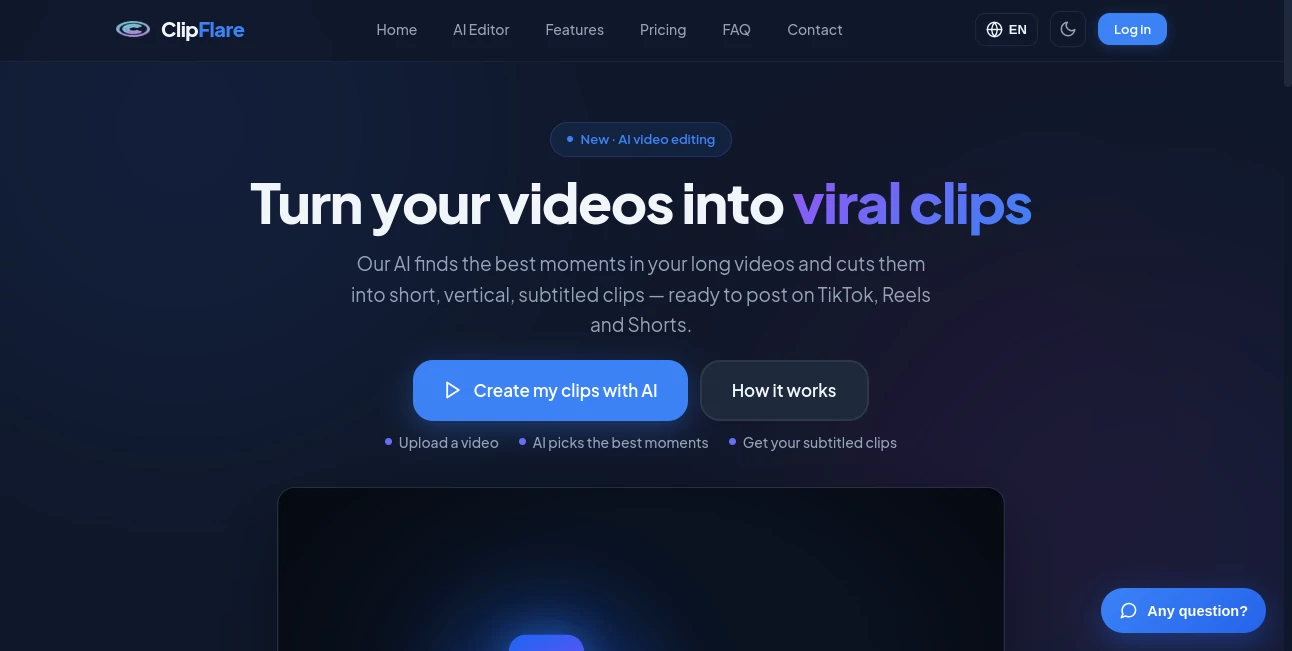
ClipFlare is an AI-powered video editing platform built for creators who want to get more content from the videos they already have. Instead of spending hours watching a podcast, interview, livestream, vlog, or other long recording to find usable moments, the platform analyzes the footage and turns the strongest sections into short, vertical clips.
The idea is particularly useful for anyone trying to maintain a consistent presence across TikTok, Instagram Reels, YouTube Shorts, Facebook, or other social platforms. A single long recording can become several pieces of short-form content, complete with subtitles, titles, captions, and social-friendly formatting.
What makes the workflow appealing is its simplicity. Upload a video or paste a supported video link, let the AI analyze the material, and review the resulting clips. For creators who regularly publish short-form content, this can remove one of the most repetitive parts of the production process.
Key Features
- AI-powered extraction of strong moments from long videos
- Automatic creation of short vertical clips in a 9:16 format
- Animated embedded subtitles
- Automatic titles and captions adapted to the source video
- Support for YouTube, TikTok, Instagram, Vimeo, and uploaded video files
- Support for MP4, MOV, MKV, and WEBM uploads
- Video output up to 4K on supported plans
- Direct publishing and scheduling for connected social accounts
- Multilingual subtitles and AI dubbing on higher plans
- AI-generated B-roll and analytics on the Pro plan
- Brand kits for maintaining a consistent visual identity
- API access on the highest subscription tier
User Interface
The workflow is designed around a straightforward three-step process: import the source, let the AI identify promising moments, and receive finished clips. This is a sensible approach for creators who do not want to learn a complicated editing interface before they can produce their first short.
Users can paste a supported video link or upload their own footage. Once processing is complete, the resulting vertical clips can be reviewed before being downloaded or published. The emphasis is clearly on reducing the number of manual decisions required during editing.
Accuracy & Performance
The platform focuses on identifying the most interesting sections of longer recordings rather than simply cutting a video into arbitrary pieces. It can analyze podcasts, interviews, vlogs, livestreams, and other types of footage before selecting moments based on the requested clip quantity and duration.
This approach can be especially useful when a recording contains several conversations or topics. Instead of manually scrubbing through an hour-long file, a creator can start with AI-selected highlights and spend their time refining the clips that actually deserve to be published.
Performance will naturally depend on the source material, video length, and selected output settings. Higher-tier subscriptions also provide priority processing and higher-quality output, making them more suitable for users producing content at scale.
Capabilities
The feature set goes beyond basic automatic clipping. Generated videos can use the 9:16 vertical format, animated subtitles, adapted titles, and captions. Paid plans add more advanced reframing and subtitle controls, multilingual subtitles, direct publishing, and brand kits.
The Pro plan takes the workflow further with AI dubbing in multiple languages, AI-generated B-roll, intelligent scheduling, analytics, and API access. That makes the service interesting not only for individual creators but also for teams and businesses managing larger volumes of social content.
Another practical detail is its support for several common input formats, including MP4, MOV, MKV, and WEBM. Users can also work from links to supported platforms rather than downloading every source file first.
Security & Privacy
The service states that it collects the information needed to operate accounts, process uploaded content, manage billing, and provide its publishing features. Connected social accounts use access tokens rather than requiring users to provide their social-media passwords.
Publishing is also user-controlled. A connected account is not automatically used for every publication; users select the account and decide whether content should be published immediately or scheduled. The privacy policy states that personal data is not sold and that connected social tokens can be removed by disconnecting an account.
Use Cases
Podcasters can use the platform to turn long episodes into a collection of short highlights for social promotion. This is one of the most obvious applications because a single conversation may contain dozens of moments that work well as independent clips.
Content creators can also use it for interviews, educational videos, livestreams, and vlogs. Rather than treating each long video as a single piece of content, they can turn it into a series of shorter posts and build a more consistent publishing schedule.
Marketing teams can benefit from the same workflow. A webinar, product presentation, customer interview, or recorded event can provide material for multiple social posts without requiring an editor to manually create every version.
For multilingual audiences, the higher plans add another useful layer. AI dubbing and multilingual subtitles can help adapt existing footage for viewers who speak different languages, potentially extending the useful life of a single recording.
Pros and Cons
- Pros: Quickly converts long-form footage into short vertical clips.
- Pros: Supports several popular social platforms and common video formats.
- Pros: Automatic subtitles, captions, titles, and vertical reframing reduce editing work.
- Pros: Higher plans include scheduling, analytics, dubbing, B-roll, brand kits, and API access.
- Pros: A free option provides daily credits for testing the workflow.
- Cons: The free plan includes watermarked output and standard quality.
- Cons: Advanced features require a paid subscription.
- Cons: AI-selected highlights may still need human review before publishing.
Pricing Plans
The pricing structure is based on monthly clip credits called coins, with one generated clip using one coin. A free plan provides 3 coins per day and includes standard-quality output with a watermark.
The Starter plan costs EUR 11.99 per month, or EUR 119 annually, and includes 150 coins per month, HD quality, watermark-free clips, all supported platforms, one brand kit, and basic virality scores.
The Creator plan costs EUR 22.99 per month, or EUR 229 annually. It provides 500 coins per month, output up to 4K, advanced subtitles and reframing, full virality scores, direct publishing, five brand kits, and multilingual subtitles.
The Pro plan is EUR 32.99 per month, or EUR 329 annually. It adds priority processing, 1,500 coins per month, multilingual AI dubbing, AI B-roll, intelligent scheduling and analytics, 15 brand kits, and API access.
For occasional users, individual coin packs are also available. The listed packs include 50 coins for EUR 5.99, 150 coins for EUR 14.99, and 500 coins for EUR 29.99. This gives users another option when a recurring subscription does not make sense for their publishing schedule.
How to Use ClipFlare
Start by uploading a video or pasting a supported video link. The service accepts common formats such as MP4, MOV, MKV, and WEBM, while supported online sources include YouTube, TikTok, Instagram, and Vimeo.
Next, allow the AI to analyze the recording and identify promising moments. You can specify the number and duration of the clips you want, making it easier to tailor the output to your content strategy.
Once the clips are generated, review the selections and check the subtitles, framing, titles, and captions. If everything looks good, download the finished videos or connect the appropriate social account and publish them immediately or schedule them for later.
Comparison with Similar Tools
There are several AI video clipping platforms designed around the same general problem: converting long-form recordings into short social videos. Many of them focus heavily on finding highlights from spoken content, particularly podcasts and interviews.
This platform takes a broader publishing-oriented approach by combining clipping with subtitles, social scheduling, direct publishing, brand kits, multilingual features, AI dubbing, analytics, and API access. That makes the overall workflow more interesting for users who want to go beyond simply generating a few Shorts.
For a creator who only needs occasional highlight extraction, a simpler editor may be enough. However, someone building a repeatable short-form content operation may find the combination of editing and distribution features more convenient because fewer separate tools are required.
Conclusion
Turning long videos into useful short-form content can be surprisingly time-consuming. The real advantage of an automated workflow is not simply cutting footage faster; it is making the process repeatable enough that creators can publish consistently without turning every video into a lengthy editing project.
With automatic highlight selection, vertical formatting, subtitles, captions, social publishing, scheduling, and increasingly advanced features on its paid plans, this platform offers a practical solution for creators and businesses working with a steady stream of video content.
The free daily credits also make it easy to test the basic workflow before committing to a subscription. For anyone sitting on hours of podcasts, interviews, livestreams, or other long recordings, it is a compelling way to discover how much more content can be extracted from material they have already created.
Frequently Asked Questions (FAQ)
What type of videos can I use?
You can work with long-form content such as podcasts, vlogs, livestreams, interviews, and other recordings. The service also supports several common video file formats and selected online video sources.
Can I create vertical videos for TikTok and Reels?
Yes. Generated clips are designed around the 9:16 vertical format, making them suitable for short-form platforms such as TikTok, Instagram Reels, and YouTube Shorts.
Does the free plan have a watermark?
Yes. The free plan provides daily coins but uses standard-quality output with a watermark. Paid plans provide watermark-free output.
Can I schedule social media posts?
Yes. Supported paid features allow users to choose an immediate publication or schedule a clip for a specific date and time.
Does it support subtitles?
Yes. Automatic subtitles are part of the core clipping workflow, while higher plans provide more advanced subtitle options and multilingual subtitles.
Can I use it for multilingual content?
Yes. Multilingual subtitles are available on the Creator plan, while the Pro plan adds AI dubbing in multiple languages.
Is there an API?
API access is included with the Pro plan, making the service more suitable for users who want to connect video clipping capabilities with their own workflows or applications.
Is there a free trial?
Users can start with daily free coins, and the service also advertises a 7-day Premium trial. The Premium trial requires a card, with no charge before the trial period ends.
Can I publish to multiple social platforms?
The service supports major platforms including TikTok, Instagram, YouTube, Twitter, and Facebook. Users choose the specific connected account before publishing.
AI Tiktok Assistant , AI Video Editor , AI Short Clips Generator , AI Repurpose Assistant .
These classifications represent its core capabilities and areas of application. For related tools, explore the linked categories above.

ClipFlare Alternatives Product

Banana 2 Edi…

RepurposingB…

LatentSync

GoViralTrend

lyric video …

Happy Horse …
Katto
Subclip

Seedance 2.5