
Clipin AI
What is Clipin AI?
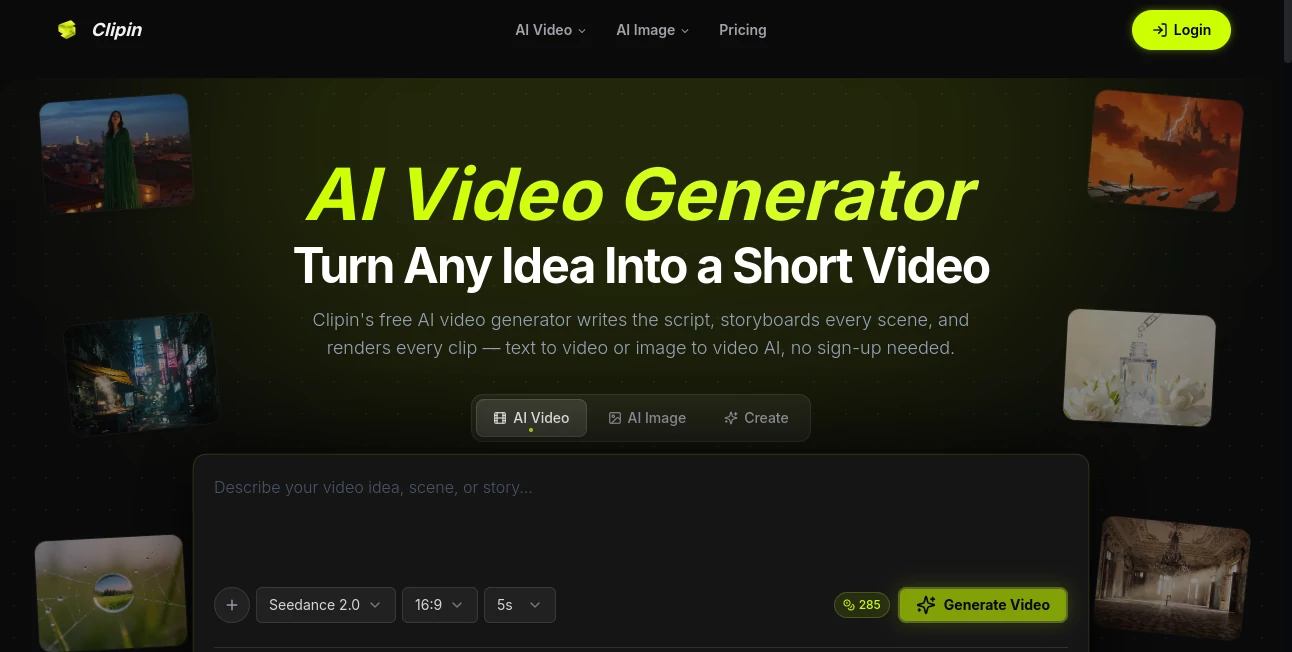
Creating engaging short-form videos has never been easier. This AI-powered platform transforms simple text prompts, scripts, or even a single image into polished short videos ready for today's most popular social platforms. Instead of juggling multiple editing applications, users can generate scripts, voiceovers, storyboards, and video clips within one streamlined workspace.
Whether you are a content creator, marketer, educator, entrepreneur, or social media manager, the platform dramatically reduces production time while maintaining impressive visual quality. It supports both text-to-video and image-to-video generation, allowing anyone to produce professional-looking content without previous editing experience.
One of the most attractive aspects is its beginner-friendly workflow. Even users with no video editing background can create eye-catching content in just a few minutes, making it an excellent choice for creators who need consistent publishing without spending hours on production.
Key Features
User Interface
The workspace is clean, modern, and designed for speed. Instead of overwhelming users with complicated timelines and editing panels, every major function is organized into a simple creation flow. From entering a prompt to exporting the final video, the process feels intuitive and accessible for both beginners and experienced creators.
Accuracy & Performance
The platform automatically generates scripts, voiceovers, scene layouts, and video clips while keeping visual consistency across the entire project. Video rendering is fast, and multiple AI models are available to match different creative requirements, making production efficient even for frequent content publishing.
Capabilities
- Generate videos directly from text prompts.
- Animate static images into dynamic videos.
- Create AI-generated voiceovers automatically.
- Build complete storyboards without manual editing.
- Support multiple video aspect ratios including 9:16, 16:9, and 1:1.
- Create content suitable for Shorts, Reels, and TikTok.
- Generate AI images that can be used as video scenes.
- Edit AI-generated images with natural language instructions.
- Export clean videos for publishing.
- Access dozens of AI generation models for different creative styles.
Security & Privacy
The service maintains a dedicated privacy policy explaining how user information, account data, payment details, and uploaded content are handled. Personal information is processed for account management and service improvement, while secure connections help protect user data during creation and payment processes.
Use Cases
- Creating viral TikTok videos from simple ideas.
- Producing Instagram Reels for brands and influencers.
- Making YouTube Shorts without traditional editing software.
- Generating promotional videos for products.
- Creating educational explainers for online courses.
- Building marketing campaigns for social media.
- Transforming product images into engaging video advertisements.
- Producing storytelling videos for personal brands.
- Creating visual content for startups and small businesses.
- Rapid content creation for digital agencies.
Pros and Cons
Pros
- Extremely beginner-friendly interface.
- Complete AI-powered video creation workflow.
- Supports both text-to-video and image-to-video generation.
- Built-in AI voiceover generation.
- Multiple export aspect ratios.
- Fast rendering performance.
- Free credits available for new users.
- No advanced editing knowledge required.
Cons
- Advanced features require paid plans.
- Credit-based generation may not suit very heavy users.
- Rendering time can vary depending on selected AI models.
Pricing Plans
The platform offers a free starter option with complimentary credits, allowing users to test video and image generation before subscribing. Paid subscriptions include Starter, Creator, and Studio plans with increasing annual credits, commercial usage rights, permanent asset storage, and access to premium AI models. Flexible pay-as-you-go credit packs are also available for occasional creators.
How to Use Clipin
- Open the video creation workspace.
- Enter a text prompt, upload a script, or add an image.
- Select the preferred video style and aspect ratio.
- Allow the AI to generate scenes, voiceover, and storyboard.
- Review the generated content.
- Make adjustments if necessary.
- Render the final video.
- Export and publish on your preferred social media platform.
Comparison with Similar Tools
Unlike many AI video generators that focus only on individual clips, this solution manages the entire creative workflow from concept to finished video. Script writing, storyboard generation, voice creation, image generation, image editing, and video production all work together inside a single platform. This significantly reduces the need to combine multiple AI services, making the overall production process much more efficient for creators who publish frequently.
Conclusion
For anyone looking to create professional short-form videos with minimal effort, this platform delivers an impressive balance between automation, creative flexibility, and ease of use. Its ability to transform text, scripts, or images into complete videos makes it valuable for marketers, creators, educators, startups, and businesses alike. With support for multiple AI models, modern editing capabilities, and an approachable workflow, it stands out as an excellent solution for producing engaging video content at scale.
Frequently Asked Questions (FAQ)
Can beginners use this platform?
Yes. The workflow is designed for users with little or no video editing experience.
Does it support text-to-video generation?
Yes. Users can generate complete short videos from simple text prompts or scripts.
Can images be converted into videos?
Yes. Static images can be animated into engaging short videos using AI.
Is there a free version?
Yes. New users receive free credits to explore the platform before upgrading to a paid plan.
Who is this platform best suited for?
It is ideal for content creators, marketers, agencies, educators, entrepreneurs, and businesses that publish video content regularly.
AI Image to Video , AI Video Generator , AI Short Clips Generator , AI Text to Video .
These classifications represent its core capabilities and areas of application. For related tools, explore the linked categories above.

Clipin AI Alternatives Product

Seedance 2

Brainrotshor…

Seedance 2

hailuo03

Trump AI Vid…
Seedance 2.0

Veo 3.1
VideoFlux

vio4 ai video