


















Clment
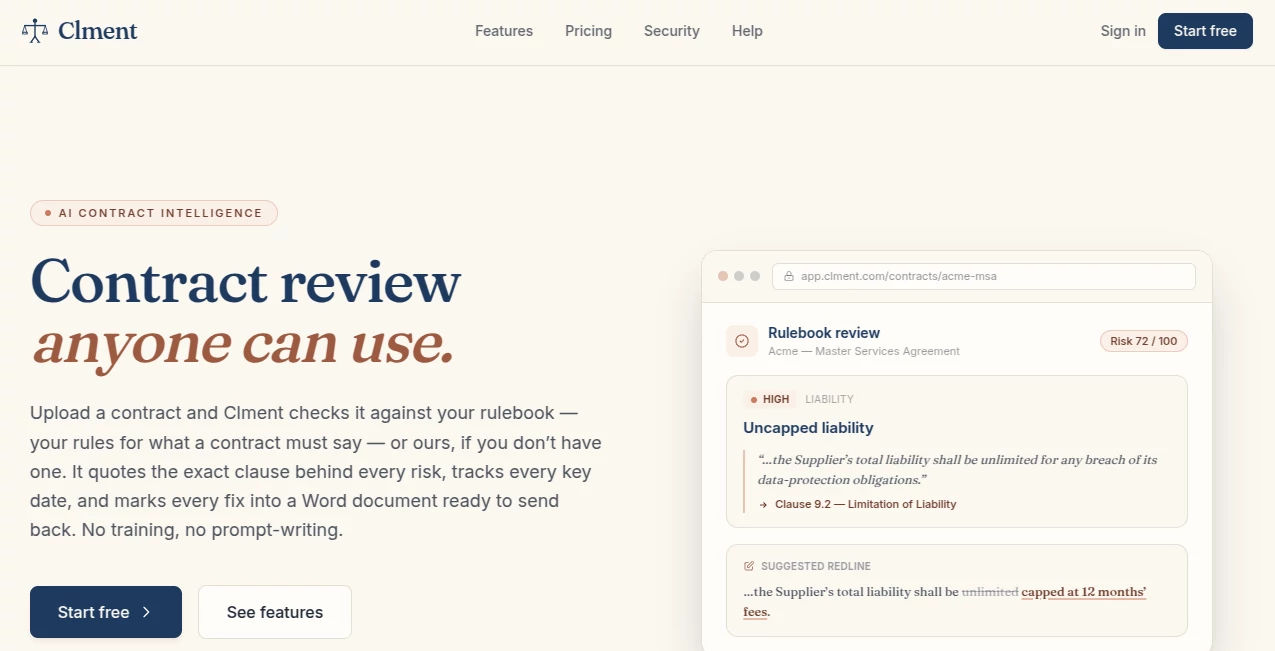
What is Clment?
Clment is an AI contract intelligence platform designed to make contract review less time-consuming and easier to manage. Instead of simply summarizing a document, it examines agreements against a defined playbook, points to the exact clauses behind its findings, extracts important dates, scores risks, and can turn approved decisions into a tracked-changes Word document.
The approach is particularly useful for legal teams, operations professionals, and businesses that deal with contracts regularly but do not want every agreement to become a long manual review. A user can upload a PDF or Word document, let the platform process it, review the findings, discuss individual clauses with teammates, and prepare a redline for the other party.
There is also a practical benefit for teams that already have their own review standards. Rules can be written in plain English, while the platform can also help create a playbook when a team is starting from scratch. This makes the workflow feel closer to an organized review process than a generic chatbot session.
Key Features
- AI-powered contract review against customizable playbooks
- Automatic classification across 16 categories and more than 60 contract types
- Extraction of parties, dates, financial terms, and other important metadata
- Clause-level evidence for review findings
- Risk scoring from 0 to 100 across multiple dimensions
- Natural-language questions with citations to source clauses
- Automatic key-date and renewal tracking
- Team comments, assignments, and recorded decisions
- Tracked-changes Word redlines
- Contract version comparison when a counterparty returns an edited document
- REST API and MCP server support for integrations and AI assistants
User Interface
The workflow is built around a straightforward upload-and-review process. Users can drag a PDF or Word contract into the platform and move through the review without having to learn complicated prompting techniques.
Findings are presented alongside the relevant contract language, making it easier to understand why a particular provision has been flagged. Team members can comment on findings, tag colleagues, and mark decisions such as agree, partial, or disagree. Once decisions are made, the approved changes can be converted into a Word document with tracked changes.
The overall design suits a real contract workflow: upload the document, inspect the findings, discuss them, make decisions, create the redline, and compare the returned version.
Accuracy & Performance
Contract analysis is most useful when findings can be traced back to the underlying document. The platform addresses this by quoting the specific clause associated with each finding instead of presenting unexplained conclusions.
Uploaded contracts are processed through OCR and document parsing, followed by classification, metadata extraction, key-date detection, and risk scoring. Contract types receive confidence scores, while natural-language questions can return citations to the relevant source material.
For individual document analysis, the platform provides a full-context mode with a stated 200K context window. For questions spanning multiple contracts, its RAG mode can search across a portfolio and provide source citations.
Capabilities
One of the strongest parts of the platform is the connection between review and action. A flagged clause is not simply added to a report and forgotten. Reviewers can decide how to handle it, and those decisions can feed directly into a redline.
Risk scoring covers areas including financial exposure, liability, intellectual property, termination, regulatory concerns, counterparty risk, and missing clauses. Important dates such as renewals, expirations, and milestones can also be extracted automatically and connected to configurable alerts.
The playbook system is another useful feature for organizations with established contract standards. Teams can define rules in everyday language, and repeated reviewer decisions can help refine those rules over time. Proposed changes remain subject to approval, keeping the team in control of its own standards.
For organizations looking beyond the web interface, REST API access and an MCP server provide ways to connect contract information with other workflows and AI assistants.
Security & Privacy
Security is an important consideration when working with contracts, and the platform places considerable emphasis on keeping customer documents isolated. It states that it is SOC 2 Type II audited and that customer data stays within the customer's region.
Data is encrypted in transit using TLS 1.3 and at rest using AES-256. Tenant isolation is enforced at the application layer, with organization-scoped access controls designed to prevent cross-tenant access.
The company also states that its AI calls use no-retention endpoints and that customer contracts are not used to train foundation models. These policies are particularly relevant for legal departments and businesses handling confidential commercial agreements.
Use Cases
- Legal teams: Review incoming agreements against internal standards and prepare redlines faster.
- Procurement teams: Identify commercial, liability, renewal, and contractual risks before approving vendor agreements.
- Sales operations: Review customer and SaaS agreements without manually searching every page for important provisions.
- Business operations: Keep track of contract obligations, renewal dates, and changes across a growing portfolio.
- Small businesses: Get structured assistance when reviewing agreements without building a large internal legal operation.
- Contract-heavy organizations: Search across multiple agreements and compare clauses using natural-language questions.
Pros and Cons
Pros:
- Moves beyond basic contract summarization into review and redlining.
- Provides clause-level evidence for findings.
- Supports customizable review playbooks.
- Combines risk scoring with practical recommendations.
- Tracks renewals, expirations, and other important dates.
- Supports team collaboration and audit-logged decisions.
- Creates tracked-changes Word documents for practical follow-up.
- Offers a free plan for individuals getting started.
Cons:
- Credit-based usage means heavier contract review can require additional credits.
- Advanced API and automation capabilities are aimed at higher-tier plans.
- Organizations with complex legal requirements may still want human legal review before finalizing important agreements.
- The value of the platform is greatest for users who regularly work with contracts rather than those handling only occasional documents.
Pricing Plans
The pricing structure is designed to scale with contract volume rather than simply charging for every user. A free plan is available at no cost and includes support for up to 25 contracts, one user, three rulebooks, and 1,000 starting credits.
The Pro plan is aimed at small teams and supports up to 250 contracts, five users, 10 rulebooks, and 10,000 credits per month. The Business plan increases capacity to 1,000 contracts, 20 users, unlimited rulebooks, and 25,000 monthly credits, while also targeting teams that need full API access and automation.
Enterprise plans are available with custom limits and pricing for organizations requiring greater scale and advanced security. Annual billing provides two months free compared with paying monthly.
Usage is measured through credits. Uploading a page costs one credit, while AI queries cost 10 credits. Standard and deep rulebook reviews use a base amount plus additional credits according to document length, making larger contract reviews consume more of the available allowance.
How to Use Clment
- Create an account and start with the available free plan if you want to test the workflow.
- Upload a PDF or Word contract.
- Allow the platform to process and classify the document.
- Review extracted parties, dates, financial information, contract type, and risk score.
- Run the contract through an existing playbook or create review rules in plain English.
- Inspect flagged clauses and read the cited evidence behind each finding.
- Ask questions about the agreement in natural language when additional clarification is needed.
- Invite teammates to comment, assign findings, and record decisions.
- Generate a tracked-changes Word redline from the decisions you approve.
- When the other party returns an edited version, compare the new document with your previous redline.
Comparison with Similar Tools
Many AI legal products focus primarily on summarization, question answering, or extracting information from contracts. This platform takes a more workflow-oriented approach by connecting analysis with review decisions and document redlining.
The distinction becomes especially noticeable when a team has its own contracting standards. Rather than asking a general-purpose AI assistant to interpret every agreement from scratch, reviewers can establish playbook rules and evaluate findings against those standards. The resulting workflow is closer to a repeatable internal review process.
Its combination of contract classification, cited findings, portfolio questions, risk scoring, date tracking, collaborative review, tracked changes, and version comparison also makes it useful beyond the initial document analysis stage.
Conclusion
For anyone who deals with contracts regularly, the biggest advantage here is that the work does not stop at a summary. The platform connects document analysis with the decisions that actually happen during a contract review.
It can identify contract types, extract important information, surface potential risks, explain findings using the original clauses, and help teams turn approved positions into a practical Word redline. The playbook system adds another layer of value for organizations that want reviews to follow their own standards rather than generic rules.
The free plan makes it relatively easy to explore the workflow before committing to a larger setup. For teams managing a substantial contract portfolio, the combination of automated review, collaboration, risk analysis, date tracking, and integrations makes it a compelling option to consider.
Frequently Asked Questions (FAQ)
What types of contracts can it review?
The platform automatically classifies contracts into 16 broad categories and more than 60 specific contract types, covering documents such as SaaS agreements, software licenses, commercial leases, and other business contracts.
Can it create redlines?
Yes. After reviewers decide which findings should be addressed, the platform can generate a Word document containing tracked changes and comments that is ready for further review or sending back to the counterparty.
Can I ask questions about a contract?
Yes. Users can ask questions in natural language. Answers can include citations pointing back to the relevant contract clauses, while portfolio-level questions can search across multiple contracts.
Does it track contract renewal dates?
Yes. Important dates such as renewals, expirations, and milestones can be extracted automatically, with configurable alerts and calendar support.
Does it have a free plan?
Yes. The free plan is available at $0 and includes up to 25 contracts, one user, three rulebooks, and 1,000 starting credits.
Does it support API integrations?
Yes. API and MCP server capabilities are available for connecting contract information and workflows with external systems and compatible AI assistants.
Is human legal review still necessary?
AI-assisted contract analysis can reduce repetitive work and help teams spot provisions that deserve attention, but important legal decisions should still be reviewed by an appropriately qualified professional.
AI Contract Management , AI Legal Assistant .
These classifications represent its core capabilities and areas of application. For related tools, explore the linked categories above.

Clment Alternatives Product

Clearterms

TuCanChat

Harvey

Referent
