

















Clearterms
What is Clearterms?
Legal documents can be difficult to understand even when you read every line. A service agreement may hide an automatic renewal clause, an employment contract may contain a broad non-compete, and a business agreement can place important financial obligations deep inside several pages of legal language. The problem is not simply the length of these documents. It is knowing which parts deserve attention.
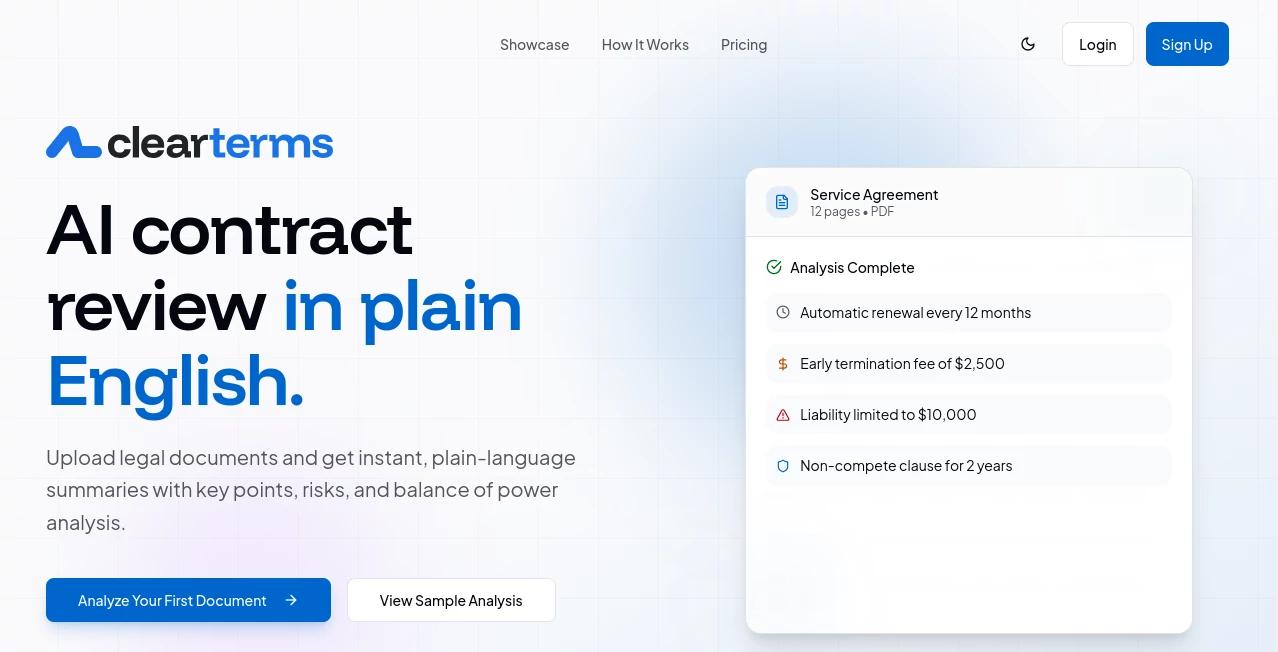
ClearTerms is designed to make that first review much easier. It analyzes legal and compliance documents and turns dense language into a structured explanation of the terms that matter. Instead of receiving a long block of simplified text, users can see key points, potential risks, financial terms, obligations, restrictions, and an assessment of which side the agreement appears to favor.
The service is particularly useful for freelancers, employees, founders, small business owners, and anyone who regularly encounters contracts but does not have legal training. The goal is not to replace a lawyer. Rather, it helps users arrive at a legal conversation better prepared, with specific points and questions already identified.
Key Features
- Plain-language summaries of legal and compliance documents
- Automatic identification of potentially problematic clauses
- Risk ratings based on severity
- Balance of power analysis showing which party benefits from important terms
- Extraction of fees, deadlines, obligations, rights, and restrictions
- Identification of the parties involved in an agreement
- Financial term extraction for items such as subscription fees and termination costs
- Questions that users can take to an attorney for further review
- Interactive document Q&A for follow-up questions
- Support for PDF, Word, plain text, HTML, and RTF documents
- Support for files up to 50MB
User Interface
The interface focuses on making the results easy to scan. After a document is processed, the analysis is organized into recognizable sections rather than presented as one large explanation. Users can move between an overview, key points, risks, financial information, and legal review details.
The balance-of-power view is especially practical. Rather than forcing someone to interpret every clause independently, the analysis gives an at-a-glance indication of whether the agreement appears to favor the user, remain relatively balanced, or favor the other party. For someone reviewing a contract between meetings, that kind of presentation can save considerable time.
Accuracy & Performance
The platform states that it uses GPT-5.2 with specialized prompts for extracting structured information from legal documents. Results are written at approximately an eighth-grade reading level, which makes the explanations considerably more approachable than traditional legal wording.
Most documents are analyzed in under two minutes, while longer documents of more than 50 pages can take up to around five minutes. Real-time processing updates are provided, so users do not have to repeatedly refresh the page while waiting.
There is an important limitation worth keeping in mind. The system is intended as a starting point and performs best with standard commercial contracts, terms of service, and employment agreements. Highly specialized or jurisdiction-specific documents should still be reviewed by a qualified legal professional.
Capabilities
The strongest part of the platform is the way several types of information are brought together. A contract review can identify the parties, duration, payment obligations, restrictions, termination conditions, rights, and other important provisions while also highlighting clauses that may deserve closer attention.
For example, a SaaS agreement could reveal an automatic annual renewal, a short cancellation window, a liability cap, or broad data usage rights. An employment agreement might highlight an unusually broad non-compete clause or an extensive intellectual-property assignment. These findings give users a much clearer starting point for deciding what they should ask about.
The attorney question generator adds another useful layer. Instead of simply telling users that a clause may be concerning, the system can turn findings into specific questions to discuss with legal counsel. This makes the first-pass review more actionable.
Security & Privacy
Legal documents can contain highly sensitive business and personal information, so privacy is an important consideration. Uploaded documents and analysis results are encrypted at rest using AES-256, while data transmitted between the user and the service is protected through TLS.
Uploaded files are stored in private cloud storage rather than publicly accessible URLs. The service also states that customer documents are not used to train AI models and that users can delete their documents from their accounts.
These protections are useful for people dealing with contracts, NDAs, employment documents, and business agreements. Even so, users should always consider the sensitivity of a document and their own organization's data-handling requirements before uploading confidential material.
Use Cases
Freelancers: Independent professionals can use the analysis to review client agreements before accepting new work. Payment terms, termination clauses, intellectual-property provisions, and restrictive conditions are easier to spot before signing.
Small Businesses: Business owners frequently receive vendor agreements, software contracts, service agreements, and other documents. A first-pass review can help identify the provisions that deserve attention before involving an attorney.
Employees and Job Candidates: Employment agreements can contain compensation details, IP assignments, non-compete provisions, termination conditions, and other restrictions. Having these points summarized can make an employment discussion more productive.
Founders and Startups: Young companies often have to review a steady stream of NDAs, SaaS agreements, partnership contracts, and other paperwork. A quick first review can help founders organize their questions before spending time with legal counsel.
Anyone Signing a Contract: You do not need to work in a legal department to encounter complicated agreements. When an important document feels difficult to interpret, a plain-language breakdown can provide useful context before making a decision.
Pros and Cons
Pros
- Turns complicated legal language into easier-to-read explanations
- Highlights risks instead of providing only a basic summary
- Shows which party appears to benefit from important terms
- Extracts financial obligations, deadlines, and restrictions
- Generates practical questions for an attorney
- Supports several common document formats
- Offers a free plan without requiring a credit card
- Includes document-based interactive Q&A
Cons
- AI analysis should not be treated as legal advice
- Specialized and jurisdiction-specific documents may require professional verification
- The free plan is limited to five documents per month
- Higher-volume usage requires a paid subscription
Pricing Plans
The pricing structure is straightforward, with a free option for occasional users and paid plans for people who need more document reviews.
- Free: $0 per month with up to 5 documents per month.
- Starter: $49 per month with up to 20 documents per month.
- Business: $199 per month with up to 250 documents per month.
- Enterprise: Custom pricing with unlimited documents, dedicated support, custom integrations, and an SLA guarantee.
All plans include the core analysis features, including full reports, risk identification, balance-of-power analysis, key point extraction, and attorney question generation. The free tier is a useful way to test the workflow before committing to a subscription.
How to Use It
Start by uploading a legal or compliance document in a supported format. The service extracts the document's text and structure before running the analysis.
Once processing is complete, review the plain-language summary first. Then move through the key points, risks, financial information, obligations, and balance-of-power assessment. Pay particular attention to findings marked with higher severity.
After identifying the clauses that matter most, use the generated attorney questions to prepare for a professional review. You can also ask follow-up questions about the document through the interactive Q&A interface.
A practical approach is to treat the analysis as a preparation tool. It can help you understand what you are reading and decide what deserves attention, while a qualified attorney remains the right person for legal advice and decisions involving significant legal consequences.
Comparison with Similar Tools
Many contract platforms concentrate on managing agreements, storing documents, or supporting legal teams throughout the contract lifecycle. This approach is somewhat different. Its main strength is the first-pass understanding of a document.
The balance-of-power analysis is a useful differentiator because it goes beyond simply explaining what a clause says. It attempts to show how the terms affect each side. The risk ratings and attorney question generator also make the results more useful for someone who is not a legal specialist.
For a company that needs advanced contract lifecycle management, negotiation workflows, or large-scale legal operations, a dedicated enterprise platform may be more appropriate. For an individual or small team that primarily wants to understand a document before discussing it with a lawyer, the simpler review-focused workflow can be a better fit.
Conclusion
Understanding a contract should not require spending hours decoding every sentence of legal language. A good first review should quickly answer practical questions: What am I agreeing to? What will it cost? What am I required to do? What can the other party do? What happens if something goes wrong?
This platform does a strong job of organizing those answers into a readable analysis. Its combination of plain-language explanations, risk detection, financial extraction, balance-of-power analysis, and attorney question generation makes it particularly useful for people who regularly encounter legal documents but do not work with lawyers every day.
The most sensible way to use it is as a preparation layer before making an important legal decision. It can help users arrive informed, spot areas worth questioning, and make conversations with legal professionals more focused. For routine first-pass document analysis, that can be a meaningful improvement over simply opening a long contract and hoping the important clauses stand out.
Frequently Asked Questions (FAQ)
Is this a replacement for a lawyer?
No. The service provides informational analysis rather than legal advice. Important legal decisions, especially those involving specialized contracts or significant financial consequences, should be reviewed with a qualified attorney.
What types of documents can be analyzed?
It supports legal and compliance documents including contracts, terms of service, privacy policies, NDAs, employment agreements, license agreements, regulations, and similar materials. Supported formats include PDF, Word, plain text, HTML, and RTF.
How large can an uploaded document be?
Individual files can be up to 50MB in size. Longer documents may take more time to process than shorter ones.
How quickly are documents analyzed?
Most documents are processed in under two minutes. Documents exceeding 50 pages may take up to approximately five minutes.
Are uploaded documents used to train AI models?
The service states that uploaded documents are not used to train AI models. Documents and analysis results are encrypted, and uploaded files are stored using private cloud storage.
Is there a free plan?
Yes. The free plan allows users to analyze up to five documents per month and does not require a credit card to get started.