


















Comic Day
What is Comic Day?
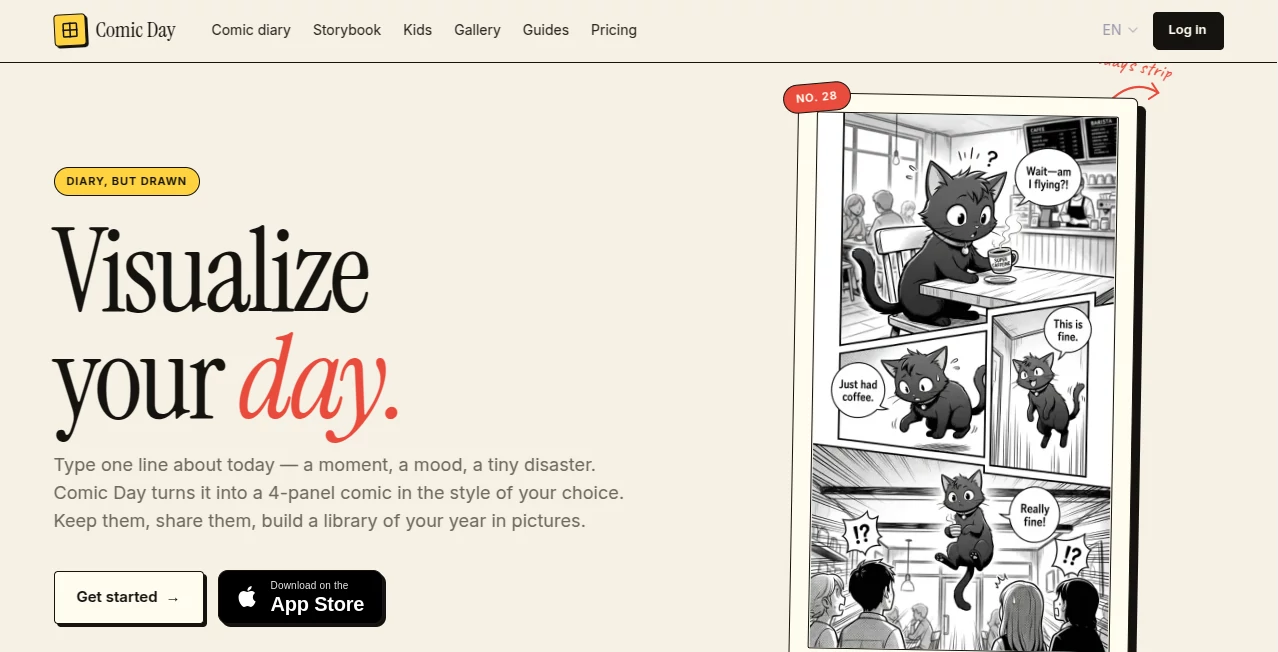
Comic Day is an AI-powered creative tool that turns everyday moments, memories, jokes, and short stories into finished comic strips. Instead of learning drawing software or spending time arranging panels, users simply describe what happened and choose a visual style. The result is a ready-to-share comic built around the original idea.
The concept is especially appealing for people who want to keep a visual diary without the effort of traditional illustration. A funny commute, an awkward conversation, a memorable trip, or even a small moment with a pet can become a four-panel story in roughly thirty seconds. The platform also lets users collect their favorite creations into comic books, giving individual moments a longer life.
Key Features
- AI-generated four-panel comics from simple text prompts
- Multiple visual styles, including manga, cartoon, chibi, doodle, sketch, webtoon, newspaper, coloring, lineart, and scrapbook-inspired looks
- Custom character creation from a description or reference photo
- Reusable characters that can appear consistently across different comics
- Personal library for saving generated comics
- Comic book creation for organizing multiple strips into a larger story or collection
- Options for sharing finished comics and public books
- Browser-based Studio with an iPhone app available as well
User Interface
The experience is intentionally simple. Users begin with a short description of a scene, select an artistic direction, optionally add characters from their cast, and generate the comic. There is no need to deal with brushes, layers, panel grids, or complicated illustration controls.
This makes the interface approachable even for someone who has never created a comic before. The workflow feels closer to writing a quick diary entry than operating a traditional design application.
Accuracy & Performance
The platform is designed around short, clear descriptions and can turn a written moment into a finished comic in about thirty seconds. The website recommends describing a specific scene, including what happened and who was involved, which gives the system useful context for constructing the visual story.
Character consistency is another useful part of the experience. Custom characters can be created from a description or photo and reused in later comics, helping recurring people and pets maintain a recognizable appearance across different strips.
Capabilities
The tool goes beyond producing a single comic image. Users can build a collection of illustrated memories, organize selected strips into books, and choose whether those books remain private or are shared with others. This makes it suitable for both one-off creative experiments and longer-running visual projects.
The range of styles also gives the same idea a different personality. A personal memory can feel nostalgic as a scrapbook, playful as a cartoon, expressive as manga, or deliberately loose as a doodle.
Security & Privacy
User prompts and generated comic images are stored with the associated account so they can be accessed across sessions. Custom character descriptions and reference photos are also stored when users create reusable characters. The service states that payment details themselves are not accessible to it because web transactions are processed through Stripe and iOS purchases through the Apple App Store.
Users should still consider the nature of anything they upload, particularly reference photographs. The service explains that prompts and reference images may be sent to third-party AI services for image generation and that analytics and other infrastructure providers are used to operate the platform.
Use Cases
- Visual diaries: Turn ordinary daily events into illustrated memories.
- Personal jokes: Convert an inside joke or funny situation into a comic that can be shared with friends.
- Travel memories: Transform memorable moments from a trip into a collection of illustrated entries.
- Pet stories: Create recurring characters based on cats, dogs, and other pets.
- Creative writing: Visualize short scenes, character ideas, and story concepts before developing them further.
- Social content: Create compact visual stories suitable for sharing online.
- Family keepsakes: Collect meaningful moments into a private illustrated book.
- Character experimentation: Develop recurring characters and place them in different scenes and artistic styles.
Pros and Cons
- Pros: Very simple text-to-comic workflow, multiple artistic styles, reusable custom characters, fast generation, personal comic library, book creation, and a free first comic to try the experience.
- Cons: The service is focused primarily on generating complete comics rather than providing detailed manual editing controls. Users who want professional panel-by-panel illustration software may find the simplified approach restrictive.
Pricing Plans
The web version uses a pay-as-you-go credit system called inks rather than a recurring subscription. A free ink is provided to let new users try the service before paying.
- 10 inks: $2.99, with no expiration.
- 40 inks: $8.99, with no expiration.
- 100 inks: $17.99, with no expiration.
A standard four-panel comic costs one ink. Character creation also costs one ink, while longer storybooks use one ink per page. The service states that ink purchases do not automatically renew and that failed generations are refunded. Web credits and iOS app credits are handled separately.
How to Use the Tool
Start by writing a short description of the moment you want to illustrate. It can be as simple as a single sentence, although adding details about the people, setting, action, or mood can give the generated story more direction.
Next, select an artistic style. Manga, cartoon, chibi, doodle, lineart, and several other options allow you to change the visual personality of the same basic idea. If your story includes a recurring person or pet, you can also add a previously created character.
Generate the comic and review the finished result. You can save it to your library, share it, or collect it with other comics in a book. This workflow makes it easy to start with one small moment and gradually build a larger visual collection.
Comparison with Similar Tools
Many AI image generators are built around producing individual images from detailed prompts, while traditional comic software gives users extensive control over panels, drawing, typography, and composition. This tool sits somewhere between those approaches, with the emphasis firmly on convenience.
Its strongest distinction is the combination of text-to-comic generation, recurring characters, and long-term organization. Someone who simply wants to describe a funny moment and receive a finished comic does not need to learn a complicated creative suite. At the same time, the library and book features make it more useful than a generator designed only for one-off images.
For users who value speed and storytelling over detailed manual control, this focused approach can be considerably more enjoyable than starting with a blank canvas.
Conclusion
Comic Day offers a charming way to turn everyday experiences into something worth keeping. Its biggest strength is how little effort it asks from the user: write what happened, choose a style, and let the AI handle the visual work.
The ability to reuse characters and combine individual strips into books gives the platform more depth than a simple comic generator. Whether the goal is documenting daily life, creating a funny story for friends, developing characters, or preserving a memorable trip, it provides a straightforward creative outlet without requiring drawing skills.
Frequently Asked Questions (FAQ)
Can it create comics from text?
Yes. Users can describe a scene in natural language and generate a finished comic from the written prompt.
Do I need drawing skills?
No. The main workflow is text-based, so users do not need to draw panels, characters, or backgrounds manually.
How many comic styles are available?
The platform offers ten styles, including manga, cartoon, webtoon, sketch, chibi, newspaper, doodle, coloring, lineart, and scrapbook.
Can I create recurring characters?
Yes. A character can be created from a description or reference photo and reused across different comics to help maintain a consistent appearance.
Can I make a comic book?
Yes. Individual comics can be collected into books, allowing users to organize memories, trips, seasons, or other themed collections.
Is there a free option?
Yes. New users receive a free ink to create their first comic before purchasing additional credits.
Does the service require a subscription?
No. The web version uses one-time ink packs. Purchased inks do not expire or automatically renew.
Can I use it on a phone?
Yes. The service can be accessed through a web browser, and an iPhone app is also available.
Is it useful for story development?
Yes. Short scenes, character moments, jokes, and story ideas can be visualized as comics, making it useful for creative experimentation and early-stage storytelling.
AI Creative Writing , AI Illustration Generator , AI Story Writing , AI Manga & Comic .
These classifications represent its core capabilities and areas of application. For related tools, explore the linked categories above.
Comic Day details
Website unavailable — View Alternatives
Pricing
- Freemium
Apps
- Web App
- iOS App
Categories

Comic Day Alternatives Product

Banana Promp…

Krea 2 Turbo

ComicsMaker

Yodayo AI

AI Story Gen…

MIBOOKO

AI Podcast I…

Noir Prompt

PixAI - AI A…
