
ContentForge
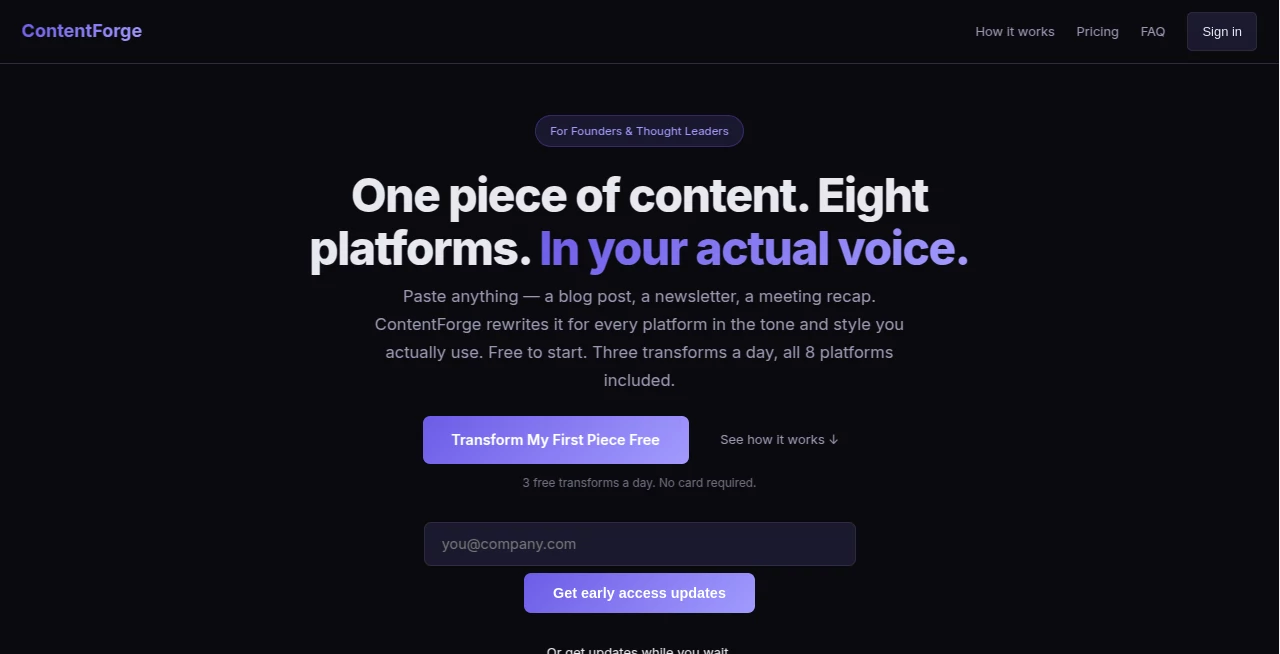
What is ContentForge?
Turning one strong idea into content for several platforms sounds simple until you actually have to do it. A blog post may need to become a LinkedIn post, an X thread, an Instagram caption, an email newsletter, and several other formats. Rewriting each version manually can quickly become one of the most time-consuming parts of a content workflow.
ContentForge takes a different approach. Instead of asking creators to produce something new for every channel, it transforms existing content into platform-specific versions while keeping the original message and writing style recognizable. Users can paste a blog post, newsletter, meeting recap, transcript, product brief, or other text-based material, select their preferred platforms, and receive ready-to-use variations.
The service is particularly appealing to founders, thought leaders, marketers, and creators who already have useful ideas but struggle to maintain a consistent publishing schedule. There is a free tier with three transformations per day, so users can test the workflow without entering payment details.
Key Features
- Transform one piece of content for up to eight publishing platforms.
- Convert blogs, newsletters, meeting notes, transcripts, product updates, and other text-based material.
- Generate platform-native formats rather than simply copying the same paragraph everywhere.
- Customize the tone with options such as professional, casual, witty, inspirational, and bold.
- Build a personalized Voice Profile from real writing samples.
- Keep transformed content available through content history on eligible plans.
- Export generated content together for easier publishing.
- Business users can access bulk CSV processing, API access, team accounts, and multiple voice profiles.
User Interface
The interface is deliberately straightforward. The workflow follows three basic actions: paste the source material, select the platforms, and transform the content. There are no complicated prompt templates to master, which makes the service approachable even for people who are not experienced with generative AI.
The transformation screen keeps the important controls close together. Users can select LinkedIn, X, email, Instagram, Facebook, TikTok, YouTube, or a blog outline and optionally choose a tone before starting the process. Generated versions are then presented together, making it easy to review and copy the pieces that are ready to publish.
Accuracy & Performance
The main strength here is not simply producing text quickly. It is adapting the same underlying idea to the conventions of different platforms. A long-form thought can become a concise LinkedIn post, a numbered X thread, an email newsletter, or a shorter social caption without requiring the creator to rewrite everything from scratch.
The website indicates that transformations usually take around 5–10 seconds, while its broader product messaging emphasizes producing platform-ready variations in under a minute. For everyday content repurposing, that makes the workflow considerably faster than manually adapting every piece.
Of course, generated content still deserves a human review before publication. A quick edit can add current context, personal details, or a final opinion that makes the result feel completely natural.
Capabilities
The platform supports eight content destinations: LinkedIn, Twitter/X, Facebook, Instagram, email, TikTok, YouTube, and blog outlines. It can work with many different starting points, including articles, newsletters, meeting notes, podcast summaries, product updates, and thought-leadership content.
One of its more interesting capabilities is the Voice Wizard. Users can provide several examples of their own writing and describe preferences such as tone, vocabulary, common openings, formatting habits, and phrases they prefer to avoid. The system then creates a voice profile designed to keep future transformations closer to the user's established writing style.
This is useful for creators who have a recognizable way of communicating and do not want every AI-assisted post to sound like it came from the same generic writing template.
Security & Privacy
According to the product's FAQ, submitted content is processed in real time and is not stored on its servers. The service also states that user content is not used to train AI models. For writers and businesses working with unpublished material, this is an important consideration.
Even with these stated protections, businesses should still review the provider's current privacy policy and terms before processing confidential, regulated, or commercially sensitive information.
Use Cases
For founders, a single product announcement can become a LinkedIn update, an X thread, an email, and several social captions without requiring a separate writing session for each channel.
Content marketers can use the workflow to extend the lifespan of existing articles. Instead of publishing a blog post once and moving on, they can turn the same research into multiple pieces of channel-specific content.
Freelancers and social media managers can also benefit when working with multiple clients. A client's original article or newsletter can become several deliverables while maintaining a consistent voice.
It is equally useful for thought leaders who have plenty to say but limited time to distribute their ideas. In that situation, the biggest benefit may not be generating more ideas at all. It is getting more mileage from the ideas that already exist.
Pros and Cons
Pros:
- Simple three-step content transformation workflow.
- Supports eight different publishing destinations.
- Designed specifically for content repurposing rather than generic text generation.
- Voice Profile helps maintain a more consistent personal writing style.
- Free plan available without requiring a credit card.
- Useful options for creators, marketers, freelancers, and teams.
- Business plan includes API access and bulk processing.
Cons:
- The free plan is limited to three transformations per day.
- Advanced voice features require a paid plan.
- Generated content should still be reviewed before publishing.
- Users looking for a general-purpose AI writing suite may find the product more specialized than broader AI platforms.
Pricing Plans
The service follows a straightforward free-to-paid model. The Free plan costs $0 and includes three transformations per day, all eight platforms, and tone customization. It is a practical way to test the core workflow before committing to a subscription.
The Creator plan costs $19.99 per month, with an annual option listed at $179.99. It increases the allowance to 50 transformations per day and adds content history, priority processing, and one Voice Profile. A seven-day free trial is available.
The Business plan costs $49 per month, with an annual price of $470. It removes the transformation limit and adds five Voice Profiles, bulk CSV processing, API access, and team accounts. Paid plans include a seven-day free trial, and the site also states that a 30-day money-back guarantee is available after the trial period.
How to Use ContentForge
Start by pasting a piece of content you have already written. This could be a blog article, newsletter, meeting summary, transcript, product update, or another substantial piece of text.
Next, choose the platforms where you want to publish. Each selected channel receives a version adapted to its expected tone, length, and structure. You can also choose a preferred tone such as professional, casual, witty, or bold.
Then run the transformation. The resulting pieces appear together so you can review, edit, and copy them for publication. If maintaining your personal writing style is important, set up the Voice Profile with several samples of your own writing and use it for future transformations.
Comparison with Similar Tools
Many AI writing products focus on generating new material from a prompt. This service is more narrowly focused on what happens after you already have something worth publishing: adapting that material for different channels.
Compared with general AI assistants, its advantage is the dedicated repurposing workflow and the ability to build a reusable voice profile. Compared with social media management platforms, its emphasis is on transforming the actual writing rather than managing a complete publishing calendar.
That makes it a particularly good fit for someone who already creates long-form content and wants an easier bridge between one substantial piece and a wider distribution strategy. It is less compelling for someone who primarily needs a full social scheduling, analytics, or campaign-management platform.
Conclusion
Content repurposing is often treated as a minor task, but for active creators it can quietly consume hours every week. The value of this approach is that it tackles that specific problem without turning the workflow into another complicated software project.
The combination of multi-platform transformation, tone controls, and personalized voice profiles gives creators a practical way to reuse their best ideas without repeatedly starting from an empty editor. The free plan makes the concept easy to test, while Creator and Business provide a clear path for people with heavier publishing needs.
For founders, marketers, freelancers, and thought leaders who want to publish consistently without rewriting the same idea eight different times, this is a focused and useful addition to a modern content workflow.
Frequently Asked Questions (FAQ)
What type of content can be transformed?
You can start with blog posts, newsletters, meeting notes, podcast summaries, product updates, thought-leadership pieces, transcripts, product briefs, and other text-based content.
Which platforms are supported?
The current platform supports LinkedIn, X/Twitter, Facebook, Instagram, email newsletters, TikTok, YouTube, and blog outlines.
Can it learn my writing style?
Yes. The Voice Wizard allows users on eligible plans to provide writing samples and preferences so a personalized Voice Profile can be created and applied to future transformations.
Is there a free plan?
Yes. The Free plan provides three transformations per day across all eight supported platforms and includes tone customization.
Is a credit card required to try it?
No. The website states that the free tier does not require a credit card, and users can try three transformations per day.
Can businesses use it for client work?
Yes. The service specifically supports content marketers, social media managers, and freelancers working with client content. The Business plan adds team accounts, bulk processing, multiple voice profiles, and API access.
Is my content used to train AI models?
According to the service's FAQ, submitted content is processed in real time, is not stored on its servers, and is not used to train AI models.
Does it replace human editing?
No. It can remove much of the repetitive rewriting work, but reviewing the generated copy before publishing is still recommended, especially when accuracy, brand messaging, or current information matters.
AI Content Generator , AI Social Media Assistant , AI Repurpose Assistant , AI Email Marketing .
These classifications represent its core capabilities and areas of application. For related tools, explore the linked categories above.
ContentForge details
Website unavailable — View Alternatives
Pricing
- Freemium
Apps
- Web App
Categories

ContentForge Alternatives Product

Discord Time…

SocialRails

RichlyAI

Song Lyrics …

Resize Image…

ViraFlow

LyricStudio

SuperAI

Simplified