

















Create0
What is Create0?
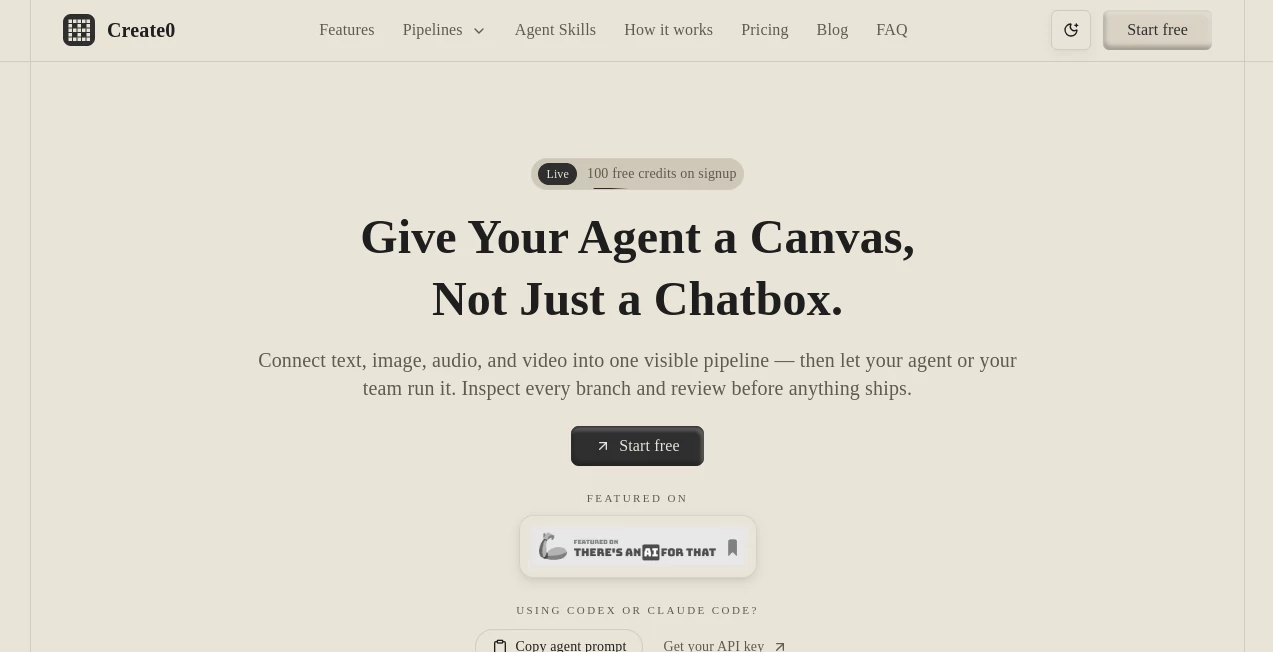
Create0 is an innovative AI workflow canvas designed to help users build, connect, and manage intelligent agent pipelines beyond traditional chat-based experiences. Instead of keeping AI interactions hidden inside separate conversations, it provides a visual workspace where text, images, audio, and video processes can be connected into structured workflows.
The platform brings more transparency and control to AI automation by allowing users to see how each step works, review outputs, compare different branches, and improve workflows before finalizing results. It is especially useful for creators, developers, and teams that want a clearer way to organize complex AI tasks.
By combining visual workflow design with multimodal AI capabilities, this tool creates a more practical environment for experimenting with AI agents and turning ideas into repeatable processes.
Key Features
User Interface
The platform offers a visual canvas interface where users can create workflows using connected nodes and branches. This approach makes AI processes easier to understand compared with traditional prompt-only systems.
Users can arrange different steps, attach files and references, and observe how information moves through the workflow. The clean canvas design helps both technical and non-technical users understand what an AI agent is doing at every stage.
Accuracy & Performance
The workflow-based approach improves reliability by allowing users to inspect individual steps instead of relying on a single final response. Users can identify problems, retry specific sections, and refine prompts or settings without rebuilding the entire process.
This makes it suitable for projects where consistency matters, such as content pipelines, research workflows, creative production, and internal automation systems.
Capabilities
The platform supports multimodal AI workflows that combine different types of information. Users can connect text, image, audio, and video tasks inside one visual pipeline.
- Create structured AI agent workflows with connected nodes.
- Combine multiple AI tasks into one repeatable process.
- Attach files, prompts, and reference materials as workflow context.
- Review generated results before continuing to the next stage.
- Compare different workflow branches and outputs.
- Retry individual workflow steps without restarting everything.
- Create reusable pipelines for future projects.
Security & Privacy
The platform focuses on controlled AI workflow execution by providing structured access methods for agents and workflows. Instead of allowing unrestricted changes, users can work through defined processes and review results before moving forward.
This approach helps teams maintain better visibility over automated tasks and keeps important workflow decisions under human supervision.
Use Cases
The flexible workflow system makes the platform useful across many professional scenarios. Teams can design AI processes for content creation, research, automation, and creative production.
- Content Creation: Build pipelines that transform ideas, references, and drafts into finished content.
- Marketing Workflows: Connect research, writing, creative generation, and review steps.
- AI Agent Development: Prototype and improve intelligent agents using visible workflows.
- Creative Projects: Combine image, audio, video, and text generation tasks in one environment.
- Team Collaboration: Share understandable AI processes instead of complicated prompt histories.
- Automation: Turn repeated AI tasks into reusable workflows.
Pros and Cons
Pros
- Visual workflow design makes complex AI processes easier to manage.
- Supports multiple content formats including text, image, audio, and video.
- Allows users to review and improve AI outputs before completion.
- Encourages reusable AI pipelines instead of one-time prompts.
- Useful for both individual creators and collaborative teams.
Cons
- Users unfamiliar with workflow builders may need time to understand the system.
- Advanced automation features may require experimentation to master.
- Complex projects can become challenging without proper workflow organization.
Pricing Plans
The platform uses a credit-based pricing model that allows users to choose a plan based on their workflow activity. This flexible approach is suitable for both experimentation and larger production needs.
- Starter: A free credit package designed for testing workflows and exploring features.
- Creator: A larger credit option for regular individual usage and weekly AI projects.
- Growth: A high-volume option designed for teams and larger workflow operations.
Users can begin with available credits and scale usage as their AI workflow requirements grow.
How to Use Create0
Getting started is simple. Users can create a workflow canvas, add different AI steps, connect them together, and provide the required context through files, prompts, or references.
- Create a new workflow canvas.
- Add the required AI processing nodes.
- Connect steps to define the workflow path.
- Provide files, instructions, or additional context.
- Run the workflow and review generated results.
- Improve individual steps and reuse successful pipelines.
Comparison with Similar Tools
Many AI platforms focus mainly on conversation-based interactions, where users send prompts and receive answers. This approach works well for simple tasks but can become difficult to manage when projects involve multiple steps.
This platform takes a different approach by focusing on visual workflow management. Users gain more control over AI processes, making it easier to understand, modify, and repeat complex operations.
For teams that need structured AI automation rather than isolated conversations, a visual canvas approach can provide a more organized and scalable experience.
Conclusion
AI workflows are becoming more complex, and managing them through simple chat interfaces is not always enough. A visual environment that connects tasks, tracks progress, and allows human review can make AI adoption much more practical.
With its multimodal workflow canvas, flexible pipeline system, and focus on transparency, this platform provides a powerful way for creators and teams to design smarter AI processes. It is a strong choice for anyone looking to move from basic AI conversations toward more organized and repeatable automation.
Frequently Asked Questions (FAQ)
What is this AI workflow platform?
It is a visual canvas for creating and managing AI agent workflows by connecting different tasks, inputs, and outputs in a structured pipeline.
Can it handle different types of media?
Yes. The platform supports workflows involving text, images, audio, and video, allowing users to combine multiple AI capabilities together.
Is coding required to use it?
The visual workflow approach reduces the need for traditional coding, making it accessible for creators and teams who want to design AI processes visually.
Can users review AI results before completion?
Yes. Users can inspect workflow steps, compare branches, and review outputs before deciding what should continue through the pipeline.
Who can benefit from using this tool?
Creators, developers, marketers, researchers, and teams building AI-powered workflows can benefit from its structured approach to automation.
AI Workflow Management , AI No-Code & Low-Code , AI Productivity Tools , AI Developer Tools .
These classifications represent its core capabilities and areas of application. For related tools, explore the linked categories above.

Create0 Alternatives Product
ClearWork

Rierino

Resyfy AI

globalize.now

GameClick.io

Tooladda

Sourcetable

Zapier

Lime Social
