

















Tooladda
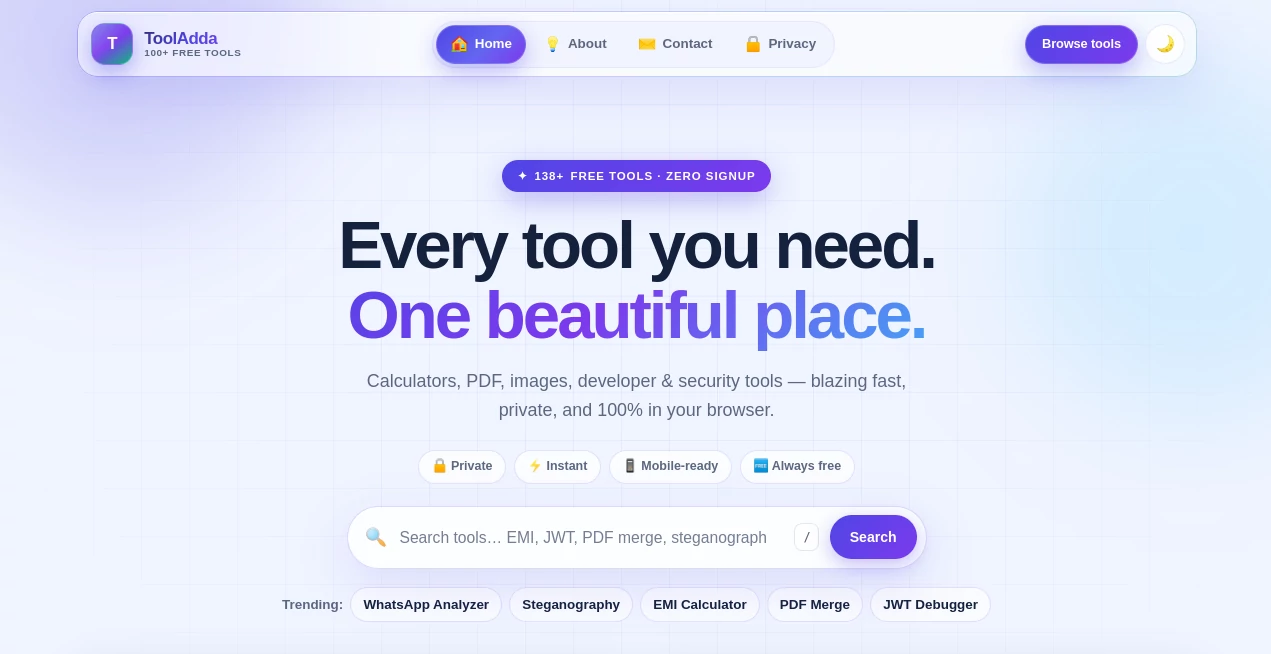
What is Tooladda?
ToolAdda is a practical collection of free online utilities designed for people who want to get everyday digital tasks done without installing software or creating an account. Instead of jumping between dozens of websites for small jobs, users can find calculators, PDF utilities, image tools, developer helpers, text utilities, security tools, SEO resources, and even simple games in one place.
The biggest attraction is simplicity. Open a tool, do the task, and move on. There is no complicated dashboard to learn and no registration process standing between the user and the utility they need. The platform currently offers more than 99 tools and emphasizes browser-based processing, making it particularly appealing for quick tasks where convenience matters.
Key Features
- More than 99 free online tools covering multiple everyday categories.
- Browser-based processing for calculations, conversions, and many file operations.
- No signup requirement for accessing the tools.
- Free access without paywalls or watermarks.
- Responsive layouts designed for desktop, tablet, and mobile use.
- Dedicated sections for calculators, PDF, image, text, developer, security, SEO, marketing, education, and game utilities.
- Search functionality for quickly finding a specific utility.
- Regularly added tools, including newer developer, PDF, image, education, and productivity utilities.
User Interface
The interface is built around a straightforward idea: find the tool and start using it. The homepage provides a search field, trending tools, featured utilities, category navigation, and recently added tools. This structure works especially well for visitors who arrive with a specific task in mind rather than wanting to explore a complicated application.
Individual utilities generally keep the controls focused on the job at hand. Whether someone needs to merge a PDF, test a regular expression, convert an image, calculate a value, or inspect a JWT, the experience is designed to stay out of the way.
Accuracy & Performance
Performance is one of the platform's strongest practical advantages because many operations happen directly inside the browser. There is no need to wait for a remote server to process every calculation or file operation. This can make simple utilities feel almost instantaneous, particularly when working with smaller inputs.
The individual tools also include purpose-built functionality rather than treating every task as a generic converter. For example, the scientific calculator includes equation solving, graphing, matrices, statistics, and unit conversion, while the PDF collection includes options such as merging, splitting, compression, rotation, extraction, comparison, and redaction.
Capabilities
The range of utilities is unusually broad for a free online toolkit. Developers can work with JSON, XML, JWTs, regular expressions, URLs, hashes, Cron expressions, and other technical formats. Content and productivity users can find text converters, handwriting tools, notepads, worksheet generators, and typing utilities.
There is also a substantial collection of PDF and image utilities. Users can convert PDF pages to images, merge documents, add watermarks, remove sensitive content, compress images, create passport-sized photographs, resize signatures, and perform other routine file tasks without installing desktop software.
Security & Privacy
Privacy is a major part of the product's positioning. The service states that calculations, conversions, and file processing run on the user's device rather than requiring files to be uploaded to a remote server. This is particularly useful for documents, images, signatures, and other material that users may not want to send to an external service.
Several individual utilities reinforce this approach. The PDF tools advertise no-upload processing, while security-oriented utilities such as the password checker emphasize zero uploads and local processing. Of course, users should still follow sensible security practices when handling highly sensitive information in any browser application.
Use Cases
Developers: Developers can use the collection for quick JSON and XML conversions, JWT inspection, regular-expression testing, URL encoding, hashing, Cron schedule generation, and other small technical tasks that do not justify installing a dedicated application.
Students: Students can use calculators, GPA and CGPA utilities, worksheet generation, typing tests, text tools, and PDF helpers while studying or preparing documents.
Office workers: Everyday office work often involves repetitive file and document tasks. Merging PDFs, comparing documents, resizing signatures, converting images, creating receipts, and preparing printable materials can all be handled through the available utilities.
Marketers and website owners: SEO and marketing utilities such as UTM building, URL shortening, robots.txt creation, and link checking can help with routine website and campaign management.
Design and content work: Image conversion, background removal, poster printing, handwriting conversion, font generation, and other visual or text-focused utilities provide useful shortcuts when a full design application would be unnecessary.
Pros and Cons
Pros
- Large collection of free utilities.
- No account required to get started.
- Many tools process data directly in the browser.
- No paywalls or watermarks are promoted on the platform.
- Useful coverage across PDF, image, text, developer, security, calculator, and marketing tasks.
- Mobile-friendly interface.
- New utilities are added regularly.
Cons
- The large number of utilities can feel overwhelming for first-time visitors.
- Some specialized tasks may still require dedicated professional software.
- Browser-based processing can be affected by the device's available memory and processing power when handling larger files.
- The collection focuses on practical utilities rather than deep project-management or enterprise workflows.
Pricing Plans
There is no complicated pricing structure to navigate. The tools are presented as free to use, with no signup requirement, no paywalls, and no watermarks. This makes the service particularly attractive for users who only need an occasional utility and do not want another subscription.
For someone who needs to merge a few PDFs today, calculate a loan payment, inspect a JWT, convert an image, or create a UTM link, the ability to simply open the required utility and use it can be more valuable than paying for a large software package.
How to Use It
- Open the website and browse the available categories or use the search field.
- Choose the utility that matches the task you want to complete.
- Enter text, numbers, settings, or files as requested by the selected tool.
- Adjust the available options when the utility provides customization controls.
- Run the operation and review the result.
- Copy, download, or export the result when the tool provides an appropriate option.
For example, someone working with several documents can open the PDF section, choose the appropriate utility, add the required files, arrange or configure them, and generate the result directly in the browser. There is no need to create an account first.
Comparison with Similar Tools
Many online utility websites specialize in one area. One may focus almost entirely on PDF conversion, another on developer utilities, and another on image editing. The main difference here is breadth. Instead of maintaining separate bookmarks for every small task, users can access a wide selection from one toolkit.
It also stands apart from subscription-focused productivity platforms. The goal is not to replace a complete office suite or development environment. It is better understood as a convenient toolbox for those small jobs that appear throughout the day and usually take only a few minutes to complete.
That distinction makes the service especially useful as a companion to existing software. A developer can keep using their normal IDE while relying on a browser utility for a quick conversion. A student can use their usual study applications while opening a calculator or PDF helper when needed. The same approach works for marketers, designers, administrators, and casual users.
Conclusion
A good online utility should not make a simple task feel complicated. That is where this collection makes a strong impression. With a broad range of free tools, no signup requirement, client-side processing across many utilities, and a clean category-based structure, it offers a convenient alternative to installing separate applications for every minor job.
Its real strength is variety without unnecessary commitment. Whether the task involves a PDF, image, calculation, piece of text, developer format, security check, or marketing utility, there is a good chance that a suitable option is already available. For anyone who regularly works online and values speed, privacy, and straightforward tools, it is a useful website to keep bookmarked.
Frequently Asked Questions (FAQ)
Is the service free to use?
Yes. The website presents its collection as free forever, with no paywalls or watermarks.
Do I need to create an account?
No. The platform is designed around zero signup access, so users can open a utility and start working without creating an account.
Are uploaded files sent to a server?
Many of the tools are designed for client-side processing, meaning the work happens in the browser and files do not need to leave the device. The individual tool should still be checked for its specific processing behavior when handling particularly sensitive information.
What types of tools are available?
The collection includes calculators, PDF utilities, image tools, text utilities, developer tools, security utilities, SEO and marketing tools, education resources, science utilities, and games.
Can it be used on a phone?
Yes. The website is designed with responsive layouts and touch-friendly use in mind, allowing many of its utilities to be accessed from smartphones and tablets as well as desktop computers.
Are new tools added?
Yes. The platform regularly introduces new utilities, with recent additions spanning developer, PDF, calculator, text, image, education, and other categories.
Is it suitable for professional work?
It can be very useful for professional day-to-day tasks, particularly when you need a quick calculator, converter, PDF utility, developer helper, or marketing tool. For complex workflows requiring collaboration, advanced automation, or enterprise controls, dedicated professional software may still be more appropriate.