


















CubeLV
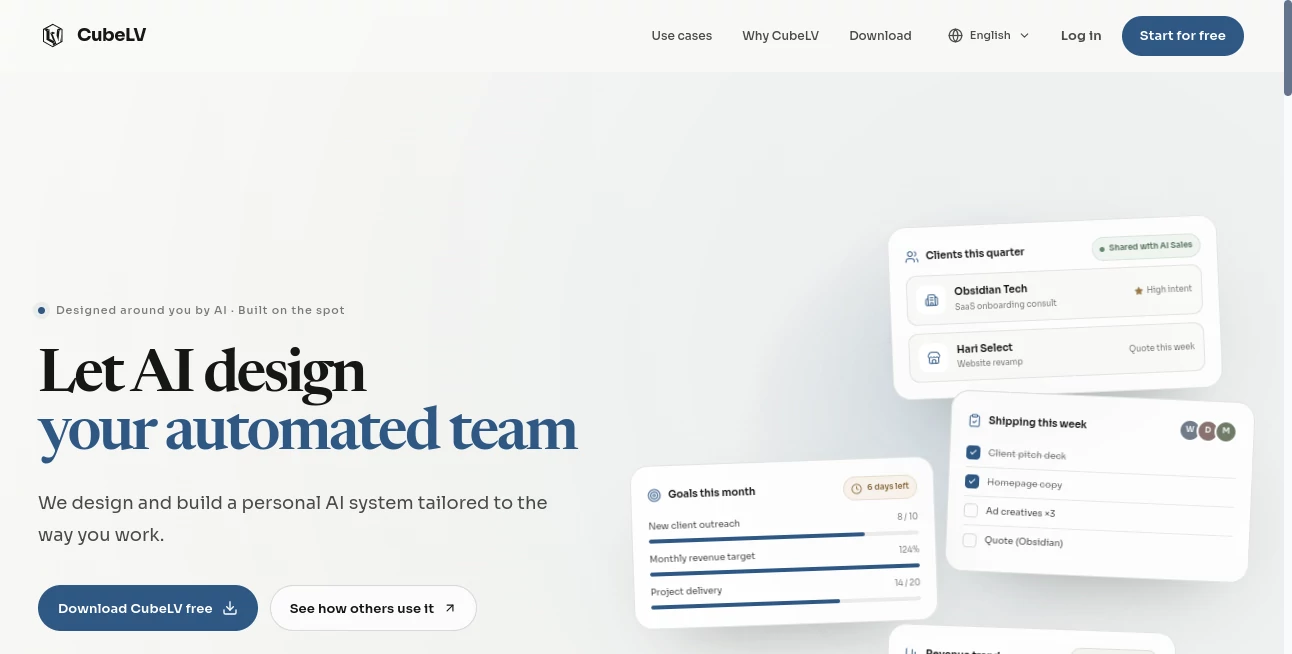
What is CubeLV?
CubeLV takes a different approach to productivity software. Instead of asking users to adapt their work to a fixed collection of features, it lets them describe what they need in everyday language and turns that description into a working system. The idea is simple: explain how you work, identify what slows you down, and let AI help design the tools and workflows around it.
The platform combines AI-powered notes, to-do lists, task management, data organization, custom tools, and automated AI employees in one workspace. It can be used from the web, macOS, Windows, iOS, and Android, with data stored in the cloud so the same workspace can follow you between devices.
For freelancers, founders, consultants, small teams, and other people who regularly switch between several business tasks, this approach can be particularly appealing. A client follow-up board, inventory tracker, quote generator, reporting workflow, or sales assistant does not have to be built from scratch with conventional software.
Key Features
- Natural-language tool building: Describe the system or feature you need and the platform can break the request into tasks, create components, and connect the required data.
- AI employees: Completed tools can be handed over to dedicated AI employees that perform recurring or one-time jobs.
- Automated workflows: Tasks can be scheduled so recurring work continues without requiring manual intervention every time.
- AI-managed information: Notes, todos, cards, and charts can be organized, extended, or generated with AI assistance.
- Cross-platform access: The same cloud-based workspace is available across desktop, mobile, and web environments.
- Google Sheets synchronization: Charts can be connected with spreadsheets in Google Drive, allowing information to move between the two workflows.
- Team collaboration: Tools and data can be shared with other people, with changes visible in real time.
User Interface
The interface is built around the idea of describing work rather than navigating through complicated configuration screens. Users can explain what they want to accomplish and watch the system turn that request into a structured workflow.
For someone who has never built an automation before, this can make the first experience much less intimidating. Instead of starting with technical settings, you can start with a sentence such as “build a client follow-up board” and let the platform work from there.
The workspace also brings together familiar productivity concepts such as notes, tasks, cards, charts, and shared information. That combination makes it easier to move from planning an activity to actually getting the work done.
Accuracy & Performance
Performance is especially important when AI is responsible for creating workflows and carrying out recurring tasks. The platform is designed to show the building process as tasks are completed, giving users visibility into how a requested system is being assembled.
Its automated employees can also be assigned recurring schedules or one-time jobs. This makes the experience more practical than simply generating text or suggestions, because the AI can participate in an ongoing workflow.
As with any AI-powered system, generated information and automated decisions should still be reviewed when the work involves important business, financial, legal, or other high-impact decisions. The service itself notes that AI-generated content can contain errors or outdated information.
Capabilities
The strongest part of the platform is its ability to turn a description of a business process into something more structured. A user might need a sales follow-up system, a shipping tracker, a quote generator, an inventory workflow, or a weekly reporting process. Rather than looking for a separate application for every requirement, the user can describe the desired workflow and have the system build around it.
AI employees add another layer to this concept. A business could organize separate responsibilities for sales, marketing, accounting, customer support, reporting, or other recurring activities. These employees can then be assigned jobs and schedules.
There is also support for email-based automation. Gmail messages can be forwarded into the platform so an AI employee can process them according to the instructions provided by the user and prepare or send replies. The service states that it receives send permission for this workflow rather than mailbox-reading permission.
Another useful capability is two-way synchronization with Google Sheets. This is particularly practical for people who already rely heavily on spreadsheets but want AI-assisted organization and automation around them.
Security & Privacy
Privacy matters when a productivity platform is handling business information, emails, documents, and operational data. The service states that user content remains owned by the user, while its terms explain that content may be used to provide and improve the service.
For the Gmail automation feature, the platform states that it only receives permission to send messages and cannot read the user's mailbox. The Google Play listing also reports that no data is shared with third parties, data is encrypted in transit, and users can request deletion of their data.
Users should still review the current privacy policy and service terms before connecting sensitive accounts or business information, particularly when setting up automated agents.
Use Cases
- Freelancers: Create client follow-up systems, task boards, quote generators, and reporting workflows without maintaining several disconnected applications.
- Small businesses: Organize sales, customer support, inventory, orders, and recurring administrative tasks.
- Consultants: Turn meeting notes into action items, organize client information, and schedule follow-up work.
- E-commerce teams: Track orders, shipping progress, inventory, reviews, and purchasing activities.
- Marketing: Organize social content, advertising analysis, campaign information, and recurring marketing reports.
- Operations: Create recurring workflows for reporting, reconciliation, monitoring, and internal administration.
- Solo founders: Build a collection of AI-assisted workflows that can handle repetitive parts of running a business.
Pros and Cons
Pros
- Build custom tools by describing requirements in natural language.
- Combines productivity features and AI automation in one workspace.
- AI employees can perform scheduled and one-time tasks.
- Works across web, desktop, and mobile platforms.
- Supports collaboration and shared workspaces.
- Google Sheets synchronization is useful for spreadsheet-heavy workflows.
- The free plan does not require a payment card.
Cons
- AI-generated results can still require human verification.
- Credit consumption becomes important for users running many AI employees.
- Some advanced workflows may require time to understand and configure properly.
- Users handling sensitive business information should carefully review privacy and permission settings before connecting external services.
Pricing Plans
The platform offers a free plan as well as paid subscriptions. The Free plan costs $0 forever and does not require a card. It includes 500 one-time AI credits, 2 GB of storage, access to every feature, and support for iOS, Android, Mac, Windows, and web.
The Pro plan costs $7.99 per month or $84.99 per year on the web. It includes 5,000 AI credits each month, 100 GB of storage, scheduled AI employees, and the option to purchase additional credits.
The Max plan costs $29.99 per month or $299.99 per year. It provides 20,000 monthly AI credits, 100 GB of storage, access to heavier models for larger jobs, and additional credit purchases when needed.
Extra credit packs are also available. The web pricing lists 3,500 credits for $5.99, 8,000 credits for $12.99, and 16,600 credits for $26.99. Prices inside mobile applications can be slightly higher because of app-store fees.
How to Use It
- Start with the web version or install the application on a supported device.
- Describe the work you want to organize or automate using ordinary language.
- Let the AI break the request into tasks and design the required system.
- Review the generated structure and allow it to build the requested tools.
- Assign appropriate AI employees to the completed workflows.
- Choose whether a task should run once or follow a recurring schedule.
- Connect supported services, such as Google Sheets, when they are useful for the workflow.
- Share tools or data with teammates when collaboration is required.
- Monitor the automated work and review important outputs before relying on them.
Comparison with Similar Tools
Traditional productivity applications usually provide a predefined set of boards, lists, calendars, databases, and automation rules. They can be excellent for structured teams, but users often have to adjust their processes to match the software.
This approach is more flexible because the starting point is the user's description of the work. Instead of simply managing an existing task list, the system can help create a custom workflow around a specific requirement.
It also differs from basic AI assistants. A conventional chatbot may answer a question or generate content, while this platform is designed to turn instructions into tools and then place AI employees behind those tools to perform recurring work. That makes it particularly interesting for users who want AI to participate in business operations rather than simply provide occasional assistance.
Conclusion
For people who feel that their work requires too many disconnected tools, this platform offers an interesting alternative. Its central idea is not just to help you complete individual tasks, but to let you describe how your work happens and build an AI-powered system around it.
The combination of custom tool creation, AI employees, scheduled automation, productivity features, cloud access, collaboration, and spreadsheet synchronization gives it plenty of room to fit different workflows. A solo founder could use it to create a lightweight operational team, while a consultant could turn repetitive client work into repeatable processes.
The free plan also makes it relatively easy to explore the concept before committing to a subscription. For users willing to experiment with AI-driven workflows, it is a compelling way to rethink how everyday business and productivity tasks are organized.
Frequently Asked Questions (FAQ)
What is CubeLV used for?
It is designed for building custom productivity and automation systems, managing notes and tasks, creating workflows, and assigning AI employees to recurring or one-time jobs.
Does it require coding?
No. The platform is designed around natural-language instructions, allowing users to describe what they need without learning how to program the underlying system.
Can AI employees run tasks automatically?
Yes. AI employees can be assigned recurring schedules or one-time jobs, allowing repetitive workflows to continue with less manual involvement.
Can it work with Google Sheets?
Yes. Charts can be synchronized with Google Sheets, allowing changes to move between the workspace and spreadsheets in Google Drive.
Is there a free plan?
Yes. The Free plan costs $0, does not require a payment card, and includes 500 one-time AI credits and 2 GB of storage.
Which devices are supported?
The service is available through the web and supports macOS, Windows, iOS, and Android, with cloud-based data shared across platforms.
Are AI-generated results always accurate?
No. AI-generated information can contain errors, omissions, outdated information, or incorrect statements. Important outputs should be independently reviewed before they are used for consequential decisions.
Can teams collaborate on the same workspace?
Yes. Tools and data can be shared with other people, and changes can be visible in real time, making it possible for humans and AI to work within the same environment.
AI Workflow Management , AI Productivity Tools , AI Task Management , AI Spreadsheet .
These classifications represent its core capabilities and areas of application. For related tools, explore the linked categories above.
CubeLV details
Website unavailable — View Alternatives
Pricing
- Free
Apps
- Web App
- iOS App
- Android App
- Windows App
- Mac App
Categories

CubeLV Alternatives Product

ToolIMG

ace.me

Kaamfu

GameClick.io

Free AI Chat

Motion

Productivity…

Hintder AI

Arobis AI Vi…
