
DeepRead
What is DeepRead?
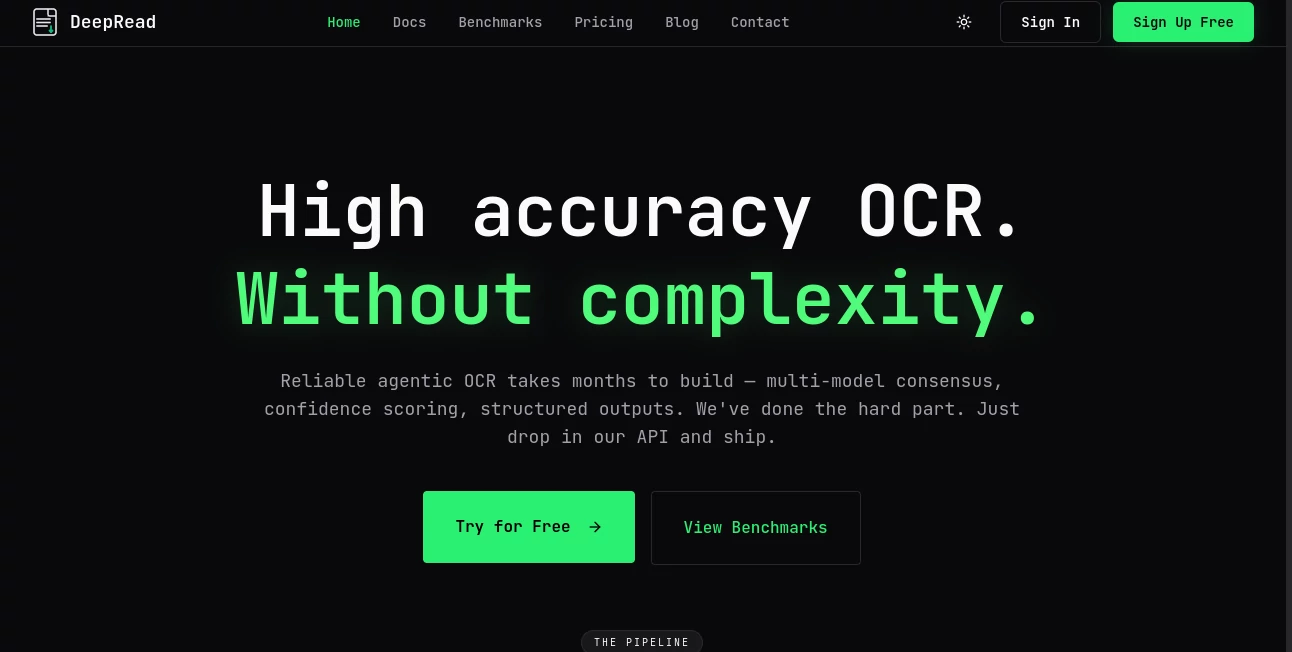
I’ve worked with enough OCR tools to know the usual frustrations: missed text, wrong layouts, endless manual corrections. Then I tried DeepRead and it felt different. It doesn’t just pull text from documents — it understands structure, context, and delivers clean, reliable structured data with impressive accuracy. Developers and businesses who process invoices, contracts, forms, or scanned records are finding it saves them serious time while reducing errors. It’s the kind of tool that makes you wonder how you ever managed with the old patchwork solutions.
Introduction
Document processing is still a pain point for many teams. Traditional OCR often falls short on complex layouts, handwriting, or low-quality scans. DeepRead takes a smarter, AI-native approach. Using multi-model consensus, it achieves consistently high accuracy (often 95%+) without requiring complicated prompt engineering. Built as a clean REST API, it’s easy to integrate into any stack. Whether you’re automating invoice processing, extracting data from contracts, or handling large document volumes, it turns messy files into structured, actionable information quickly and reliably.
Key Features
User Interface
The API is refreshingly straightforward — no heavy SDKs or complicated setup. If your code can make an HTTP request, you’re ready to go. The dashboard is clean and practical, letting you test documents, monitor jobs, and review results without clutter. Developers appreciate how little friction there is between idea and implementation. Everything feels designed for real workflows rather than theoretical demos.
Accuracy & Performance
What stands out is the consistent accuracy across different document types. By combining multiple AI models and smart consensus logic, it flags uncertain fields for review instead of guessing. This human-in-the-loop approach dramatically reduces downstream errors. Processing is fast and scalable, handling both single documents and high-volume batches efficiently. In practice, teams report significantly less manual correction work compared to previous solutions.
Capabilities
It excels at turning PDFs, scanned images, and complex documents into structured JSON with high confidence scores. Features include form filling, PII redaction, blueprint-optimized extraction, and webhook support for async workflows. The API is versioned for stability, and it handles everything from simple invoices to dense contracts or multi-page reports. Developers can also teach AI agents to use it through available skills and integrations.
Security & Privacy
Security is taken seriously with proper encryption, compliance standards, and options like Bring Your Own Key (BYOK). Documents are processed securely, and the platform is designed for enterprise environments where data sensitivity matters. You stay in control of your information without unnecessary vendor lock-in.
Use Cases
A finance team automates invoice processing and reduces manual entry time by over 80%. A legal department extracts key clauses from contracts at scale while flagging uncertain sections for review. An insurance company processes claim documents faster with higher accuracy and better audit trails. Developers integrate it into their products to offer document intelligence features to end users. It fits anywhere documents need to be read, understood, and turned into usable data.
Pros and Cons
Pros:
- High accuracy through multi-model consensus with smart uncertainty flagging.
- Simple, versioned REST API that’s easy to integrate and maintain.
- Strong focus on structured output and real-world document challenges.
- Enterprise-ready security and compliance features.
- No heavy SDKs or lock-in — works with any tech stack.
Cons:
- Best results still benefit from reasonably clear input documents.
- Advanced volume and features are on paid plans.
Pricing Plans
It offers a free tier generous enough to test real documents and integrate into small projects. Paid plans scale with usage and unlock higher volume, priority processing, and advanced features. The pricing is transparent and usage-based, making it accessible for startups while scaling comfortably for larger operations.
How to Use DeepRead
Sign up, grab your API key, and start sending documents via simple POST requests. Upload a file or provide a URL, specify any processing options, and receive structured JSON results. For async workflows, use webhooks to get notified when processing completes. Review confidence scores and flagged fields, then integrate the clean data into your systems. The whole process is straightforward whether you’re testing one document or building a full pipeline.
Comparison with Similar Tools
Many OCR solutions either sacrifice accuracy for speed or require complex configuration. DeepRead stands out with its multi-model approach and practical focus on structured, reliable output with minimal prompt engineering. It’s more developer-friendly than heavy enterprise platforms and more accurate than lightweight alternatives. The balance of simplicity, power, and accuracy makes it a strong choice for modern document workflows.
Conclusion
Document processing doesn’t have to be a constant source of headaches and manual fixes. DeepRead makes it faster, more accurate, and far more reliable. By combining smart AI with a clean API, it helps teams move from raw documents to actionable insights without the usual friction. For developers and businesses that live in documents every day, it’s the kind of tool that quietly becomes essential once you start using it.
Frequently Asked Questions (FAQ)
How accurate is the extraction?
It targets 95%+ accuracy on most documents using multi-model consensus and flags uncertain fields for review.
Do I need to install an SDK?
No — it’s a clean REST API. If your code can make HTTP requests, you can use it.
What file types are supported?
PDFs, scanned images, and common document formats work well.
Is it suitable for large volumes?
Yes — the platform scales efficiently for high-volume processing on paid plans.
How is data privacy handled?
Secure processing with enterprise compliance standards and options like Bring Your Own Key.
AI Document Extraction , AI Documents Assistant , AI Research Tool , AI Developer Tools .
These classifications represent its core capabilities and areas of application. For related tools, explore the linked categories above.

DeepRead Alternatives Product

Rename files…
Devplan

Grow A Garde…

ReportRemarks

LongTerMemory

Agent Grid

JSON to TOON…

AgentOne

JSON-Tools