Deqsy
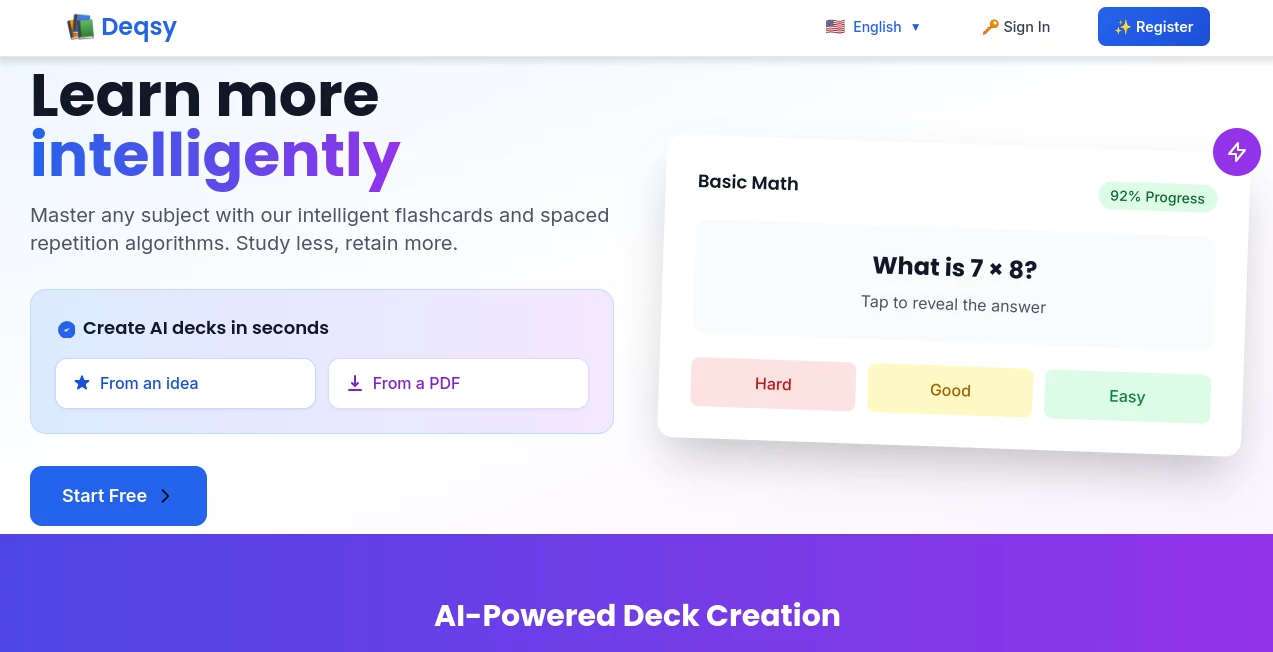
What is Deqsy?
I’ve tried dozens of flashcard apps over the years, but most of them eventually feel like a chore. You make cards, review them for a while, and then life gets busy and they gather digital dust. This platform feels different. It combines classic spaced repetition with thoughtful AI that can generate entire decks from a topic, a PDF, or even a quick voice note. The result is studying that actually sticks — and somehow feels less like work. Friends who used it for language learning or exam prep keep telling me how much faster they’re retaining information compared to their old methods.
Introduction
Spaced repetition is one of the most proven ways to learn effectively, but creating good cards and keeping up with reviews can be overwhelming. Deqsy makes the whole process smoother and smarter. You can build decks manually if you want, but the real magic happens when you let the AI handle the heavy lifting — turning notes, documents, or ideas into well-structured flashcards automatically. It then schedules reviews at the perfect intervals so you spend time on what you actually need to practice. Whether you’re learning a language, preparing for medical exams, or mastering a new skill for work, it adapts to your pace and helps information move from short-term memory to long-term knowledge without the usual burnout.
Key Features
User Interface
The design is clean and focused, which makes a big difference when you’re reviewing cards every day. Creating a new deck is straightforward — you can type cards one by one or let the AI generate them from a prompt or uploaded file. The review screen is distraction-free with large, readable text and simple swipe or button controls. Progress tracking feels motivating rather than stressful, showing you exactly where you’re improving without overwhelming charts.
Accuracy & Performance
The spaced repetition algorithm is solid and adjusts intelligently based on how well you know each card. AI-generated cards are surprisingly high quality — they pull out key concepts instead of just surface-level facts. In practice, users notice they remember material longer because the system surfaces weak areas at the right moment. Generation is fast, and the platform stays responsive even when you have large decks.
Capabilities
You can create decks from scratch, import from files, or generate them instantly using AI from any topic or document. It supports images, audio, and rich text in cards. The scheduling is fully adaptive, and you can share decks with friends or students. It also includes progress analytics that help you understand your learning patterns over time. Whether you need quick vocabulary practice or deep conceptual mastery, it scales to your goals.
Security & Privacy
Your study data and uploaded materials are handled responsibly. The platform focuses on delivering a great learning experience without unnecessary data collection. Decks you create stay yours, and sharing is always under your control. For students and professionals working with sensitive material, that respect for privacy builds real trust.
Use Cases
Medical students turn dense textbook chapters into focused review decks that help them retain complex information before exams. Language learners generate daily conversation cards from podcasts or articles and see steady improvement in recall. Professionals preparing for certifications build targeted decks during commute time. Teachers create shared decks for their classes, making review sessions more interactive and effective. Even hobbyists use it to learn history, music theory, or cooking techniques without feeling overwhelmed.
Pros and Cons
Pros:
- AI generation saves enormous time when creating high-quality decks.
- Smart spaced repetition actually improves long-term retention.
- Clean, focused interface that makes daily review enjoyable.
- Works great for both quick study sessions and serious exam prep.
- Flexible input options — text, PDF, voice, or manual entry.
Cons:
- Advanced AI features and unlimited generations require a paid plan.
- Very specialized or niche topics may need some manual editing after AI generation.
Pricing Plans
It offers a solid free tier that lets you create and study decks with core spaced repetition features — enough to experience the difference. Paid plans unlock unlimited AI generations, advanced analytics, larger storage, and priority support. Many students and professionals find the upgrade pays for itself quickly through time saved and better learning outcomes.
How to Use Deqsy
Sign up and create your first deck. You can add cards manually or click the AI button and describe what you want to learn (“Spanish travel vocabulary” or “Organic Chemistry reactions”). Upload a PDF or notes if you have them. Review the generated cards, make small edits if needed, then start studying. The system will show you cards at the right intervals based on how well you know them. Check your progress dashboard regularly to see how your retention is improving over time. It’s simple enough for daily use but powerful enough for serious study goals.
Comparison with Similar Tools
While many flashcard apps rely on manual entry or basic templates, this one combines strong spaced repetition with genuinely helpful AI generation. It feels more modern and efficient than older tools, and the focus on adaptive learning helps users retain information longer. It strikes a nice balance between simplicity for casual learners and depth for serious students or professionals.
Conclusion
Learning doesn’t have to be a grind. When you combine proven spaced repetition with smart AI that handles the boring parts, studying becomes more effective and even enjoyable. This platform delivers exactly that balance — helping you learn better while saving significant time. Whether you’re a student facing exams, a professional building new skills, or just someone who loves learning, it’s a tool that quietly makes a big difference in how much you remember and how confident you feel.
Frequently Asked Questions (FAQ)
How good is the AI at creating cards?
Very good for most subjects — it pulls key concepts and creates natural question-answer pairs, though you can always tweak them.
Can I import my existing notes or PDFs?
Yes, you can upload documents and let the AI turn them into structured flashcards.
Is there a limit on free use?
The free plan is generous for regular study, with paid options for heavier AI usage and advanced features.
Does it work for any subject?
It works across languages, sciences, history, medicine, law, and many more — basically anything you can describe or document.
Can I share decks with others?
Yes, you can share decks with classmates, colleagues, or study groups.
AI Tutorial , AI Course , AI Education Assistant , AI Knowledge Base .
These classifications represent its core capabilities and areas of application. For related tools, explore the linked categories above.

Deqsy Alternatives Product

Wondika

Sourcetable

ukamiru

Llamaroo

Physics gpt

PrepScore

SlideStorm AI

UPDF AI

ChirpyPet