


















DevLensPro
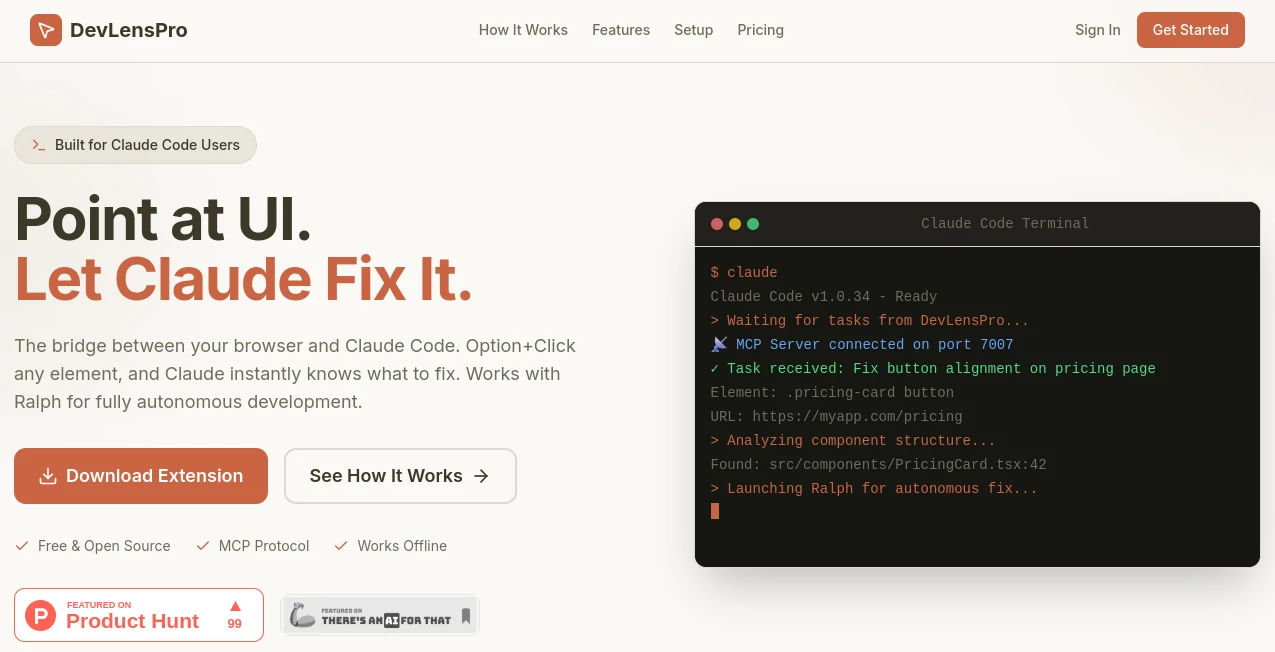
What is DevLensPro?
I’ve spent far too many hours trying to explain a broken button or misaligned card to Claude. “The button on the pricing page with the blue background…” — only to get the wrong file or incomplete context. Then I started using this tool and everything changed. Option + Click the element, and Claude instantly sees exactly what I see: the screenshot, the exact CSS, the component name if it’s React, even the console logs. The back-and-forth disappears. What used to take ten minutes of description now takes seconds, and the fixes land much more accurately.
Introduction
Modern AI coding tools like Claude are incredibly powerful, but they’re blind to what you’re actually looking at in the browser. DevLensPro acts as the missing eyes and hands. It’s a Chrome extension that bridges your live application directly to Claude Code (and works beautifully with autonomous agents like Ralph). Point at anything on the page, and rich context — screenshot, DOM info, computed styles, React component details, and more — is instantly sent over. It turns vague descriptions into precise, actionable tasks. For frontend developers, full-stack engineers, and anyone building UIs with AI assistance, it removes one of the biggest remaining friction points in agentic development.
Key Features
User Interface
The extension is wonderfully minimal. Install it, enable Developer Mode if needed, and you’re ready. Option + Click (or your custom shortcut) on any element, and a clean overlay shows what was captured. You can add a quick note like “this button looks off on mobile” before sending. The whole interaction feels natural — like having a conversation with Claude while pointing at the actual thing you’re talking about. No cluttered panels or complex setup.
Accuracy & Performance
The context it captures is impressively complete: full DOM node, CSS selector, computed styles, screenshot with highlight, console logs, and React Fiber data when applicable. This richness leads to dramatically better results from Claude. Tasks that used to require multiple clarification rounds now often get fixed in one shot. The WebSocket connection is fast and reliable, keeping the flow smooth even during longer sessions.
Capabilities
It supports local development and remote VPS setups, works with Claude Code and other MCP-compatible tools, detects React components with source file mapping, and integrates with autonomous agents like Ralph for hands-free fixing. You get full element context including position, dimensions, inner text, and more. URL-to-project-folder mapping means Claude always knows exactly which codebase to edit. It turns “fix this UI” into a precise, context-rich task.
Security & Privacy
Everything runs locally by default. No unnecessary data leaves your machine unless you explicitly use cloud relay mode. The architecture is privacy-first — your code and browser context stay under your control. For developers working on sensitive projects, this local-first approach is a big confidence booster.
Use Cases
A frontend developer spots a spacing issue on a pricing page, Option + Clicks the element, describes the fix, and Claude applies the change in the right file instantly. A full-stack engineer uses Ralph + DevLensPro to autonomously implement new features by pointing at existing UI for context. A solo founder rapidly iterates on their MVP by fixing UI bugs without breaking flow. Teams reduce the usual “describe the bug in words” overhead and ship polished interfaces faster. It shines anywhere the gap between “what I see” and “what the AI knows” slows you down.
Pros and Cons
Pros:
- Eliminates the painful “describe what you see” step in AI coding.
- Extremely rich context leads to much more accurate fixes.
- Works seamlessly with Claude Code and autonomous agents like Ralph.
- Local-first with optional cloud relay for remote setups.
- Feels like a natural extension of your development workflow.
Cons:
- Currently focused on Claude Code ecosystem (though expanding).
- Requires initial setup of MCP server (quick but not zero-click).
Pricing Plans
It’s free and open source for core functionality. The extension and MCP server are available at no cost. Optional paid plans or cloud relay features may exist for teams needing easier remote setups or additional support. The fact that the main experience is free and open source makes it especially appealing for individual developers and small teams.
How to Use DevLensPro
Install the Chrome extension, run the MCP server locally with the provided command, and configure it for Claude Code. Once connected, simply Option + Click any element on your page. Add a short description of what you want changed, and the rich context is sent to Claude. Review the suggested edit, apply it, and continue. For autonomous mode, combine it with Ralph to let the AI handle entire tasks after you point at the relevant UI. The loop from observation to fix becomes incredibly tight.
Comparison with Similar Tools
Traditional debugging involves lots of manual description and context switching. Other browser-to-AI tools often capture limited information or require complex setup. DevLensPro stands out with its depth of captured context, seamless MCP integration, and focus on real developer speed. It turns AI coding from “describe then debug” into “point and improve,” which feels like a genuine leap forward for frontend and full-stack work.
Conclusion
AI coding is powerful, but it’s only as good as the context you give it. DevLensPro closes that critical gap between what you see in the browser and what the AI understands. It makes the entire process faster, more accurate, and honestly more enjoyable. If you use Claude Code (or similar tools) and work on user interfaces, this extension quickly becomes one of those “how did I live without this” tools. The future of development isn’t just faster coding — it’s smarter context. This tool delivers exactly that.
Frequently Asked Questions (FAQ)
Do I need Claude Code specifically?
It’s built primarily for Claude Code but works with any MCP-compatible setup.
Is it difficult to set up?
Most users get it running in under 5 minutes following the quick start guide.
Can it work with remote development servers?
Yes — cloud relay mode supports VPS and remote setups.
Does it capture React component info?
Yes — it detects React components via Fiber and provides source file context when available.
Is everything local and private?
Yes in local mode — all processing stays on your machine.
AI Code Assistant , AI Code Explanation , AI Developer Docs , AI Developer Tools .
These classifications represent its core capabilities and areas of application. For related tools, explore the linked categories above.

DevLensPro Alternatives Product

Lovable APP

Ito AI

DeepSeek

Emergent

freellm

OGimage

Vibe Coding …

Tate-A-Tate

LocaFlow
