
Crawl4AI
What is Crawl4AI?
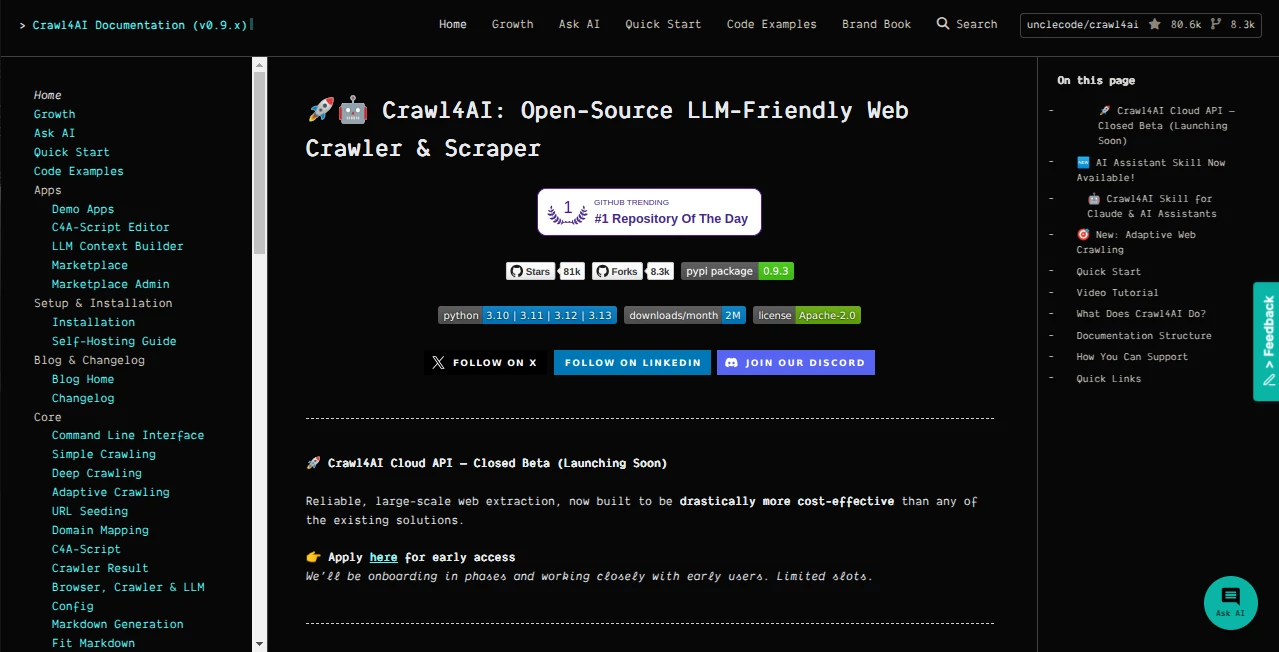
Turning a modern website into useful data is rarely as simple as downloading a page. JavaScript, dynamic content, repeated layouts, authentication, media, and constantly changing structures can make ordinary scraping approaches frustrating. Crawl4AI takes a developer-focused approach to this problem by combining web crawling, browser automation, and structured extraction with output designed for modern AI workflows.
What makes this project particularly interesting is its focus on producing clean, usable information rather than simply returning raw HTML. Developers can crawl pages asynchronously, convert useful content into Markdown, extract structured information, and prepare web data for applications such as RAG pipelines, AI agents, research systems, and automated data-processing workflows.
The open-source model is another strong advantage. Developers can run the crawler in their own environment without being forced into a proprietary scraping platform or requiring an API key for the core open-source workflow. For teams that want control over their infrastructure, that can make a substantial difference.
Key Features
- LLM-friendly Markdown generation for AI and RAG workflows.
- Asynchronous crawling designed for high-concurrency workloads.
- Structured extraction using CSS selectors, XPath, and LLM-based strategies.
- Browser automation through a modern browser environment.
- Support for sessions, cookies, proxies, hooks, and advanced browser controls.
- Deep crawling strategies for exploring multiple pages within a website.
- Content filtering and caching options for more efficient processing.
- Docker deployment with API-based access for teams that prefer a service architecture.
- Command-line support for users who want to perform crawls without writing a complete application.
- Adaptive crawling capabilities designed to determine when enough relevant information has been collected.
User Interface
This is primarily a developer tool rather than a traditional point-and-click SaaS application. The main experience comes through Python, command-line tools, APIs, Docker deployments, and configuration objects.
That approach may feel different if you are accustomed to visual scraping platforms, but it is a major benefit for developers who need repeatable workflows. Instead of manually configuring every crawl through a dashboard, a developer can define the crawling behavior in code and integrate it directly into an existing application.
The documentation is organized around installation, quick starts, core crawling, advanced browser controls, extraction strategies, and API references. Practical examples make it easier to move from a basic crawl to a more customized implementation.
Accuracy & Performance
Performance is one of the project's strongest selling points. Its asynchronous architecture allows multiple crawling operations to be handled efficiently, while browser pooling, caching, and parallel processing can help reduce unnecessary overhead in larger workflows.
Accuracy depends heavily on the extraction strategy selected by the developer. CSS and XPath extraction can be useful when a website has predictable structures, while LLM-based extraction can handle more flexible content patterns. This gives developers the ability to choose precision and control when the page structure is known, or more adaptive extraction when it is not.
For example, a developer collecting product information from hundreds of pages can target specific fields instead of storing entire HTML documents. Another workflow might convert documentation pages into clean Markdown before passing them to a retrieval system. The difference is practical: the resulting dataset contains information that is easier for downstream systems to understand.
Capabilities
The platform goes well beyond basic URL fetching. Developers can control browser behavior, manage sessions, work with authenticated pages, configure proxies, handle dynamic content, and process links and media.
Its extraction system is particularly useful for AI applications. Structured data can be obtained through CSS or XPath rules, while LLM-based strategies provide a more flexible option for extracting information from less predictable pages. Chunking and filtering capabilities can also help prepare large documents for downstream processing.
Deep crawling adds another useful layer. Rather than treating a website as a collection of isolated URLs, developers can configure strategies to discover and process related pages. Adaptive crawling can also stop when the system determines that sufficient information has been gathered for a particular objective.
The project can be used as a Python library, from the command line, or through containerized deployments. That flexibility makes it suitable for everything from a small research script to a larger backend data pipeline.
Security & Privacy
Self-hosting gives developers considerably more control over where crawled data is processed and stored. This can be valuable for projects involving proprietary datasets or internal research.
At the same time, self-hosting means security becomes part of the developer's responsibility. Production deployments should use HTTPS, restrict access to trusted systems where appropriate, validate URLs, and carefully review hooks and extracted content before feeding them into other applications.
Recent releases have also introduced security protections around URL schemes, API configuration, expression evaluation, hooks, authentication, and rate limiting. Developers running containerized or production deployments should keep the software updated and follow the project's security guidance rather than treating an open-source crawler as automatically secure.
Use Cases
RAG and Knowledge Bases: Website content can be transformed into cleaner Markdown and structured data before being indexed for retrieval-augmented generation systems.
AI Agents: Agents often need reliable access to current web information. A programmable crawler can provide the extraction layer between an agent and external websites.
Research and Data Collection: Researchers can crawl documentation, articles, public datasets, and other sources while controlling how information is extracted and organized.
E-commerce Data: Structured extraction can be used to collect product names, specifications, prices, descriptions, and other fields from supported website structures.
Competitive Research: Businesses can automate the collection of publicly available information across multiple pages and turn it into structured datasets for analysis.
Documentation Processing: Large documentation websites can be crawled and converted into clean material suitable for search systems, internal assistants, or developer-focused knowledge bases.
Data Pipelines: Development teams can place the crawler inside a larger Python-based pipeline that cleans, transforms, stores, and analyzes extracted information automatically.
Pros and Cons
Pros:
- Open-source and highly customizable.
- Designed specifically with LLM and AI workflows in mind.
- Strong asynchronous crawling capabilities.
- Supports CSS, XPath, and LLM-based extraction.
- Useful Markdown output for RAG and knowledge-processing systems.
- Works with browser automation and dynamic websites.
- Supports Python, CLI, Docker, and API-based workflows.
- Provides extensive control over sessions, proxies, cookies, and browser behavior.
- Suitable for both small scripts and larger automated pipelines.
Cons:
- It is more developer-oriented than visual scraping platforms.
- Advanced configurations can require a solid understanding of Python and browser automation.
- Self-hosted deployments require the user to manage infrastructure and security.
- LLM-based extraction may introduce additional processing requirements compared with deterministic selectors.
- Websites with aggressive anti-bot systems may still require careful configuration and responsible crawling practices.
Pricing Plans
The core project is open source, so developers can install and run it without purchasing a conventional monthly SaaS subscription. This is especially attractive for individuals and development teams that prefer to operate their own crawling infrastructure.
A cloud API is also being developed, with the project currently describing it as a closed beta and onboarding users in phases. Because cloud availability and commercial pricing can change as the service develops, users should check the latest official information before planning a production budget around the hosted offering.
How to Use It
Getting started is straightforward for developers familiar with Python. The package can be installed through pip, followed by the required browser setup. A basic crawler instance can then be created asynchronously and used to process a target URL.
A typical workflow starts by crawling a page and reading the resulting Markdown. From there, developers can add content filters, extraction strategies, browser configuration, sessions, authentication, proxies, or deeper crawling behavior depending on the project.
For larger deployments, Docker provides another option. This makes it possible to expose crawling functionality through an API and integrate the crawler with other services without embedding the entire crawling process directly inside an application.
The command-line interface is useful for quick experiments. A developer can test a URL, request Markdown output, perform deeper crawling, or experiment with extraction before committing the workflow to application code.
Comparison with Similar Tools
Traditional scraping libraries are often excellent at downloading pages and selecting elements, but AI-oriented applications need more than raw HTML. They need content that can be cleaned, structured, filtered, chunked, and passed efficiently to language models or retrieval systems.
Cloud scraping services, on the other hand, can reduce infrastructure work but usually introduce usage limits, API costs, platform dependencies, or restrictions around customization. A self-hosted open-source approach gives developers considerably more control over the environment and crawling logic.
The biggest distinction is therefore not simply scraping speed. It is the combination of browser control, structured extraction, asynchronous crawling, Markdown generation, and AI-oriented workflows. For developers building their own data pipeline, that combination can be more valuable than a simple visual scraper.
Conclusion
For developers who need to turn websites into reliable inputs for AI systems, this project offers a compelling balance between flexibility, performance, and control. Its open-source foundation removes many of the restrictions associated with hosted scraping platforms, while its extraction and browser capabilities provide room for much more sophisticated workflows.
The strongest use cases are likely to be found where crawling is not the final goal, but the first step in a larger process. Whether the destination is a RAG database, AI agent, research platform, internal knowledge base, or automated data pipeline, having clean and structured web information can dramatically simplify everything that comes afterward.
It is not necessarily the easiest choice for someone looking for a purely visual scraping interface. For developers, however, the ability to control the crawler from code and deploy it on their own infrastructure makes it a particularly attractive option.
Frequently Asked Questions (FAQ)
Is it open source?
Yes. The core project is open source and can be installed and run by developers on their own infrastructure.
Can it extract content for RAG applications?
Yes. Clean Markdown output, content filtering, structured extraction, and crawling capabilities make it well suited to preparing website information for retrieval-augmented generation workflows.
Does it support JavaScript-heavy websites?
Yes. Browser automation allows it to process pages where important information is generated dynamically rather than being available in the initial HTML response.
Can developers use CSS or XPath extraction?
Yes. Both CSS and XPath strategies are supported, alongside more flexible LLM-based extraction approaches.
Can it be deployed with Docker?
Yes. Docker deployment is supported and can be useful when crawling needs to be exposed as a service or integrated into a larger backend architecture.
Does it require an API key?
The core open-source workflow does not require a proprietary API key. Developers can install and operate the software themselves.
Is there a cloud version?
A cloud API is being developed and is currently described by the project as a closed beta with phased access.
Is it suitable for large crawling projects?
It can be used for larger workloads thanks to asynchronous crawling, concurrency, caching, deep crawling, and deployment options such as Docker. Production workloads should still be configured carefully according to the target websites and available infrastructure.
What programming language is primarily used?
The main developer experience is Python-based, making it a natural fit for AI, data-processing, automation, and backend projects built around the Python ecosystem.
Can it crawl multiple pages instead of a single URL?
Yes. Deep crawling strategies allow developers to discover and process multiple related pages, with options for controlling the crawling strategy and page limits.
AI Web Scraping , Github Repos , AI Research Tool , AI Developer Tools .
These classifications represent its core capabilities and areas of application. For related tools, explore the linked categories above.

Crawl4AI Alternatives Product

Odysseus AI

Reverse Imag…
CoolVerdict
Toflow AI
Skillselion
langextract.…

UPDF AI

Prelight

AyeWatch AI