


















Dola AI
What is Dola AI?
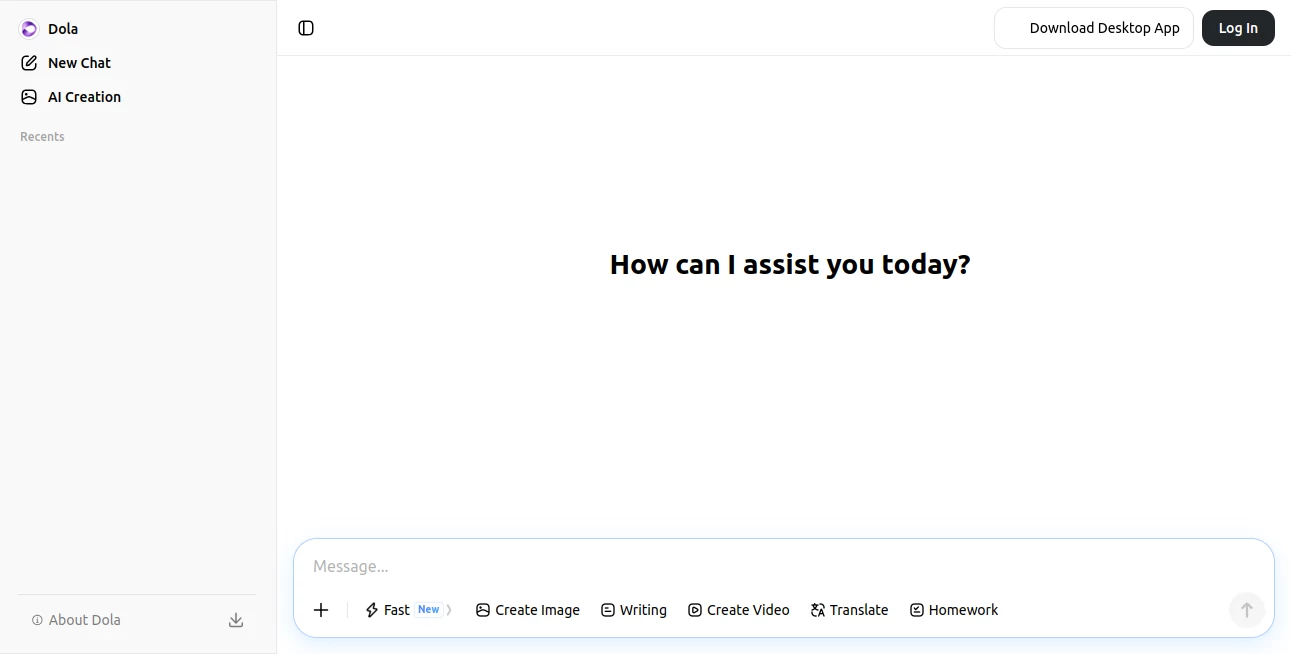
Dola is an AI assistant designed to make everyday digital work faster, simpler, and less fragmented. Instead of jumping between separate tools for searching, writing, reading documents, summarizing pages, and creating images, users can bring many of these tasks into one AI-powered workspace.
Its usefulness becomes particularly clear when working across different types of content. A user can ask questions, summarize a long webpage, work with a PDF, translate text, draft professional writing, or generate an image without constantly changing applications. The service is also available through desktop and browser experiences, making it easier to bring AI into the tools people already use.
For someone who regularly deals with documents, research, online content, and writing, having these capabilities in one place can remove a surprising amount of friction from the workday.
Key Features
- AI-powered chat and assistance for everyday questions and tasks.
- PDF reading and conversational interaction with documents.
- Support for multiple document formats, including Word files.
- Webpage, YouTube, PDF, and image summarization.
- AI-assisted search with generated summaries.
- Writing assistance for emails, blog posts, social content, and other text.
- Translation support for working across languages.
- AI image generation for creative and marketing-oriented content.
- Long-form writing capabilities for substantial documents and articles.
- Desktop and browser tools that make AI accessible from different applications.
User Interface
The experience is built around keeping AI close to the content you are already working with. The desktop version includes an AI toolbar that can work alongside applications such as Office, while the browser extension puts functions such as summarization, search assistance, translation, and writing support directly into the browsing experience.
This approach feels practical rather than overly complicated. Someone reading an article, watching a long YouTube video, or reviewing a document can use AI assistance without opening a completely separate workflow for every small task.
Accuracy & Performance
Performance is one of the strongest reasons to use an all-purpose assistant like this. Summarizing long material, extracting useful points from documents, and producing an initial draft can turn tasks that normally take considerable time into much shorter sessions.
That said, AI-generated answers should still be reviewed before being used for important decisions. The service itself notes that AI output can sometimes be incorrect, incomplete, or unreliable, so users should verify information when accuracy matters.
Capabilities
The range of capabilities is unusually broad for a single assistant. Its document features allow users to open and read PDFs, ask questions about their contents, summarize material, and work with multiple files. Long-context document handling is especially useful when comparing several articles or extracting common points from a collection of PDFs.
The browser experience adds another layer of convenience. Users can summarize webpages and YouTube content, receive AI-assisted search results, translate text, and get help composing emails, posts, blogs, and other written material.
Creative users can also take advantage of image generation, while the long-form writing feature can help produce substantial drafts such as academic material or marketing copy.
Security & Privacy
Privacy deserves attention whenever an AI assistant handles documents, conversations, or personal information. The service states that user inputs and generated outputs belong to the user between the user and the service, while its privacy policy explains how account, technical, usage, and content-related information may be processed.
Users should still avoid uploading confidential third-party information or sensitive material unless they have the necessary authorization. As with any cloud-based AI service, checking the current privacy terms before using it for confidential business documents is a sensible step.
Use Cases
Research: Quickly summarize articles, videos, PDFs, and other online material when you need the important points without reading every word.
Students: Work through lengthy documents, ask questions about uploaded material, translate passages, and create first drafts for assignments or research projects.
Professionals: Draft emails, summarize business documents, extract information from PDFs, and get quick answers while working inside familiar desktop applications.
Content creators: Turn research into outlines and long-form drafts, summarize source material, create social content, and generate supporting images.
Multilingual work: Translate text while reading or preparing content in another language, making the workflow more convenient for international teams and creators.
Pros and Cons
- Pros: Broad collection of AI capabilities in one service.
- Pros: Useful PDF and document interaction features.
- Pros: Browser and desktop integrations make the assistant accessible during everyday work.
- Pros: Supports research, writing, summarization, translation, search, and image generation.
- Pros: Free access is available for the browser experience.
- Cons: The wide range of functions may take some time to explore fully.
- Cons: AI-generated information still requires verification for high-stakes work.
- Cons: Availability and functionality can vary by region and service.
Pricing Plans
The service currently provides free access to its browser experience, with the official extension page advertising free installation and unlimited free usage for the sign-up experience. The desktop offering also promotes a free AI toolbar, browser features, ChatPDF functionality, AI search, and other capabilities.
Because AI products frequently change their plans, limits, and availability, users should check the current offering before making a purchasing decision. At the time of review, the free entry point makes it possible to explore the core experience without committing to a paid plan.
How to Use Dola
Start by signing up for an account and choosing the experience that best matches your workflow. The browser extension is useful when most of your work happens online, while the desktop application is better suited to people who want AI assistance across multiple applications.
For document work, upload a PDF or supported document and ask focused questions about its contents. Instead of simply requesting a generic summary, try questions such as “What are the three main conclusions?” or “Compare the arguments in these two files.” This usually produces more useful results.
For online research, use the browser tools to summarize pages or videos and then ask follow-up questions. When writing, provide the intended audience, tone, and purpose rather than relying on a one-line prompt. A little context can make the resulting draft much more useful.
Comparison with Similar Tools
Compared with single-purpose AI applications, the biggest advantage here is breadth. Dedicated writing tools may offer deeper controls for writers, while specialist PDF applications can sometimes provide more focused document workflows. General AI chatbots can also be excellent for conversation and reasoning.
The difference is that this assistant attempts to bring several of those activities together. Its browser extension, desktop toolbar, document capabilities, search functions, writing assistance, and creative tools make it particularly attractive to people who prefer one general-purpose assistant instead of maintaining a collection of specialized services.
Conclusion
The appeal of this AI assistant is straightforward: it puts a large selection of useful AI functions within reach of the same workflow. Reading a PDF, researching a topic, summarizing a video, drafting an email, translating text, or creating an image can all become part of a single productivity routine.
It will not replace careful judgment or specialist software for every task, but it can save meaningful time on the everyday work that surrounds those tasks. For users who want an AI companion that can move between documents, websites, writing, research, and creative work, it is a compelling option to explore.
Frequently Asked Questions (FAQ)
What is Dola used for?
It is designed as a general-purpose AI assistant for tasks such as research, writing, summarization, document analysis, search, translation, and image generation.
Can it work with PDF files?
Yes. Its PDF features allow users to read PDFs, ask questions about their contents, extract key points, and summarize longer material. Multiple PDF files can also be used for comparison and analysis.
Can it summarize YouTube videos?
Yes. The browser experience provides quick summarization and highlights for YouTube content, along with webpages, PDFs, and images.
Does it have a browser extension?
Yes. The browser extension brings features such as AI-assisted search, summaries, translation, and writing assistance into the browsing experience.
Can it help with writing?
Yes. It can assist with emails, blog posts, social media content, long-form articles, and other written material.
Is it free to use?
A free browser experience is available, and the official extension currently promotes free installation and free usage. Features and limits may vary depending on the product experience and region.
Can it generate images?
Yes. The desktop experience includes AI image generation for uses such as portraits and marketing materials.
Should AI-generated answers be trusted without checking?
No. AI systems can occasionally produce inaccurate or incomplete information. Important facts, especially those related to financial, legal, health, academic, or business decisions, should be independently verified.
These classifications represent its core capabilities and areas of application. For related tools, explore the linked categories above.

Dola AI Alternatives Product

gemini omni …

ISEKAI ZERO

SoulChat

DeepSeek V4

Your Own AI

AiZolo

Ablaze AI

ChatGPT

KKV AI
